

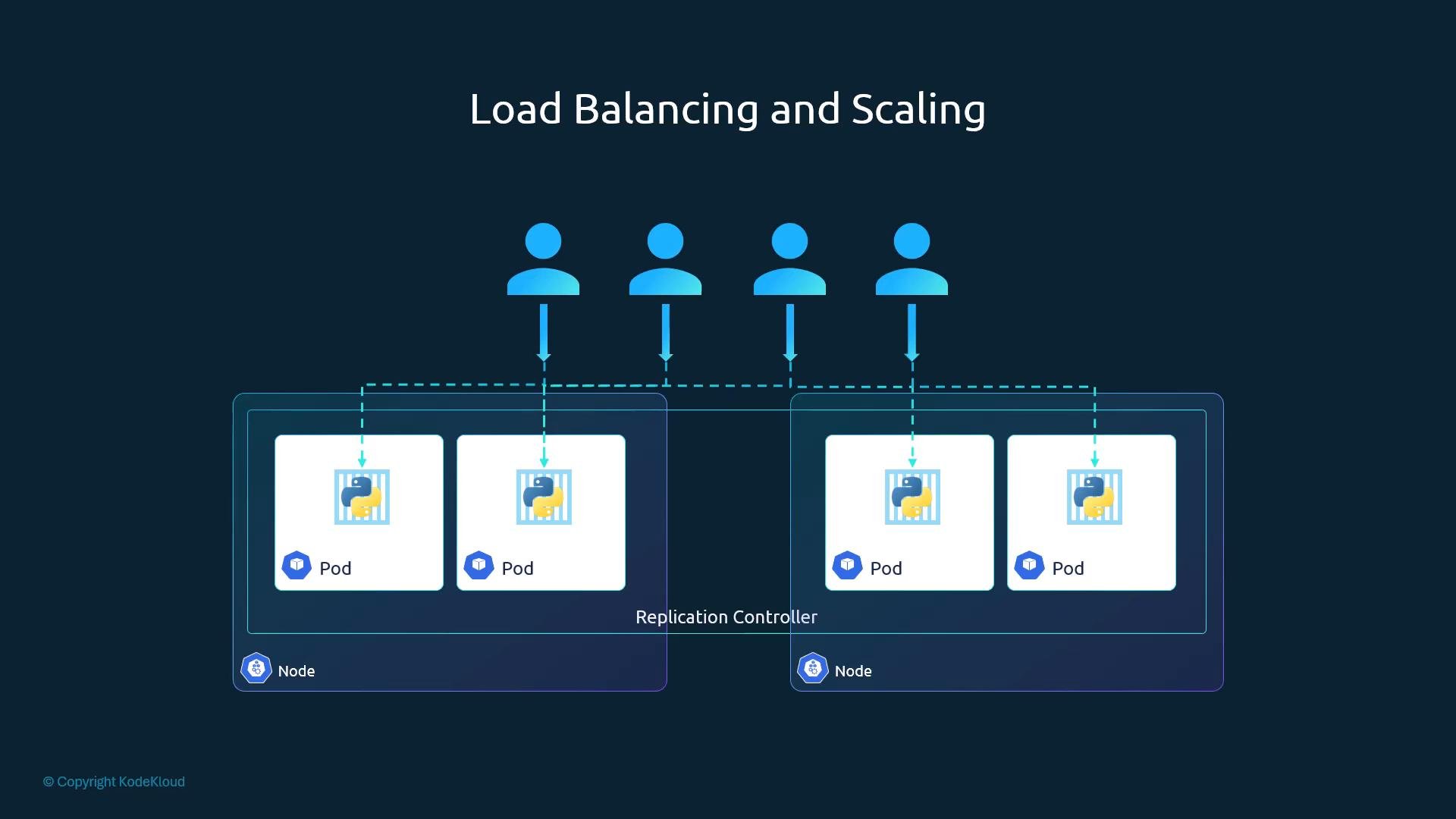
- High availability: if one pod crashes, other replicas keep serving traffic.
- Fault tolerance: restarts or node failures are handled by creating replacements.
- Load distribution: multiple replicas share incoming load across pods and nodes.
- Autoscaling compatibility: controllers enable both manual and automated scaling strategies.
ReplicationController vs ReplicaSet
ReplicationController is the legacy resource. ReplicaSet (part ofapps/v1) is the modern replacement and is preferred for new clusters. Both ensure a desired replica count and use a pod template, but ReplicaSet introduces a stricter selector model and aligns with current API practices.
Prefer ReplicaSet (and Deployments that manage ReplicaSets) for modern Kubernetes usage.
ReplicationController exists primarily for backward compatibility.
Creating a ReplicationController
A ReplicationController YAML follows the standard structure:apiVersion, kind, metadata, and spec. The spec includes:
replicas: desired number of pod replicastemplate: pod template (metadata+spec) used to create pods
spec.template, ensuring the template is nested under template. Note that the controller and the pod template each have their own metadata sections.
Example ReplicationController definition (rc-definition.yml):
myapp-rc), indicating controller ownership.
ReplicaSet
ReplicaSet is conceptually similar to ReplicationController but requires an explicit selector and lives under theapps/v1 API.
If you attempt to create a ReplicaSet with the wrong API version, kubectl will return:
replicaset-definition.yml):
Selectors and labels
Labels let you tag objects for selection and grouping. A ReplicaSet uses a selector to determine which pods to manage.matchLabels is the common form:
The ReplicaSet
selector.matchLabels must match the labels in template.metadata.labels. A mismatch produces a validation error when creating the ReplicaSet.- The ReplicaSet needs the
templatefor future replacement pods: if a pod fails later, the controller uses the template to recreate matching pods with the desired configuration.
Scaling a ReplicaSet
You can scale a ReplicaSet manually either by editing YAML or with kubectl commands.- Update the YAML and run replace:
- Use kubectl scale (no file edit required):
kubectl scale -f updates the live object in the cluster but does not change the replica count in the static file on disk. For automated scaling based on metrics, use the Horizontal Pod Autoscaler (HPA).
Quick command reference
Summary
- ReplicationController and ReplicaSet ensure a desired number of pod replicas are running.
- ReplicaSet (
apps/v1) is the modern replacement and should be used with Deployments for most production scenarios. - ReplicaSets require an explicit
selector(usuallymatchLabels) and a podtemplate. - Use labels and selectors to define which pods controllers manage.
- Scale manually with kubectl or automatically with higher-level controllers (Deployments) and autoscalers (HPA).