

How the scheduler selects a Node (recap)
When a Pod is created the scheduler follows a multi-step process:- The Pod enters the scheduling queue and is ordered by priority.
- The scheduler filters out Nodes that cannot meet the Pod’s requirements.
- Remaining Nodes are scored according to configured scoring rules.
- The scheduler binds the Pod to the Node with the highest resulting score.
- Only Nodes with at least 10 CPUs available will be considered.
- Pods are ordered in the scheduling queue by priority; higher priority Pods are processed first.
Scheduling pipeline: phases, extension points, and example plugins
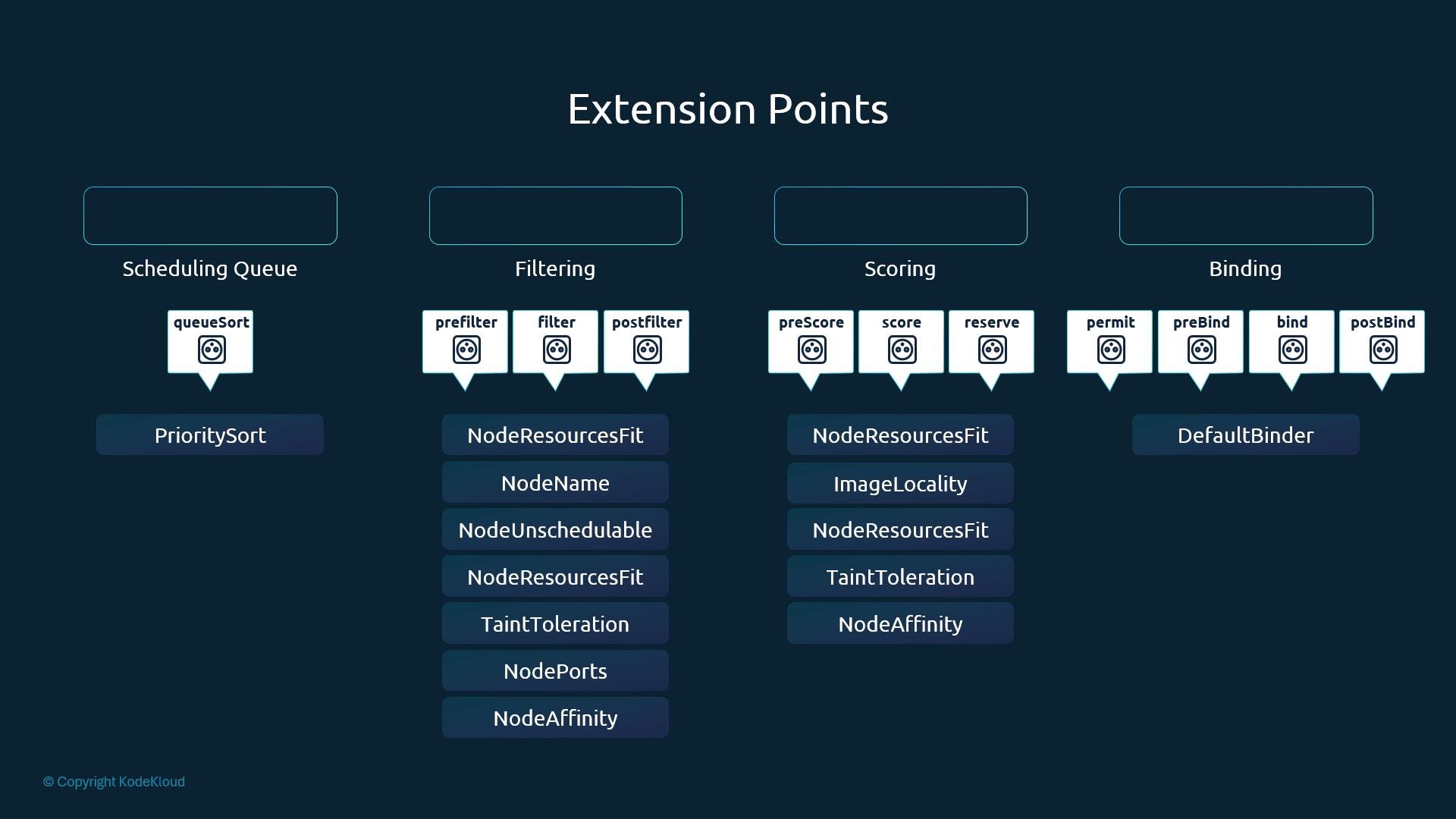
The scheduling framework exposes multiple extension points where plugins can run. Below is a concise mapping of the common phases, their purpose, and example plugins:
Plugins may implement one or more extension points (for example,
NodeResourcesFit participates in both Filter and Score).
Notes on scoring vs filtering
- Filter plugins determine whether a Node is feasible (yes/no).
- Score plugins assign numeric scores to feasible Nodes to indicate preference; they never reject a Node.
Scheduling queue and plugins lifecycle
The scheduling framework offers many extension points where plugins can be invoked:- Queue sort (order Pods):
PrioritySort - preFilter, filter, postFilter
- preScore, score
- reserve, permit
- preBind, bind, postBind
Examples of Pod placement constraints
Pod pinned to a specific Node usingnodeName:
Configuring custom behavior: scheduler binaries vs. scheduler profiles
Historically you might run multiple scheduler processes (each with its own binary and config) such asdefault-scheduler, my-scheduler, my-scheduler-2. This approach increases operational overhead and can introduce race conditions when multiple independent schedulers interact with the same cluster.
Since Kubernetes 1.18, kube-scheduler supports multiple scheduling profiles in a single process. Each profile behaves like an independent scheduler (it has its own schedulerName) but runs inside the same kube-scheduler process.
Comparison:
Minimal example using multiple profiles in one kube-scheduler configuration:
Configuring plugins per profile
Under eachprofile you can enable or disable plugins for specific extension points. This allows different scheduling policies to coexist and be selected by Pods that set spec.schedulerName.
Example: enabling/disabling plugins per profile
- Use exact plugin names or wildcard patterns (for example,
'*') to disable all plugins for an extension point. - Each extension point under
plugins:acceptsenabled:anddisabled:lists.
How Pods select a profile
- A Pod is scheduled by the profile whose
schedulerNamematches the Pod’sspec.schedulerName. - If a Pod does not set
spec.schedulerName, it is scheduled by the cluster’s default scheduler profile (typicallydefault-scheduler).
Additional references
For the original design and rationale, see the KEP 1451 (multi-scheduling profiles) and the Scheduling Framework documentation for details on extension points and plugin implementation.
Summary
- The scheduler pipeline includes queue sorting, filtering, scoring, and binding, with several extension points between them.
- Plugins are the primary mechanism for customizing scheduling behavior and can be configured at multiple hooks.
- Multi-profile kube-scheduler (since Kubernetes 1.18) lets you run multiple logical schedulers (profiles) within a single kube-scheduler process; each profile can enable or disable plugins independently and is selected by Pods via
spec.schedulerName.