

What is a Dead Letter Queue (DLQ)?
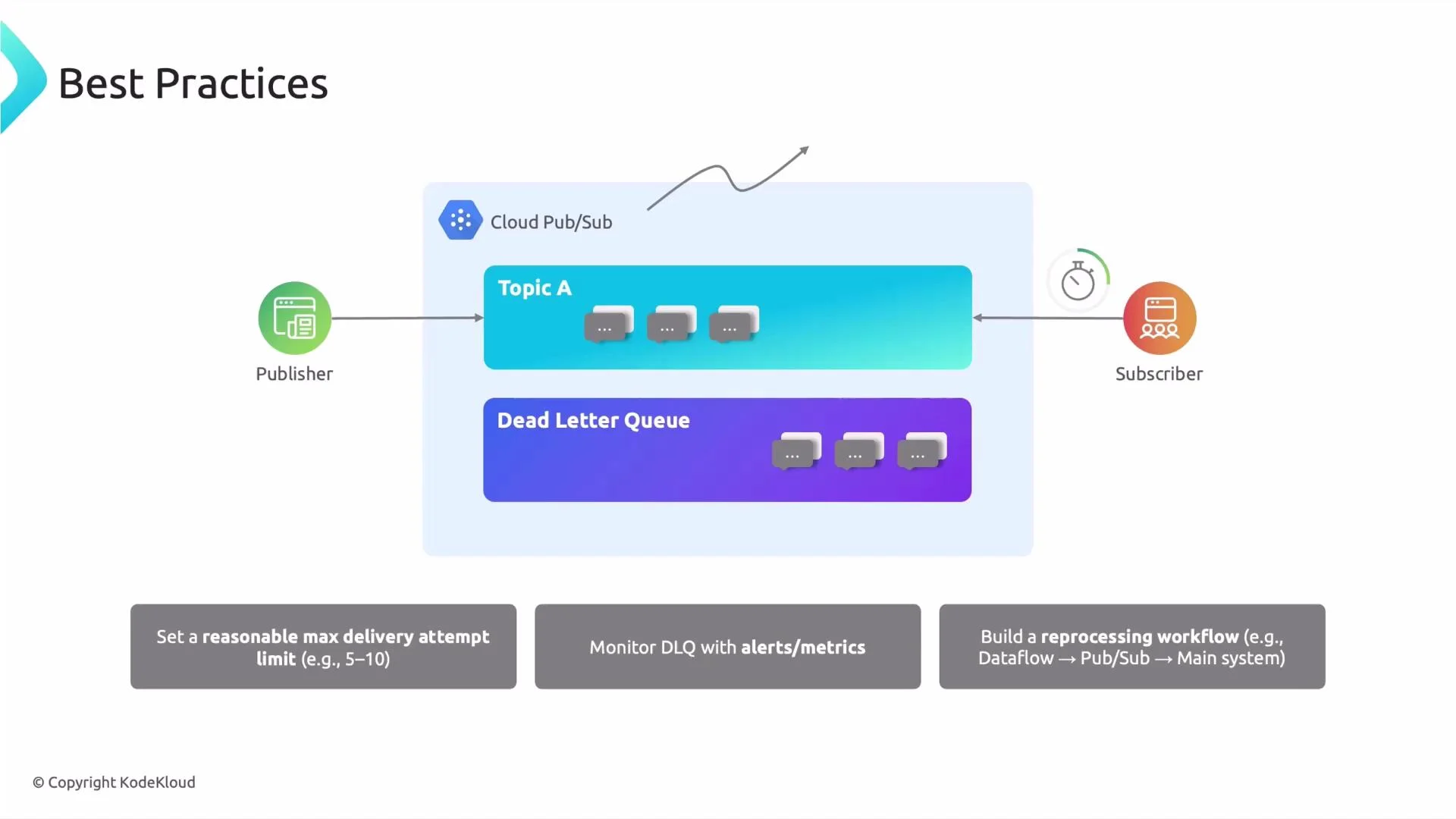
A dead letter queue is a secondary Pub/Sub topic that safely stores messages that repeatedly fail processing. Instead of allowing a single problematic message to block the subscription and slow your pipeline, Pub/Sub forwards those messages to the DLQ for later inspection, repair, or reprocessing.Typical DLQ flow
- A publisher sends messages to a topic.
- Subscribers consume messages and attempt processing.
- If a message exceeds the configured maximum delivery attempts, Pub/Sub forwards it to the subscription’s dead letter topic.
- Engineers inspect and fix DLQ messages, then either reprocess them or update subscriber logic to handle the payloads.
Exam tip: DLQs are configured on subscriptions, not topics. This is a common multiple-choice trap.
Why messages end up in a DLQ
Messages commonly land in a DLQ for these reasons:Example scenario
- A publisher sends JSON messages that must include exactly four keys.
- Some messages contain extra keys or malformed fields.
- The subscriber logic throws errors for those payloads and never acknowledges them.
- After the configured number of delivery attempts, Pub/Sub moves the problematic messages to the DLQ for manual review.
Why use a DLQ?
- Prevent blocked subscriptions: without a DLQ, Pub/Sub keeps retrying failed messages and may slow the entire subscription.
- Isolate problematic messages: engineers can review individual failed records and choose to reprocess or discard.
- Improve reliability and traceability: individual bad messages won’t derail the whole pipeline.
Best practices for DLQs in Pub/Sub
-
Configure a sensible
maxDeliveryAttempts(often 5–10).- Too low: transient errors may cause premature DLQing.
- Too high: excessive retries increase latency and waste resources. Tune based on failure patterns and message criticality.
- Monitor DLQ growth and set alerts. Use Cloud Monitoring to detect sudden increases in DLQ messages, which can indicate schema changes or downstream outages.
- Build a robust reprocessing workflow. After fixing root causes, re-ingest DLQ messages back into the pipeline or transform them with Dataflow / Apache Beam before republishing.
- Ensure idempotency when reprocessing to avoid duplicate side effects.
Configuration example
Note: the dead-letter topic must already exist as a Pub/Sub topic and should typically be in the same project as the subscription. When usinggcloud in the same project you can refer to topics by their short names; otherwise supply the full resource name: projects/PROJECT_ID/topics/TOPIC.
Create a dead-letter topic and a subscription with a dead letter policy using gcloud:
Reprocessing DLQ messages
Common approaches:- Pull messages from the dead-letter topic and republish to the original topic after fixing payloads.
- Run a Dataflow job to transform and republish DLQ messages in bulk.
- Add a manual review step for sensitive records before reprocessing.
Real-world example
Imagine an e-commerce system where payment events are published to Pub/Sub. If some events fail due to missing fields or malformed payloads, they land in the DLQ. After diagnosing and fixing the root cause (for example, updating the publisher schema or adding defensive parsing in the subscriber), engineers can reprocess DLQ messages to ensure no transactions are missed—preserving financial accuracy and customer trust.Summary
Dead letter queues in Pub/Sub:- Prevent message blockage by isolating repeatedly failing messages.
- Allow focused analysis and remediation of problematic records.
- Improve system reliability, traceability, and data completeness.