Hello and welcome back. In this lesson we’ll cover organization-level IAM roles in Google Cloud — a foundational part of access management for companies and large teams. Organization-level roles let you control who can view, modify, or administer resources across your entire Google Cloud organization. We’ll review the Google Cloud resource hierarchy, explain how IAM inheritance works, and describe the three basic predefined roles — Viewer, Editor, and Owner — including guidance on when and where to assign them. For more details, see the Google Cloud documentation on Understanding roles and Resource hierarchy.

Organization hierarchy

At the top of the Google Cloud resource hierarchy sits the organization node. This is the root for all your resources and the most common place to apply organization-wide policies, IAM bindings, and identity management. Beneath the organization node you can create folders to logically group related projects. For example:
  • Marketing
  • Data Engineering
  • Finance
Folders make it easy to apply the same permissions or policies across multiple projects at once. Projects live under folders (or directly under the organization) and contain actual cloud resources — Compute Engine VMs, BigQuery datasets, Cloud Storage buckets, Cloud Functions, etc. Because IAM bindings inherit downward, any permissions granted at a higher level automatically apply to the nodes below.
The organization node is the most powerful scope. Apply permissions there only when you want the role to affect every folder, project, and resource in the organization.

How IAM inheritance works

  • Organization-level bindings apply to all folders, projects, and resources under that organization node.
  • Folder-level bindings apply to projects and resources contained in that folder.
  • Project-level bindings apply only to resources inside that project.
Always verify the scope (organization, folder, or project) before assigning a role — granting a role at a higher level increases the effective scope of that role.
ScopeApplies toTypical use
OrganizationAll folders, projects, and resourcesGlobal policies, org-wide auditors, central admins
FolderProjects and resources in the folderDepartmental teams, shared infrastructure groups
ProjectResources in the project onlyApplication owners, CI/CD pipelines, project-specific roles

Org-level roles: Viewer, Editor, Owner

There are three primitive predefined roles in Google Cloud that are commonly used at the organization level. They grant increasing levels of access:
  • Viewer
    • Read-only access to view resources and configuration.
    • Useful for monitoring logs, reviewing configurations, or auditing usage.
    • Cannot make changes or modify configuration.
  • Editor
    • Can create, modify, and delete resources (Compute Engine, BigQuery, Cloud Storage, Cloud Functions, etc.).
    • Cannot manage IAM policies (cannot grant or revoke roles).
  • Owner
    • Full administrative control, including the ability to manage IAM.
    • Can grant/revoke roles, invite/remove principals, and delete projects and resources.
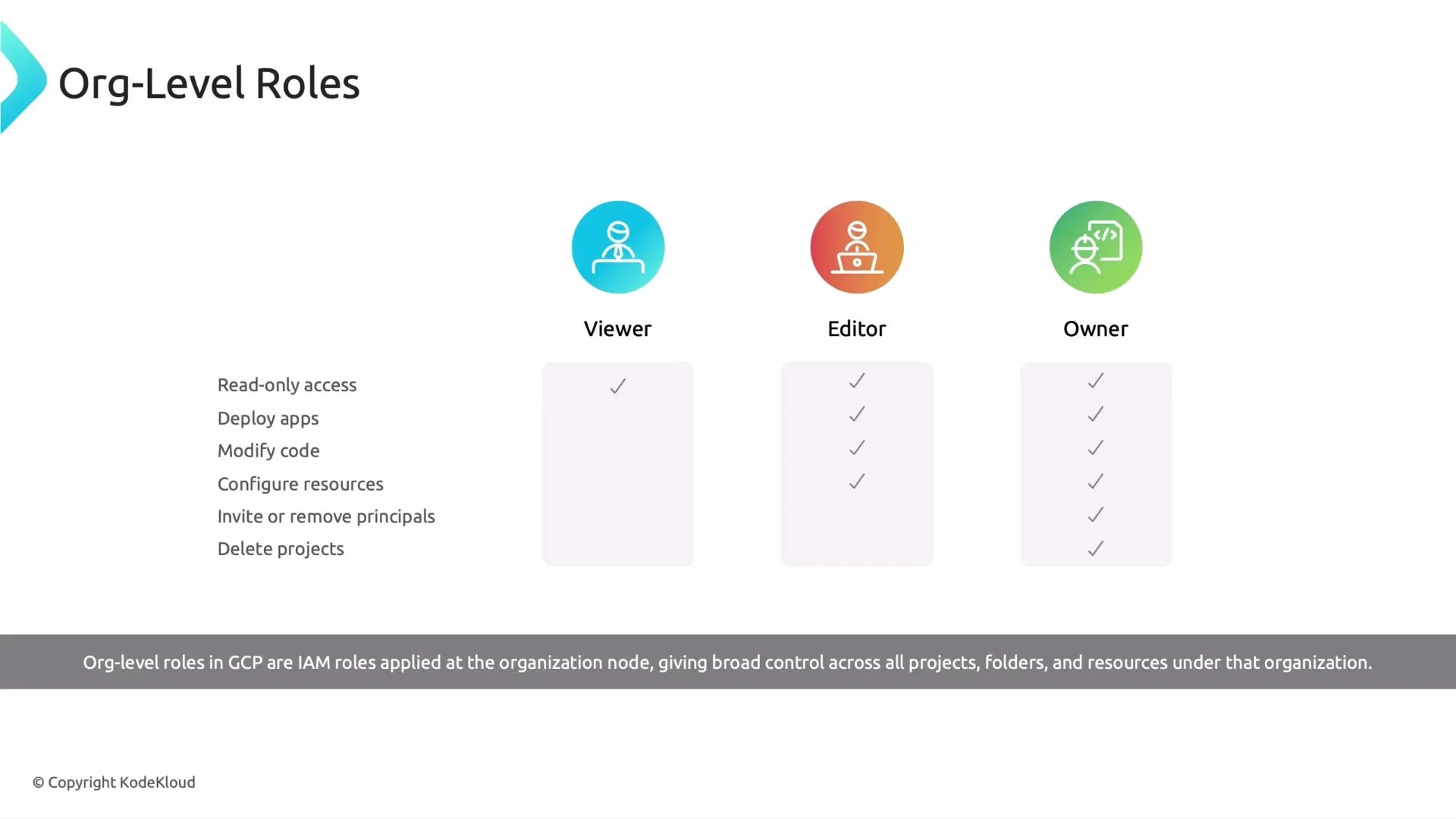
When assigning these roles, always ask: “At what level am I applying this role?” For example, a user with Owner at the organization level has full control across all projects and folders within the organization.
RoleTypical permissionsWhen to use
ViewerRead-only across the scopeReporters, auditors, non-admin stakeholders
EditorModify/create/delete resources (no IAM)Developers, operators who manage resources but not IAM
OwnerAll Editor permissions + IAM managementTrusted administrators who manage org policies and access
A slide titled "Org-Level Roles" showing three GCP IAM roles — Viewer, Editor, and Owner — with icons and checkmarks indicating increasing permissions from read-only to full control. A caption notes these roles apply at the organization node across all projects, folders, and resources.

Practical guidance

  • Follow least privilege: grant the most restrictive role that still allows the user to perform their tasks.
  • Prefer assigning roles at the project or folder level rather than the organization level to reduce blast radius.
  • Limit organization-level Owner assignments to a very small group of trusted administrators.
  • Use predefined and custom roles appropriately — predefined primitive roles are broad; consider fine-grained predefined or custom roles for production use.
Be careful granting Owner at the organization level — that role can change IAM policies across the entire organization, including deleting projects and revoking other admins.

Summary

Organization-level roles in GCP are IAM roles applied at the organization node and cascade down to folders, projects, and resources. Viewer provides read-only access, Editor allows resource changes but not IAM management, and Owner has full control including IAM. Always verify the assignment scope and follow least-privilege principles to keep your environment secure. End of lesson.

Watch Video