

How to choose a database on GCP
Focus on the workload characteristics: transactional vs analytical, consistency vs availability, scale, latency, and access patterns. Use the short descriptions below to narrow options, then consult the product docs to finalize architecture and SLA choices.- Transactional, relational, strong consistency: Cloud SQL or Cloud Spanner
- Globally-distributed transactions and horizontal scaling: Cloud Spanner
- Large-scale analytics and reporting: BigQuery
- Real-time sync for mobile/web, schemaless documents: Firestore
- High-throughput, low-latency wide-column access (time-series): Cloud Bigtable
- Ultra-low latency caching or ephemeral state: Memorystore (Redis / Memcached)
- Legacy Datastore apps: Firestore in Datastore mode
- PostgreSQL compatibility with higher performance: AlloyDB for PostgreSQL
Service-by-service quick guide
Cloud SQL
- What it is: Fully managed relational database (MySQL, PostgreSQL, SQL Server).
- Best for: OLTP — many small, fast transactions such as user accounts, payments, and session state.
- Scaling: Vertical scale (larger VMs); add read replicas for read throughput; HA via regional failover replicas.
- Exam tip: Not designed as a horizontally sharded, globally-distributed database.
- Docs: Cloud SQL documentation
Cloud Spanner
- What it is: Horizontally distributed, strongly consistent relational DB with SQL.
- Best for: Global, mission-critical OLTP that requires consistent cross-region transactions (financial systems, global backends).
- Scaling: Horizontal scaling across nodes/regions with automatic sharding and replication.
- Key property: Global transactions with strong consistency.
- Docs: Cloud Spanner documentation
BigQuery
- What it is: Serverless, petabyte-scale analytical warehouse that uses SQL.
- Best for: OLAP — analytics, dashboards, ETL and large-scale reporting.
- Architecture note: Storage and compute are separated for independent scaling.
- Best practice: Use BigQuery for analytical queries and reporting; not for transactional updates.
- Docs: BigQuery documentation
Cloud Firestore
- What it is: Serverless, document-oriented NoSQL database with real-time synchronization.
- Best for: Mobile/web apps needing real-time sync, offline support, and automatic scaling (chat, collaborative apps, user profiles).
- Modes: Native mode (recommended for new apps) and Datastore mode (compatibility with legacy Datastore apps).
- Key property: Low operational overhead and client-side real-time listeners.
- Docs: Cloud Firestore documentation
Cloud Bigtable
- What it is: Wide-column NoSQL store (HBase-compatible) optimized for very large scale and low-latency single-row reads/writes.
- Best for: Time-series, telemetry, IoT, ad-tech — workloads with known access patterns requiring high throughput and low latency.
- Limitations: No joins; transactions limited to single-row atomic operations — design schema around access patterns.
- Docs: Cloud Bigtable documentation
Memorystore (Redis / Memcached)
- What it is: Managed in-memory data store offering Redis and Memcached engines.
- Best for: Sub-millisecond caching, session stores, leaderboards, ephemeral state, and fast counters.
- Persistence: Redis supports persistence mechanisms (RDB/AOF) and some persistence options are available in Memorystore depending on tier; Memcached is ephemeral.
- Key decision: Choose Redis for persistence and richer data structures; choose Memcached for simple, volatile caching.
- Docs: Memorystore docs
Cloud Datastore (legacy)
- What it is: The original schemaless NoSQL datastore, now legacy.
- Current guidance: Use Firestore in Datastore mode for compatibility with older applications; prefer Firestore Native mode for new projects.
- Docs: Migrating from Datastore
AlloyDB for PostgreSQL
- What it is: Fully managed, PostgreSQL-compatible database optimized for higher performance and operational features.
- Best for: Mixed transactional and analytical workloads that need PostgreSQL compatibility with better performance characteristics than standard managed Postgres.
- Scaling: Read replicas for read scaling, performance optimizations; not globally sharded like Spanner.
- Docs: AlloyDB documentation
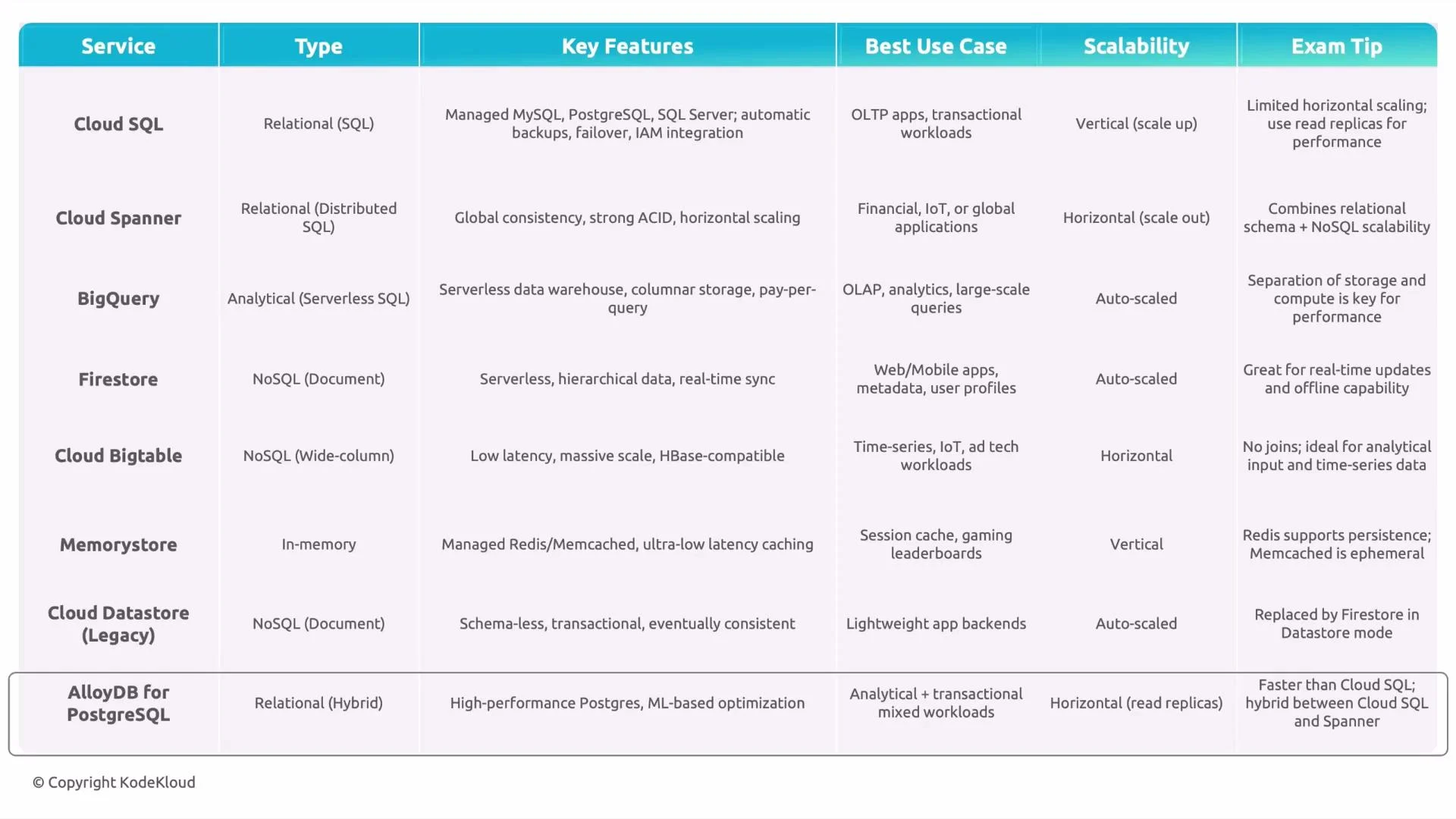
Comparison at a glance
Exam tip: Map the workload to database properties — Cloud SQL for traditional OLTP, Cloud Spanner for globally-distributed transactional systems, BigQuery for OLAP analytics, Firestore or Bigtable for NoSQL application data, and Memorystore for caching and sub-millisecond access.
Final checklist when deciding
- Is the workload transactional (OLTP) or analytical (OLAP)?
- Do you need global consistency across regions?
- Are access patterns known and simple (Bigtable) or flexible and document-oriented (Firestore)?
- Is sub-millisecond latency required (Memorystore)?
- Is PostgreSQL compatibility a hard requirement (AlloyDB or Cloud SQL)?