

- Imagine a networking company managing thousands of routers and switches. Each device periodically emits logs and performance metrics.
- Raw events are published to a Cloud Pub/Sub topic — a scalable, durable streaming source that captures the event stream.
- Pub/Sub is the pipeline’s source; Dataflow consumes the stream, transforms it, and writes the results to a sink such as Cloud Storage or BigQuery.
- PCollection — the fundamental distributed, immutable dataset in Apache Beam / Cloud Dataflow.
- Transform — a computation (map, filter, group, aggregate) that consumes one or more PCollections and emits new PCollections.
- ParDo — per-element processing (map/filter/enrich); can emit zero, one, or many outputs per input.
- GroupByKey / Aggregation — grouping elements by key and computing per-key aggregates.
- Source / Sink — where data enters and leaves the pipeline (Pub/Sub, Cloud Storage, BigQuery, etc.).
PCollections are like in-memory tables or DataFrames conceptually, but they are distributed and immutable. Use the PCollection + transforms model when you need scalable, parallel processing across many workers rather than single-node operations.
- Definition: a PCollection is a distributed, immutable collection of elements (events or records) that Beam/Dataflow processes in parallel.
- Immutability: applying a transform never mutates the original PCollection; it produces a new PCollection representing the transformed data.
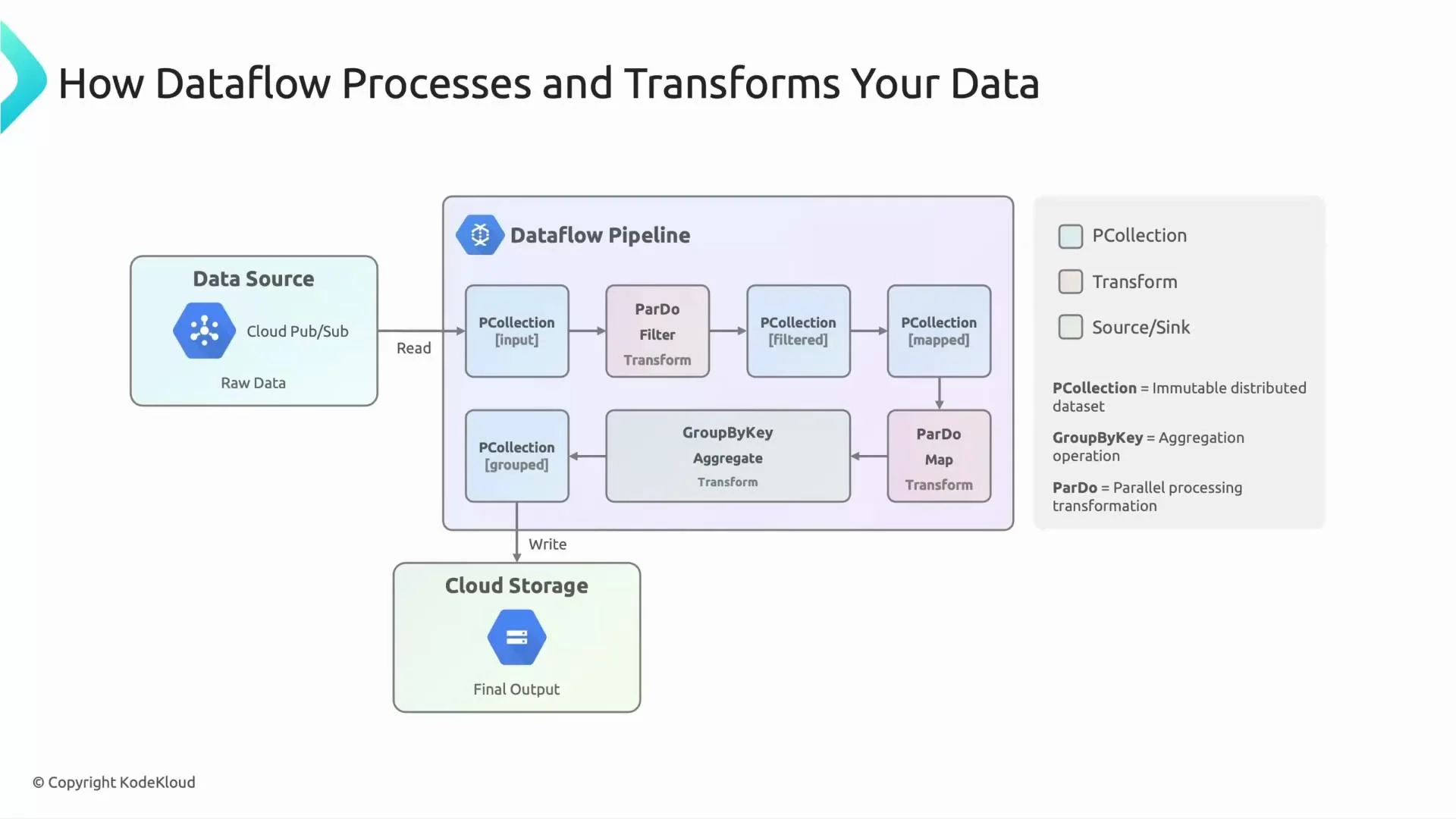
- Visuals: in pipeline diagrams, each blue box labeled “PCollection” represents a distinct, versioned dataset produced by a previous transform. At scale, a PCollection’s elements are partitioned across multiple workers.
- A transform consumes one or more PCollections and returns one or more new PCollections.
- Transforms are applied in parallel across elements; think of them as distributed functions.
- Common transforms:
- ParDo: element-wise processing (parse, enrich, filter).
- Filter: drop unwanted elements.
- Map: transform each element.
- GroupByKey + Combine: group elements by a key and compute aggregates (sum, count, average, custom combine).
- ParDo is Beam’s flexible per-element transform. It applies a user-defined function to each element and may emit zero, one, or many outputs.
- Use ParDo for parsing message payloads, field-level enrichment, or filtering logic before grouping or aggregation.
- GroupByKey groups elements by a specified key (for example, device ID).
- After grouping, apply a Combine or custom aggregator to produce per-key metrics (counts, sums, averages, top‑N, etc.).
- Grouping often triggers a shuffle across workers, so design keys and windows carefully for performance.
- Source (ingest): where pipeline data originates — e.g., Cloud Pub/Sub, Cloud Storage, BigQuery exports.
- Sink (output): where processed data is written — e.g., Cloud Storage, BigQuery, Pub/Sub.
- In this lesson’s example we use Cloud Storage as the final sink, but BigQuery is a common choice for analytics queries.
- Devices publish events to a Cloud Pub/Sub topic (Source).
- Dataflow reads messages from Pub/Sub into an initial PCollection.
- A ParDo transform parses message payloads, validates fields, and optionally filters out malformed or irrelevant records. The parsed/filtered results become a new PCollection.
- Records are keyed by an attribute (e.g., device ID), then GroupByKey is applied. A Combine/aggregation computes per-device metrics (counts, averages, deltas). Aggregated results form another PCollection.
- The final PCollection is written to a Sink (Cloud Storage in this example, or BigQuery for analytics).
Best practices (brief)
- Keep ParDo functions stateless or manage state carefully to enable parallel scaling.
- Avoid heavy computations inside GroupByKey to reduce shuffle cost.
- Choose appropriate windows and triggers for streaming aggregates to balance latency and completeness.
- For analytics sinks, prefer BigQuery for queryability; use Cloud Storage for archival or batch outputs.
- Cloud Pub/Sub provides a scalable, streaming source for raw events.
- PCollections are immutable, distributed datasets that represent intermediate pipeline state.
- Transforms (ParDo for per-element processing, GroupByKey/Aggregate for grouping/aggregation) consume and produce PCollections.
- The final PCollection is written to a sink such as Cloud Storage or BigQuery depending on downstream needs.
- Apache Beam: https://beam.apache.org/
- Cloud Dataflow: https://cloud.google.com/dataflow
- Cloud Pub/Sub: https://cloud.google.com/pubsub
- Cloud Storage: https://cloud.google.com/storage
- BigQuery: https://cloud.google.com/bigquery