Welcome back. In this lesson we explore practical, production-ready integration patterns using Google Cloud Functions. These patterns show how serverless functions glue cloud services together to implement automated workflows, real-time pipelines, and lightweight APIs — all with minimal operational overhead. We’ll walk through four common, real-world scenarios using an example Tesla service application. Different parts of that system react to events: a file upload from a support tool, a customer updating contact info, streaming telemetry from cars, or a mobile app requesting availability. Cloud Functions are an ideal fit for these event-driven automations. What you’ll learn
  • How functions respond to Cloud Storage uploads for ETL and analytics.
  • How Firestore change events enable near-real-time analytics.
  • How Pub/Sub + Functions validate and process IoT telemetry.
  • How an HTTP-triggered function behind API Gateway supports serverless APIs.
Table of patterns and services
PatternPrimary triggerTypical downstream servicesExample use
File upload processingCloud StorageCloud Functions, BigQuery, DataflowConvert, enrich, and ingest diagnostic logs for analytics
Database change streamingFirestore triggersCloud Functions, Pub/Sub, BigQueryKeep analytics and downstream systems in sync on writes
IoT / telemetry processingPub/Sub messagesCloud Functions, Bigtable, MonitoringValidate, filter, and store time-series telemetry
API Gateway patternHTTP triggerCloud Functions, API Gateway, IAMBuild serverless APIs that aggregate multiple backends
We’ll step through each pattern and show concise example code and architecture notes so you can adapt them to production.

1) File upload processing (Cloud Storage → Function → BigQuery)

Scenario Support tools and automated agents upload car diagnostic logs to Cloud Storage. A Cloud Function triggers on object creation and implements validation, transformation (e.g., CSV → newline-delimited JSON), enrichment (attach metadata), and ingestion into BigQuery for analytics. Why use Cloud Functions here
  • Automatic, event-driven processing on file arrival.
  • Fast, scalable, pay-per-execution model.
  • Great for lightweight ETL or invoking a pipeline (e.g., Dataflow) for heavier loads.
Minimal Node.js example (GCS-triggered function)
// index.js
const {BigQuery} = require('@google-cloud/bigquery');
const BigQueryClient = new BigQuery();

exports.processDiagnosticLog = async (event, context) => {
  const file = event;
  console.log(`Processing file: ${file.name}`);

  // 1) Download and parse the file (omitted)
  // 2) Validate/transform records
  // 3) Enrich with metadata (timestamp, vehicleId from filename, etc.)
  // 4) Insert into BigQuery
  const rows = [{ vehicleId: 'VIN123', ts: Date.now(), metric: 42 }];
  await BigQueryClient
    .dataset('tesla_logs')
    .table('diagnostics')
    .insert(rows);
  console.log('Inserted rows into BigQuery');
};
Operational notes
  • Use content-based deduplication or object metadata to ensure idempotency.
  • For large files, trigger a Dataflow job via Cloud Functions rather than processing inline.
  • Monitor function retries and error logs; consider a dead-letter bucket.
A presentation slide titled "Real-World Integration Examples" listing four patterns: File Upload Processing, Database Change Streaming, IoT Data Processing, and API Gateway Pattern. Below is a simple diagram showing data flowing from GCS to BigQuery.

2) Database change streaming (Firestore → Function → Analytics Pipeline)

Scenario A customer updates contact info or a service-request status in the mobile app. Firestore triggers on document create/update/delete and a Cloud Function reacts to sanitize/enrich the change and push the record into an analytics store such as BigQuery. Why this pattern
  • Keeps analytics and downstream systems up-to-date without polling.
  • Enables event-driven enrichment and fan-out (e.g., publish to Pub/Sub, call external APIs).
Sample Firestore-triggered function (Node.js)
// index.js
exports.onCustomerUpdate = async (change, context) => {
  const before = change.before.exists ? change.before.data() : null;
  const after = change.after.exists ? change.after.data() : null;
  console.log('Document changed:', context.params.documentId);

  // Example: normalize phone number, validate fields, enrich with region
  const enriched = { ...after, normalizedPhone: normalize(after.phone) };

  // Forward to analytics pipeline: e.g., BigQuery or Pub/Sub
  // await publishToPubSub('customer-updates', enriched);
};
Operational notes
  • Design idempotent writes (use stable document IDs or dedup keys).
  • Consider partial updates and schema evolution — use versioned schemas or schema-checking libraries.
  • Use IAM to limit which services can trigger or read data.
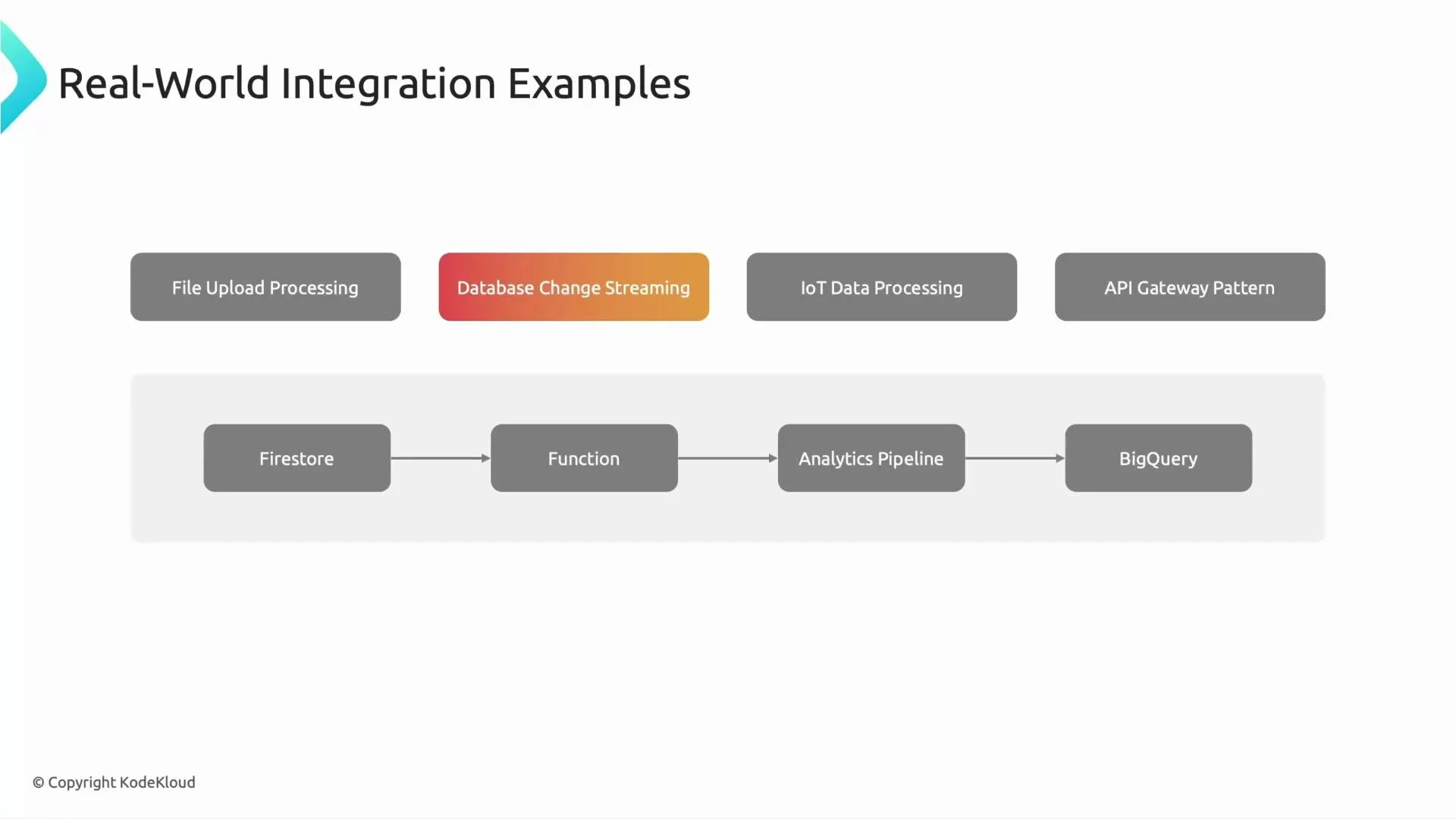
A presentation slide titled "Real-World Integration Examples" showing four example patterns (File Upload Processing, Database Change Streaming, IoT Data Processing, API Gateway Pattern) and a pipeline diagram inside a shaded box: Firestore → Function → Analytics Pipeline → BigQuery.
Quick quiz Which GCP service can directly trigger a function when a document is created or updated? Answer: Firestore triggers.

3) IoT / Telemetry processing (Pub/Sub → Function → Time-series DB)

Scenario Cars stream telemetry messages (sensor readings, battery metrics, GPS) to Pub/Sub. Cloud Functions subscribe to those topics, validate incoming messages (timestamps, schema), run anomaly detection or filtering, and store the cleaned data in a time-series store (Cloud Bigtable or a managed time-series solution) for monitoring and predictive maintenance. Why this pattern
  • Pub/Sub handles high-throughput ingestion and backpressure.
  • Functions provide lightweight, scalable compute for validation and enrichment.
  • Enables near-real-time alerts on anomalies (e.g., sudden temp spikes).
Sample Pub/Sub-triggered function (Node.js)
// index.js
exports.processTelemetry = async (message, context) => {
  const payload = JSON.parse(Buffer.from(message.data, 'base64').toString());
  // 1) Basic timestamp sanity checks
  if (!isValidTimestamp(payload.ts)) throw new Error('Bad timestamp');

  // 2) Schema validation / transformation
  // 3) Anomaly detection (simple threshold example)
  if (payload.batteryTemp > 80) {
    // alerting, write to alerting topic or monitoring
  }

  // 4) Write to time-series DB (Bigtable example) or Cloud Storage
};
Operational notes
  • Use message attributes and ordering keys when sequence matters.
  • Configure retry/backoff policies and dead-letter topics for poison messages.
  • Choose storage based on query patterns: Bigtable for high-volume point reads, BigQuery for analytics.
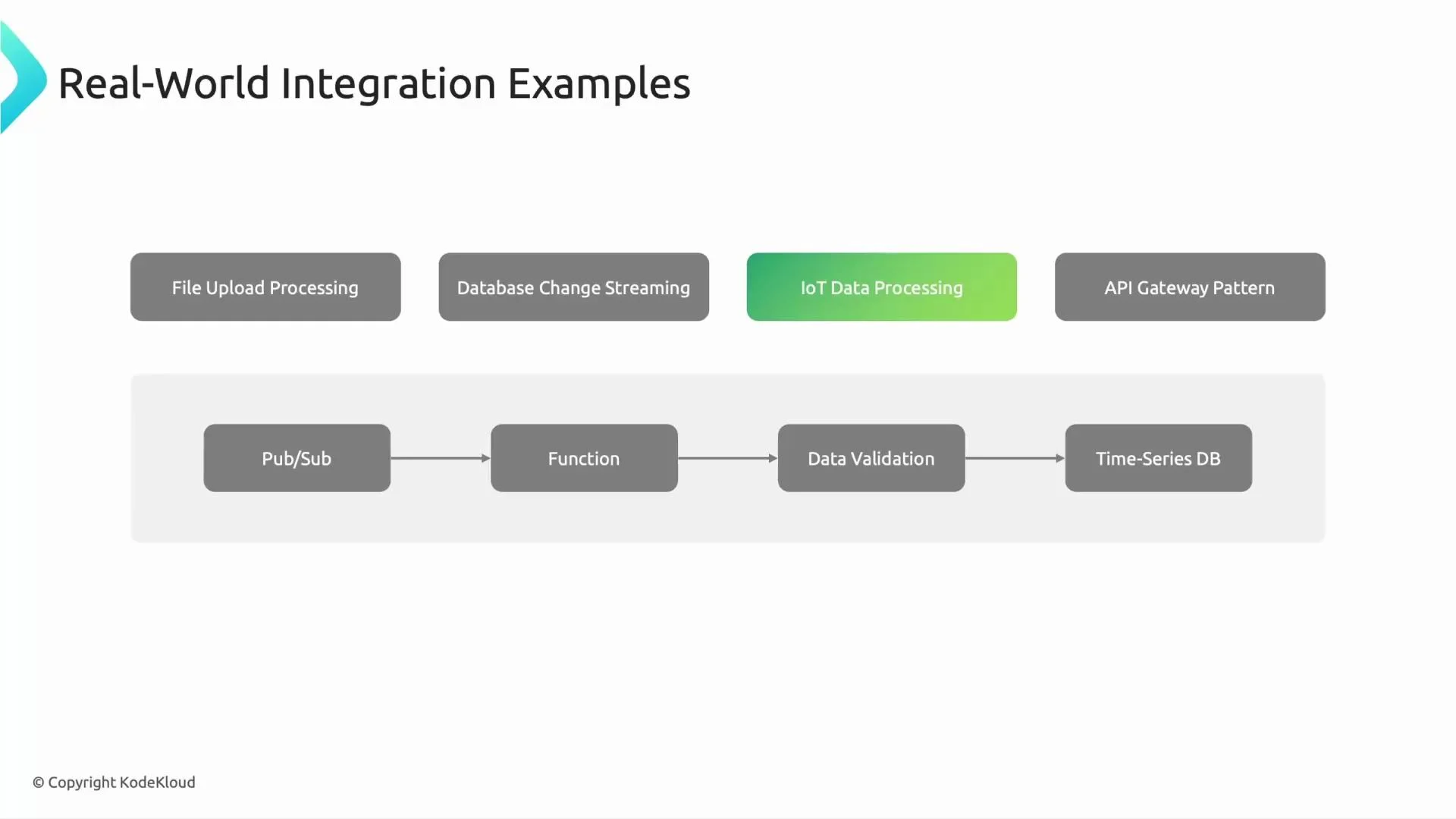
A presentation slide titled "Real-World Integration Examples" showing options like File Upload Processing, Database Change Streaming, a highlighted IoT Data Processing, and API Gateway Pattern. Below is a simple pipeline diagram: Pub/Sub → Function → Data Validation → Time-Series DB.

4) API Gateway pattern (API Gateway → HTTP Function → Multiple Backends)

Scenario A mobile app asks, “Show me the nearest Tesla service station with availability tomorrow.” The request routes through API Gateway to an HTTP-triggered Cloud Function, which aggregates availability, location, and user preference services, applies authorization and rate limiting, and returns the combined response. Why this pattern
  • Serverless APIs with integrated authentication, monitoring, and routing via API Gateway.
  • Functions allow flexible orchestration across multiple backends without managing servers.
  • Good for low-latency, lightweight orchestration logic.
Minimal HTTP function (Node.js / Express-style)
// index.js
exports.getNearestService = async (req, res) => {
  const { lat, lon, date } = req.query;
  // 1) Authenticate request (use IAM or API key checks)
  // 2) Query location service and availability backend in parallel
  const [locations, availability] = await Promise.all([
    fetchLocationService(lat, lon),
    fetchAvailabilityService(date)
  ]);

  // 3) Compose response and return
  res.json({ nearby: composeResponse(locations, availability) });
};
Operational notes
  • Use API Gateway for routing, security (API keys, JWT), and quota enforcement.
  • Implement caching for expensive backend calls where freshness allows.
  • Monitor latency and cold-starts; consider keeping critical functions warm or using newer runtimes with lower cold-start times.
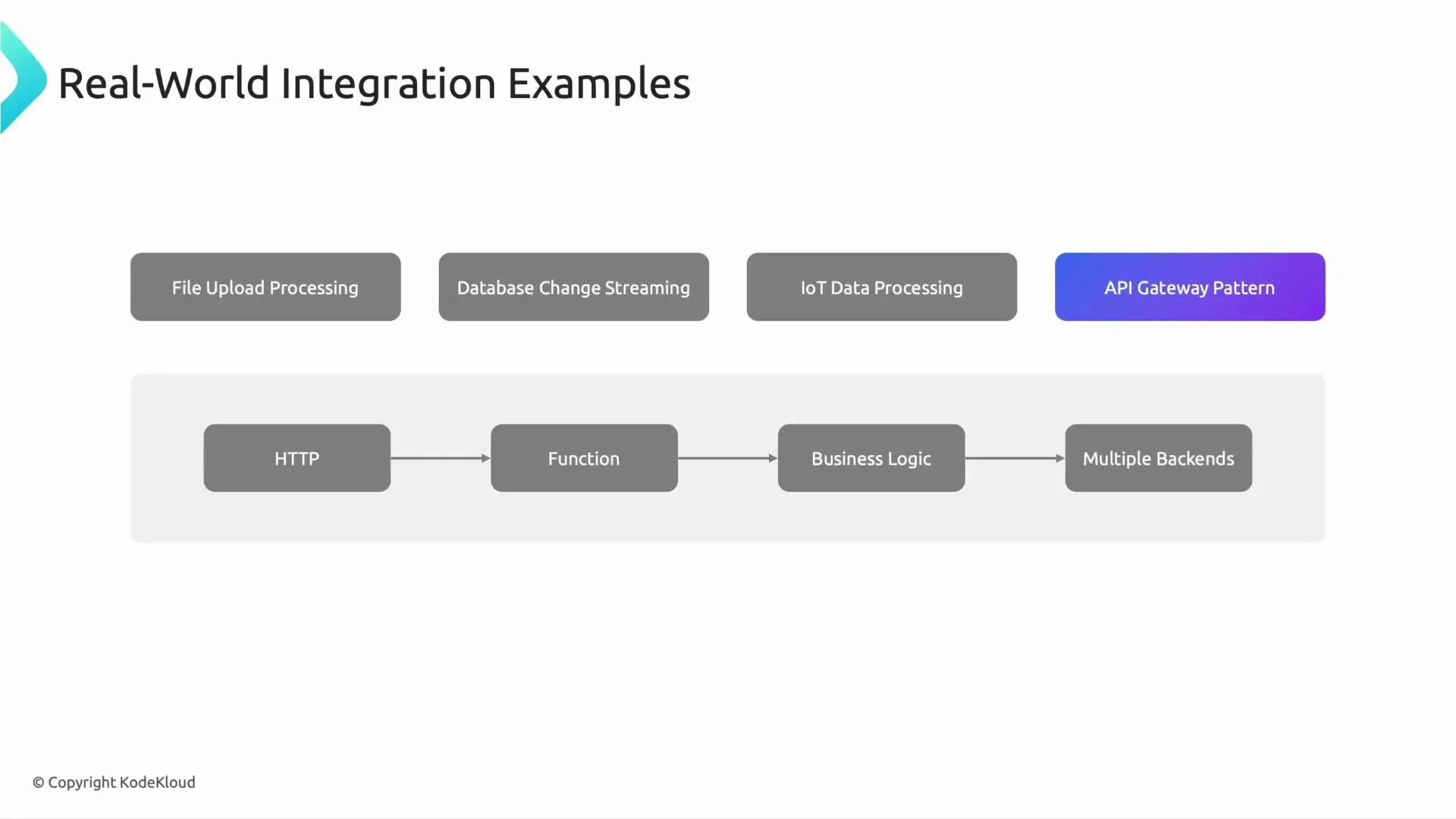
A presentation slide titled "Real-World Integration Examples" listing File Upload Processing, Database Change Streaming, IoT Data Processing, and API Gateway Pattern. Below is a grey flow diagram showing HTTP → Function → Business Logic → Multiple Backends.

Summary: Key considerations for production-ready Cloud Functions

  • Idempotency: Design functions so repeated invocations don’t cause duplicates.
  • Retry semantics: Understand automatic retries (e.g., Pub/Sub vs. HTTP) and use dead-letter topics/buckets if needed.
  • Authentication & Authorization: Use IAM, API Gateway, and service accounts to limit access.
  • Schema validation: Validate inputs early (JSON Schema, Protobuf) to avoid downstream failures.
  • Observability: Export structured logs, set up traces, and instrument metrics and alerts.
  • Cost & performance: Choose between inline processing, batching, or delegating to Dataflow/BigQuery for heavy workloads.
When designing these integrations, consider idempotency, retry semantics, authentication/authorization, schema validation, and monitoring so your workflows stay reliable and maintainable.
This covers common, real-world integration patterns using Cloud Functions. Each example can be extended with more robust error handling, observability, and security controls for production. See the linked Google Cloud docs for reference implementations and deeper configuration options. That’s it for this lesson — see you in the next one.

Watch Video