

Devices and Gateways
- Devices fall into two broad categories:
- Constrained devices: low-power, resource-limited devices (BLE sensors, microcontrollers). These typically rely on a local gateway to aggregate telemetry and perform protocol translation.
- Standard devices: more capable devices (smart hubs, cameras) that can communicate directly to the cloud using MQTT, HTTP, or HTTPS.
- Gateway responsibilities:
- Local aggregation and buffering to handle intermittent connectivity.
- Device authentication and authorization.
- Protocol translation (CoAP, BLE, custom protocols → MQTT/HTTP).
- Reliable forwarding to cloud ingestion with retry/backoff and ordering guarantees as required.
Ingestion
- Cloud Pub/Sub is the primary messaging layer for high-throughput, durable ingestion. Pub/Sub supports topics and subscriptions, push/pull delivery, and at-least-once delivery semantics, so downstream consumers must be designed for idempotency or deduplication.
- Use Cloud Monitoring and Cloud Logging to capture operational metrics and logs across gateways, ingestion, and processing layers for alerting and incident investigation.
- Partition topics by logical device groups or geographic region to scale consumers independently.
- Set message retention and dead-letter topics for problematic messages.
- Use batching and compression for cost efficiency when forwarding from gateways.
Processing (Stream Pipeline)
- Use Cloud Dataflow (Apache Beam) for real-time stream processing:
- Support for windowing (fixed, sliding, session windows) and triggers to handle late-arriving data.
- Aggregations (e.g., rolling averages, percentiles).
- Enrichment by joining with device metadata or configuration stores.
- Stateful processing and timers for complex event detection (e.g., multi-sensor correlation, anomaly windows).
- Typical real-time tasks:
- Filtering and transformation into analytics-friendly formats.
- Anomaly detection and alert generation.
- Sessionization (per-device activity windows).
- Generating materialized views or pre-aggregated results for downstream queries.
- Tune autoscaling and worker disk/CPU based on event size and state requirements.
- Use job monitoring, metrics, and backlog alerts to detect processing lag early.
Storage
Choose storage based on access patterns (point reads, time-series queries, analytical scans, or cold archival):
Streaming vs batch ingestion into BigQuery:
- Use streaming inserts for low-latency analytics (costly at scale).
- Use micro-batch loads from Cloud Storage for cost-effective bulk ingestion and replay.
Analytics and Batch Processing
- BigQuery is the primary engine for large-scale historical analysis and ad hoc queries.
- Dataproc provides managed Spark/Hadoop clusters for custom ETL, heavy transformations, or model training.
- Interactive exploration and model development can be performed with Vertex AI Workbench (managed notebooks).
Presentation and Applications
Processed and aggregated results feed user-facing services and dashboards:- App hosting: App Engine for PaaS or GKE for containerized microservices; use Compute Engine for specialized workloads.
- Dashboards and BI: Looker or Looker Studio for visualization and embedded analytics.
- APIs: Expose aggregated data and alerts to mobile/web clients or partner systems.
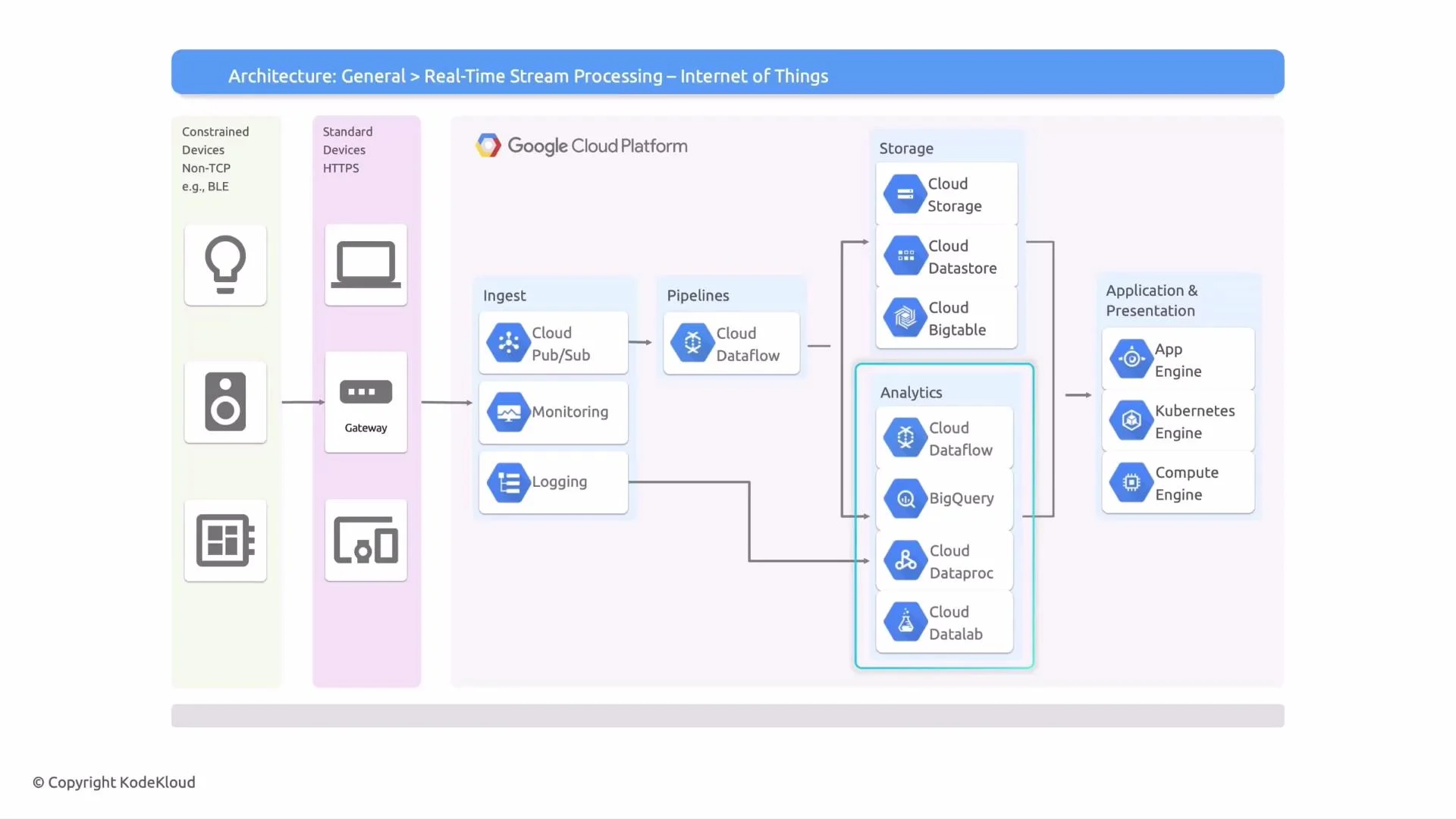
End-to-end flow summary
- Devices (constrained or standard) → local Gateway (optional) → Ingestion with Cloud Pub/Sub.
- Monitoring and logging collect operational telemetry with Cloud Monitoring and Cloud Logging.
- Stream processing (Cloud Dataflow / Apache Beam) performs windowing, aggregation, enrichment, and anomaly detection.
- Processed data is persisted to the appropriate stores: Cloud Storage, Cloud Bigtable, Cloud Firestore, and/or BigQuery.
- Analytics engines (BigQuery, Dataproc) and notebooks are used for exploration, BI, and model training.
- Results power applications hosted on App Engine, GKE, or Compute Engine and dashboards (Looker / Looker Studio).
When designing for real-time IoT streams, ensure idempotency or deduplication in downstream consumers because Pub/Sub provides at-least-once delivery. Also pick the storage option according to access patterns: Bigtable for high-throughput time-series access, BigQuery for analytical queries, and Cloud Storage for raw archival.
Links and references
- Cloud Pub/Sub — scalable messaging for ingestion
- Cloud Dataflow & Apache Beam — stream processing model and managed runner
- Cloud Storage — object storage for raw and archival data
- Cloud Bigtable — high-throughput time-series store
- Cloud Firestore — low-latency metadata store
- BigQuery — analytics data warehouse
- Cloud Monitoring and Cloud Logging — operational visibility
- Dataproc — managed Spark/Hadoop clusters
- Vertex AI Workbench — managed notebooks for ML and exploration
- App Engine, GKE, Compute Engine — hosting options