Hello and welcome back. In this lesson/article we continue learning about Google Cloud Functions. In the previous lesson we covered serverless fundamentals: how Cloud Functions automatically scale and how you don’t need to manage servers. Here, we build on that foundation and focus on two practical areas often encountered in production systems: performance characteristics and common data-processing patterns. The most important runtime behaviors to understand when designing Cloud Functions are cold start, timeout, and invocations — with additional considerations for memory/CPU, concurrency, and networking. Performance characteristics at a glance:
CharacteristicWhat it meansPractical impact
Cold startTime to initialize a new function instance before handling requestsAffects first-request latency; varies by runtime, language, dependencies, and function size
TimeoutMaximum runtime before the platform terminates the functionLimits how long a single invocation can run; check current limits in docs
InvocationsHow often the function is executed (billing unit)Influences cost and scale planning; functions are billed per invocation + compute usage
Memory & CPUConfigurable memory influences CPU allocationIncreasing memory often gives more CPU and can reduce execution time
Concurrency & NetworkingWhether an instance can handle concurrent requests and how it connects to VPCAffects throughput, connection reuse, and integration with private networks
  • Cold start — the time required for a new function instance to initialize before it begins handling requests. Cold starts vary by runtime, language, and generation (first vs second generation), and may range from a few hundred milliseconds to a couple of seconds in many cases. Choose runtimes and function sizes with cold-start behavior in mind if you need low-latency responses.
  • Timeout — the maximum runtime before the platform forcibly terminates the function. Google Cloud Functions supports timeouts up to several minutes (check the product documentation for current limits).
  • Invocations — how often a function is executed. Cloud Functions integrate with many event sources and are billed per invocation and compute usage. Cloud providers often provide a free tier and quotas; always consult the Cloud Functions pricing and quota pages for up-to-date limits.
  • Memory and CPU — you can configure memory which also impacts CPU allocation; larger memory allocations typically get more CPU and can reduce execution time.
  • Concurrency and networking — generation and runtime affect whether a function can handle multiple concurrent requests on one instance and how it connects to VPC networks via connectors.
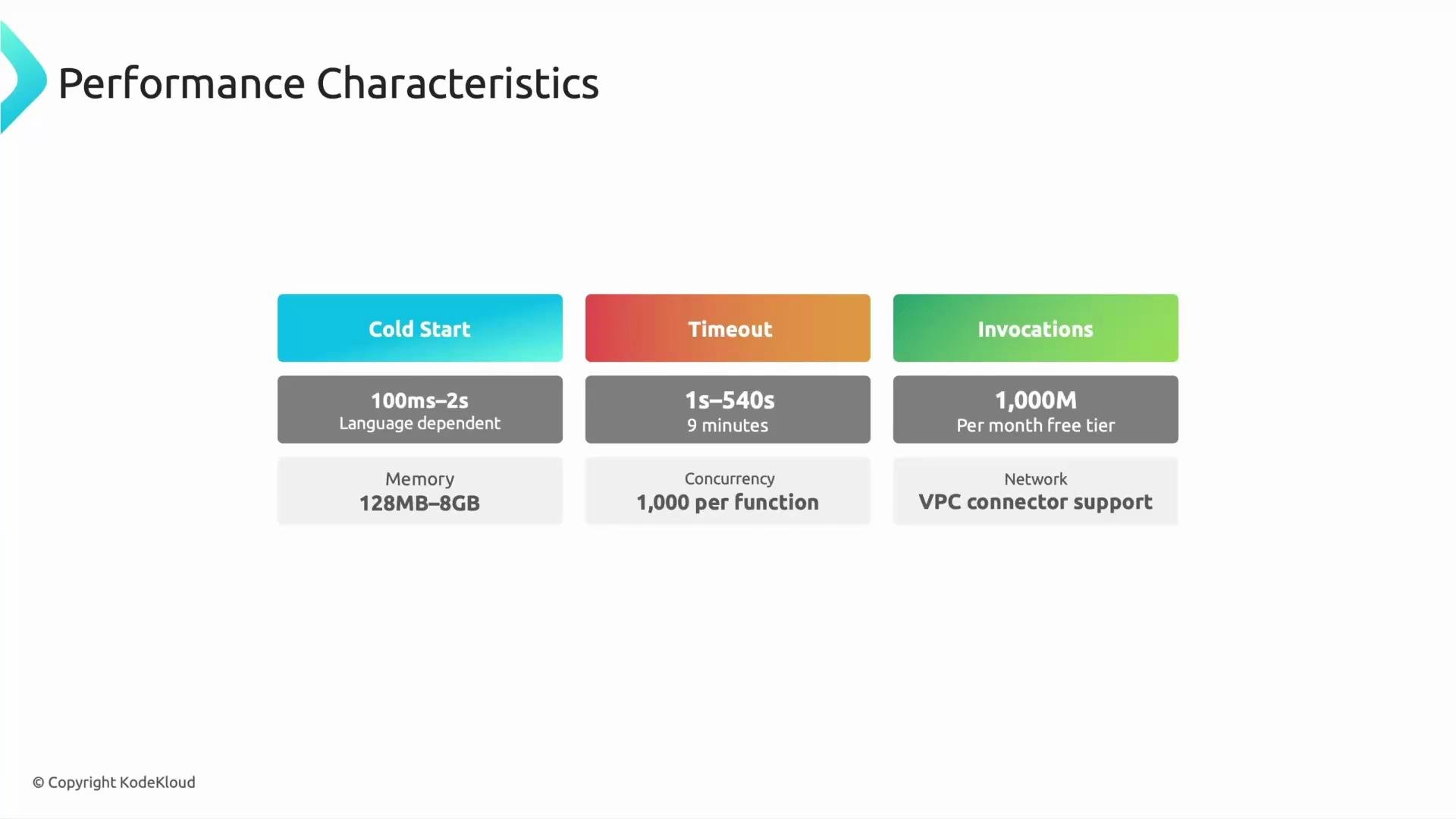
A presentation slide titled "Performance Characteristics" showing three colored cards for Cold Start (100ms–2s), Timeout (1s–540s / 9 minutes), and Invocations (1,000M per month free tier). Below are additional specs: Memory 128MB–8GB, Concurrency 1,000 per function, and VPC connector network support.
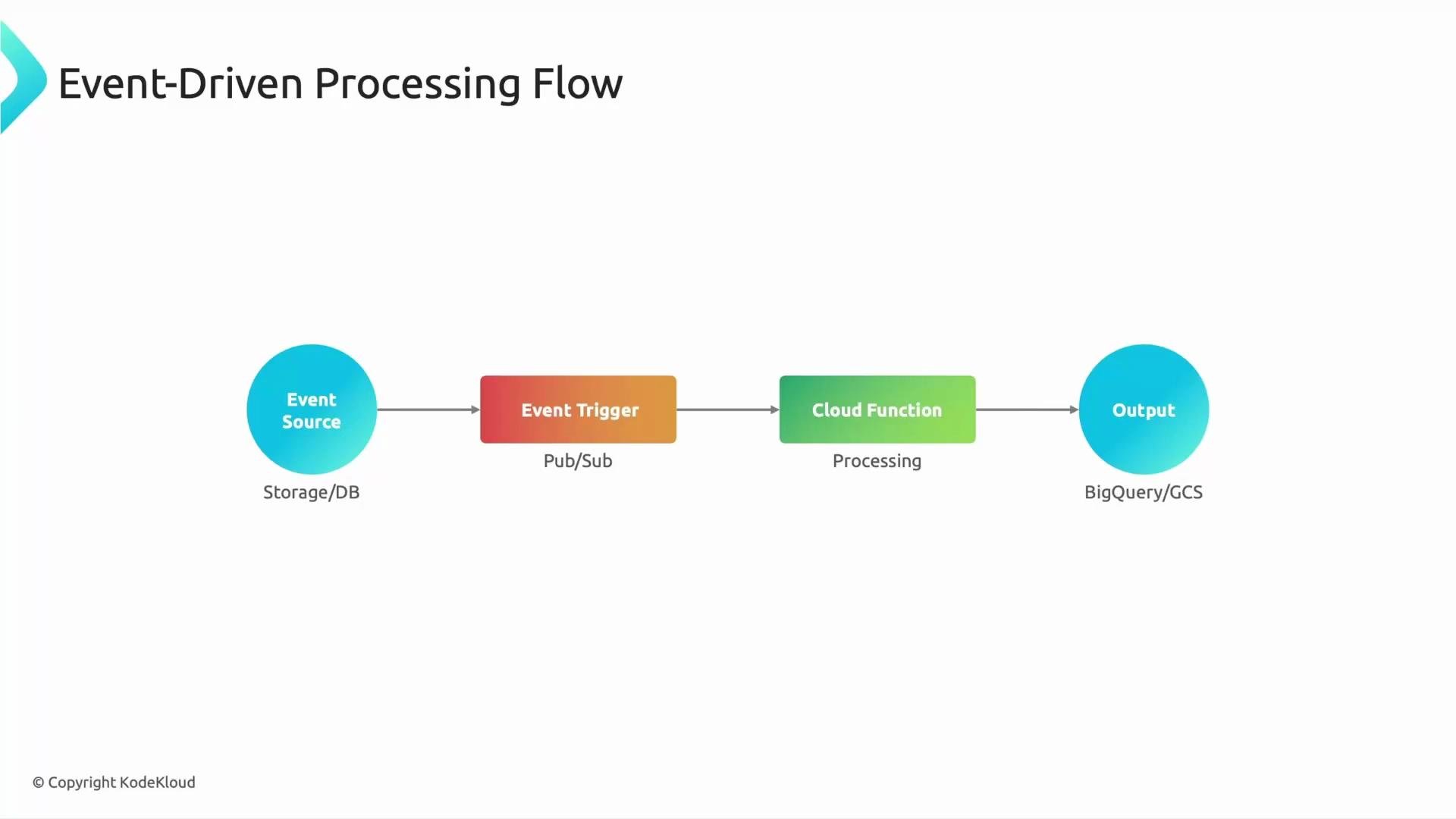
Event-driven architecture is the primary operating model for Cloud Functions. Everything begins with an event source — Cloud Storage, Pub/Sub, Firestore, HTTP requests, etc. An event trigger detects a change and invokes a Cloud Function. The function executes business logic: transform data, validate records, enrich metadata, or route to downstream systems — then writes results to destinations like BigQuery, Cloud Storage, or other services. A simple logical flow: Event Source (Storage/DB) → Event Trigger (Pub/Sub/Trigger) → Cloud Function (Processing) → Output (BigQuery/GCS)
A slide titled "Event-Driven Processing Flow" showing a simple pipeline: Event Source (Storage/DB) → Event Trigger (Pub/Sub) → Cloud Function (Processing) → Output (BigQuery/GCS). The components are depicted as colored circles/boxes connected by arrows.
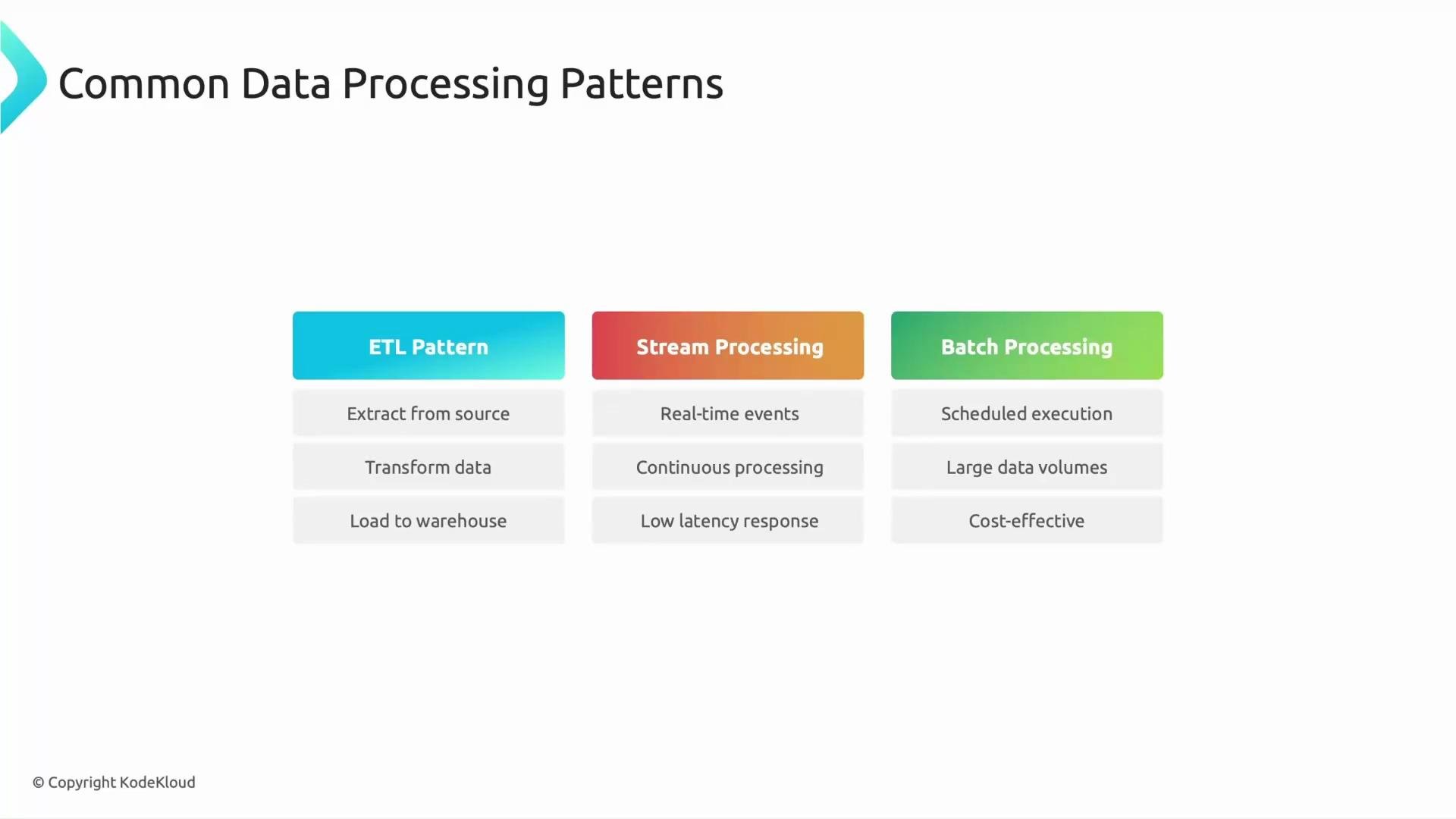
Example scenario: when a CSV file is uploaded to Cloud Storage, a Cloud Function can be triggered to parse the CSV, perform light transformations and validation, and load the cleaned rows into BigQuery — all automatically and without manual intervention. Quick conceptual question: which component initiates the execution of a Cloud Function? The answer is the event trigger. Event triggers (storage events, Pub/Sub messages, HTTP requests, etc.) are what cause the function to run. Common data-processing patterns where Cloud Functions are often used:
PatternTypical use casesHow Cloud Functions fit
ETL (Extract, Transform, Load)Small, event-driven transformations after data arrival (file rename, normalization, validation)Ideal for lightweight, immediate transformations and quick data hygiene
Stream processingReal-time metrics, fraud detection, event enrichmentLow-latency reaction to events and continuous processing of event streams
Batch orchestrationScheduled jobs that coordinate larger pipelinesGreat for scheduling/triggering batch jobs or starting workflows; not for very long-running compute-heavy jobs
A slide titled "Common Data Processing Patterns" showing three colored columns: ETL Pattern, Stream Processing, and Batch Processing. Each column lists three characteristics (e.g., ETL: Extract/Transform/Load; Stream: real-time/continuous/low latency; Batch: scheduled/large volumes/cost-effective).
Example: GCS CSV → BigQuery Below is a compact background Cloud Function in Python that responds to a Cloud Storage “finalize” event (object creation). It downloads the uploaded CSV to the function instance, parses it, and loads it into a BigQuery table. Use this as a starting point and adapt to your schema, error handling, and permission model (ensure appropriate IAM roles for the function service account).
# requirements:
# google-cloud-storage
# google-cloud-bigquery
#
import csv
import os
from tempfile import NamedTemporaryFile
from google.cloud import storage, bigquery

PROJECT_ID = "your-project-id"
BQ_DATASET = "your_dataset"
BQ_TABLE = "your_table"

storage_client = storage.Client()
bq_client = bigquery.Client(project=PROJECT_ID)

def gcs_csv_to_bigquery(event, context):
    """
    Cloud Function triggered by Cloud Storage when a CSV file is created.
    event contains keys like 'bucket' and 'name'.
    """
    bucket_name = event.get("bucket")
    object_name = event.get("name")
    if not bucket_name or not object_name:
        print("Missing bucket or name in event payload.")
        return

    bucket = storage_client.bucket(bucket_name)
    blob = bucket.blob(object_name)

    # Download file to a temporary local file
    with NamedTemporaryFile(delete=False) as tmp:
        blob.download_to_file(tmp)
        tmp_path = tmp.name

    try:
        # Simple CSV parsing and streaming into BigQuery via load job
        table_ref = bq_client.dataset(BQ_DATASET).table(BQ_TABLE)

        job_config = bigquery.LoadJobConfig(
            source_format=bigquery.SourceFormat.CSV,
            skip_leading_rows=1,  # adjust if CSV has header
            autodetect=True       # or provide schema explicitly
        )

        with open(tmp_path, "rb") as source_file:
            load_job = bq_client.load_table_from_file(
                source_file, table_ref, job_config=job_config
            )
        load_job.result()  # wait for completion
        print(f"Loaded {object_name} into {BQ_DATASET}.{BQ_TABLE}")

    except Exception as e:
        print(f"Error loading {object_name} to BigQuery: {e}")

    finally:
        try:
            os.remove(tmp_path)
        except OSError:
            pass
Practical tips and best practices:
  • Keep functions small and focused; use them as glue code for reacting, transforming, routing, and automating data flows.
  • Optimize for cold start where needed: choose runtimes with faster startup times, minimize dependency size, and prefer later-generation runtimes or smaller deployment artifacts.
  • Use batching strategies (grouping multiple events into one processing job) to improve throughput and reduce per-invocation overhead where applicable.
  • For high-throughput or long-running processing, evaluate concurrency settings, batching, and alternative compute options such as Cloud Run or Dataflow depending on throughput, cost, and latency requirements.
  • Ensure the function’s service account has least-privilege IAM permissions (e.g., read access to GCS objects, write access to BigQuery tables).
  • Monitor cold starts, error rates, latency, and costs using Cloud Monitoring and Logs to tune memory, concurrency, and retry strategies.
Cloud Function quotas, free tiers, and supported features change over time and can differ by generation and region. Always consult the official Google Cloud documentation for current limits and pricing before production use.
References and further reading: That wraps up performance characteristics and common data-processing patterns for Cloud Functions. The examples and patterns shown here illustrate how event-driven serverless functions integrate into real-world data pipelines.

Watch Video