

- a database that scales automatically,
- real-time updates to multiple clients,
- offline support for mobile users,
- flexible schema for evolving features.
- Automatic scaling and low-latency performance for variable workloads.
- Schema-less documents and collections that let your data model evolve.
- Native real-time synchronization and local offline persistence for mobile/web SDKs.
- Rich queries (filters, ordering, compound queries, array membership checks) in Native mode.
- Fully managed service with strong integration into the Google Cloud ecosystem.
- Use Cloud SQL for relational workloads with strong ACID needs and SQL joins.
- Use Cloud Spanner when you need global consistency, horizontal scaling, and relational schema at massive scale.
- Use Bigtable for very large, low-latency, high-throughput analytical or time-series workloads.
- Use Firestore when you need real-time sync, offline-first mobile/web experiences, or flexible document data.
- Uses Firestore SDKs for mobile and web (also supports gRPC/REST for server components).
- Hierarchical data model: documents in collections, with nested subcollections and complex objects.
- Real-time listeners and local offline persistence on mobile/web SDKs.
- Rich client-side queries (compound filters, array membership, ordering) and indexes.
- Best for interactive client-driven apps requiring real-time sync and offline support.
- Uses the Datastore API (backwards-compatible with Cloud Datastore).
- Flat data model: entities grouped into kinds with properties (more like traditional schemas).
- No real-time listeners or mobile/web offline SDK experience.
- Suited for backend-heavy, server-side workloads, batch processing, or legacy Datastore migrations.
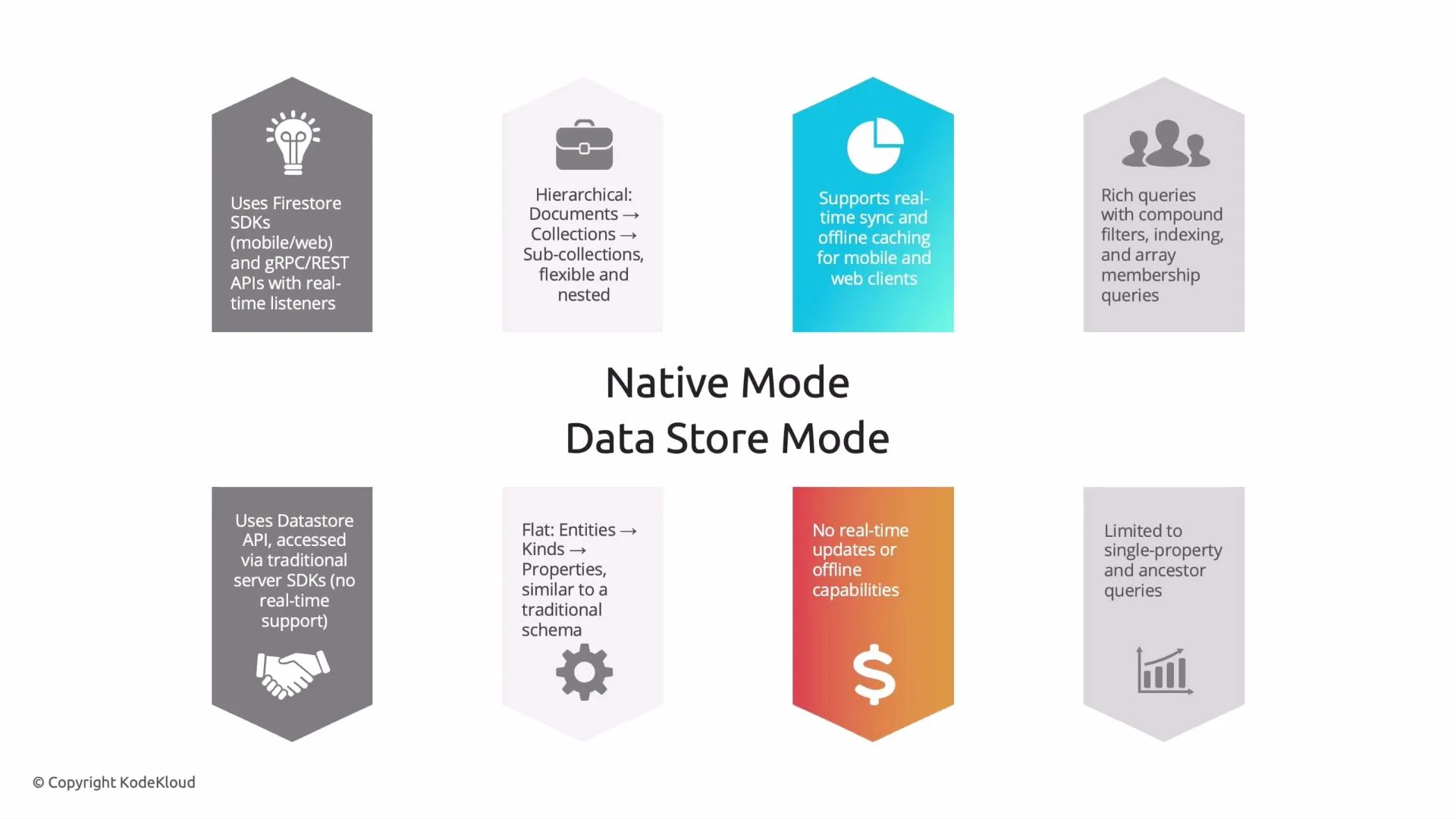
If your application needs real-time updates and an interactive mobile/web experience, choose Firestore Native mode. If the workload is backend-focused, batch-oriented, or does not require real-time sync, choose Datastore mode.
Example architecture (mobile food-delivery app)
- Client devices use Firestore Native SDKs to read/write order and delivery documents.
- Real-time listeners push status updates to the UI as drivers update their location.
- Offline persistence allows users to continue interacting while network is intermittent.
- Server-side components (e.g., billing, analytics) can access the same data using REST or Admin SDKs.
- Indexing: Native mode may require composite indexes for some compound queries. Plan and monitor index usage to avoid query failures.
- Pricing: Firestore pricing is based on operations, storage, and network. Real-time listeners and frequent writes can increase costs—design data access patterns accordingly.
- Migrations: If migrating from Cloud Datastore, Datastore mode preserves compatibility; consider Native mode only if you need real-time and mobile SDK features and are ready to adapt client code.
- Google Cloud Firestore documentation
- Cloud Datastore to Firestore migration guide
- Google Cloud Professional Data Engineer Certification