

At a glance
- BigLake: A unified, secure, and optimizable access layer for external data that integrates with governance tools and supports multiple analytical engines.
- External tables: A Quick-to-set-up BigQuery feature that points directly at external files (CSV, Parquet, Avro). Fast for ad-hoc queries, but with limited tuning and split management responsibilities.
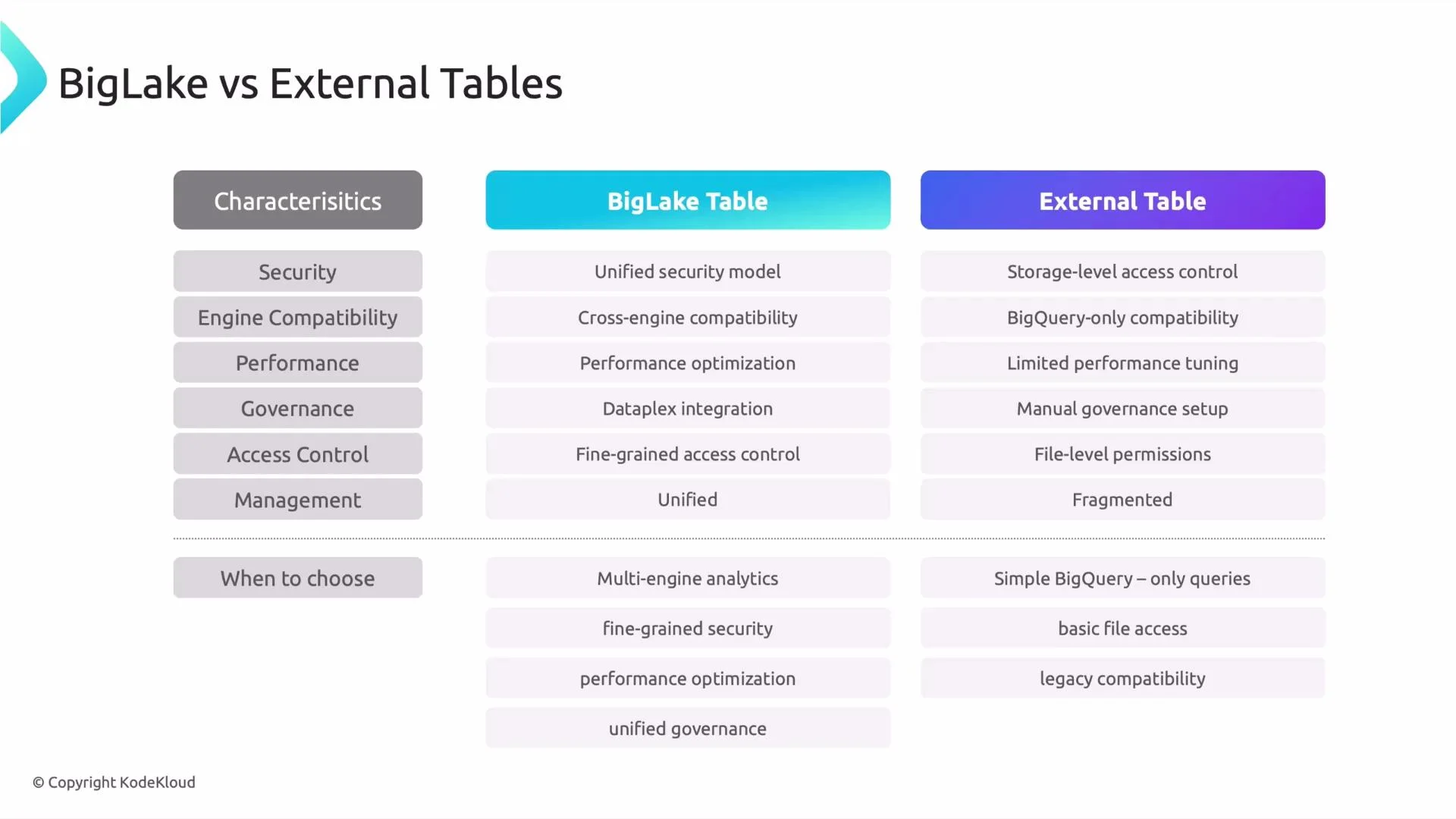
Feature comparison
Quick examples
- Create a simple BigQuery external table that points at Parquet files in Cloud Storage:
- Conceptual example for a governed BigLake table (setup often involves Dataplex or a catalog and is managed via console/administrative APIs):
External tables are ideal for quick experiments or simple migrations. For production systems that require centralized governance, multi-engine access, or predictable performance, prefer BigLake.
Security reminder: External tables generally inherit Cloud Storage permissions. Make sure IAM/ACLs are correctly configured to avoid accidental data exposure. BigLake allows more centralized, fine-grained controls when governance is required.
When to choose which
When to choose BigLake- You need multiple analytics engines (for example, BigQuery plus Apache Spark) to access the same datasets.
- You require centralized governance, metadata cataloging, and lineage (Dataplex integration).
- You want performance improvements through metadata-driven optimizations and reduced storage scans.
- You need fine-grained access controls aligned with BigQuery-style permissions.
- You want a fast, low-effort way to query files in Cloud Storage from BigQuery.
- You are running ad-hoc analysis, proofs of concept, or short-term migrations where governance and cross-engine access are not critical.
- You prefer minimal setup and are comfortable managing storage-level permissions separately.
Quick quiz (self-check)
- Which option should you choose when multiple engines like Apache Spark and BigQuery need access to the same external datasets?
- Answer: BigLake
- External tables are most suitable for which use case?
- Options:
- A: High-performance analytics
- B: Fine-grained access control
- C: Quick BigQuery queries on files without extra setup
- D: Dataplex integration
- Answer: C — quick BigQuery queries on files without extra setup
Conclusion
BigLake addresses many limitations of external tables by providing unified security, cross-engine compatibility, metadata-driven performance optimizations, and tighter governance integration. If you can design for it, BigLake is often the better default for production systems that require governed access to external data. External tables are a fast and practical solution for ad-hoc queries and simple migrations. Further reading and references:- BigLake documentation
- BigQuery external data sources
- Dataplex documentation
- Cloud Storage documentation