

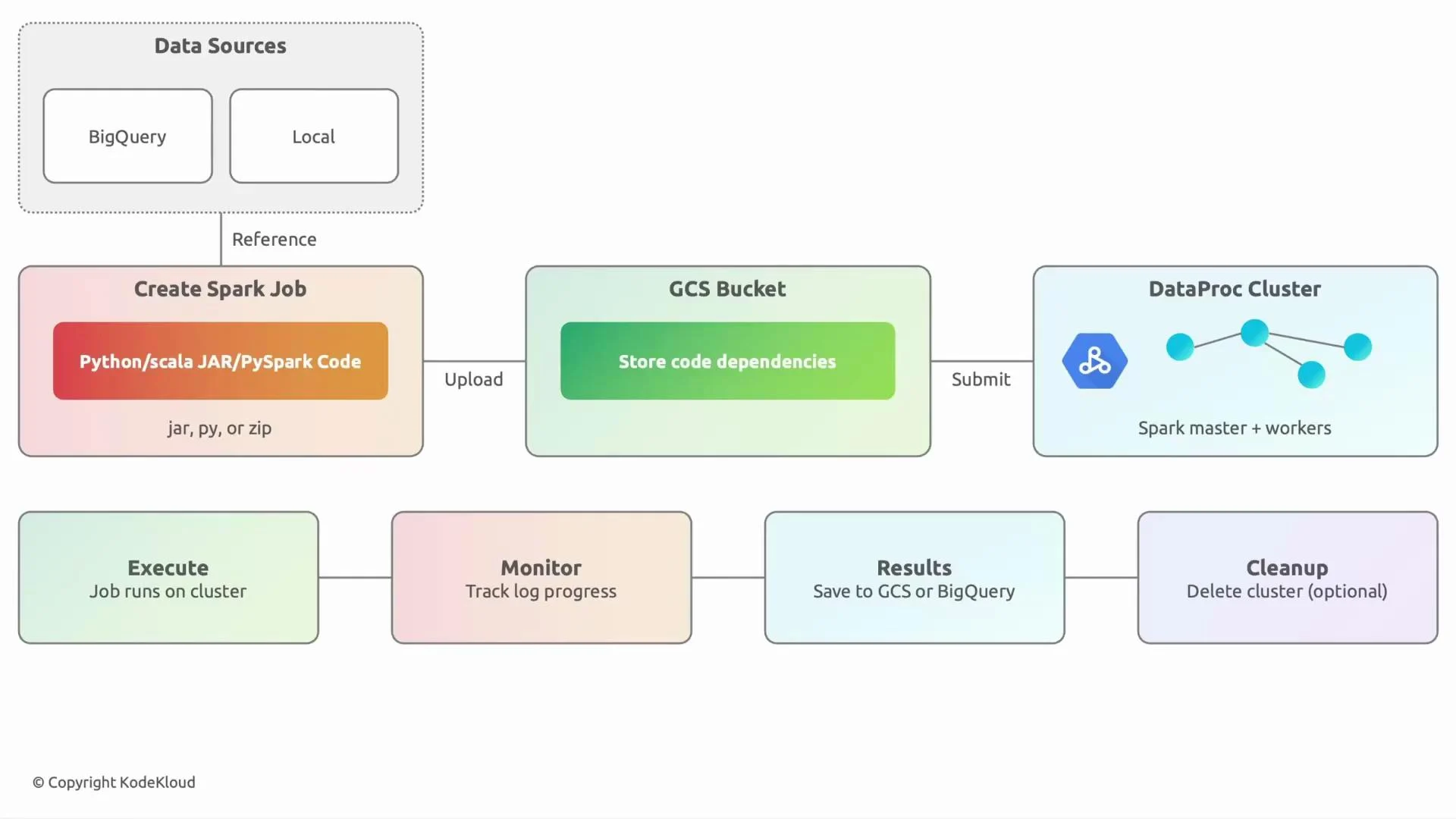
Typical lifecycle for a Dataproc Spark job
-
Data sources
- Identify where your input data lives: BigQuery, Cloud Storage (GCS), Pub/Sub, or a local dataset you upload. These are prerequisites for any Spark job.
-
Prepare and upload code and dependencies
- Develop locally (Python, Scala, Java). For Python, package your code as a directory, ZIP, or wheel; for JVM languages, produce a JAR.
- Upload artifacts and any dependencies to a GCS bucket so Dataproc can access them. For ad-hoc runs you can also submit directly from your workstation using
gcloudorspark-submit.
-
Submit the job to Dataproc
- Submit to an existing long-lived cluster or create a short-lived cluster specifically for the job. Use
gcloud dataproc jobs submitor the Dataproc API.
- Submit to an existing long-lived cluster or create a short-lived cluster specifically for the job. Use
-
Execution and monitoring
- Dataproc runs the Spark job. Monitor progress using the Spark UI, Spark History Server, Cloud Monitoring, or the Dataproc Jobs page in the Cloud Console.
-
Output and storage
- Write results to the desired sink: GCS, BigQuery, Pub/Sub, or an external system. Typical patterns: write processed files to GCS or load results into BigQuery for analytics.
-
Cluster lifecycle and cleanup
- For scheduled or infrequent batch jobs, spin up short-lived clusters and delete them when finished to minimize cost. For low-latency or interactive workloads, use a long-lived cluster with autoscaling that scales down when idle.
Concrete example workflow (CI/CD + scheduled batch)
A common production setup:- Data lands in GCS (data lake).
- Code is developed locally and stored in GitHub.
- Cloud Build creates artifacts (ZIP/JAR) and uploads them to a GCS bucket.
- A scheduled trigger spins up a short-lived Dataproc cluster, runs the Spark job to process the previous day’s data, writes results to BigQuery, and deletes the cluster when finished.
Example commands
Create a short-lived cluster:When to use short-lived vs long-lived clusters
Choose a short-lived cluster for intermittent batch jobs to minimize cost. Choose a long-lived, autoscaling cluster for low-latency or interactive workloads where startup time and job latency are important.
Monitoring, logging, and debugging
- Spark UI: track stages, tasks, and executors during the job run.
- Spark History Server: inspect completed application logs and metrics.
- Cloud Logging & Monitoring: collect logs, set alerts, and visualize performance trends.
- Dataproc Jobs page (Cloud Console): view job status and details.
- For long-running clusters, enable component gateways (e.g., Spark History Server) for easier access.
- Dataproc documentation
- Spark on Dataproc best practices
- Cloud Build documentation
- BigQuery documentation
Interview / exam tip
When asked to justify a short-lived vs long-lived Dataproc cluster, structure your answer around:- Job frequency (one-time vs recurring)
- Latency requirements (interactive vs batch)
- Cost constraints (pay-per-use vs idle resources)
- Operational overhead (automation of cluster lifecycle)
- Data locality and startup time