

- BigQuery storage tiers: active vs long-term
- Physical vs logical storage and how billing is applied
- Compute (slots) and pricing models: on-demand, flat-rate, and flex slots
- Practical guidance to reduce storage and query costs
Active vs Long-Term Storage
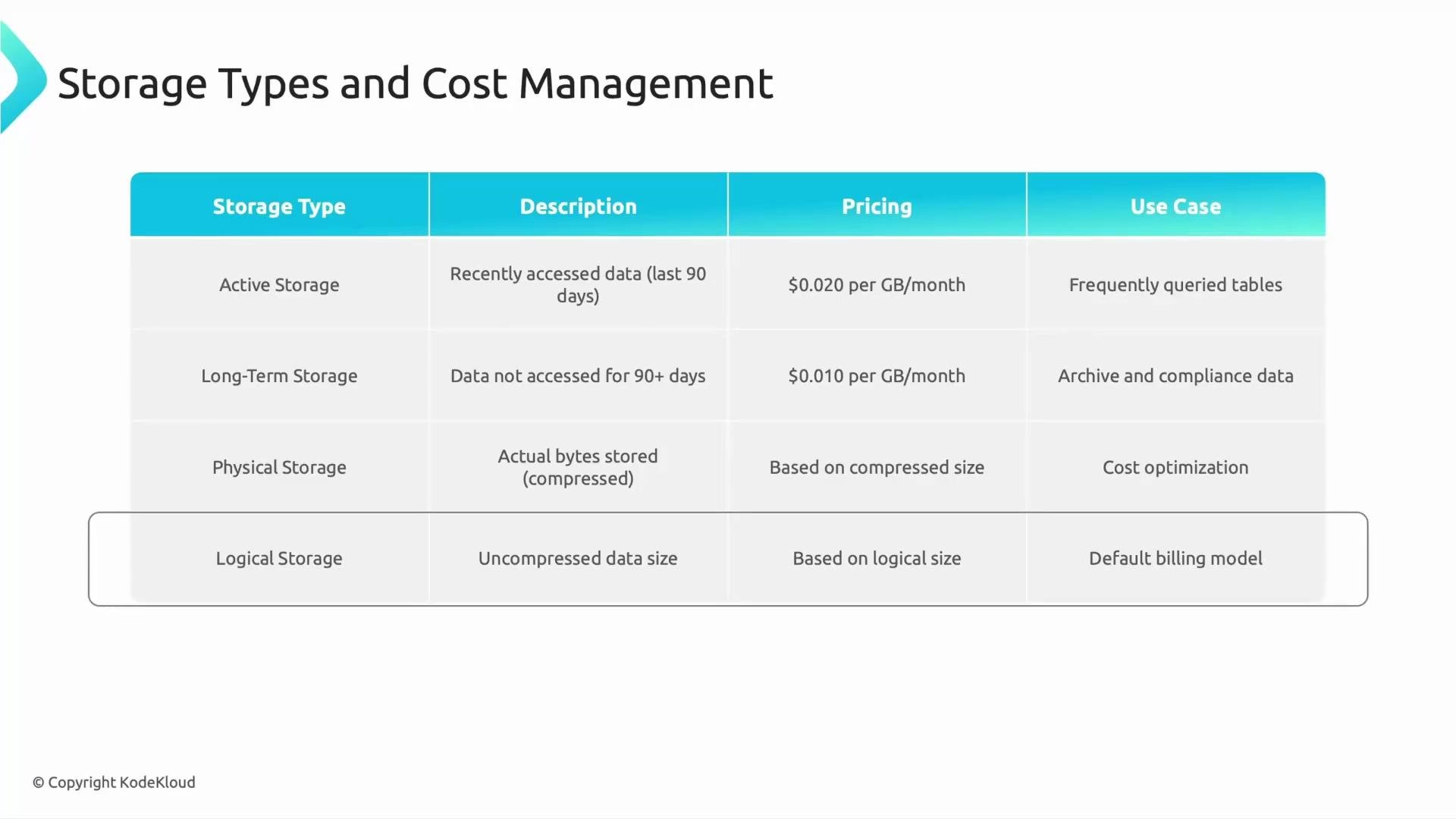
BigQuery applies two main storage tiers with automatic billing behavior:- Active storage: Data modified or ingested in the last 90 days. Billed at the standard storage rate and kept ready for frequent access.
- Long-term storage: Data unchanged for 90 consecutive days. BigQuery automatically applies a discounted long-term rate (typically about half of active pricing).
- Active: frequently queried datasets (recent product catalog, operational tables).
- Long-term: historical reports, compliance archives, backups that are rarely modified.
Physical vs Logical Storage (and billing considerations)
Understanding physical vs logical storage helps explain why you might see differences between storage billed and query bytes processed.- Physical storage: The actual bytes written to disk after BigQuery’s columnar compression. Billing and reported storage usage in the console are based on this compressed size.
- Logical storage: The uncompressed size or the conceptual amount of data in table columns. Logical layout determines how many bytes a query reads (bytes processed).
- Storage charges are based on the physical (compressed) size and the applied storage tier (active or long-term).
- Query charges (on-demand) are based on bytes processed—driven by logical size and which columns/partitions the query reads.
- Compression reduces storage costs and I/O, but query charges depend on which logical data the query scans; compression alone won’t eliminate query costs.
BigQuery automatically applies the long-term storage discount to data that hasn’t been modified for 90 consecutive days—no manual action required.
Compute and Slot Pricing
BigQuery executes queries on slots (virtualized CPU capacity). You can pay for slots in multiple ways, depending on predictability and scale of workloads.-
On-demand (pay-per-query)
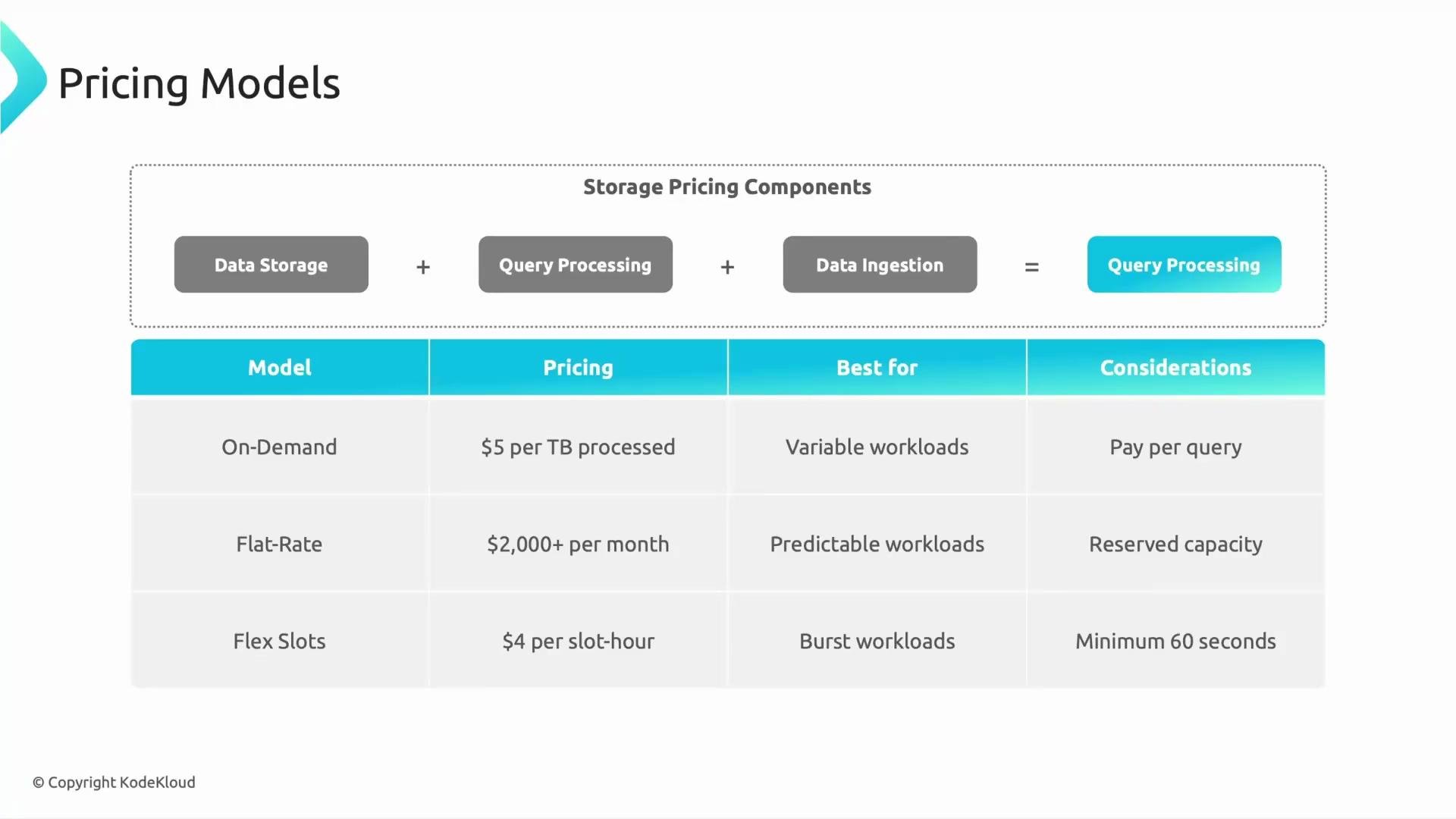
- Pricing: pay per bytes processed (commonly quoted per TB processed).
- Best for: ad-hoc analysis, unpredictable workloads, experimentation.
- Pros: no upfront commitment.
- Cons: costs can spike with many or inefficient queries, or when large unpartitioned tables are scanned.
-
Flat-rate (reservations)
- Pricing: reserve a fixed number of slots for a predictable monthly cost.
- Best for: steady, production workloads requiring predictable performance.
- Pros: consistent performance and predictable spend for large teams.
- Cons: higher upfront cost; typically used by organizations with sustained usage.
-
Flex slots
- Pricing: short-term slot reservations (hourly) to temporarily increase capacity.
- Best for: short bursts (end-of-month reporting, heavy ETL window).
- Pros: scale up only when needed without long-term commitment.
- Cons: limited to temporary bursts; may require orchestration to use effectively.
Choose the right compute model carefully: on-demand can be cost-effective for small or sporadic workloads, while flat-rate is usually more economical for sustained, high-volume query traffic. Monitor slot utilization and query efficiency to avoid overspending.
How costs add up
Your BigQuery bill typically includes:- Storage: active and long-term rates depending on last modification.
- Query processing: on-demand (bytes processed) or slot usage (flat-rate/flex).
- Data ingestion: streaming inserts or certain loading methods may incur additional fees.
- Use partitioning and clustering to limit the amount of data scanned by queries.
- Select only the columns you need in queries to reduce logical bytes processed.
- Move rarely modified data to long-term tier automatically by allowing 90 days without modification.
- Choose on-demand for low/unpredictable usage; choose flat-rate for stable, predictable workloads; use flex slots for short bursts.
References and further reading
- BigQuery documentation: https://cloud.google.com/bigquery/docs
- BigQuery pricing (storage and analysis): https://cloud.google.com/bigquery/pricing
Summary
- Organize datasets so queries read only what they need: use partitioning, clustering, and column projection to minimize bytes processed.
- BigQuery automatically applies long-term storage pricing after 90 days of no modifications—leverage this for archival/backup data.
- Choose on-demand, flat-rate, or flex slots based on usage patterns to control compute costs.
- Monitor both storage and query processing charges for a complete picture of BigQuery spend.