Welcome back. In this lesson we’ll explore Google Cloud Memorystore — a managed, in-memory caching service designed to accelerate read-heavy workloads and reduce load on durable databases. Memorystore is ideal when you need extremely low-latency access to frequently read data that doesn’t need to go to long-term, persistent storage every time. Why caching? Firestore and Cloud SQL provide durable, long-term storage and strong persistence guarantees. However, many applications repeatedly read the same data (e.g., session data, product metadata, leaderboards). Hitting the durable database on every request increases latency and load. Introducing an in-memory cache like Cloud Memorystore lets you keep “hot” data in RAM for microsecond-to-millisecond access. Example scenario:
  • A service queries Cloud SQL on each user request for product info.
  • Repeated requests for the same product create unnecessary database load and higher latency.
  • Add Cloud Memorystore as a cache layer: the service checks the cache first, falling back to Cloud SQL only on cache misses.
A typical cache-aside flow:
  • The service asks the cache (Cloud Memorystore) for a value.
  • If the value exists (cache hit), return it immediately.
  • On a cache miss, load from Cloud SQL, return to the client, and write the value into the cache for future requests.
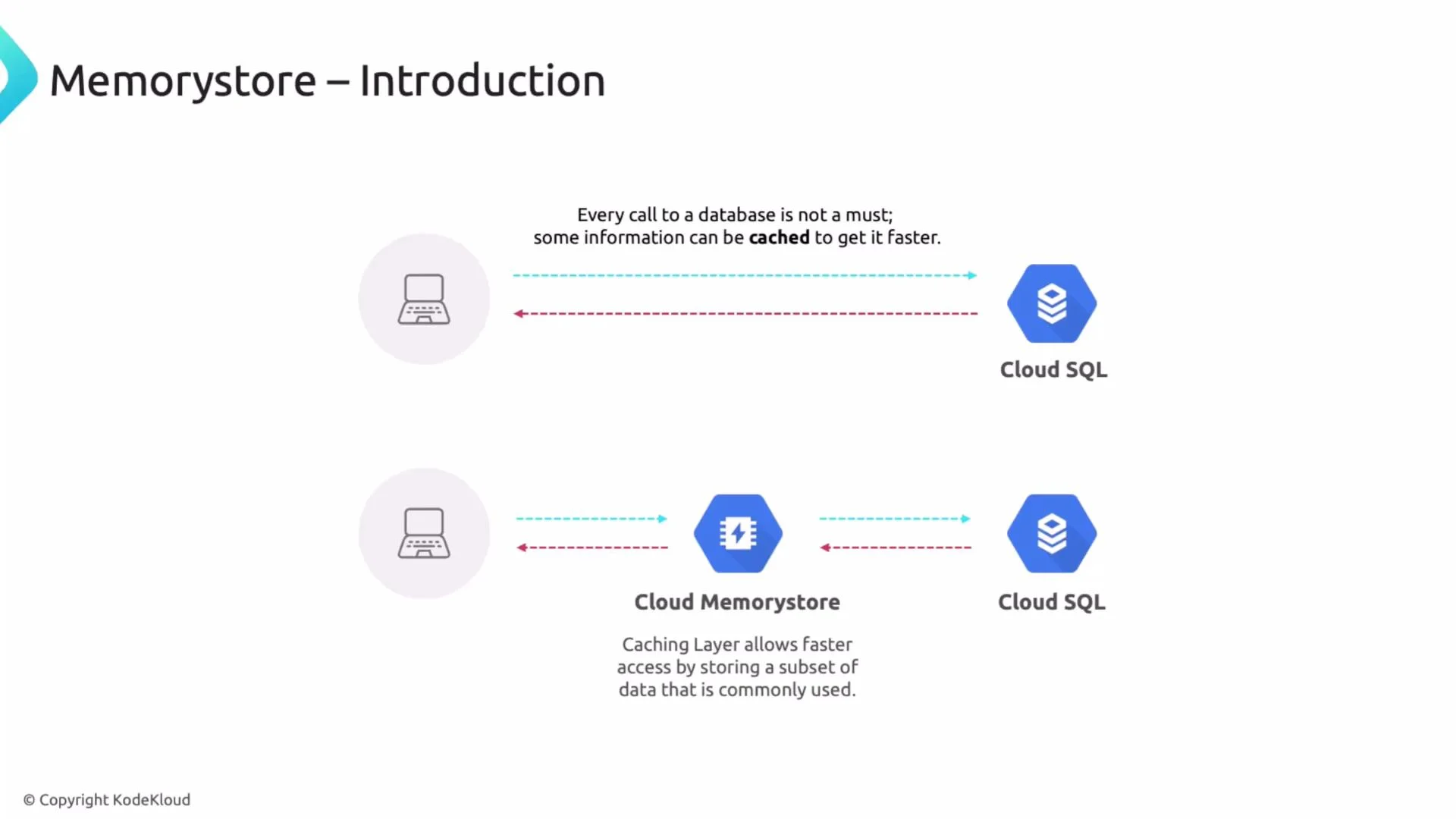
An infographic titled "Memorystore – Introduction" showing a comparison between direct client-to-Cloud SQL calls and an architecture that inserts Cloud Memorystore as a caching layer between the client and Cloud SQL. It notes that caching can reduce database calls and speed up data access.
This cache layer typically stores a subset of your data — the hot keys — and drastically improves read latency while reducing I/O and CPU load on your primary DB.
A common and safe pattern is cache-aside (lazy loading): check the cache first; on a miss, load from the database and populate the cache. Alternative patterns include write-through, write-behind, and read-through — choose based on your consistency and performance requirements.
Memorystore supports two managed engines:
  • Memorystore for Redis
  • Memorystore for Memcached
Key differences and when to choose each:
FeatureMemorystore for RedisMemorystore for Memcached
Persistence & replicationSupports replication, replicas, and optional persistence depending on configuration; managed HA with failoverPure in-memory; no built-in persistence or automatic replication
Use-case fitReal-time applications requiring richer data structures or stronger availability (sessions, leaderboards, counters, streams)Simple, transient caching (page fragments, CDN-like object caches) where cache loss is acceptable
FeaturesRich data types (lists, sets, sorted sets), pub/sub, Lua scripts, transactions, clusteringLightweight key-value store; simple operations and horizontal scaling by adding nodes
Complexity & costMore features, typically higher cost for HA setupsSimpler and usually cheaper
In practice, teams often pick Redis for production workloads that need durability, advanced data structures, and HA. Memcached works well when your primary goal is a low-cost, simple cache.
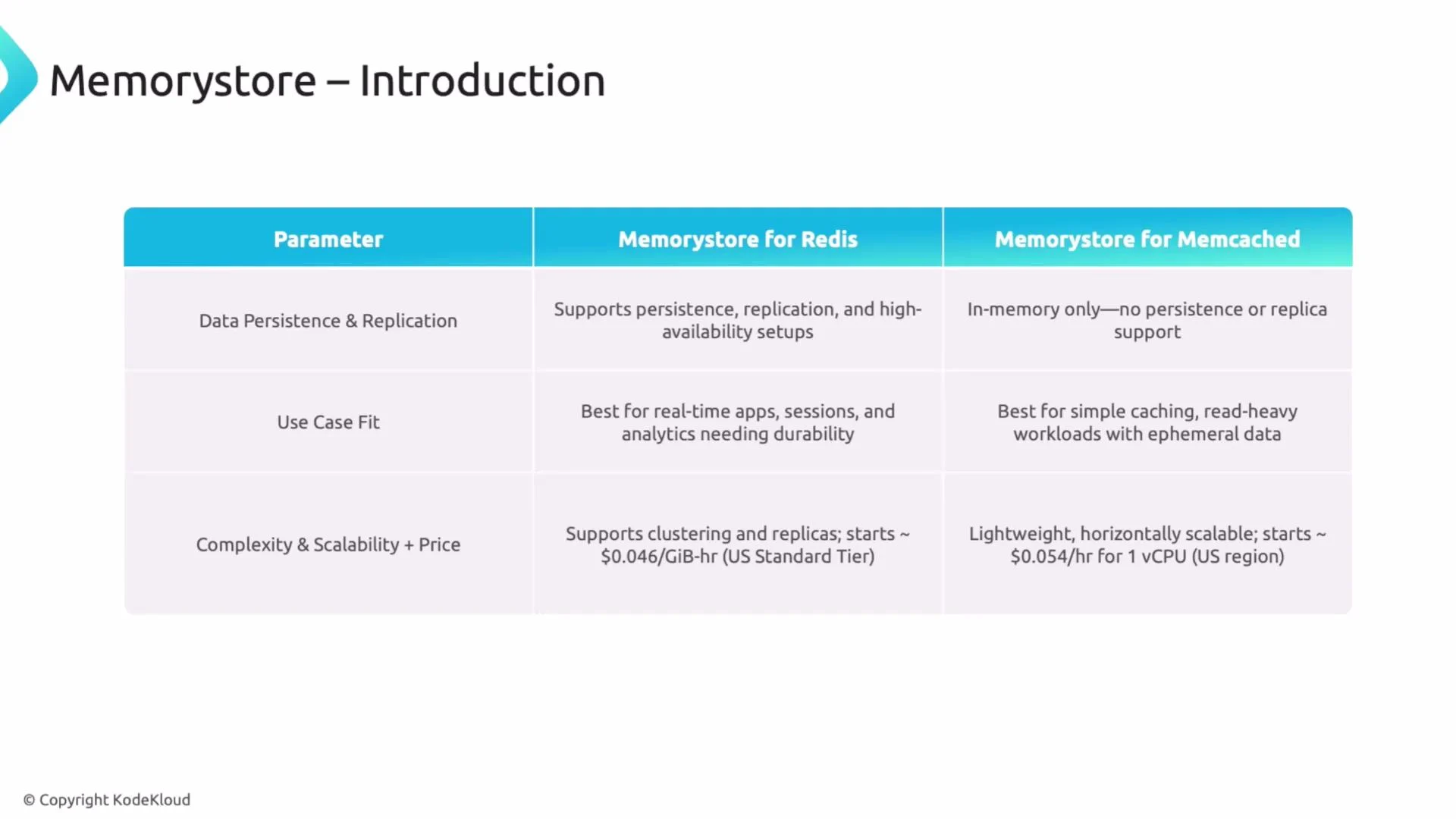
A presentation slide titled "Memorystore – Introduction" showing a comparison table between Memorystore for Redis and Memorystore for Memcached. The table contrasts data persistence/replication, use-case fit (durable real-time apps vs simple caching), and complexity/scalability with price notes.
Practical caching considerations
  • Eviction policy & TTL: Choose eviction policies (LRU, TTL) and time-to-live values that reflect how stale data can be.
  • Cache invalidation: On writes, invalidate or update related cache keys to avoid serving stale data.
  • Warm-up strategies: Preload caches or use gradual ramp-up to avoid a cold-cache spike.
  • Monitoring: Track hit rate, miss rate, latency, and eviction events to tune sizing and autoscaling.
  • Security & networking: Use VPCs, authorized networks, and IAM to restrict access to Memorystore instances.
Recommended cache-aside patterns (examples) Python (cache-aside using redis-py):
import redis
import psycopg2
import json

r = redis.Redis(host="10.0.0.5", port=6379, db=0)
conn = psycopg2.connect(...)

def get_product(product_id):
    key = f"product:{product_id}"
    cached = r.get(key)
    if cached:
        return json.loads(cached)        # cache hit

    # cache miss: load from DB
    with conn.cursor() as cur:
        cur.execute("SELECT id, name, price FROM products WHERE id = %s", (product_id,))
        row = cur.fetchone()
    if row:
        product = {"id": row[0], "name": row[1], "price": row[2]}
        r.set(key, json.dumps(product), ex=3600)  # populate cache with TTL
        return product
    return None
Node.js (cache-aside using ioredis):
const Redis = require("ioredis");
const { Pool } = require("pg");
const redis = new Redis({ host: "10.0.0.5", port: 6379 });
const pool = new Pool(/* db config */);

async function getProduct(productId) {
  const key = `product:${productId}`;
  const cached = await redis.get(key);
  if (cached) return JSON.parse(cached); // cache hit

  const res = await pool.query("SELECT id, name, price FROM products WHERE id = $1", [productId]);
  if (res.rowCount) {
    const product = res.rows[0];
    await redis.set(key, JSON.stringify(product), "EX", 3600); // set TTL
    return product;
  }
  return null;
}
Be careful with cache invalidation. Incorrect invalidation can lead to stale reads. Decide whether your application tolerates eventual consistency or requires strict consistency, then design cache write/update flows accordingly.
Summary
  • Use Cloud Memorystore to dramatically reduce latency for repeated reads and to offload traffic from Cloud SQL or Firestore.
  • Choose Memorystore for Redis when you need durability, HA, and advanced data structures.
  • Choose Memorystore for Memcached for simple, cost-effective, transient caches.
  • Implement a cache strategy (cache-aside, write-through, etc.), set TTLs/eviction policies, and monitor hit rates to tune performance.
Links and references Thanks for reading — that concludes this lesson.

Watch Video