

- The VPC is the virtual, isolated network that hosts your GCP resources.
- It defines IP ranges, subnets, firewall policies, and routing behavior.
- The VPC construct itself is global in GCP; subnets you create are regional.
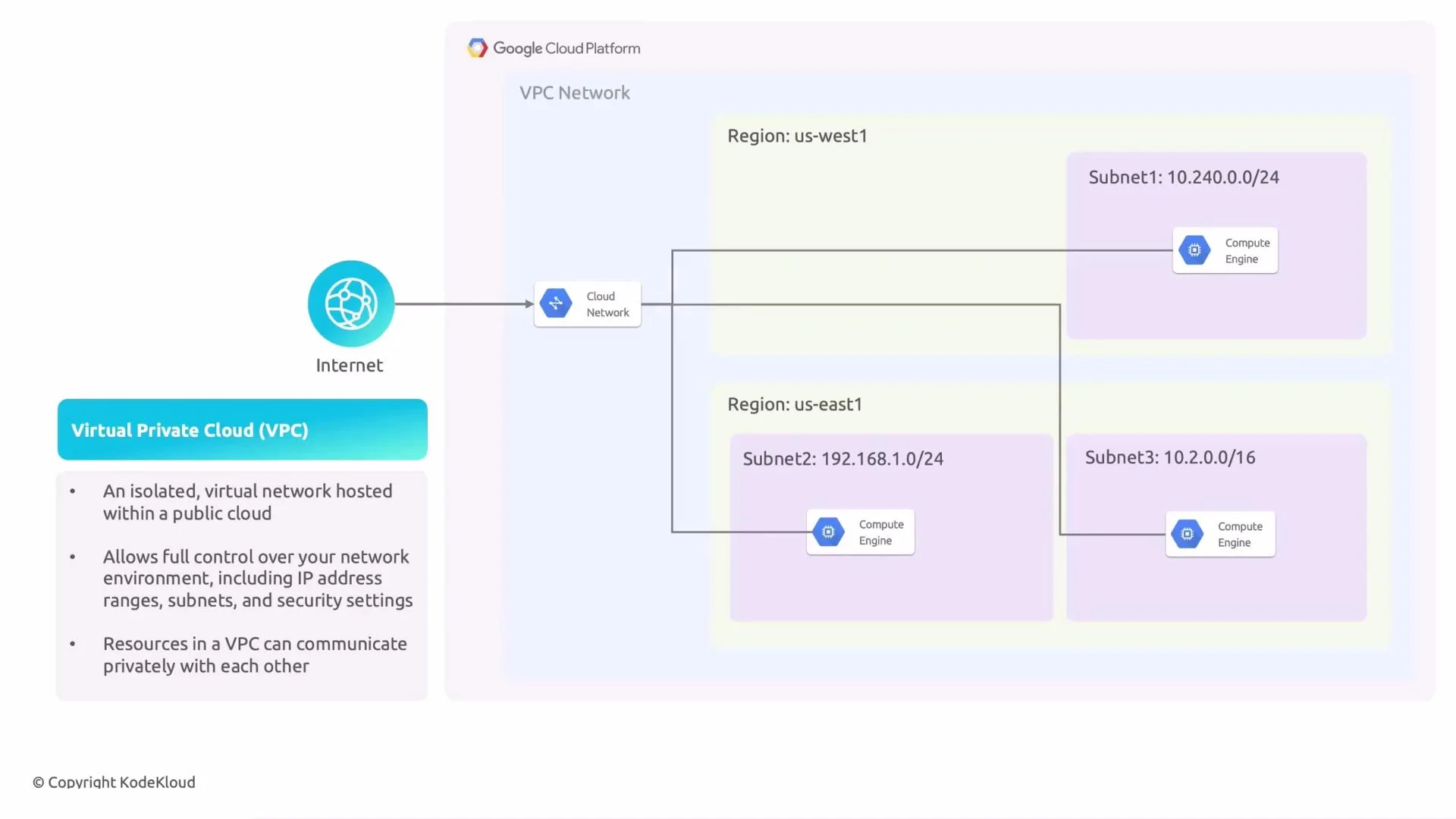
- A Virtual Private Cloud (VPC) is your private virtual network in GCP.
- It provides centralized control over IP address ranges, subnets, firewall rules, and routing.
- The VPC itself is global; subnets are created per region and span all zones within that region.
- Private (internal) IPs: Non-internet-routable addresses used for internal communication inside the VPC. Common ranges:
10.x.x.x,172.16.x.x–172.31.x.x,192.168.x.x. - External (public) IPs: Internet-routable addresses assigned to resources when direct inbound/outbound internet access is required (ephemeral or static). Instances without external IPs can still initiate outbound connections by using Cloud NAT.
- A subnet is a regional slice of your VPC’s IP address space, defined by a primary CIDR range (for example
10.0.1.0/24). - CIDR notation
a.b.c.d/nnindicates the network prefix length; the/nndetermines how many addresses are available. - In GCP, subnets are regional and span all zones in the chosen region. This simplifies IP planning across availability zones and increases resilience.
- Segment resources by function, security posture, or environment (for example,
web,app,db). - Apply different firewall rules and routing for different groups of resources.
- Simplify IP management and future scaling.
- Public subnet: Instances have external IPs and routes to the internet gateway; used for load balancers, public-facing VMs, etc.
- Private subnet: Instances only have internal IPs and no external IPs; use Cloud NAT for outbound-only internet access (OS updates, package installs) while preventing inbound internet traffic.
Important networking details for GCP
- Internet access: An instance needs an external IP to receive direct inbound traffic from the internet. Outbound egress from an instance with an external IP is available via the default route to the internet gateway.
- Cloud NAT: Provides controlled outbound-only internet connectivity for instances without external IPs.
- Secondary IP ranges: Attach secondary CIDR ranges to subnets for alias IPs, GKE clusters, or services that require additional address space.
- Firewall rules: GCP firewall rules are stateful and apply at the VPC level. Use them to explicitly allow or deny traffic to instances based on IP, protocols, and ports.
Tip: Plan your CIDR ranges and subnet layout before deploying resources. Reserve address space for growth, separate environments (prod/stage/dev), and avoid overlapping ranges across projects and on-prem networks.
Warning: Avoid overlapping CIDR ranges between VPCs or with your on-prem networks unless you use advanced routing or NAT solutions. Overlaps complicate peering and VPN connectivity.
- VPC = your controllable network in GCP (global construct).
- Subnet = regional CIDR block used to organize IPs and resources.
- Private IPs are used for internal communication; external IPs enable internet-routable communication.
- Use Cloud NAT to permit outbound-only internet for private instances without exposing them to inbound traffic.