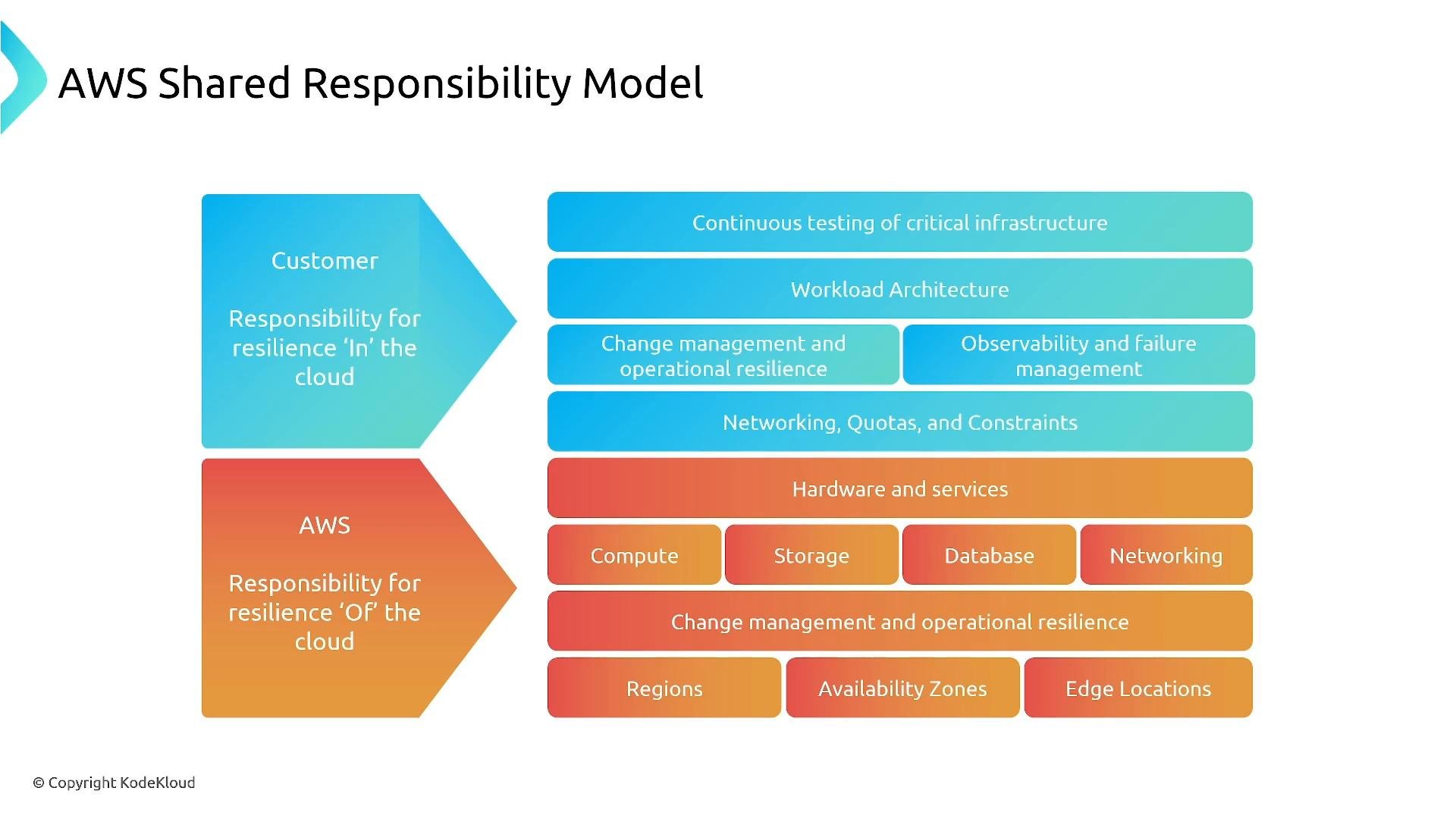
This lesson reviews disaster recovery (DR) fundamentals—Recovery Time Objective (RTO), Recovery Point Objective (RPO)—and the four common DR models used in AWS: Backup & Restore, Pilot Light, Warm Standby, and Active‑Active. You’ll learn trade-offs between cost, complexity, and recovery speed so you can design a plan that meets business requirements. At an associate or practitioner level, DR is about keeping services available during failures to protect customers and revenue while choosing an appropriate cost/complexity balance. AWS follows a shared responsibility model: AWS operates the global infrastructure (hardware, compute, storage, Regions, Availability Zones, edge locations) while customers are responsible for everything they configure and run — your applications, data, IAM policies, encryption, and resiliency controls. If you can log in or change it, you own it.
A color-coded diagram of the AWS Shared Responsibility Model showing separate customer and AWS responsibilities. It lists items like workload architecture, testing, observability and networking on the customer side and hardware, compute, storage, databases, regions, availability zones and edge locations on the AWS side.
RTO and RPO are critical inputs to DR design and planning:
  • RTO (Recovery Time Objective): the maximum acceptable time that a service can be unavailable after an incident. Example: RTO = 4 hours means the system must be recovered within 4 hours.
  • RPO (Recovery Point Objective): the maximum acceptable amount of data loss before the incident. Example: RPO = 15 minutes means losing more than 15 minutes of data is unacceptable.
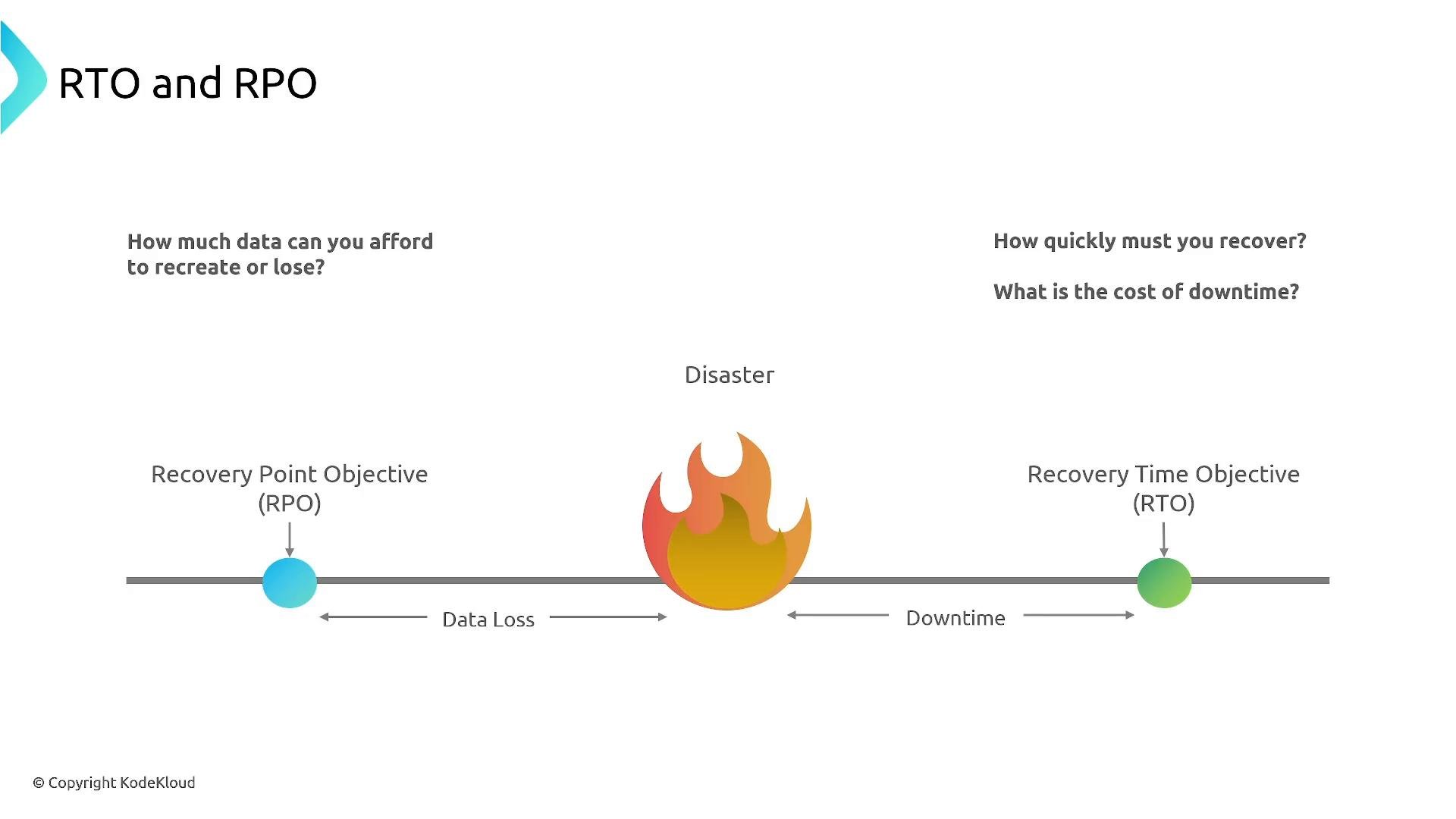
A simple diagram showing RPO and RTO on a timeline with a fire icon marking a disaster: RPO (left) indicates allowable data loss before the event, and RTO (right) indicates acceptable downtime and recovery time after it.
Both are usually measured in seconds, minutes, hours, or days. Tighter RTO/RPO requires more automation, redundancy, and cost.

Disaster Recovery Model 1 — Backup & Restore

Backup & Restore stores point-in-time copies of data and configuration in another Region (snapshots, object copies, exported data). During an outage you recreate infrastructure (typically via Infrastructure as Code) and restore data from backups. This model is cost-efficient because you don’t maintain duplicate compute, but it is the slowest option: recovery involves redeploying stacks and restoring data, which increases RTO and operational risk (drift, IaC failures). Use cases: non‑critical applications or systems that can tolerate hours of downtime or some data loss.
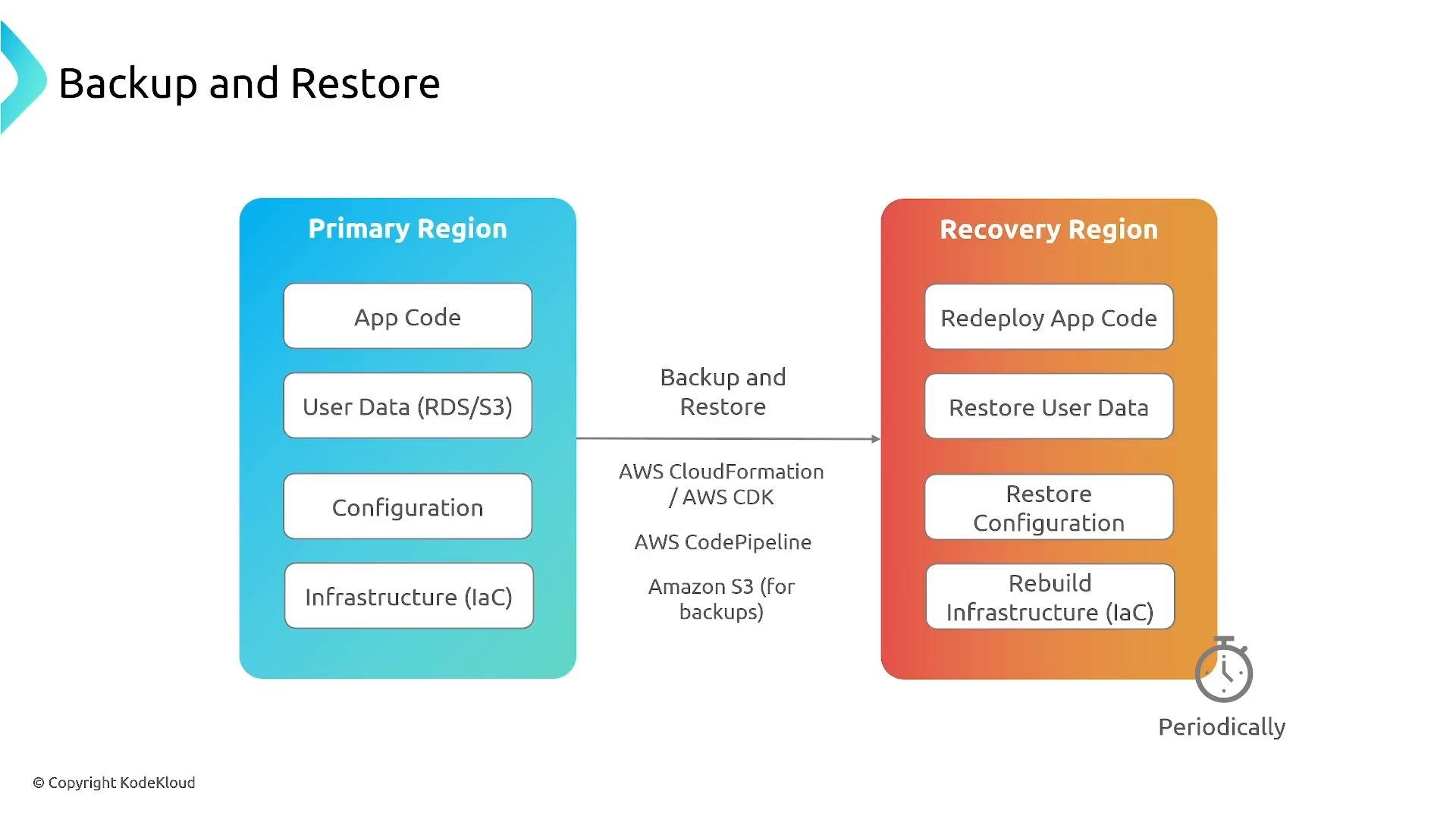
A diagram titled "Backup and Restore" showing a blue "Primary Region" column (App Code, User Data, Configuration, Infrastructure) with an arrow to an orange "Recovery Region" column listing Redeploy App Code, Restore User Data, Restore Configuration and Rebuild Infrastructure. It notes using AWS CloudFormation/AWS CDK, AWS CodePipeline and Amazon S3 for backups and indicates the process runs periodically.
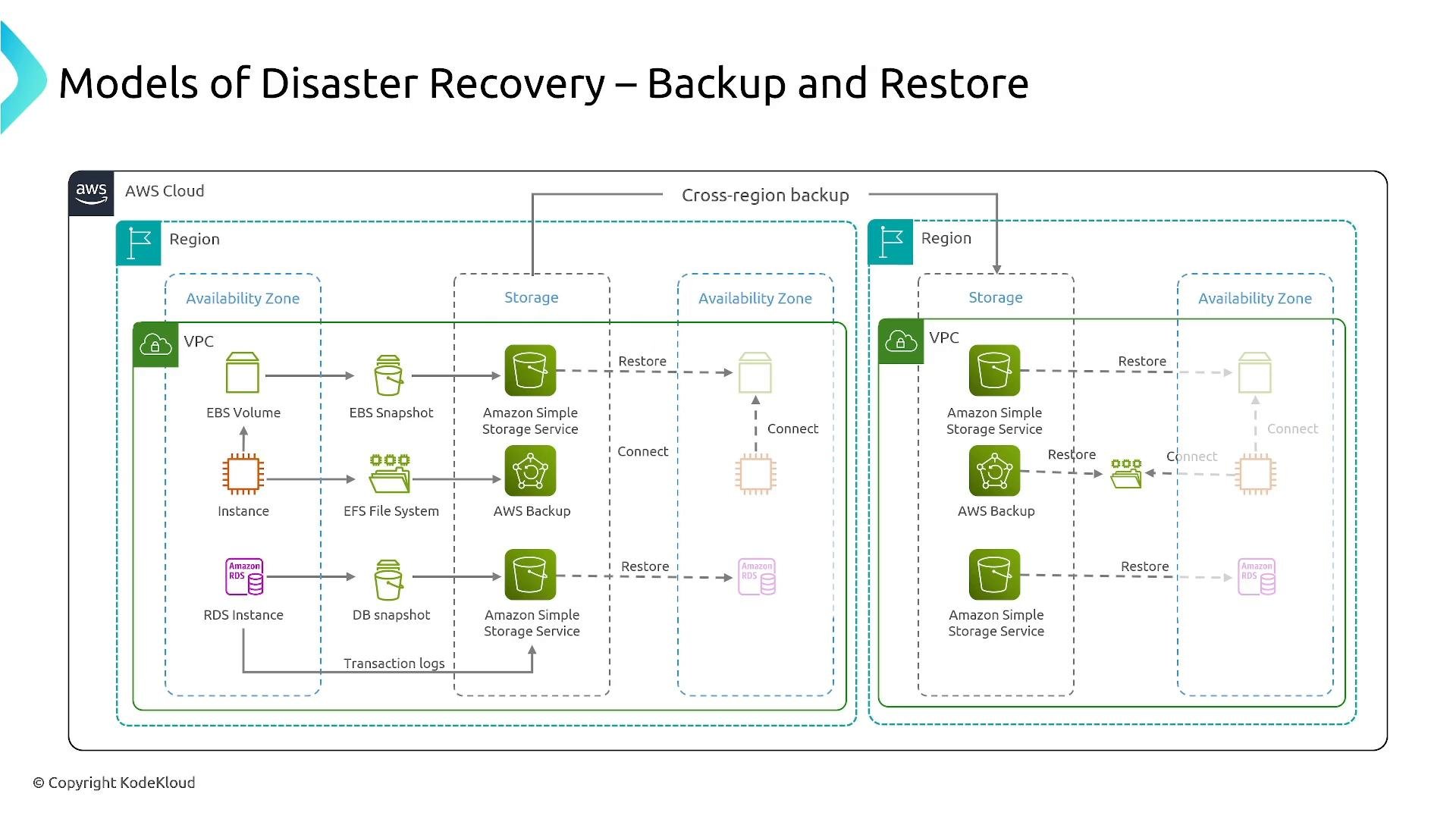
AWS Backup centralizes scheduling, retention, and cross‑Region copy for many services. But backups are only useful if restores work—regular restore testing is essential.
An AWS architecture diagram titled "Models of Disaster Recovery – Backup and Restore" showing backup and restore flows. It illustrates resources like EBS volumes, EFS, RDS, Amazon S3 and AWS Backup across availability zones and cross-region storage/restore paths.
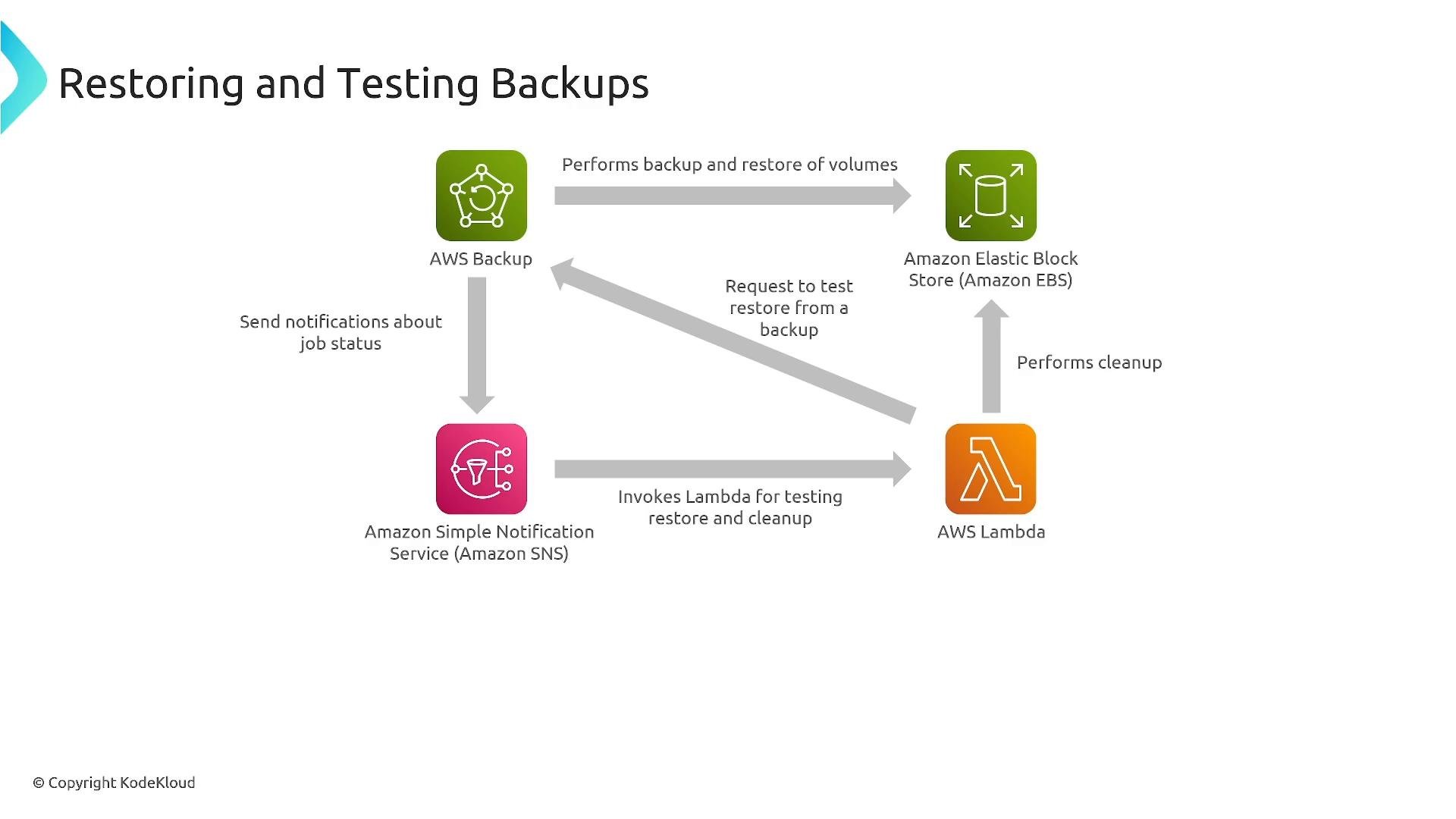
You can automate restore validation using AWS Backup plus Lambda and SNS to orchestrate test restores, run verification tests, and clean up test resources.
A flow diagram titled "Restoring and Testing Backups" showing AWS Backup, Amazon EBS, Amazon SNS and AWS Lambda icons with arrows illustrating interactions. The arrows are labeled with actions like performing backup/restore of volumes, requesting test restores, invoking Lambda for testing/cleanup, and sending job‑status notifications.
Other cross‑Region options include S3 Cross-Region Replication (CRR) with versioning enabled. CRR copies objects to another Region but requires versioning on the source (and typically the destination) to support full protection and object-level restores.
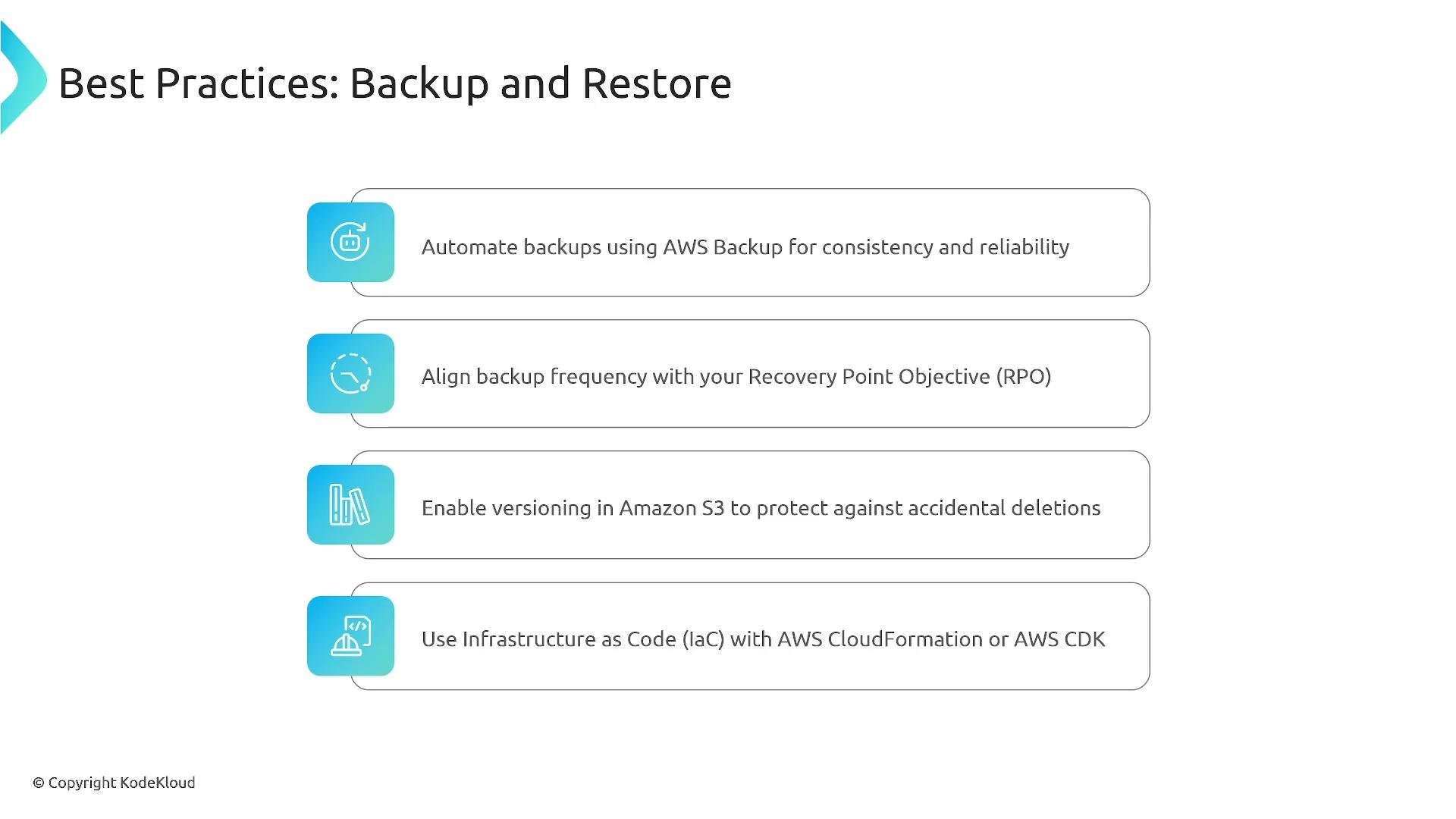
Align backup frequency and retention with your RPO, enable versioning where applicable, and automate restore testing so you can prove backups are restorable.
Backup & Restore is suitable when cost is a priority and RTO/RPO are in hours or longer. Even if you use a warmer DR model, keep immutable/point‑in‑time backups to protect against silent corruption or malicious deletion.
A presentation slide titled "Best Practices: Backup and Restore" listing recommendations like automating backups with AWS Backup, aligning backup frequency with RPO, enabling Amazon S3 versioning, and using Infrastructure as Code (CloudFormation/CDK). The slide includes rounded boxes and blue icons next to each recommendation.
Best practices
  • Use AWS Backup to centralize and automate backups.
  • Configure schedules and retention to meet your RPO.
  • Enable versioning for S3 and other versionable stores.
  • Maintain IaC templates (CloudFormation/CDK) for repeatable redeployment.
  • Periodically perform test restores and verification.

Disaster Recovery Model 2 — Pilot Light

Pilot Light keeps core components (usually data services) running and synchronized in the DR Region while the application stack is preconfigured but not actively running. At failover you start and scale application servers. This shortens RTO versus Backup & Restore because data is already replicated; recovery focuses on bringing application services online.
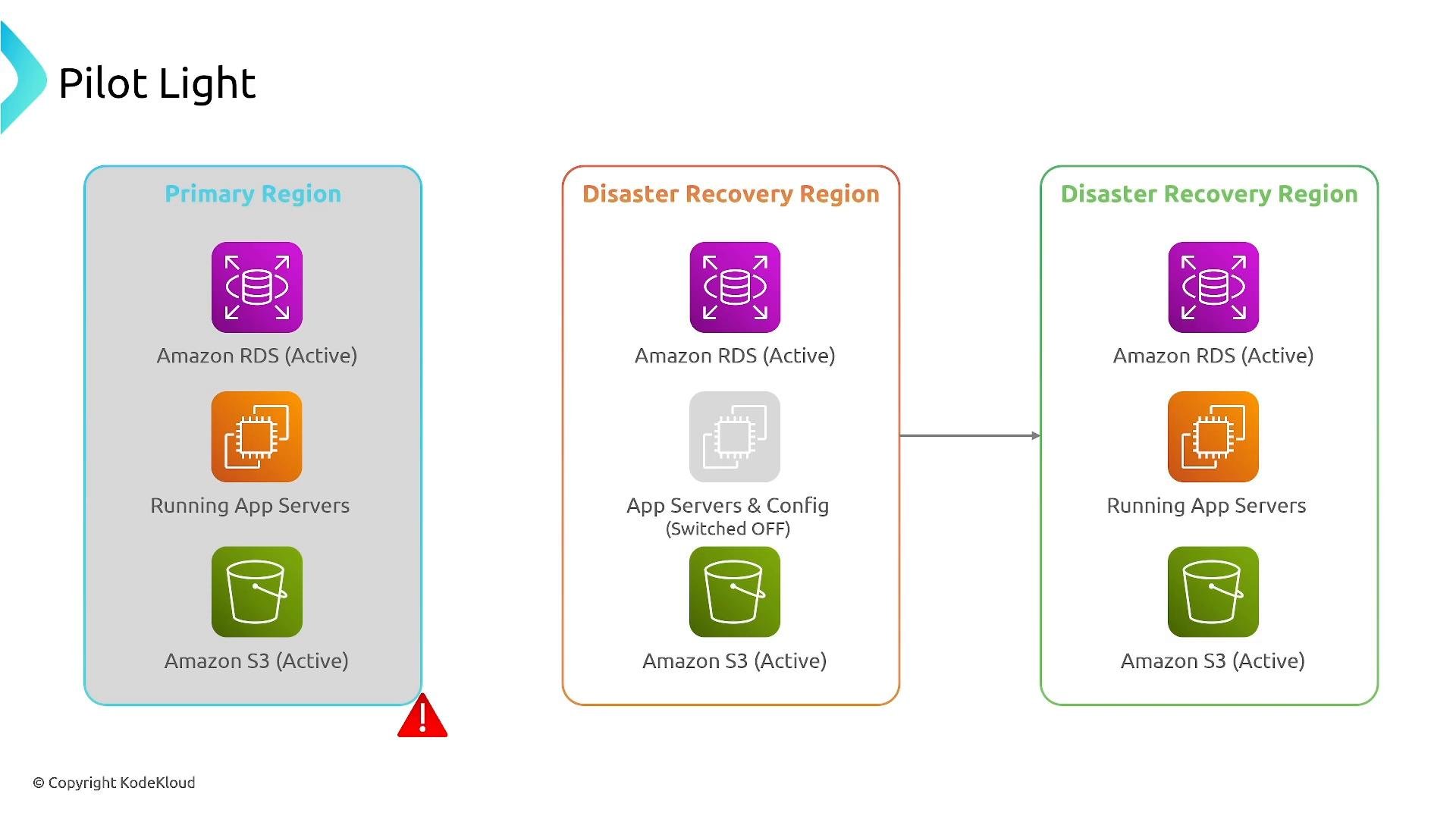
A "Pilot Light" cloud architecture diagram showing a Primary Region and two Disaster Recovery Regions with icons for Amazon RDS (active), app servers, and Amazon S3. The middle DR region indicates app servers and config switched off while the other regions show running app servers and active S3/RDS.
Pilot Light characteristics:
  • Data services (RDS/Aurora, replicated object stores) are active and replicated.
  • Application servers are off or minimal, but IaC is available for quick provisioning.
  • Recovery involves provisioning or starting app servers and switching traffic.
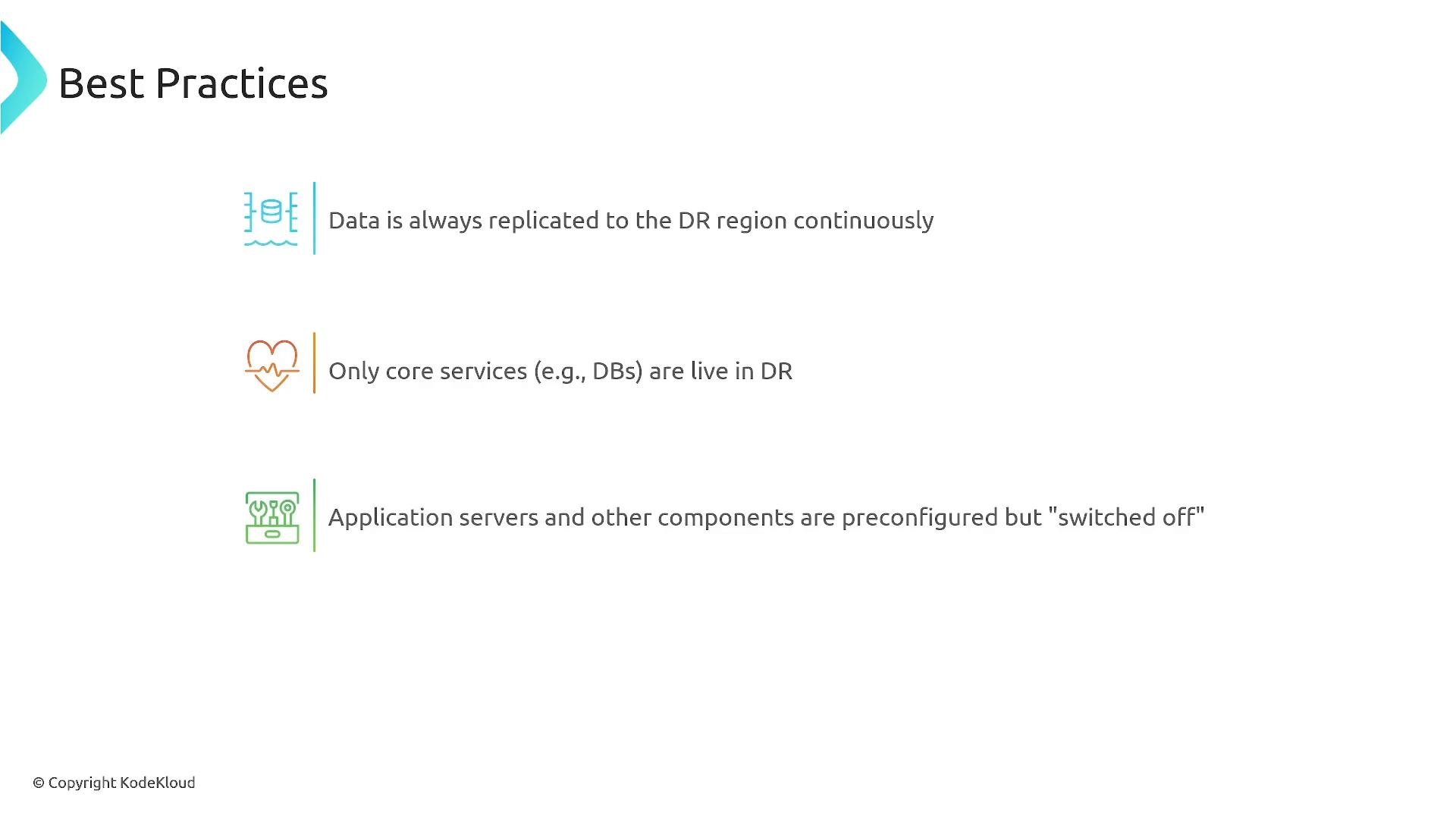
Pilot Light balances cost and recovery speed—faster than Backup & Restore, less costly than a full warm standby.
A presentation slide titled "Best Practices" showing three disaster-recovery rules. It notes continuous data replication to the DR region, only core services (e.g., DBs) are live in DR, and application servers are preconfigured but "switched off."
Automation is critical: keep IaC ready for multi‑Region deployment and use tools like AWS Elastic Disaster Recovery (formerly CloudEndure Disaster Recovery) to replicate block-level data and enable rapid launch of recovery instances.
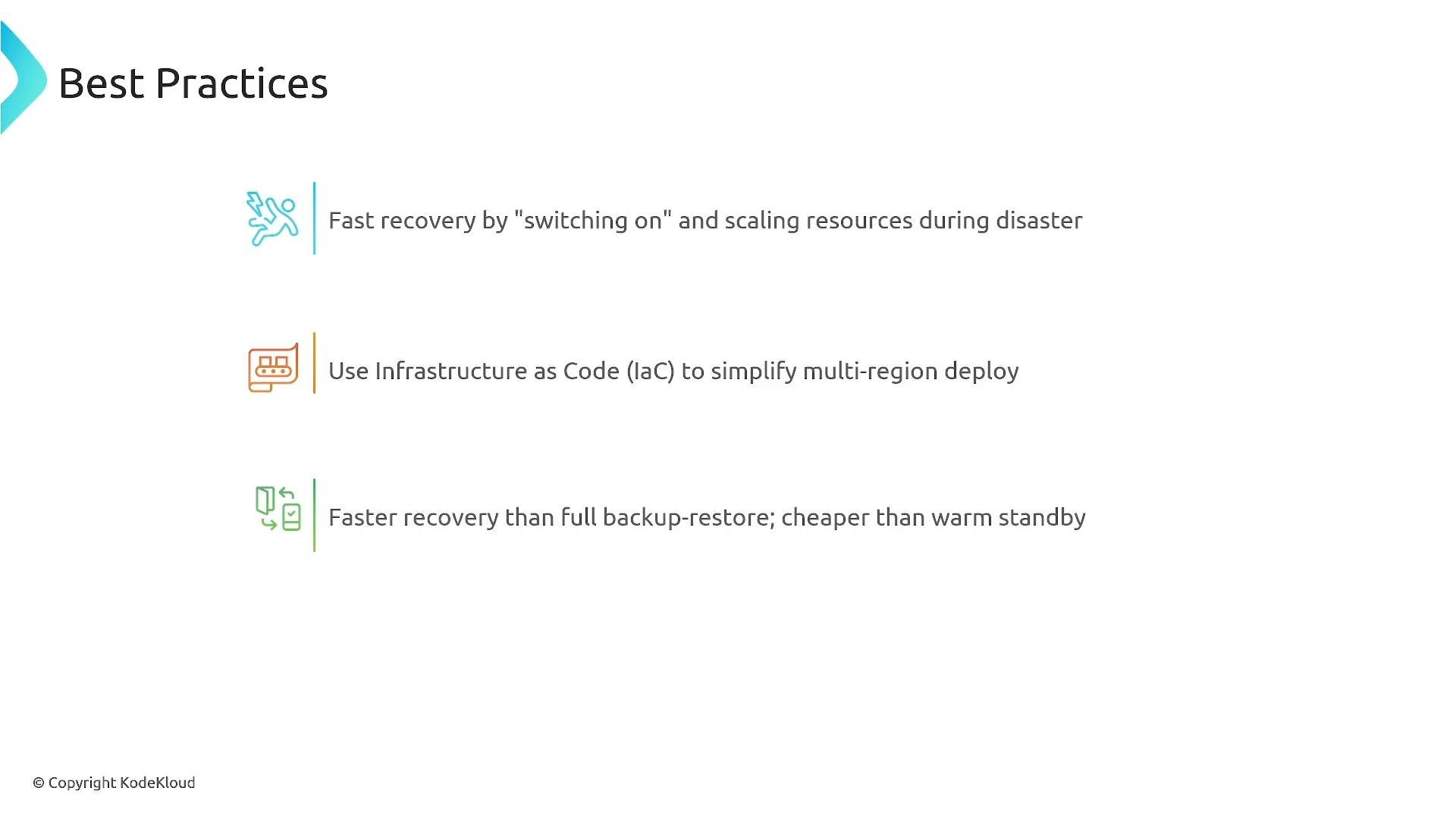
A presentation slide titled "Best Practices" with three recommendations for disaster recovery. The bullets advise fast recovery by switching on and scaling resources, using Infrastructure as Code for multi-region deployment, and a solution that's faster than full backup-restore and cheaper than warm standby.
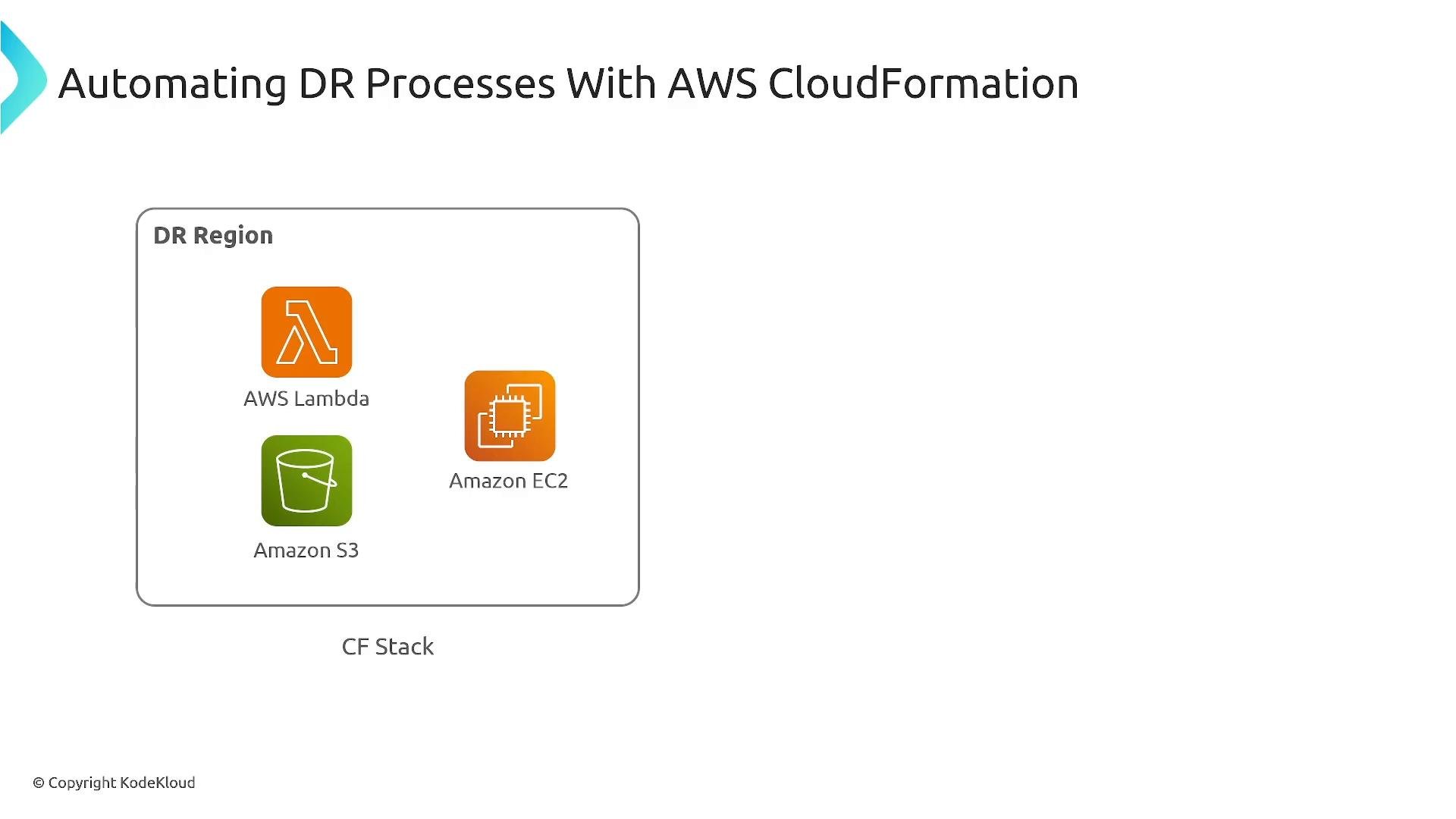
A slide titled "Automating DR Processes With AWS CloudFormation." A diagram labeled "DR Region" shows a CF Stack containing icons for AWS Lambda, Amazon EC2, and Amazon S3.
Note: AWS Elastic Disaster Recovery uses agents to replicate block-level data into a staging area in the DR Region and can build AMIs/volumes for fast recovery. It supports Pilot Light, Warm Standby, and Hot/Active scenarios.

Disaster Recovery Model 3 — Warm Standby

Warm Standby runs a fully functional, but scaled‑down, version of production in the DR Region. Some traffic or health checks may go to the standby to keep components warm. On failover you scale the standby to full capacity and shift traffic. This model gives faster recovery than Pilot Light because application servers are already running (albeit at reduced scale); failover typically involves scaling and DNS/traffic reweighting.
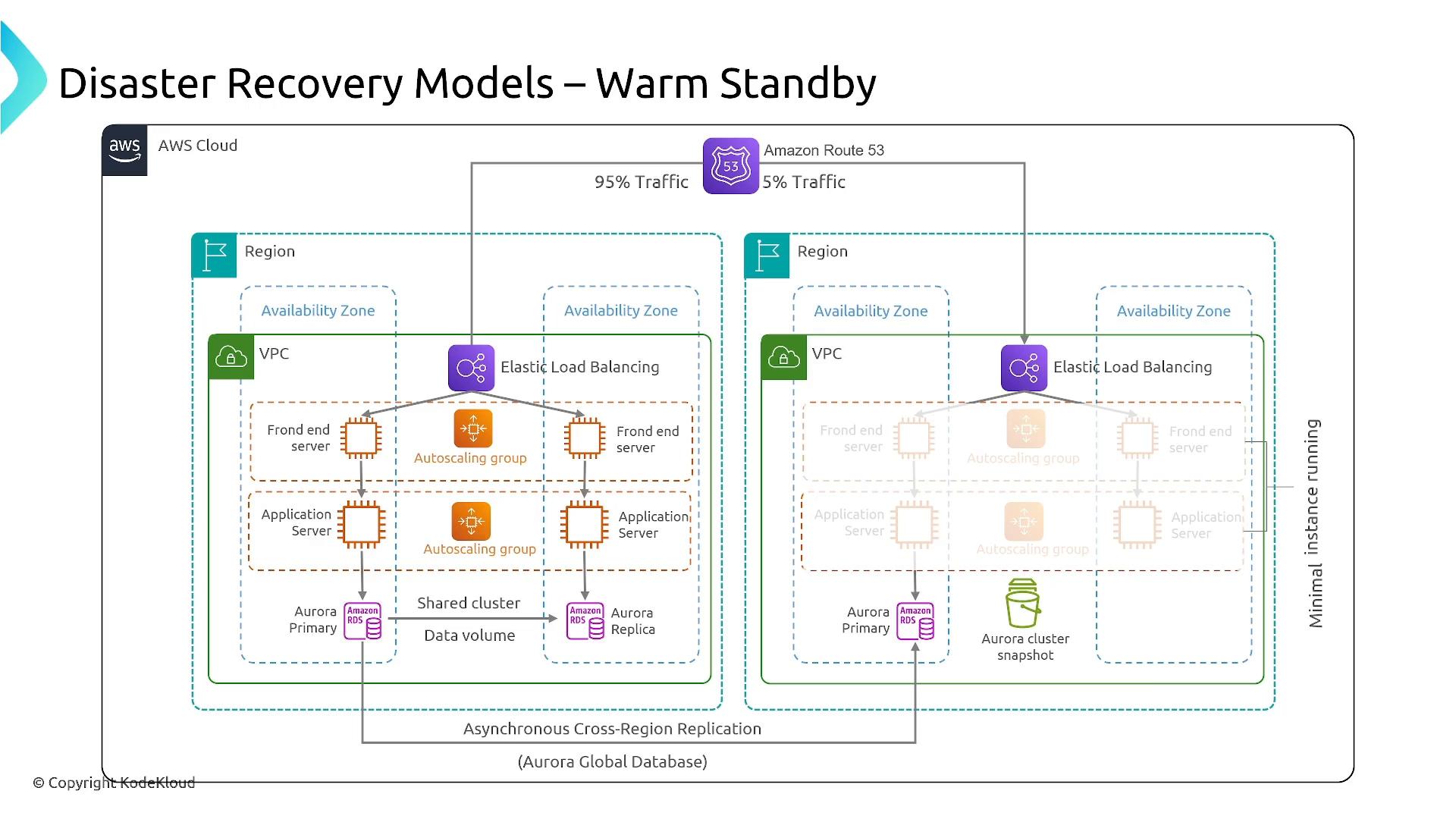
An AWS architecture diagram titled "Disaster Recovery Models – Warm Standby" showing two regions each with VPCs, availability zones, Elastic Load Balancers, auto-scaling front-end/application servers, and Aurora RDS components. It shows Amazon Route 53 splitting traffic (95%/5%) and asynchronous cross-region replication (Aurora Global Database) with minimal instances running in the standby region.
Key points
  • Both Regions run infrastructure; the DR Region is scaled down.
  • Data replication may be unidirectional or bidirectional; consider global services (Aurora Global Database, DynamoDB Global Tables) for cross‑Region data.
  • Failover primarily requires scaling and reweighting DNS/traffic.
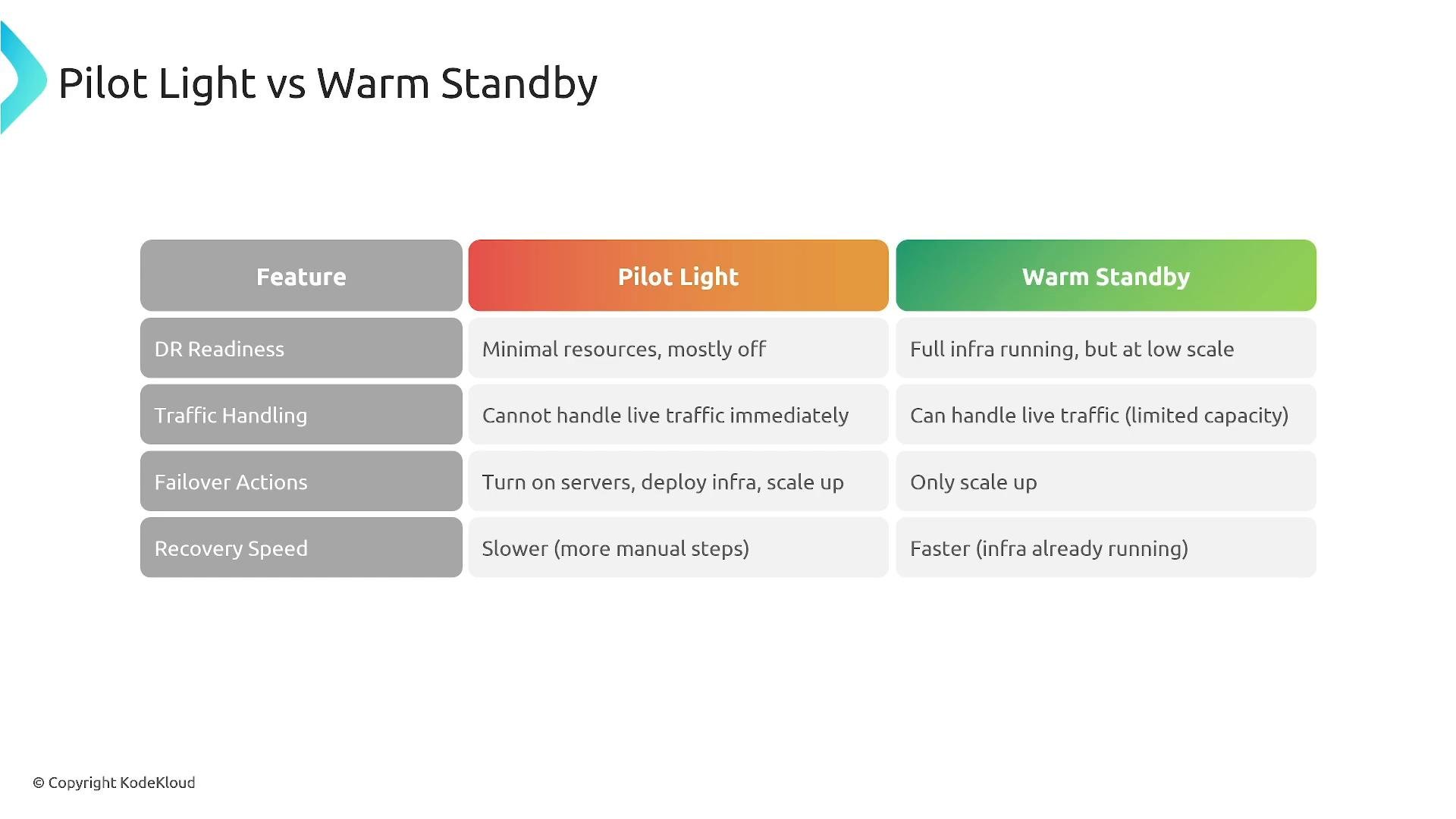
Warm Standby is appropriate when you need recovery in minutes (often under 10 minutes) and accept ongoing costs for reduced capacity.
A slide titled "Pilot Light vs Warm Standby" showing a three-column comparison table of features (DR readiness, traffic handling, failover actions, recovery speed) with descriptions for the Pilot Light and Warm Standby approaches. The Pilot Light column describes minimal resources and slower recovery, while Warm Standby shows running infra with limited traffic handling and faster recovery.

Disaster Recovery Model 4 — Active‑Active (Multi‑Site)

Active‑Active runs full production-capacity infrastructure in multiple Regions. Traffic is distributed (by latency, geography, or weighted DNS) and data replication is continuous and bidirectional so each site can serve reads and writes. This model delivers the shortest RTO/RPO (near-real‑time), but it is the most expensive and operationally complex.
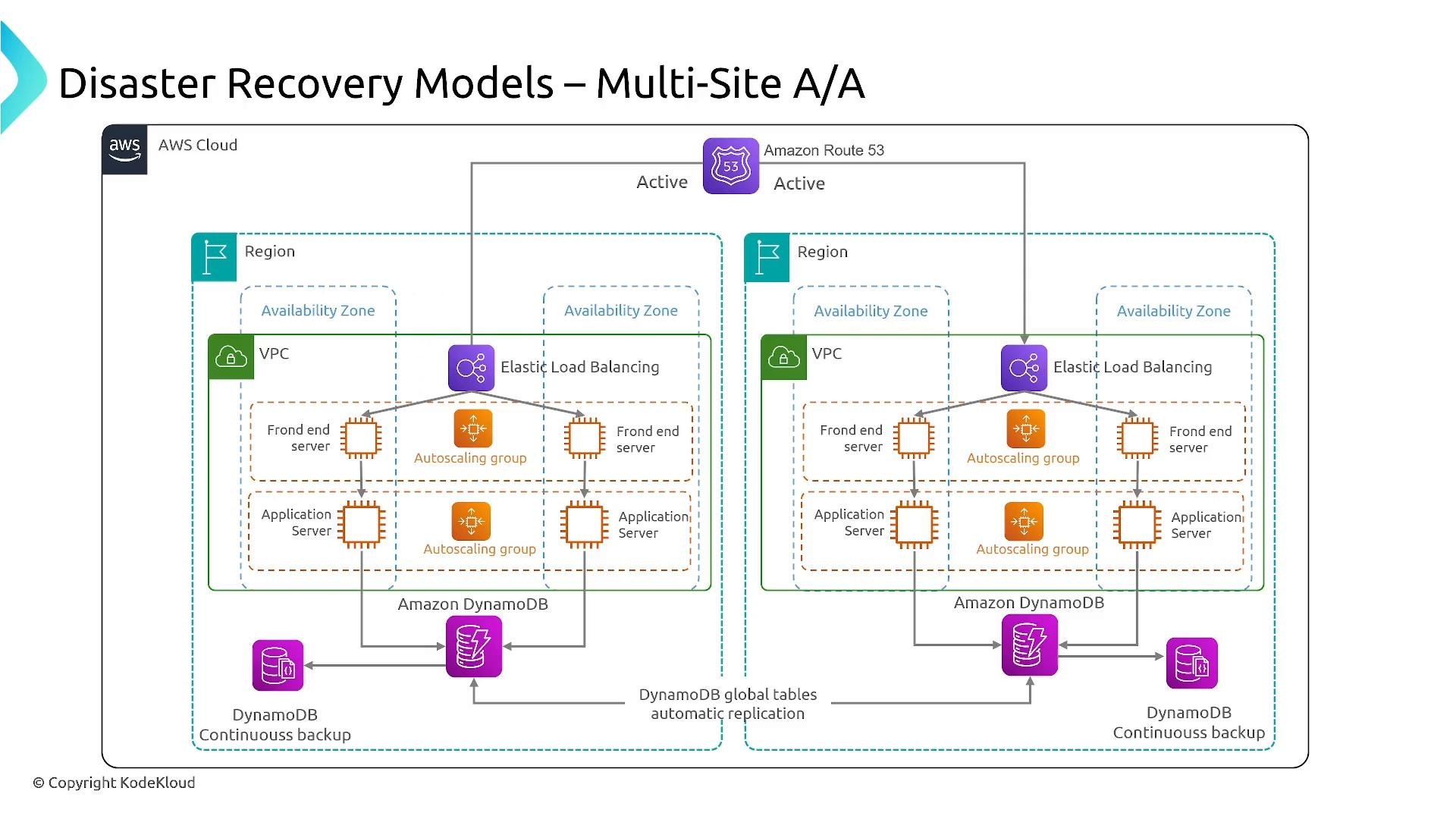
A diagram of an AWS multi-site Active/Active disaster recovery architecture showing two regions with VPCs and availability zones, Elastic Load Balancers, autoscaling front-end and application servers, and Route 53 traffic routing. It also shows Amazon DynamoDB with global tables for automatic replication and continuous backup.
Active‑Active is ideal for global services that require low latency and sub-minute RTO/RPO and can absorb the operational and cost overhead.

Choosing a Model — Quick Reference

Choose the model that aligns to your RTO, RPO, budget, and operational capability. The table below summarizes common trade-offs.
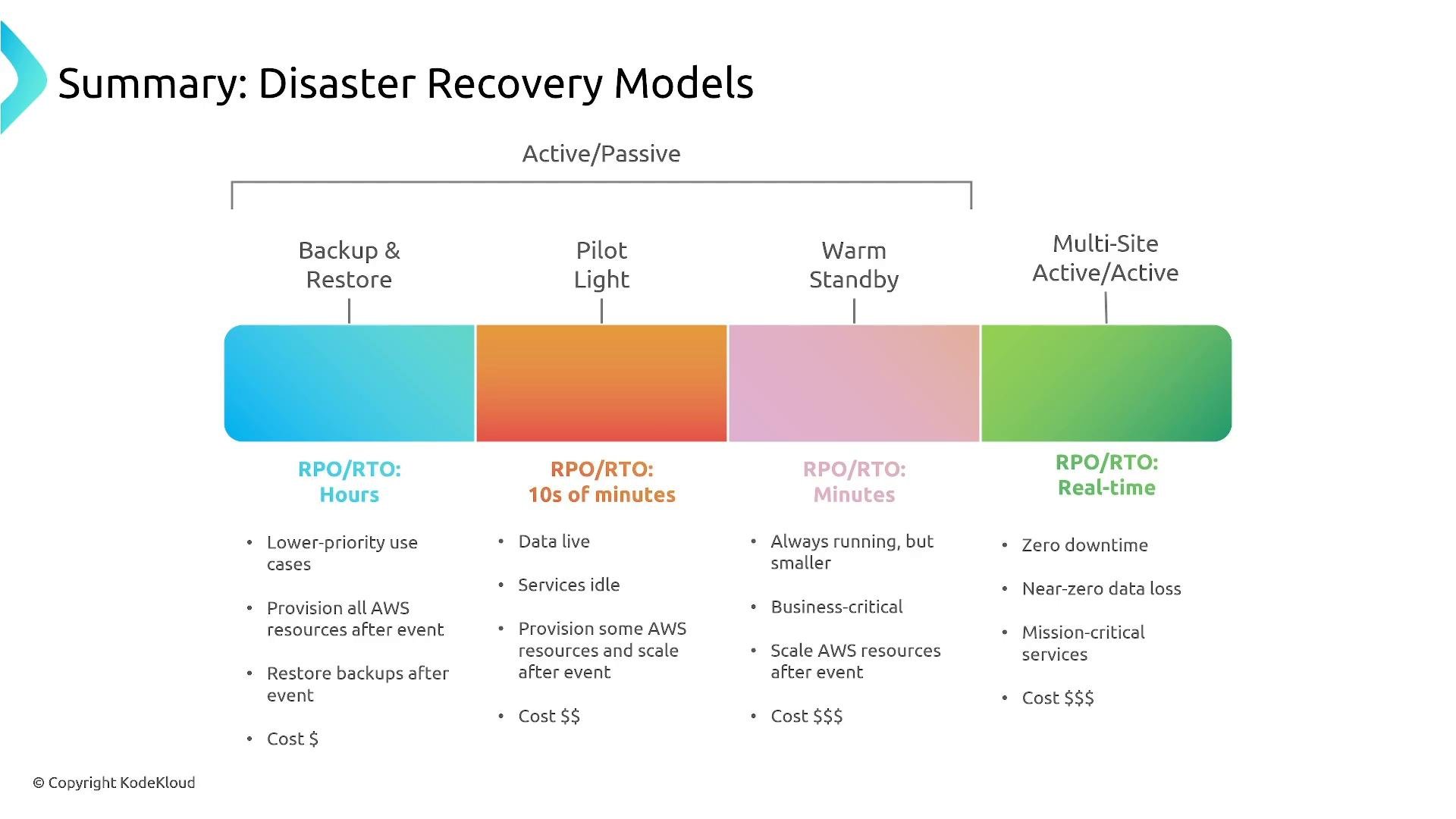
A slide titled "Summary: Disaster Recovery Models" showing a colored continuum of four recovery strategies—Backup & Restore, Pilot Light, Warm Standby, and Multi-Site Active/Active—mapped to RPO/RTO ranges from hours to real-time. Each model includes brief bullet points on use cases, provisioning, and relative cost.
Continuous replication (CRR, block-level replication, global tables) does not protect against silent data corruption or deliberate deletion. Maintain immutable/point-in-time backups, enable versioning, and run regular restore tests.

Practical Tips

  • Use Infrastructure as Code (CloudFormation, AWS CDK, Terraform) to codify deployments and accelerate failover.
  • Automate runbooks and recovery playbooks with scripts or orchestration (Lambda, Step Functions).
  • Test failover and restore scenarios regularly—both planned drills and unannounced tests.
  • Monitor replication lag, backup health, and runbook execution times to ensure RTO/RPO goals are achievable.
  • For databases, prefer managed global services (Aurora Global Database, DynamoDB Global Tables) when low-latency replication is required.
That covers the core DR models and how RTO/RPO influence design decisions in AWS. Use IaC, automation, and regular restore testing to ensure your DR plan works when you need it.

Watch Video