

Analogy: reception desk in an office building
Imagine a large office building with many departments and a central receptionist. The receptionist receives visitors and directs them to the correct department so no single office becomes overwhelmed.- The office building = your EC2 compute/backend infrastructure.
- Visitors = external traffic / requests.
- The receptionist = the Elastic Load Balancer (ELB), which directs traffic to the appropriate servers.
Types of AWS Load Balancers (quick comparison)
When you need the official docs:
- ALB: https://docs.aws.amazon.com/elasticloadbalancing/latest/application/introduction.html
- NLB: https://docs.aws.amazon.com/elasticloadbalancing/latest/network/introduction.html
- GWLB: https://docs.aws.amazon.com/elasticloadbalancing/latest/gateway/introduction.html
- ELB overview: https://docs.aws.amazon.com/elasticloadbalancing/latest/userguide/what-is-load-balancing.html
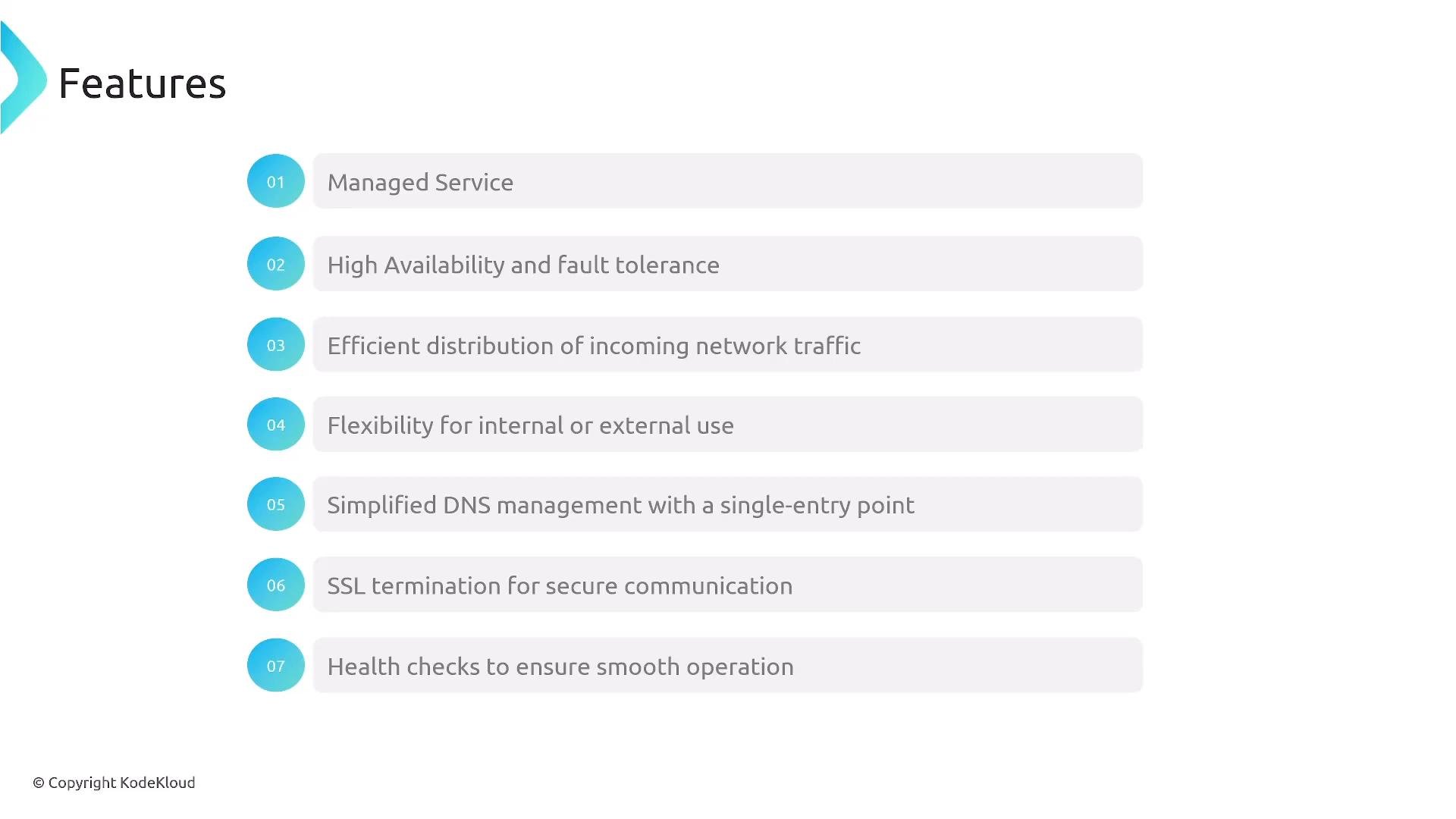
- SSL/TLS termination: Terminate TLS at the load balancer using ACM certificates; optionally re-encrypt traffic to backend instances.
- Health checks: Load balancers perform checks against registered targets so unhealthy instances stop receiving traffic. Health checks should validate real application paths and, where feasible, downstream dependencies.
- Single entry point: Use a load balancer as the externally-visible DNS endpoint that distributes traffic internally and simplifies certificate and DNS management.
Design health checks to reflect real availability: if your app depends on downstream services (databases, caches, third-party APIs), include checks that reflect those dependencies so the load balancer routes only to truly healthy instances.
Multi-AZ distribution and ENIs
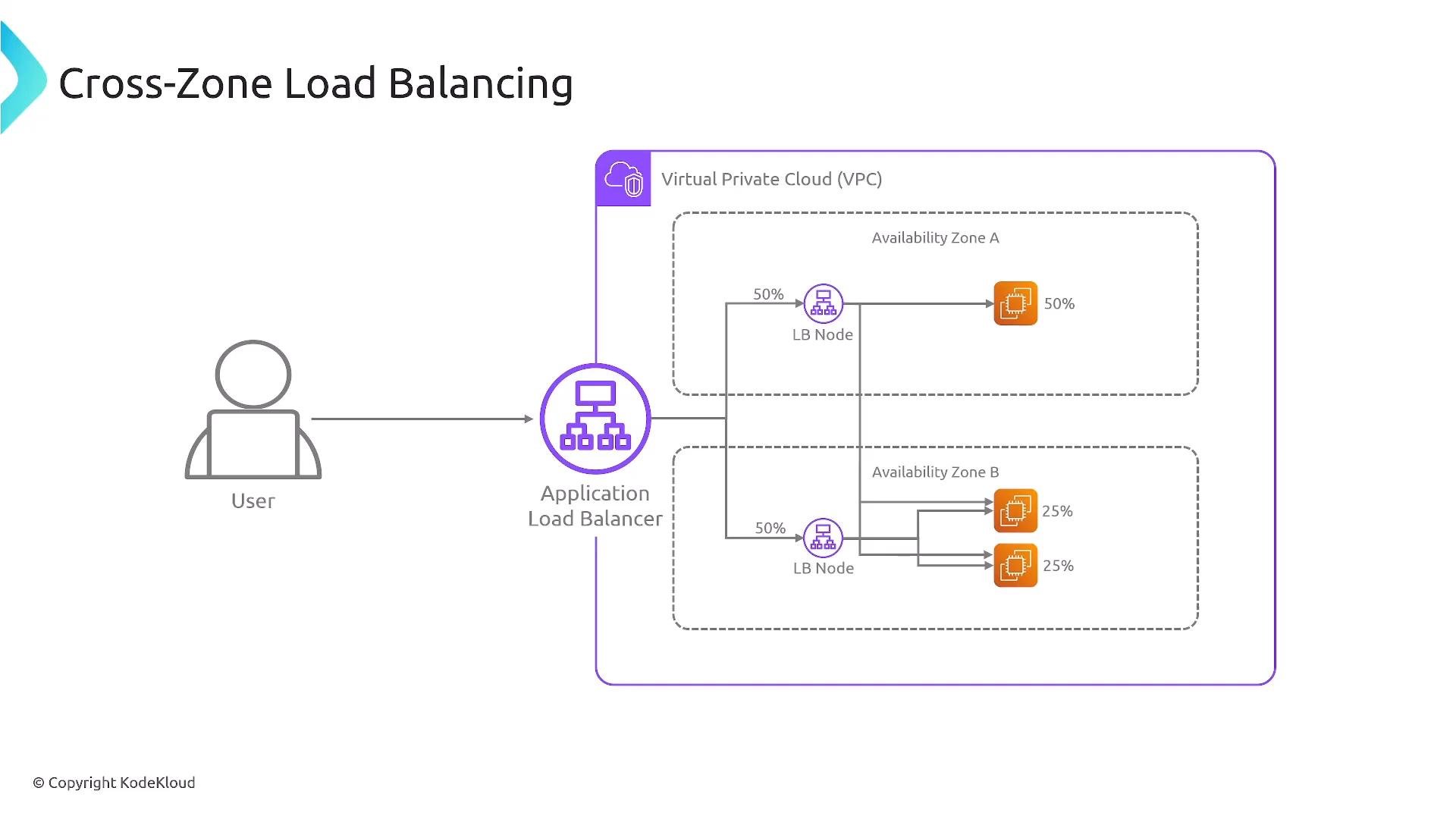
Elastic Load Balancers are designed for high availability across Availability Zones. When cross-zone load balancing is enabled, the LB distributes traffic evenly across registered targets in all AZs it’s attached to. Internally, an ALB/NLB creates an elastic network interface (ENI) in each AZ; these ENIs act as the entry points for traffic into that AZ.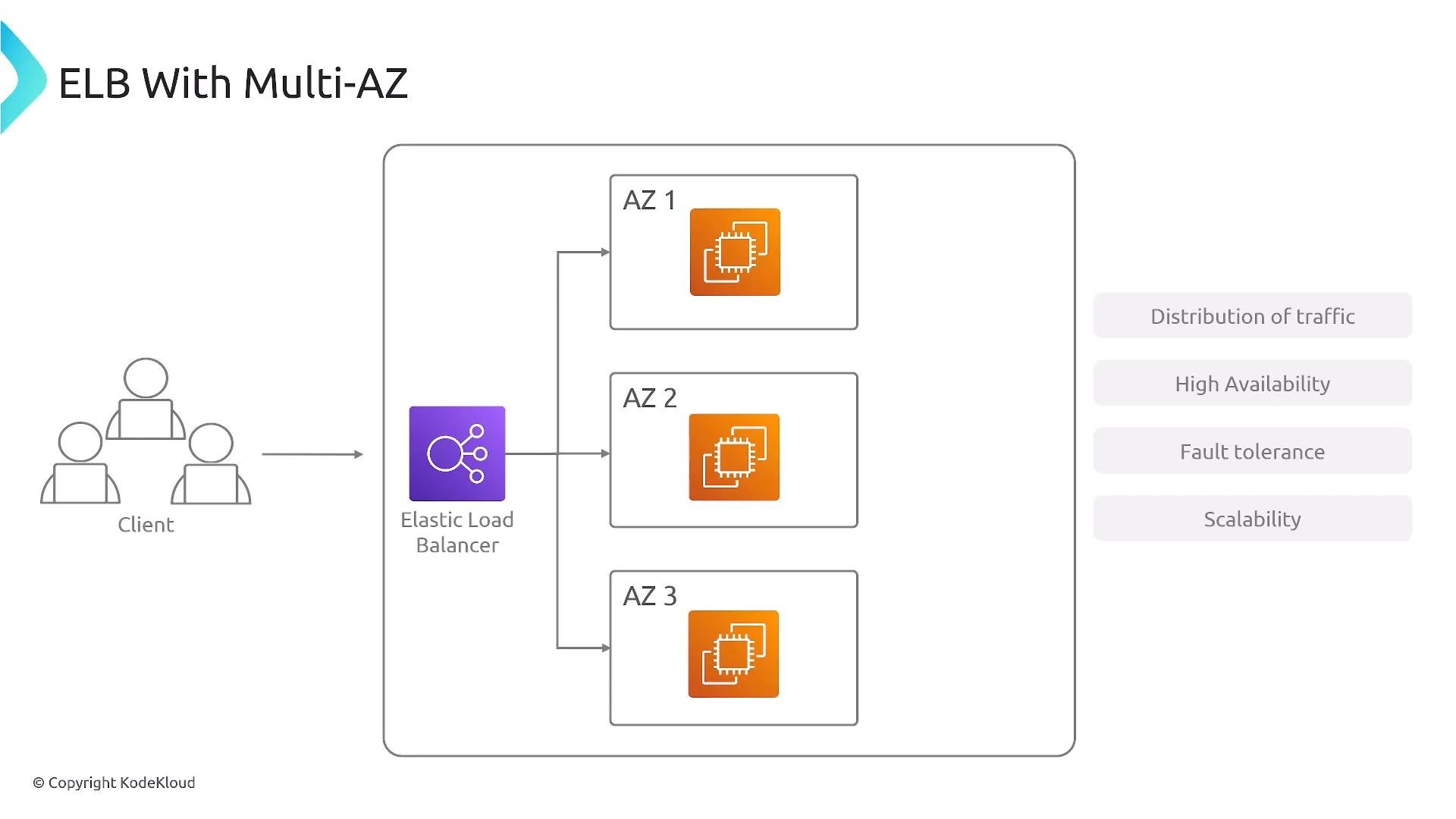
Cross-Zone load balancing (visual)
Target Groups and Listeners (ALB specifics)
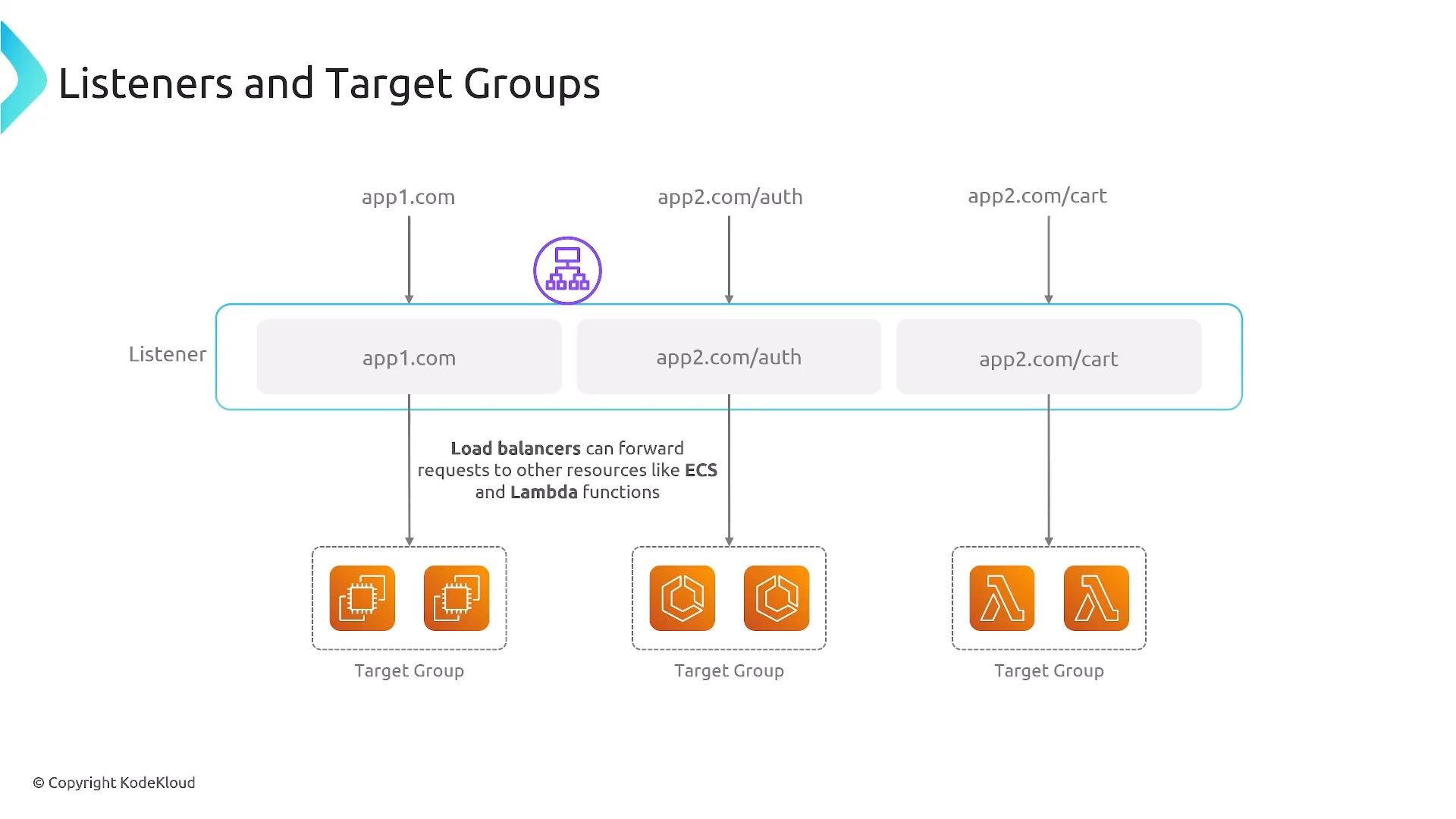
Application Load Balancers use two important concepts to route traffic:- Listener: Defines the protocol and port the load balancer accepts (for example,
HTTP:80orHTTPS:443). A listener contains rules that evaluate incoming requests and route them to target groups. - Target group: A logical set of targets (EC2 instances, IP addresses, Lambda functions) that receive traffic from the load balancer. Each target group has its own health check configuration and settings.
- Path-based routing: route
/authto one target group and/cartto another. - Host-based routing: route
app1.example.comto one target group andapp2.example.comto another. - Registering by IP: Register IPs as targets to route to resources outside the EC2 instance set (VPCs/peered VPCs where supported).
- Lambda targets: Forward HTTP(S) requests to Lambda functions for serverless backends.
When to choose which load balancer
- ALB: Use for HTTP/HTTPS workloads needing content-based routing, WAF integration, host/path rules, or containerized services (ECS/EKS). Good for web applications and many HTTP APIs.
- NLB: Choose when you need extremely low-latency, high throughput, static IPs, or to preserve client source IP (for example, for IP-based allowlists).
- GWLB: Use when you need to insert and scale third-party network or security appliances transparently (e.g., firewall or IDS chains).
- CLB: Legacy option. Avoid for new architectures; use ALB or NLB depending on workload.
Classic Load Balancer (CLB) is a legacy option. For new designs, prefer ALB or NLB depending on protocol and routing requirements.
Additional operational notes
- Auto Scaling: Load balancers are commonly used in front of Auto Scaling Groups so instances can scale horizontally while the LB maintains even traffic distribution.
- Health check strategy:
- Prefer application-level health checks (e.g., a readiness endpoint) that verify critical dependencies where possible.
- Configure appropriate thresholds and timeouts to avoid flapping during short spikes or slow startups.
- API vs. ALB: For API-specific features like request throttling, caching, and usage plans, consider API Gateway. ALB is still valid for many HTTP APIs and web apps but lacks some API Gateway features.
- Security: Use security groups (for ALB) and NACLs at the subnet level. Configure WAF and TLS via ACM for production workloads.
Quick checklist for building a resilient ALB + Auto Scaling architecture
- Use multiple AZs and register targets across AZs.
- Enable cross-zone balancing if your traffic pattern or LB type requires it.
- Attach an Auto Scaling Group to the target group for automatic scale-out/in.
- Terminate TLS at the ALB (ACM) and optionally re-encrypt to backends.
- Implement application-level health checks and set conservative deregistration delay and thresholds.
- Monitor using CloudWatch metrics and set alarms for
TargetResponseTime,UnhealthyHostCount, andRequestCount.
Summary
This lesson covered the core concepts for designing resilient, scalable architectures with EC2 Auto Scaling and Elastic Load Balancing:- The role of ALB, NLB, GWLB, and the legacy CLB.
- Key features like SSL termination, health checks, and single entry point.
- How multi-AZ and cross-zone distribution improve availability.
- How listeners and target groups route traffic for ALBs.
- AWS Elastic Load Balancing documentation: https://docs.aws.amazon.com/elasticloadbalancing/latest/userguide/what-is-load-balancing.html
- Application Load Balancer docs: https://docs.aws.amazon.com/elasticloadbalancing/latest/application/introduction.html
- Network Load Balancer docs: https://docs.aws.amazon.com/elasticloadbalancing/latest/network/introduction.html
- Gateway Load Balancer docs: https://docs.aws.amazon.com/elasticloadbalancing/latest/gateway/introduction.html