

- AWS is responsible for the security of the cloud: the physical infrastructure, hardware, global network, and foundational services.
- Customers are responsible for the security in the cloud: the resources they configure, the operating systems and applications they run, their data, identity and access management, and service configurations.
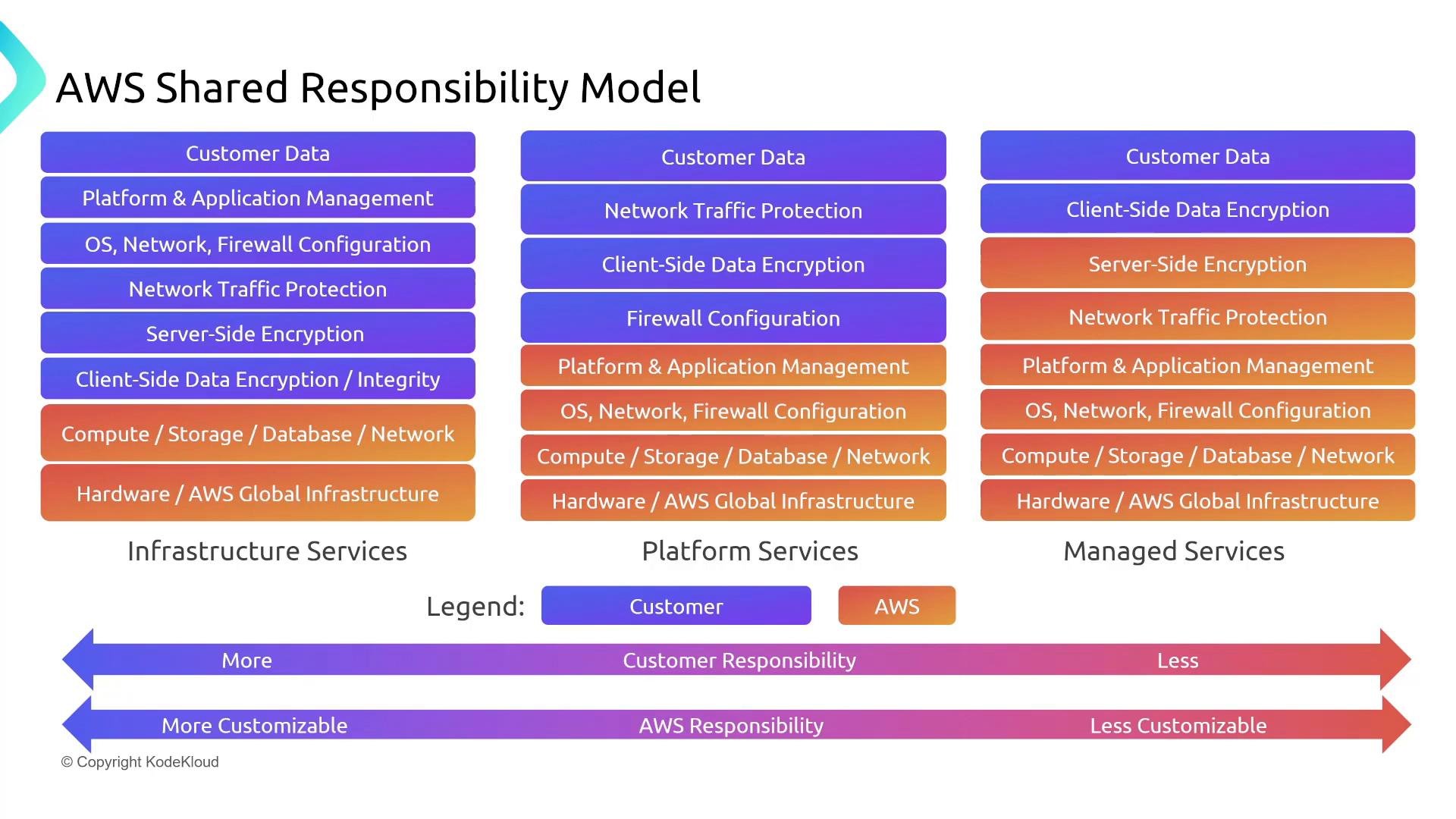
- The diagram above shows the spectrum from Infrastructure as a Service (IaaS) on the left, through Platform as a Service (PaaS), to Software as a Service (SaaS) on the right.
- Moving left → right:
- Customer responsibility decreases.
- AWS responsibility increases.
- Customer control and customizability decrease.
- Infrastructure (IaaS) — e.g., EC2
- Customer responsibilities: guest OS patching and hardening, application patching, runtime configuration, security groups and firewall rules, encryption choices for data you manage, IAM roles and instance policies.
- AWS responsibilities: physical hosts, hypervisor, physical data center security, and the underlying global infrastructure.
- Platform (PaaS) — e.g., RDS
- AWS handles more operational tasks: host maintenance, underlying OS and database engine patching (for managed engines), and storage management.
- Customer responsibilities: database schema, database users and permissions, encryption configuration (e.g., enabling KMS), backup retention configuration, and network access controls.
- Managed / Serverless (SaaS-like) — e.g., S3, DynamoDB, SQS, SNS, Lambda
- AWS manages servers, scaling, and patching.
- Customer responsibilities: data protection (encryption at rest and in transit), bucket/table policies, IAM policies and roles, application logic, and data access patterns.
Technical clarifications
- If you have access to the guest OS (for example, logging into an EC2 instance), you are responsible for patching and securing that OS and everything running on it. If you don’t have that access (for example, when using RDS or S3), AWS manages the underlying OS and host patching for the managed service.
- Even when AWS manages the infrastructure, you’re responsible for configuring the security controls the service exposes: enable server-side encryption with KMS where appropriate, enforce TLS for data in transit, and apply least-privilege IAM policies.
- Encryption options you may choose and configure (customer responsibility) include:
- Client-side encryption (you encrypt before upload)
- Server-side encryption with S3-managed keys (SSE-S3)
- Server-side encryption with AWS KMS customer- or AWS-managed CMKs (SSE-KMS)
- Server-side encryption with customer-provided keys (SSE-C)
- Serverless services (e.g., Lambda, Fargate) remove the need to manage servers, but you retain responsibility for your code, its dependencies, IAM roles assigned to functions/tasks, and event source configurations.
Remember: “Security of the cloud” is AWS’s responsibility; “security in the cloud” is the customer’s responsibility. The more managed the service, the less infrastructure you manage — but you still control and must secure your data, identity, and configuration.
- Assume responsibility for anything you configure, can log into, or can operate from your account.
- Prefer managed services to reduce operational burden, but verify secure default configurations and harden them (IAM, encryption, network controls).
- Use least-privilege IAM roles and policies; avoid broad permissions such as
*:*. - Enable encryption at rest and in transit wherever applicable. Where possible, use KMS for centralized key management and auditability.
- Implement monitoring and logging (CloudTrail, GuardDuty, Config, CloudWatch) to detect misconfigurations and unauthorized access.
- Automate patching and deployment processes (CI/CD) to reduce human error and drift.
- For audits and compliance, AWS provides attestations, certifications, and compliance reports via AWS Artifact inside the AWS Console (Security, Identity & Compliance > AWS Artifact).
- Use Artifact to obtain relevant SOC, ISO, PCI-DSS, and other compliance documents that demonstrate AWS’s controls for the layers they manage.
- If you can access or configure it, you’re responsible for securing and maintaining it.
- As services become more managed, AWS assumes more responsibility — but customers always remain responsible for data, identities, and how services are configured.
- Use managed services to reduce operational overhead, but always configure them securely (IAM, encryption, network controls).
- For compliance documents about AWS-managed controls, use AWS Artifact.