In this lesson we design security for AWS Organizations and the broader management tooling ecosystem. We focus on turning up security for Organizations, Systems Manager, and other AWS management services — covering organization-wide guardrails, centralized logging, and operational controls for managed fleets.

AWS Organizations: grouping, guardrails, and centralized logging

AWS Organizations lets you group multiple AWS accounts into Organizational Units (OUs) and apply organization-wide policies such as Service Control Policies (SCPs). Use Organizations to implement governance at scale and to centralize control of logging and access boundaries.
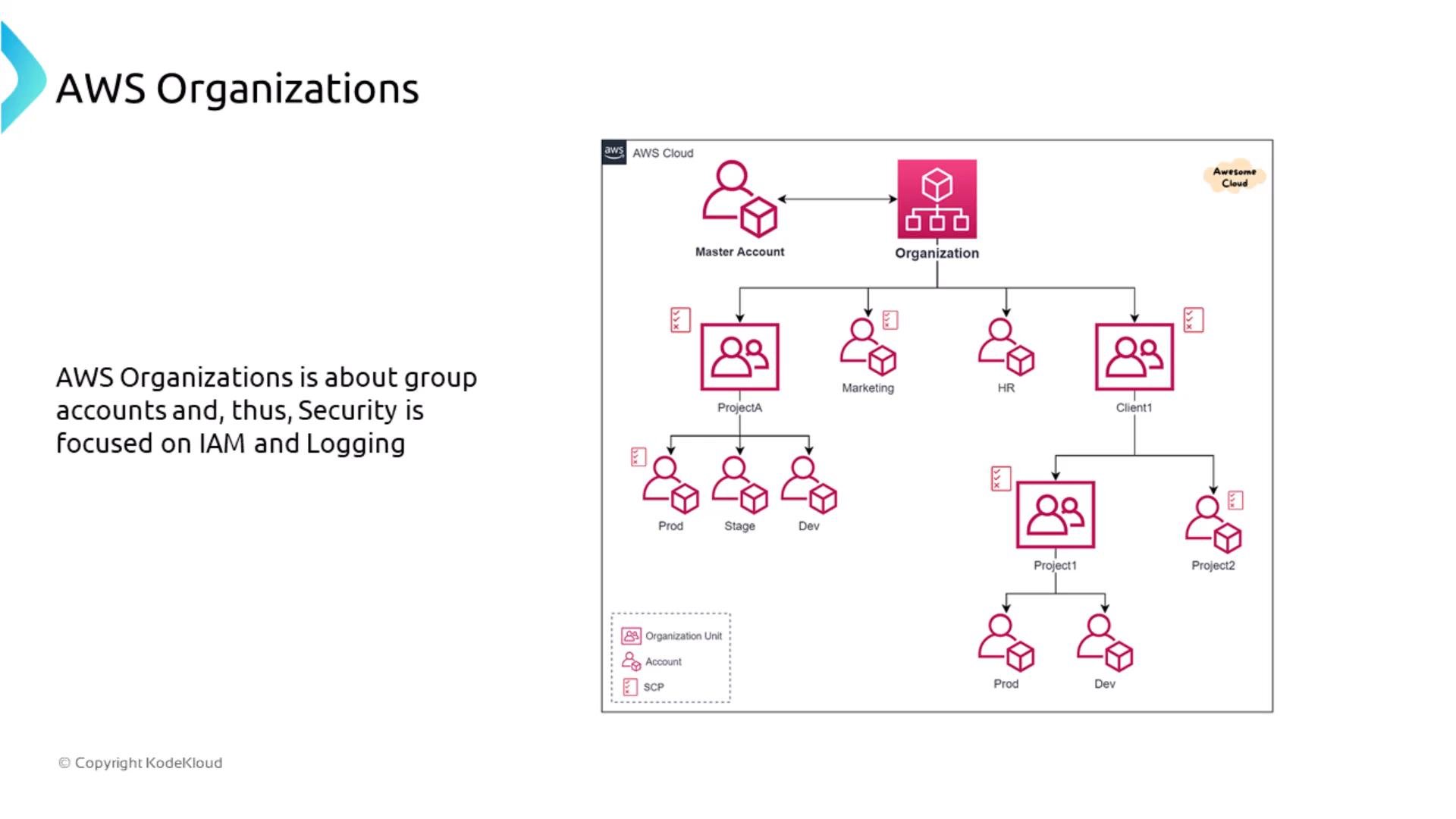
An architecture diagram of AWS Organizations showing a master account and hierarchical organization units (ProjectA, Marketing, HR, Client1) that branch into member accounts like Prod, Stage, and Dev. The slide notes that AWS Organizations groups accounts and that security is focused on IAM and logging.
Service Control Policies (SCPs) operate at the organization level to restrict which services or actions are allowed inside member accounts. Important characteristics:
  • SCPs are a boundary (deny/allow filter) and do not grant permissions by themselves.
  • Member accounts still require IAM policies, roles, or resource-based policies to grant actual permissions.
  • Use SCPs to enforce organization-wide constraints (for example, forbid region usage, block specific services, or require KMS encryption).
SCPs are an organization-wide permit/deny filter: they can prevent use of services or actions but cannot grant permissions. Use SCPs to enforce organization-level constraints; manage actual access with IAM inside each account.
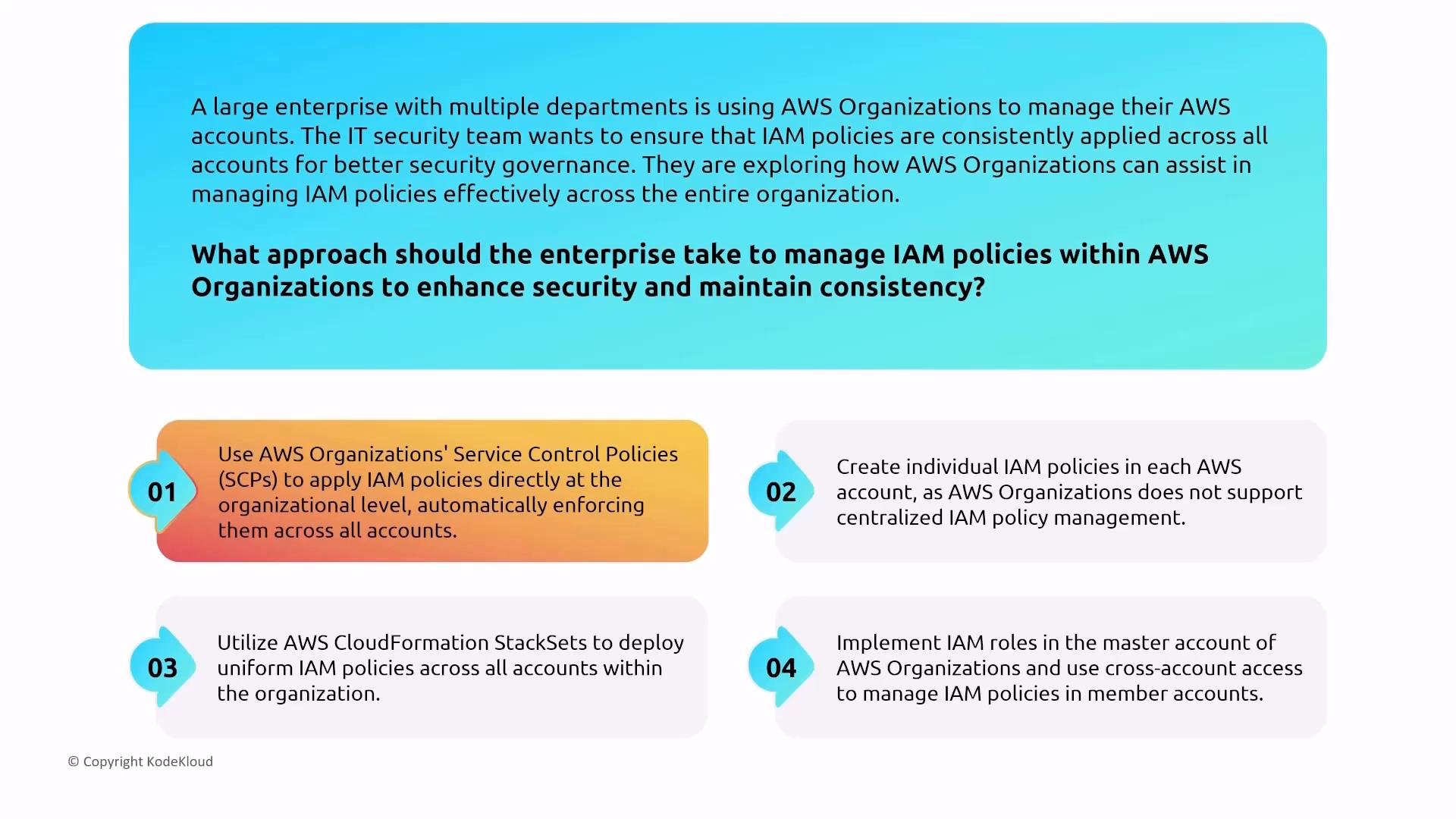
When you need consistent IAM-like controls across accounts, combine SCPs with other techniques (CloudFormation StackSets, central cross-account roles, or automation pipelines). SCPs remain the native Organizations control to limit allowed services/actions.
An infographic describing approaches for managing IAM policies across AWS Organizations to improve security and consistency. It lists four options, including using Service Control Policies (SCPs), CloudFormation StackSets, cross-account IAM roles from the master account, and creating individual IAM policies per account.
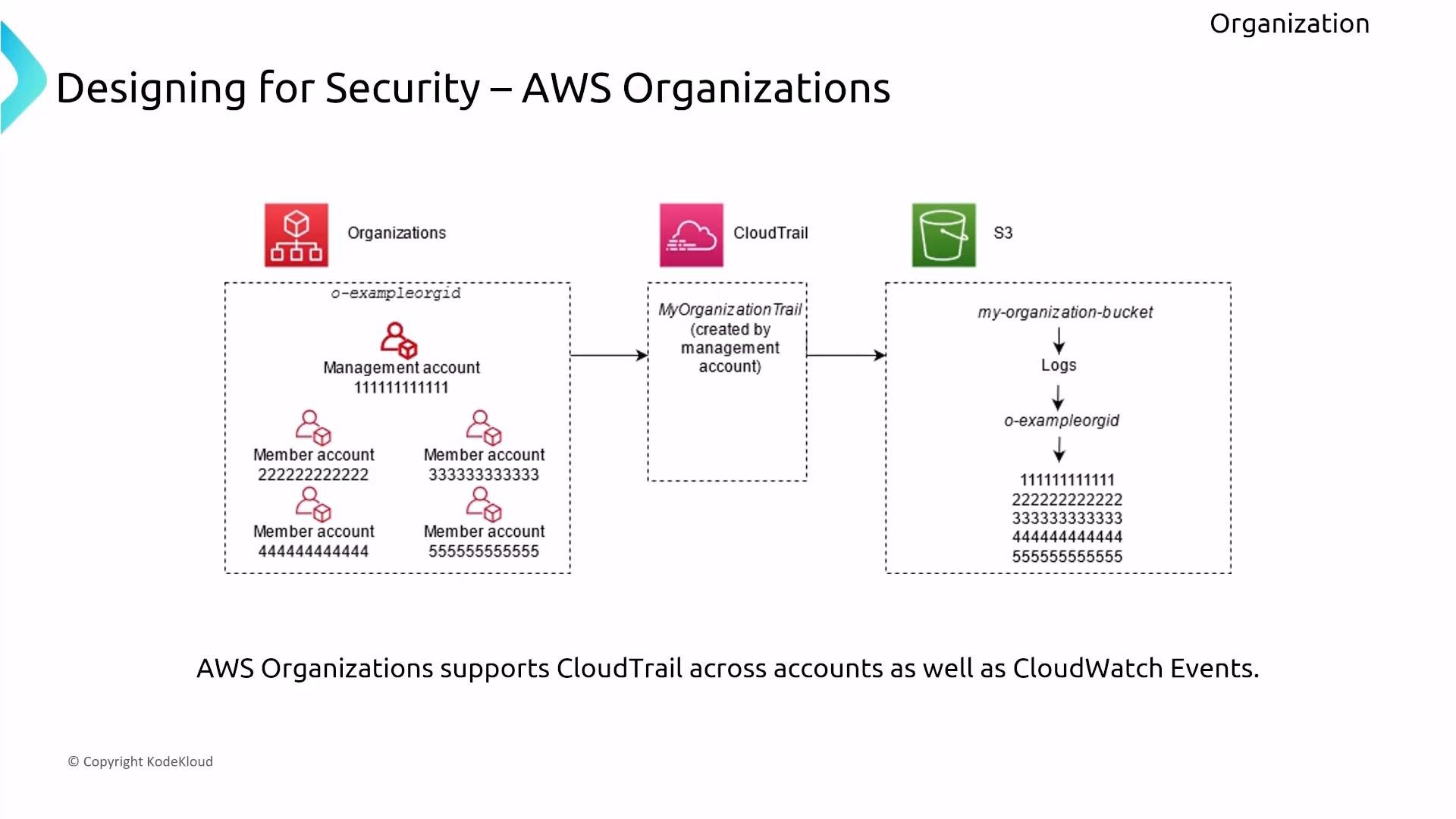
Centralized logging is a core design point for multi-account governance. Implement an Organization-level CloudTrail in the management account to capture API activity from all member accounts and global events. Route logs into a single, encrypted S3 bucket with tight bucket policies and lifecycle/retention rules.
A diagram titled "Designing for Security – AWS Organizations" showing a management account and several member accounts inside an organization. It illustrates a centralized CloudTrail (MyOrganizationTrail) sending logs from those accounts into a single S3 bucket organized by organization and account IDs.

Control Tower: bootstrap a secure landing zone

AWS Control Tower automates the setup of a best-practice landing zone: it configures Organizations, IAM Identity Center (formerly AWS SSO), centralized logging (CloudTrail), preventative guardrails (SCPs), and detective controls (AWS Config rules). Control Tower is useful to quickly bootstrap multi-account governance.
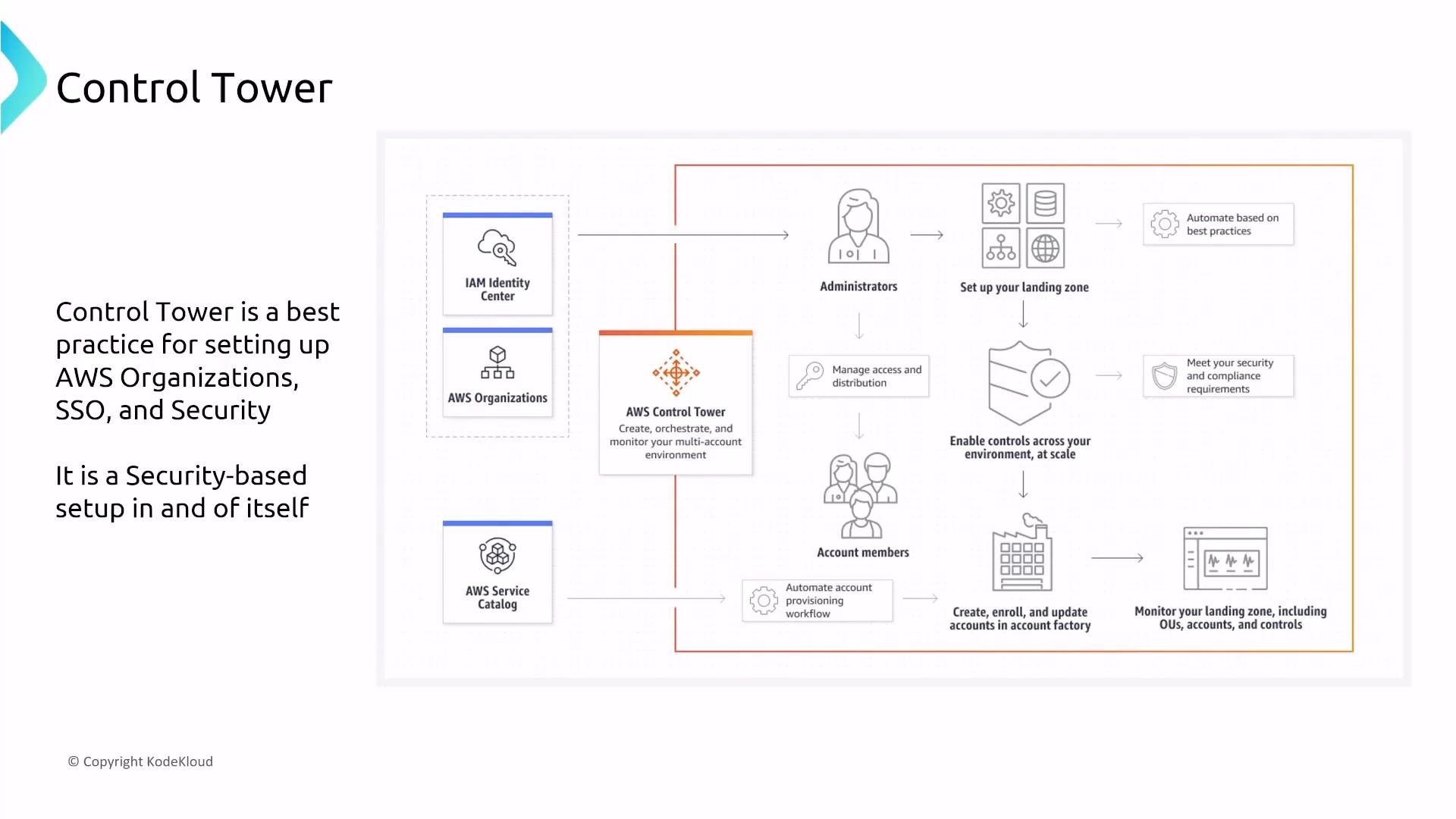
A presentation slide illustrating AWS Control Tower architecture and workflow, showing components like IAM Identity Center, AWS Organizations, and AWS Service Catalog. It maps administrators and account members to landing zone setup, access controls, account provisioning, and monitoring for a secure multi-account AWS environment.
Typical integration flow for Control Tower + IAM Identity Center:
  • Control Tower provisions IAM Identity Center and the landing zone.
  • Administrators add users/groups to IAM Identity Center and assign accounts and roles.
  • Control Tower automates new account provisioning, applies guardrails, and enables centralized logging and AWS Config.
For more reading:

Systems Manager: the central operational control plane

AWS Systems Manager (SSM) is the operational toolbox for managing fleets at scale. Its capabilities include Session Manager, Run Command, Automation, Patch Manager, Parameter Store, Application Manager, Fleet Manager, Change Manager, Distributor, State Manager, Inventory, Compliance, and more. Ensuring the SSM Agent is installed and managed on instances (EC2 or on-premises) is the foundational step.
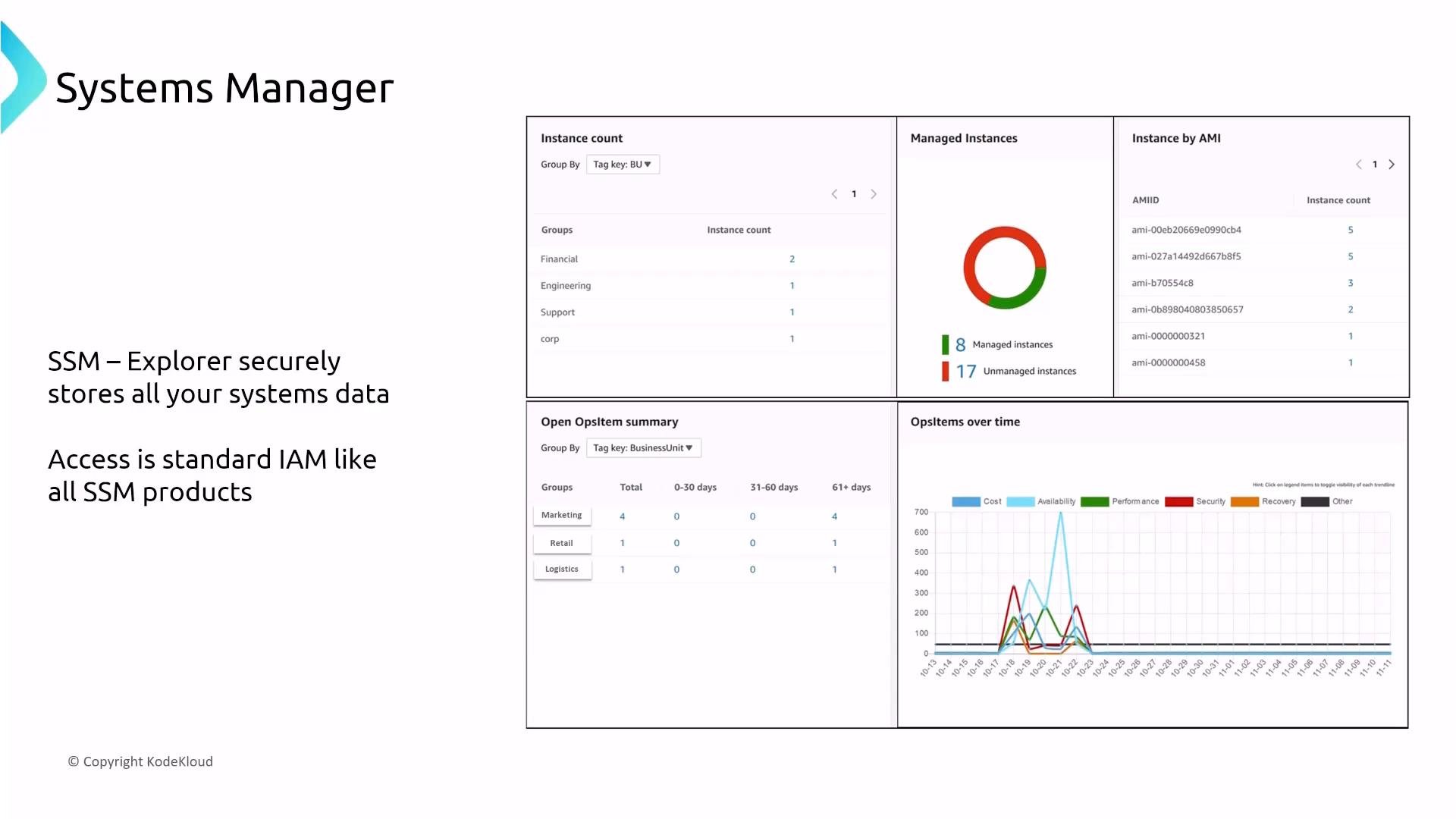
A presentation slide titled "Systems Manager" showing an SSM Explorer dashboard with instance counts, a managed vs unmanaged donut chart, an AMI list, ops item summaries, and a line chart. The slide also notes that SSM Explorer securely stores systems data and uses standard IAM for access.
Key security fundamentals for Systems Manager:
  • Access is controlled using IAM — grant only the SSM actions required for users or roles.
  • API calls are logged to CloudTrail for auditing.
  • Data is encrypted in transit and at rest; many SSM features support KMS customer-managed keys for extra control.
  • Harden SSM workflows via least-privilege IAM, KMS, and CloudTrail; there’s no single “security dial” — use the service features to harden operations (patching, configuration enforcement, incident response).
Systems Manager security relies on properly scoped IAM, KMS-encrypted data, and centralized logging (CloudTrail). Run the SSM Agent on managed hosts and enforce automation for repeatable, auditable operational tasks.

Incident response and runbooks

  • OpsCenter and Incident Manager centralize incident tracking and response orchestration. Use Incident Manager to create response plans, automated runbooks, and escalation paths.
  • Automation documents (SSM Documents) are the common enabler for runbooks, Patch Manager, and Change Manager tasks — they are IAM-controlled and logged.
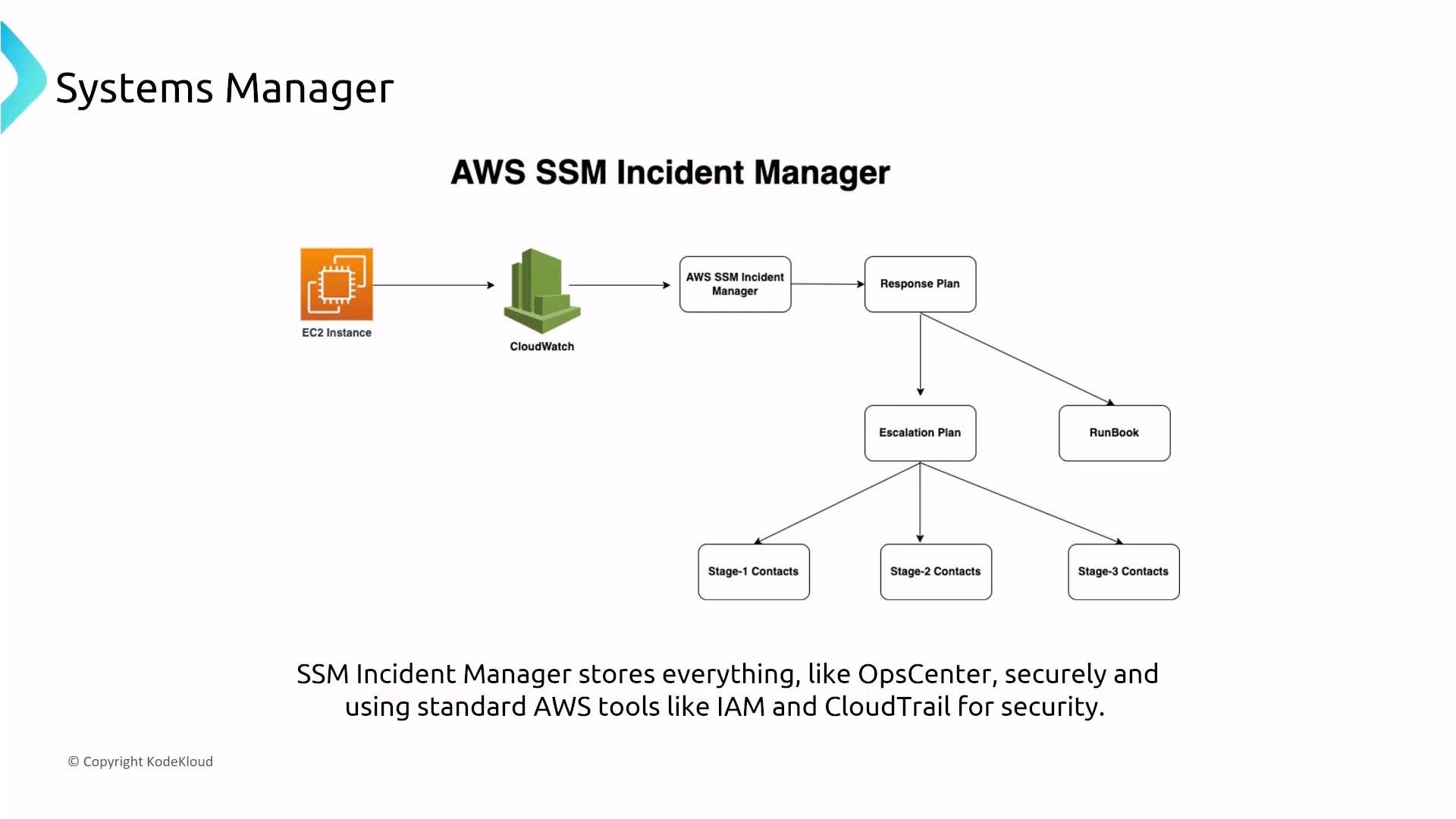
A slide showing an AWS SSM Incident Manager workflow: an EC2 instance sends alerts to CloudWatch, which triggers the SSM Incident Manager that uses a response plan, runbook and escalation plan to contact staged responders. The caption notes SSM stores data securely using AWS tools like IAM and CloudTrail.

Application configuration and secrets

  • Application Manager provides operational insights for application stacks, including EKS and CloudFormation.
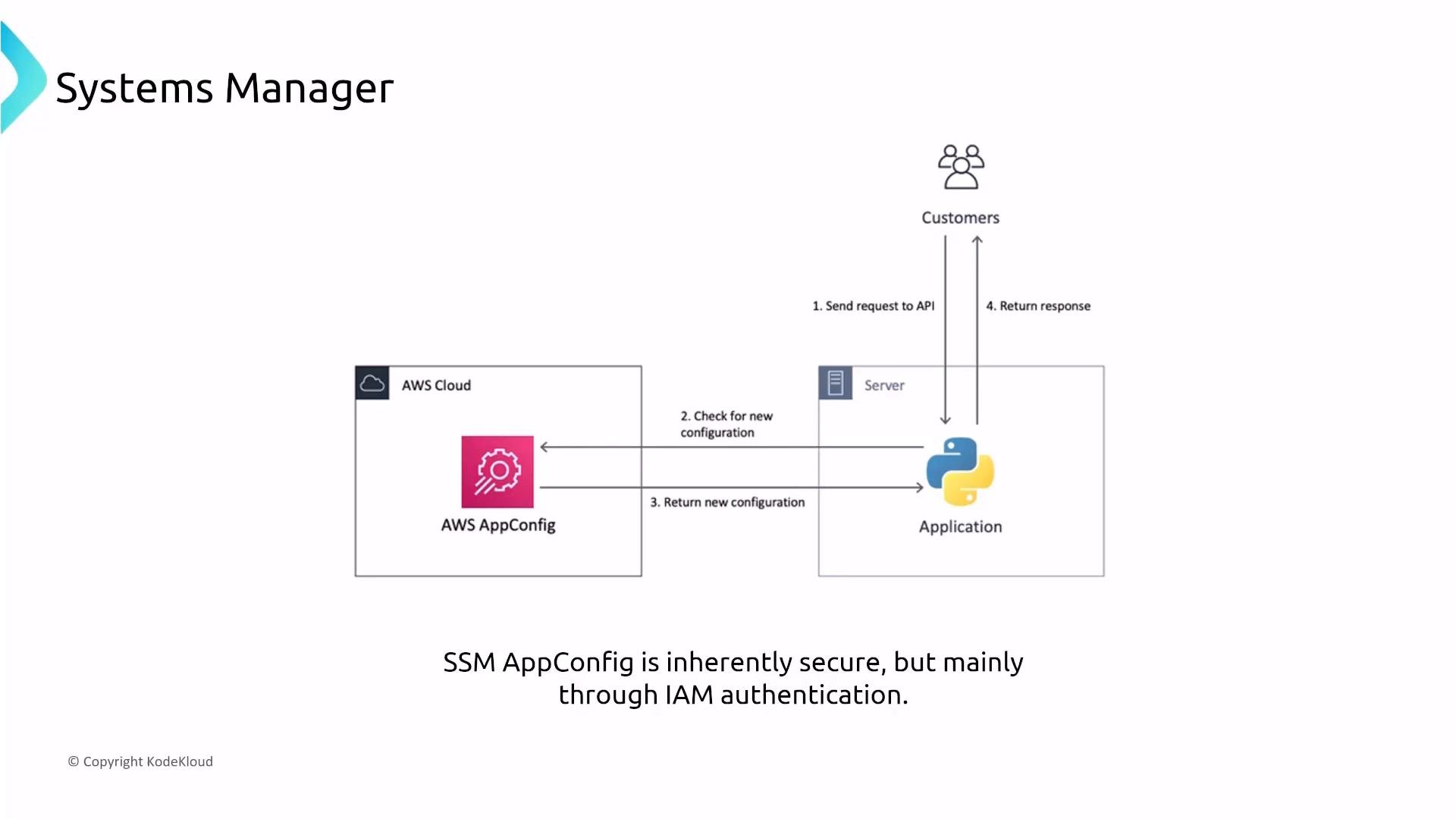
  • AppConfig (part of SSM) safely deploys validated configuration changes to applications.
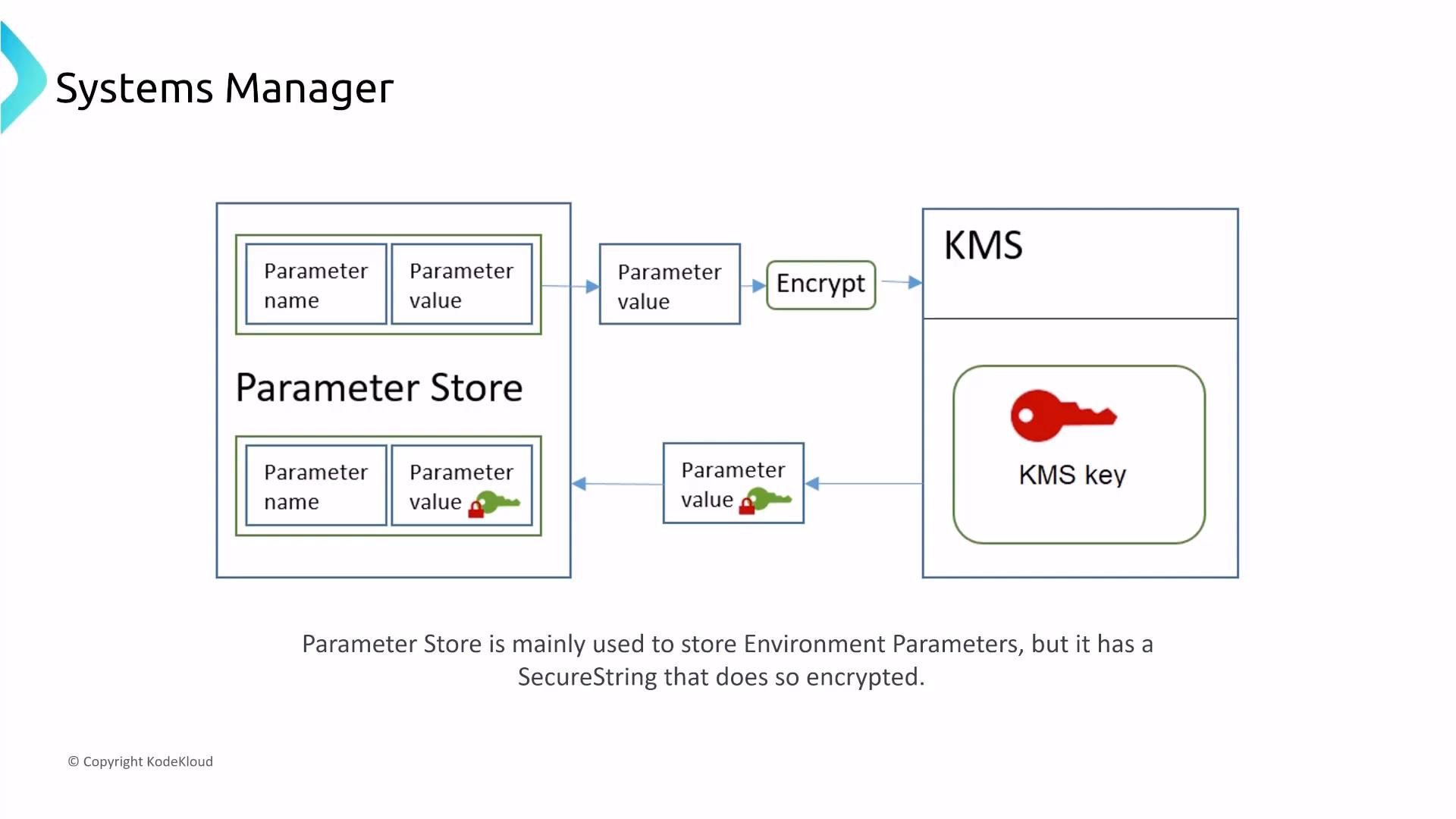
  • Parameter Store stores configuration values and secrets; use SecureString parameters encrypted with KMS for secrets and rotate them according to your policy.
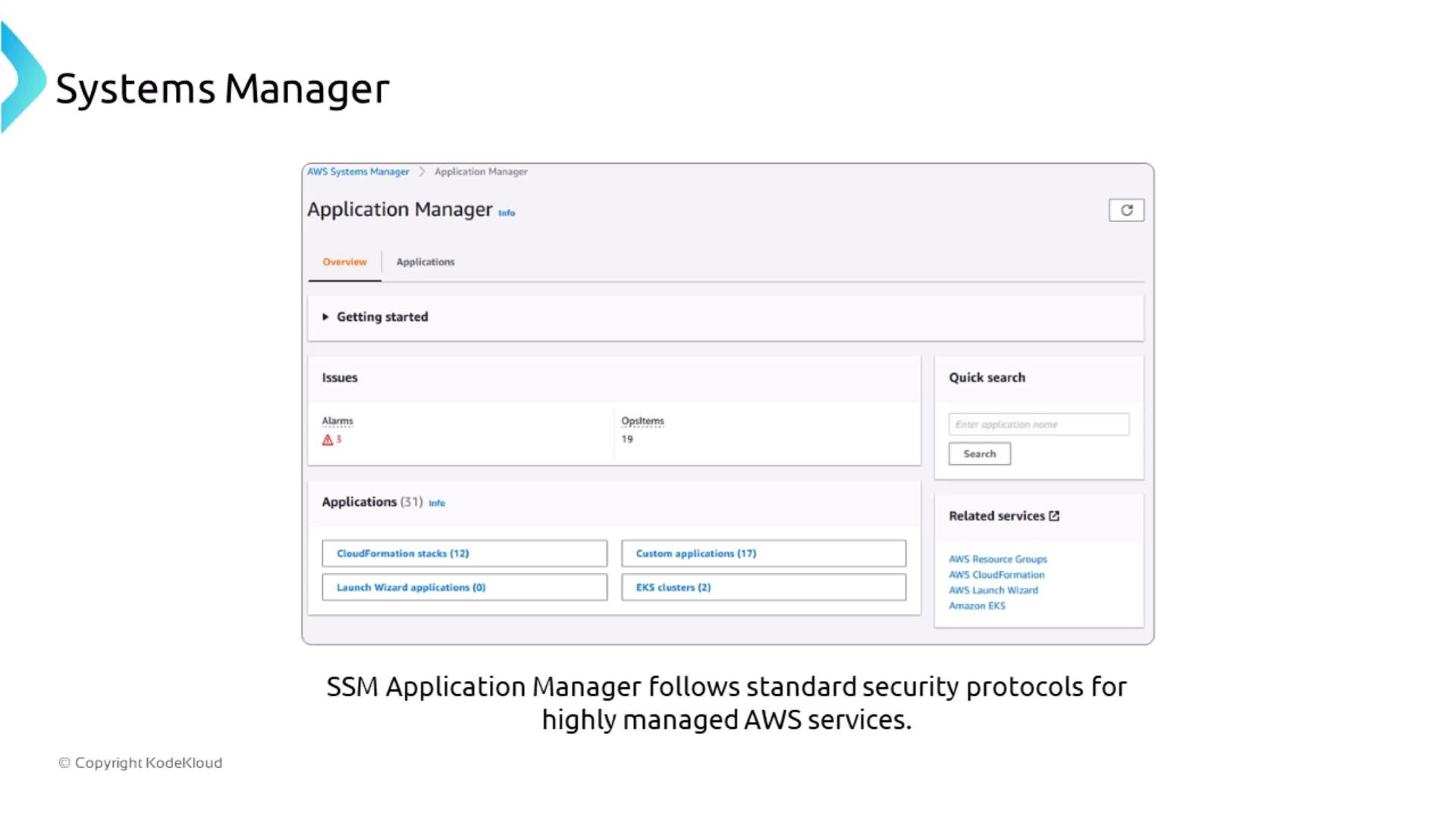
A screenshot of the AWS Systems Manager Application Manager dashboard showing the Overview tab with sections for Getting started, Issues (Alarms and OpsItems), Applications, and a Quick search box. The page header "Systems Manager" appears at the top left.
A slide titled "Systems Manager" showing a diagram where AWS AppConfig (in the AWS Cloud) provides configuration to a Python application running on a server. Customers send API requests to the application, which checks AppConfig for new configuration and returns responses.
A diagram showing AWS Systems Manager Parameter Store storing parameter name/value pairs and using AWS KMS to encrypt SecureString parameter values. It illustrates the encryption step and a KMS key icon used to secure stored parameters.

Change management and automation

  • Change Manager creates approval-driven workflows around Automation runbooks so IT changes follow defined approvals and are tracked.
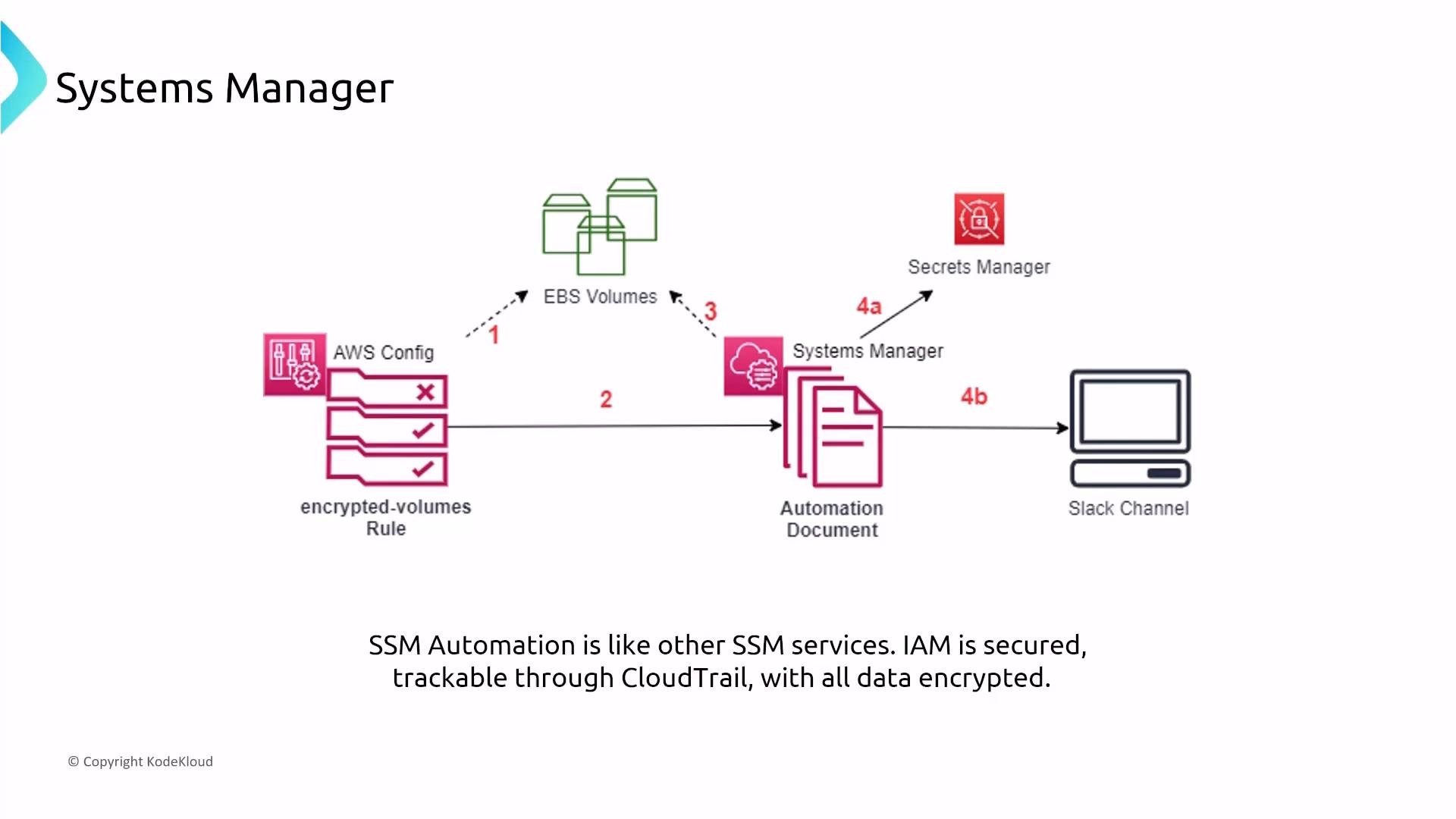
  • Automation is used to implement repeatable, auditable tasks across hybrid environments (on-prem, EC2, etc.). All Automation executions are IAM-controlled and logged to CloudTrail.
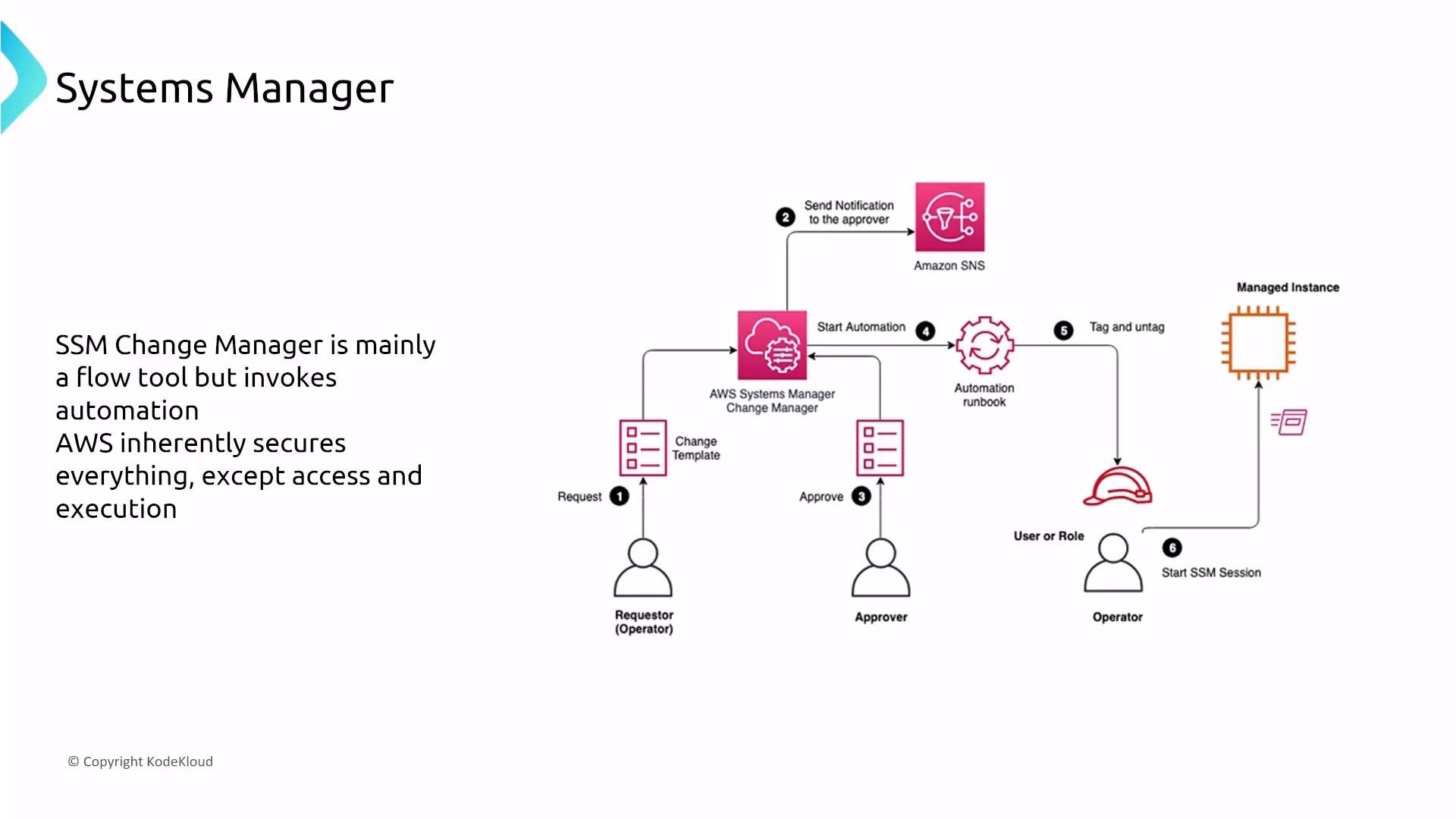
A slide showing an AWS Systems Manager Change Manager workflow diagram with icons for a requestor, approver, operator, Amazon SNS, an automation runbook and a managed instance. The left text notes that Change Manager is mainly a flow tool that invokes automation and that AWS secures everything except access and execution.
A diagram of an AWS Systems Manager automation workflow. It shows AWS Config checking EBS volumes with an "encrypted-volumes" rule that triggers a Systems Manager Automation Document which can use Secrets Manager and post results to a Slack channel.

Scheduling changes and patching

  • Use Change Calendar to define explicit change windows and prevent out-of-window operations.
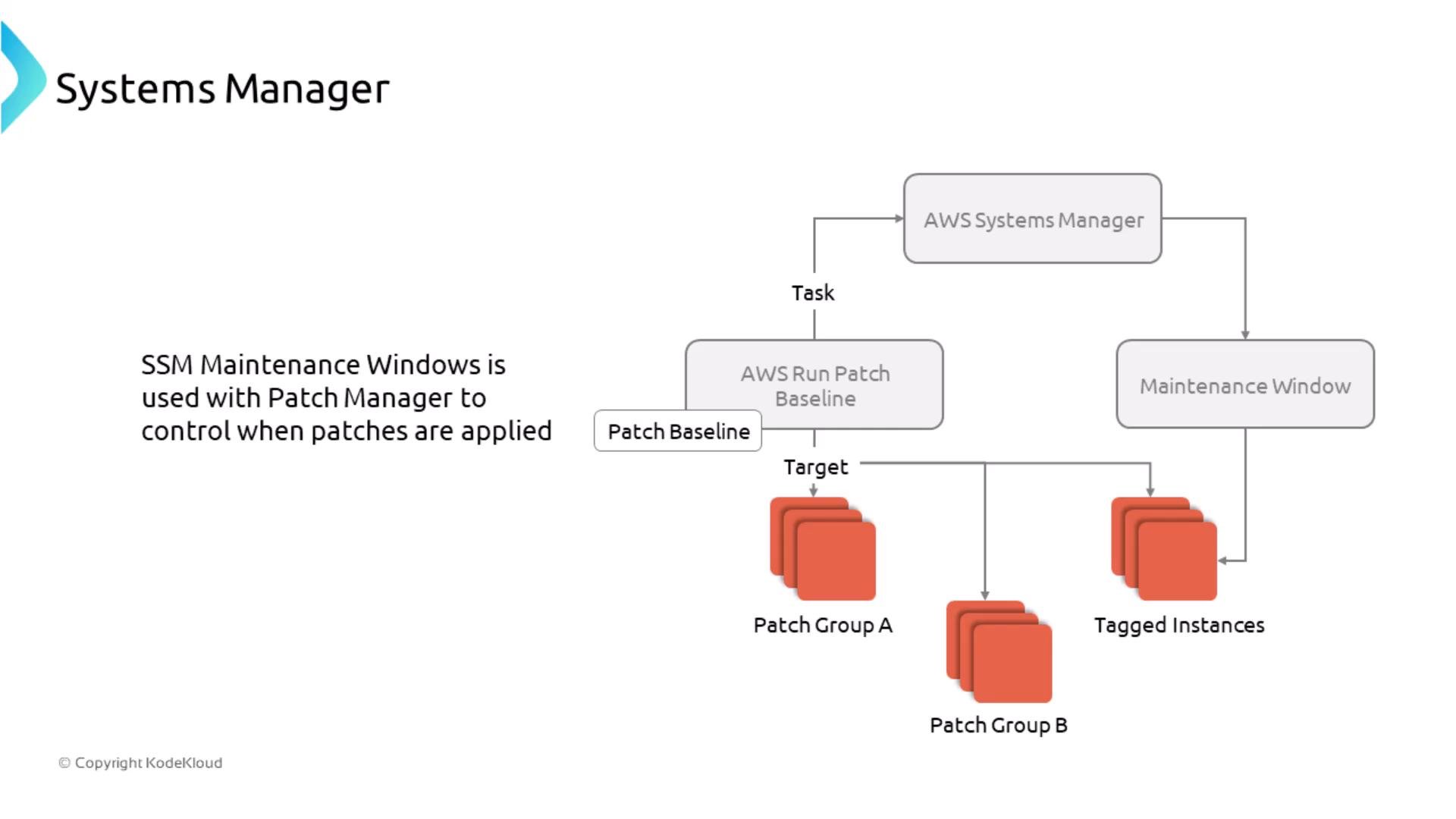
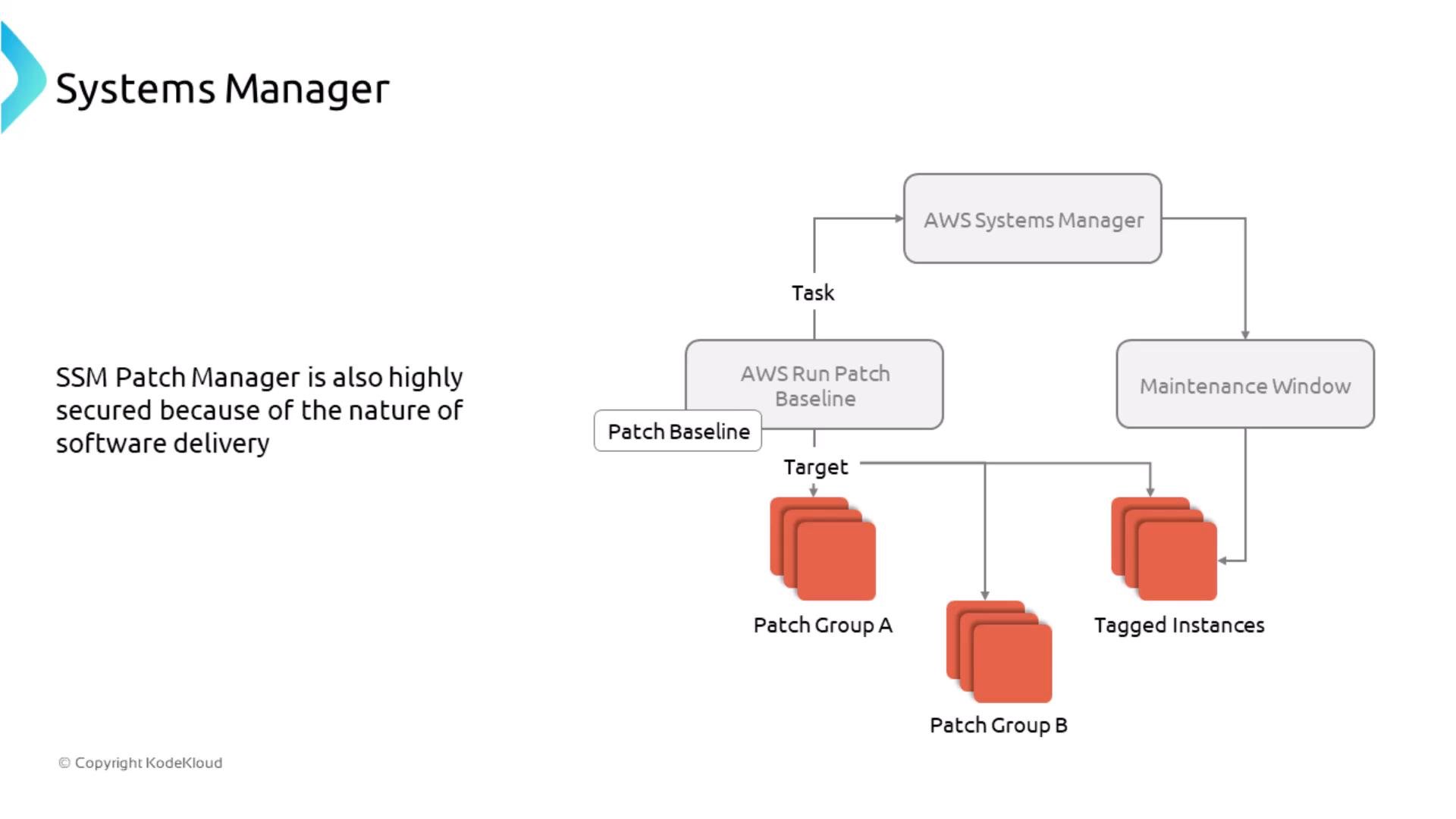
  • Maintenance Windows + Patch Manager let you schedule and control patched deployments for Windows and Linux using patch groups and tag-based targeting.
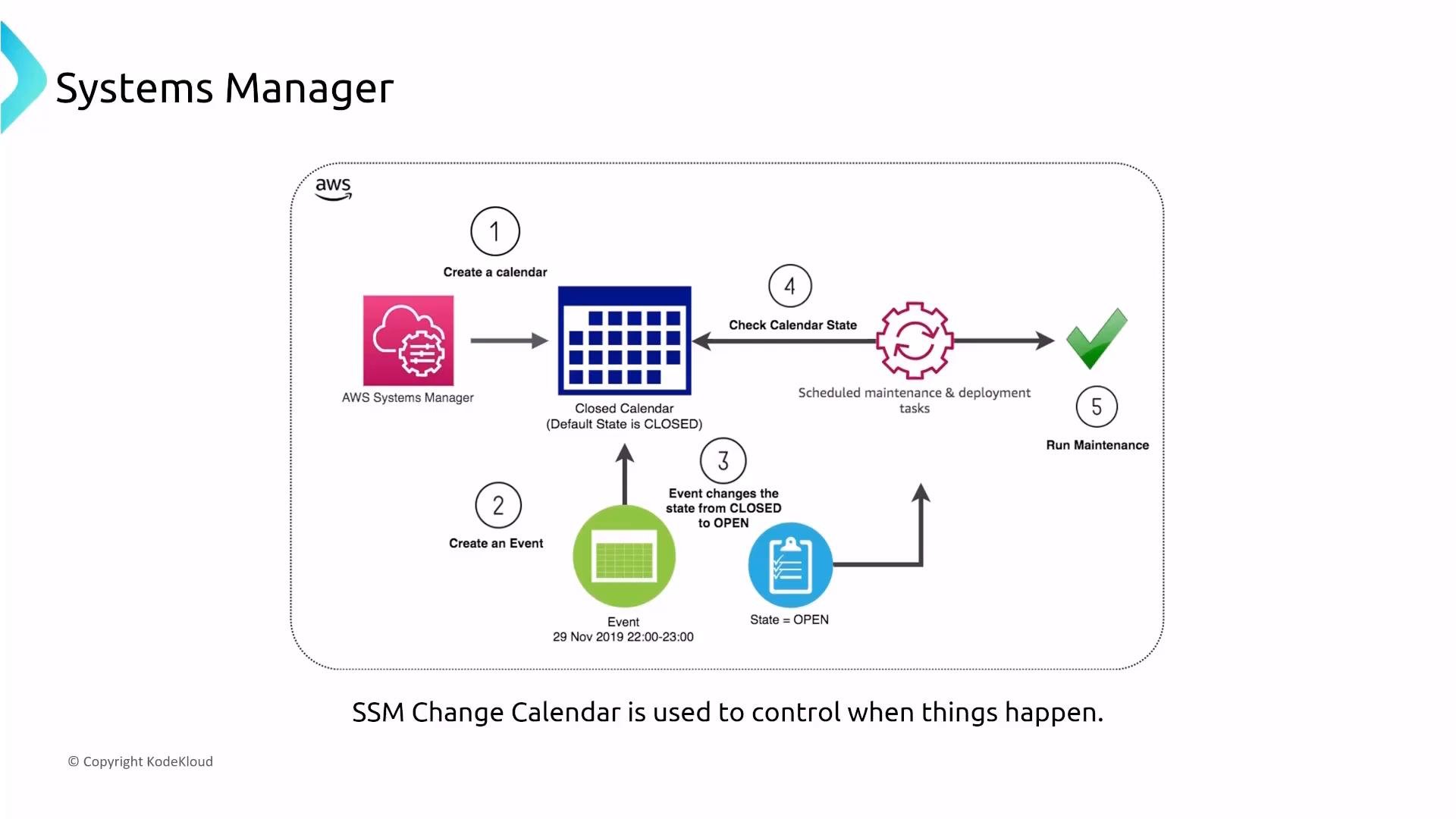
A diagram of the AWS Systems Manager Change Calendar workflow showing a calendar and event lifecycle: create a calendar, create an event that changes the calendar from CLOSED to OPEN, and scheduled maintenance checks the calendar before running tasks. Icons depict Systems Manager, a calendar grid, an event, state check, and a green check for successful maintenance.
A diagram of AWS Systems Manager showing how SSM Maintenance Windows and Patch Manager (AWS Run Patch Baseline) schedule patch tasks. It shows patch baselines targeting patch groups and tagged instances during maintenance windows.
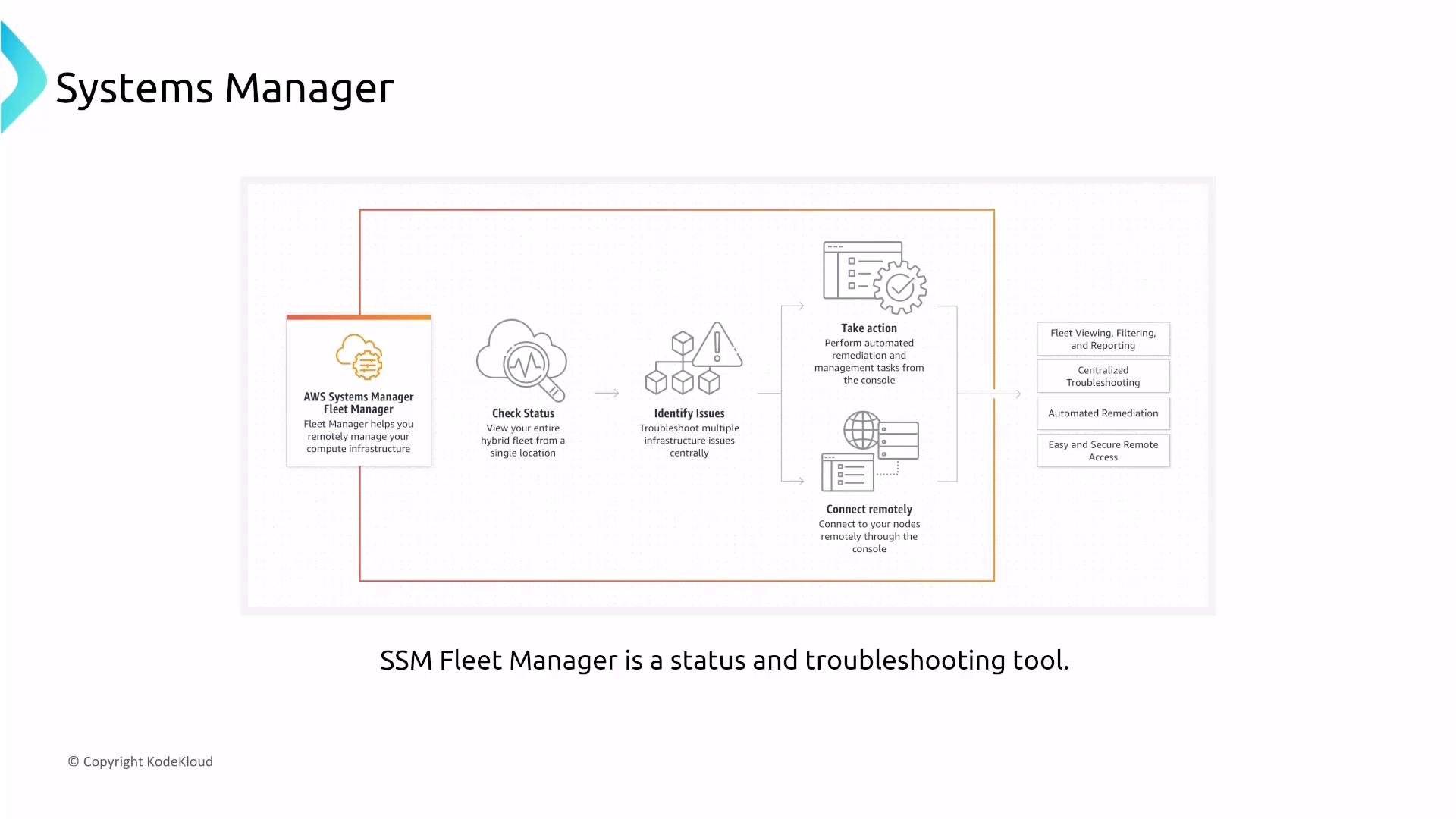
A diagram of AWS Systems Manager illustrating AWS Systems Manager Fleet Manager. It shows a workflow with icons and labels for checking status, identifying issues, taking action, and connecting remotely, plus features like fleet viewing, centralized troubleshooting, automated remediation, and secure remote access.
Fleet Manager provides a centralized console for troubleshooting, visibility, and automated remediation.

Inventory, Compliance, and hybrid management

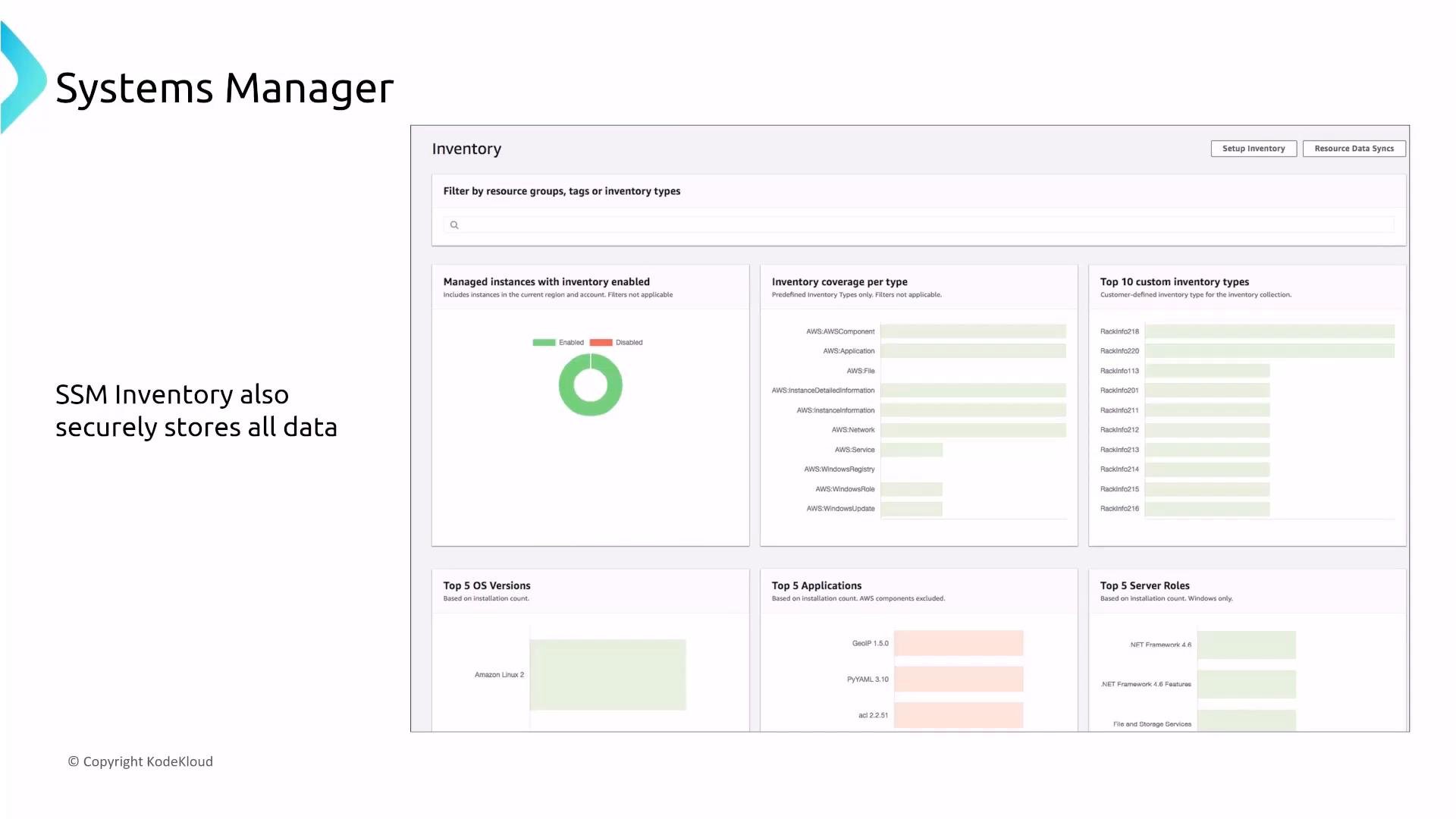
  • Inventory collects OS versions, installed packages, and application metadata across instances.
  • Compliance reports patch status and configuration compliance.
  • Use hybrid activations to register on-premises servers and VMs; activations provide codes/IDs for managed registration.
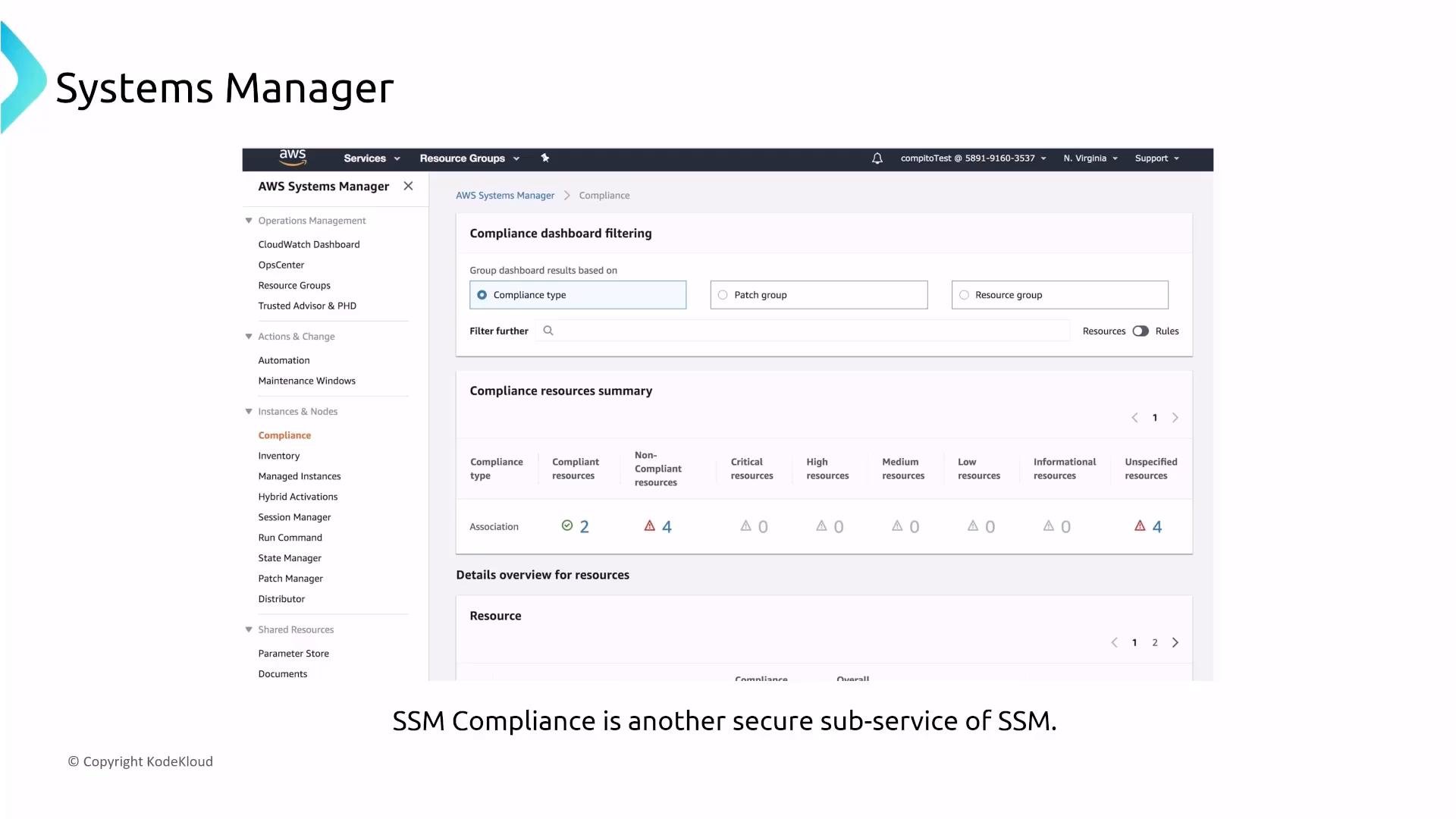
A screenshot of the AWS Systems Manager (SSM) Compliance dashboard showing filtering options and a compliance resources summary. The page displays counts of compliant and non-compliant resources and navigation/menu items on the left.
A screenshot of an AWS Systems Manager Inventory dashboard showing charts for managed instances, inventory coverage by type, top custom inventory types, top OS versions, applications, and server roles. The left side has the title "Systems Manager" and a note saying "SSM Inventory also securely stores all data."
Example hybrid activation fields (example format only):

Secure access and ad-hoc execution

  • Session Manager is an IAM-controlled, encrypted SSH/RDP replacement that brokers shell and remote access via the SSM Agent without opening inbound ports.
  • Run Command executes one-off commands across multiple instances — useful for emergency remediation and mass actions.
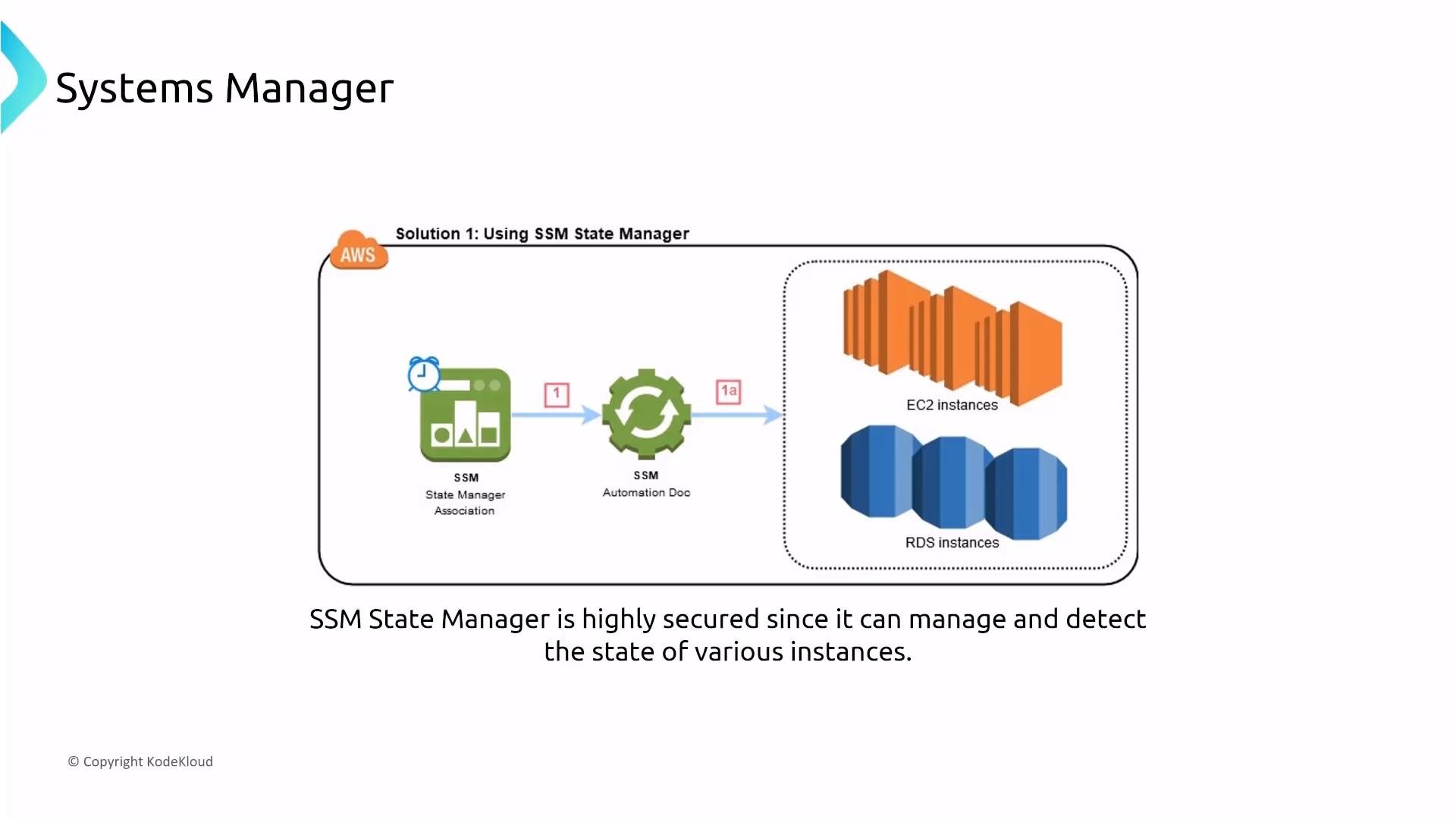
  • State Manager enforces desired configuration states by applying Automation documents on a schedule.
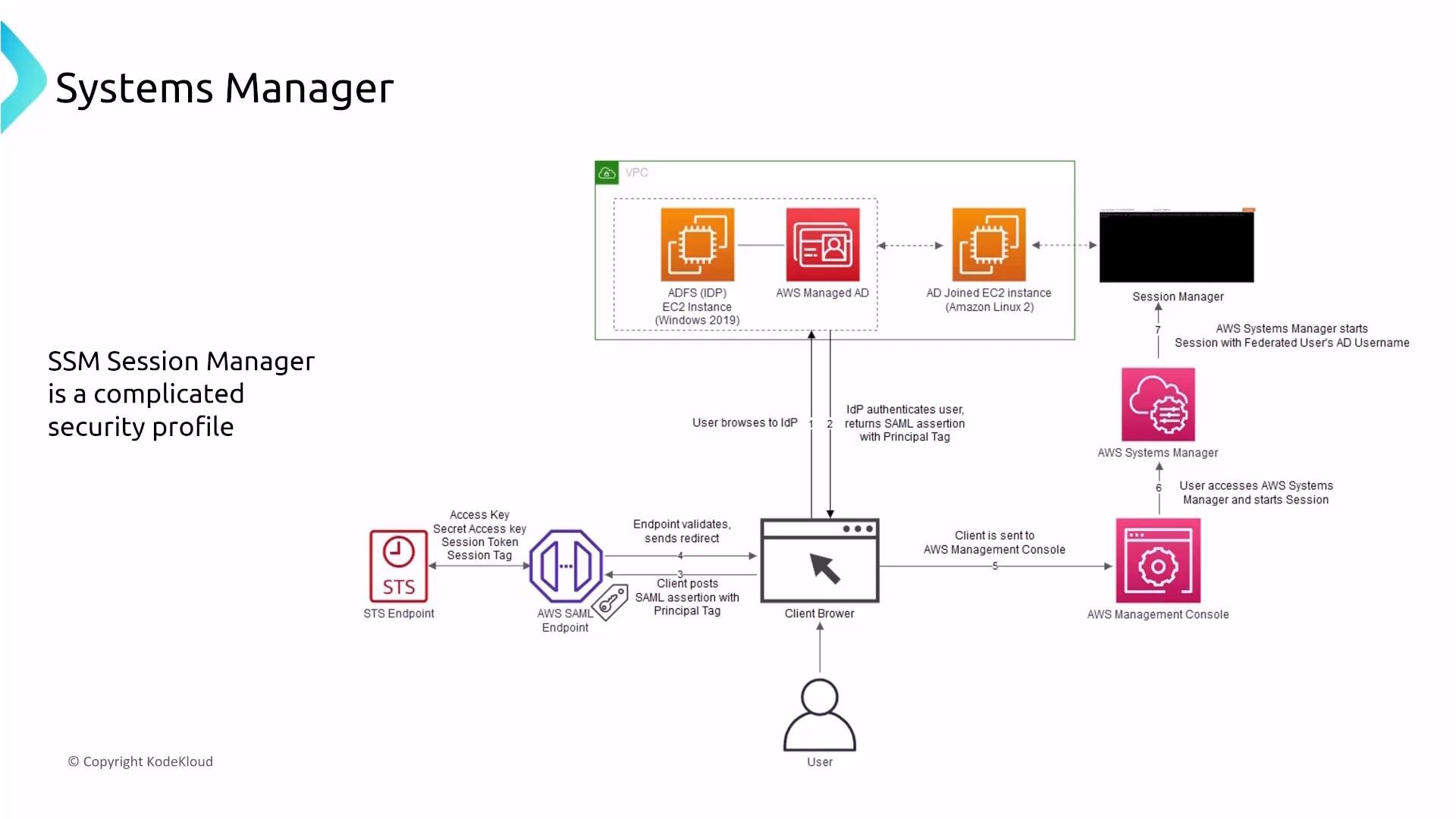
A slide titled "Systems Manager" showing an AWS architecture diagram of the SSM Session Manager authentication flow for federated Active Directory users. It diagrams components like ADFS/IdP, AWS Managed AD, AD-joined EC2, SAML/ST S endpoints, a client browser/AWS console, and Session Manager.
A diagram of AWS Systems Manager showing a State Manager association and an Automation document that manage EC2 and RDS instances. A caption notes SSM State Manager is highly secure and can detect/manage the state of various instances.
An architecture diagram for AWS Systems Manager's Patch Manager showing an AWS Run Patch Baseline and task flow to patch groups and tagged instances through a maintenance window. The slide also notes that SSM Patch Manager is highly secured because of the nature of software delivery.
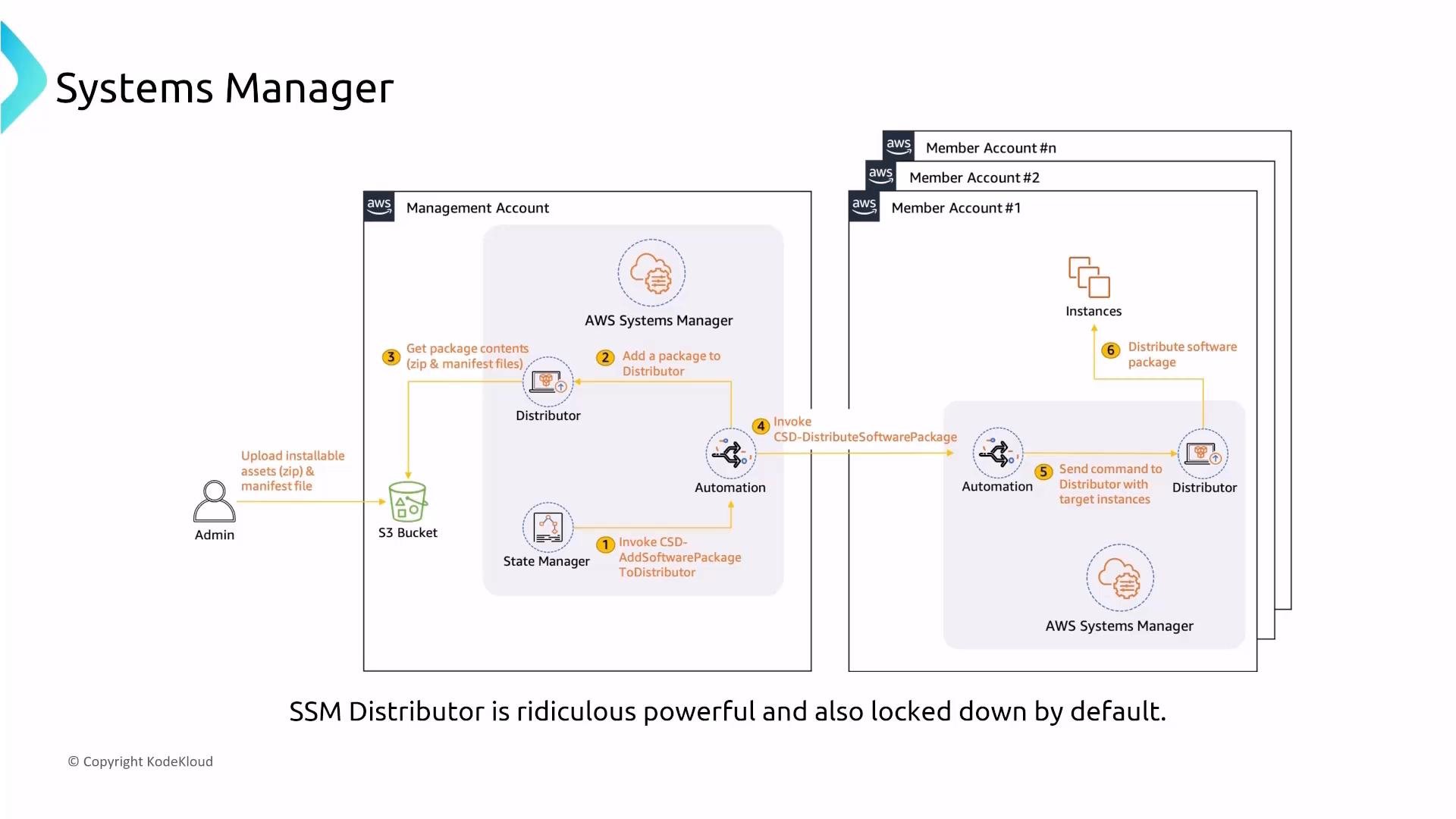
Distributor packages and distributes software and is controlled via IAM permissions and S3 policy settings.
A diagram slide of AWS Systems Manager illustrating the SSM Distributor workflow: an admin uploads packages to S3 in a management account, the package is added to Distributor and automations invoke distribution to instances in member accounts. The slide also notes that "SSM Distributor is ridiculous powerful and also locked down by default."
SSM Documents (Automation documents) standardize operational tasks across environments and are managed and encrypted by AWS.

Service Catalog, License Manager, and Proton

  • Service Catalog lets administrators package CloudFormation or Terraform templates as approved products for developers. Security is enforced by IAM (who can view/provision) and by securing the underlying product templates.
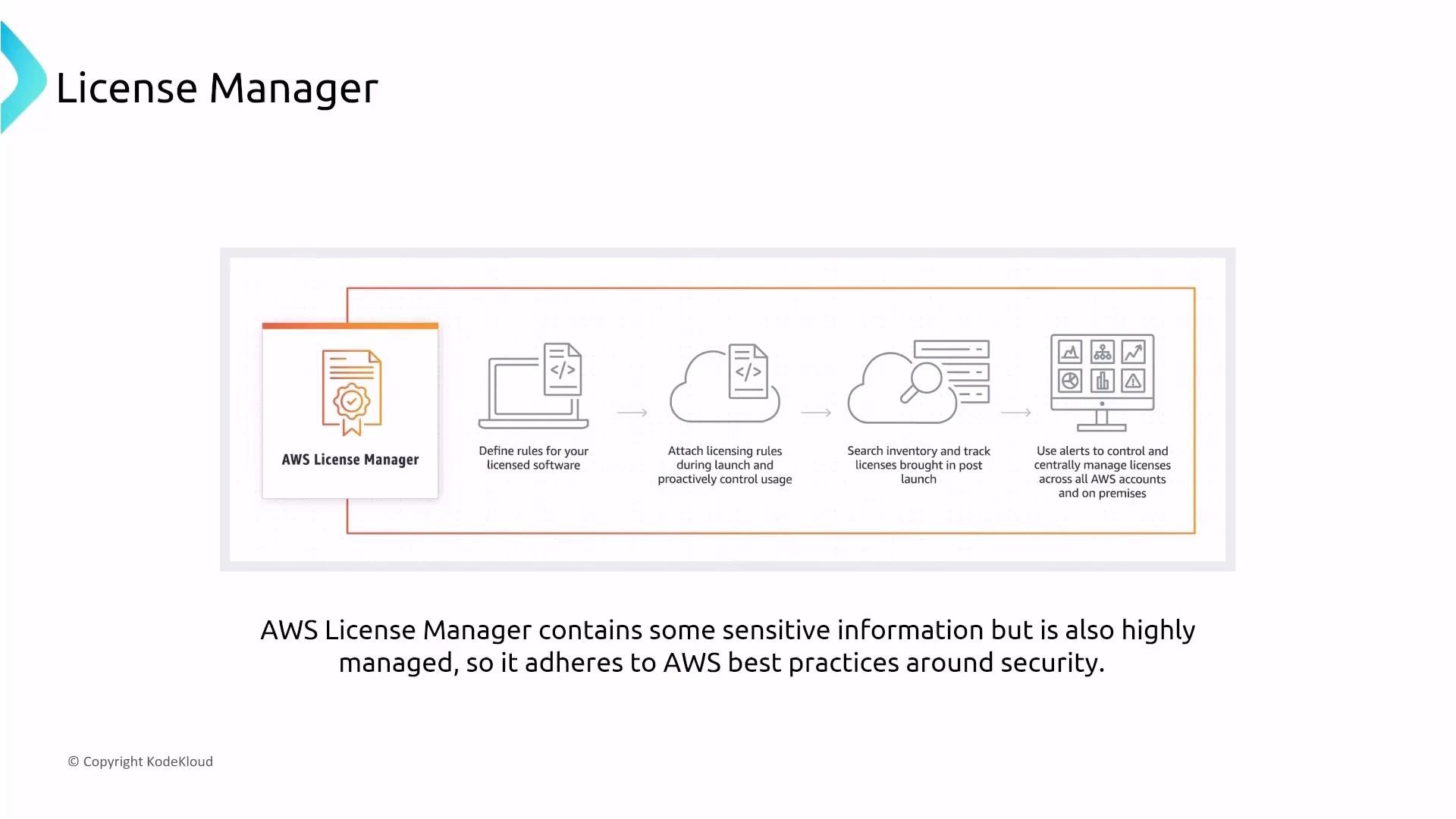
  • License Manager centralizes license tracking and enforcement, automates attachment, and alerts on overages.
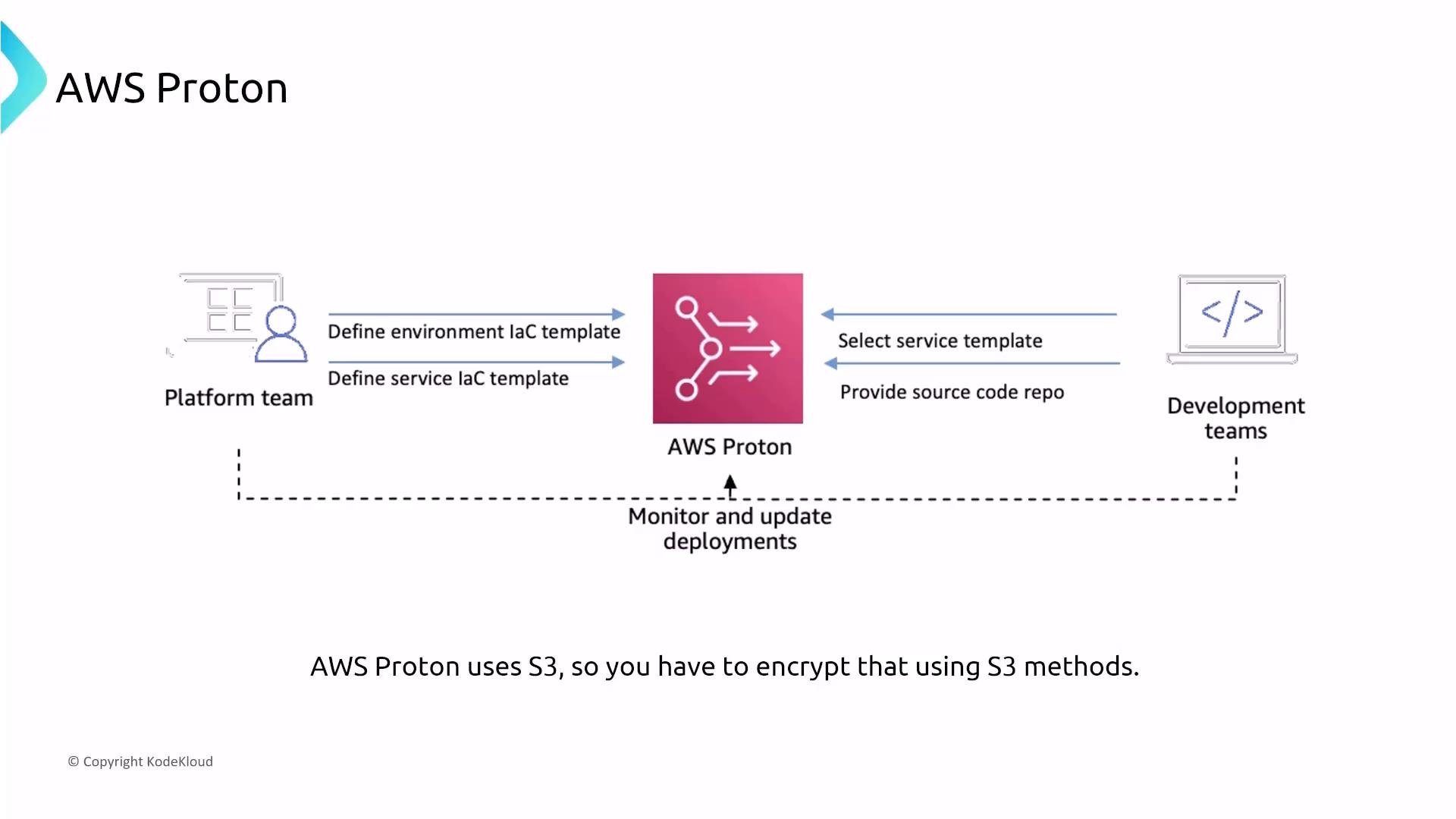
  • Proton provides an opinionated deployment platform for container and serverless workloads. For compliance and auditability, ensure CloudTrail captures Proton/CodePipeline actions, store logs in encrypted S3, and enforce KMS encryption for artifacts. Integrate IaC scanning where possible.
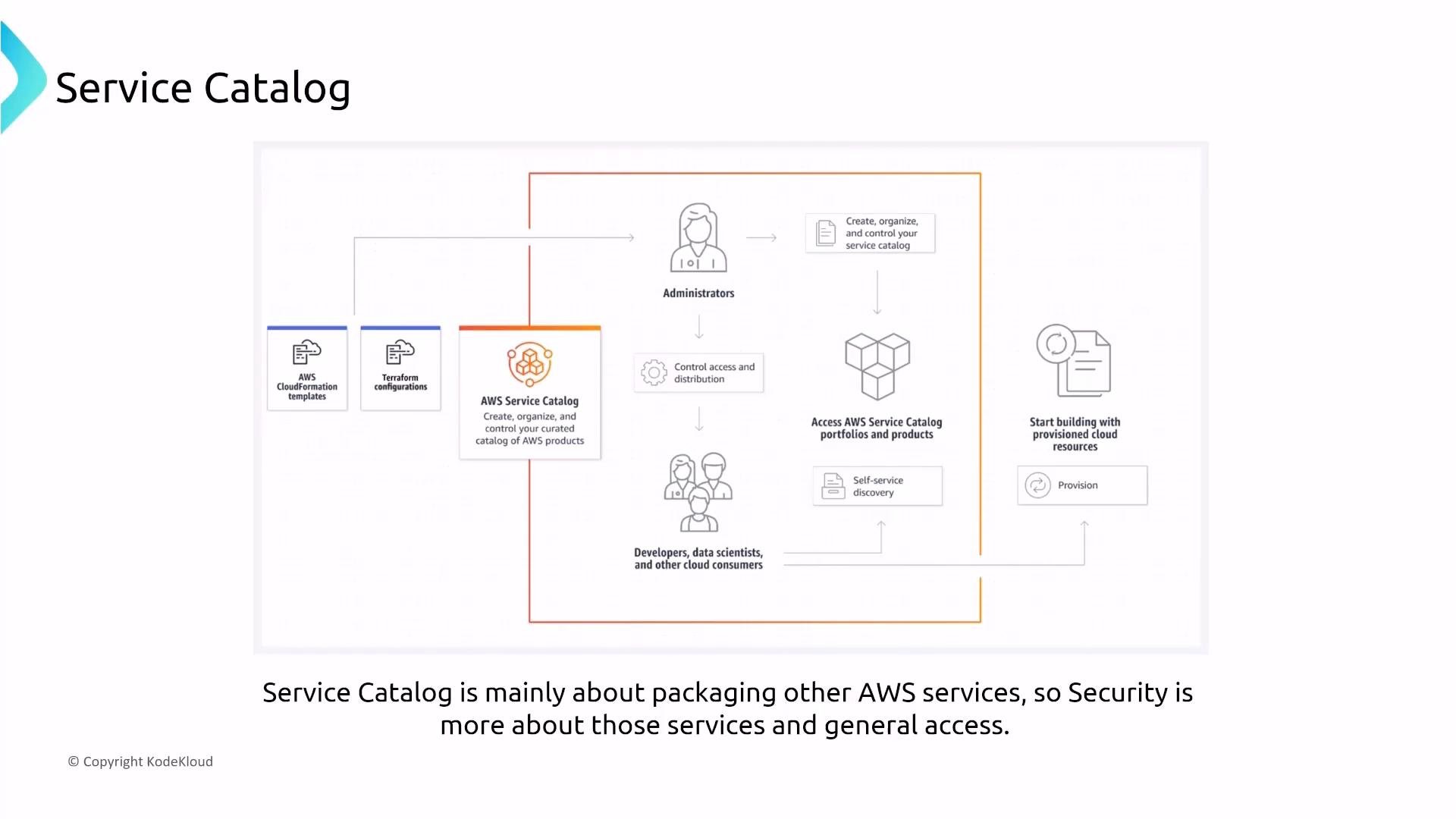
A slide titled "Service Catalog" showing an AWS Service Catalog flow diagram where CloudFormation templates and Terraform configurations are packaged into the catalog for administrators to manage access and for developers to discover and provision products. A caption below notes the Service Catalog is mainly about packaging AWS services and that security concerns apply to those services and general access.
A slide titled "License Manager" illustrating the AWS License Manager workflow. It shows icons and steps: define licensing rules, attach rules at launch, search inventory and track licenses, and use alerts to centrally manage licenses.
A diagram of AWS Proton showing a central Proton service receiving environment and service IaC templates from a platform team and service selections and source repos from development teams. It also notes Proton monitors and updates deployments and mentions S3 encryption for Proton.

Other managed governance services

Services such as Tag Editor, Resource Explorer, Resource Groups, Resource Access Manager, Resilience Hub, and Migration Hub are highly managed — their security knobs are typically IAM, logging, and encryption.
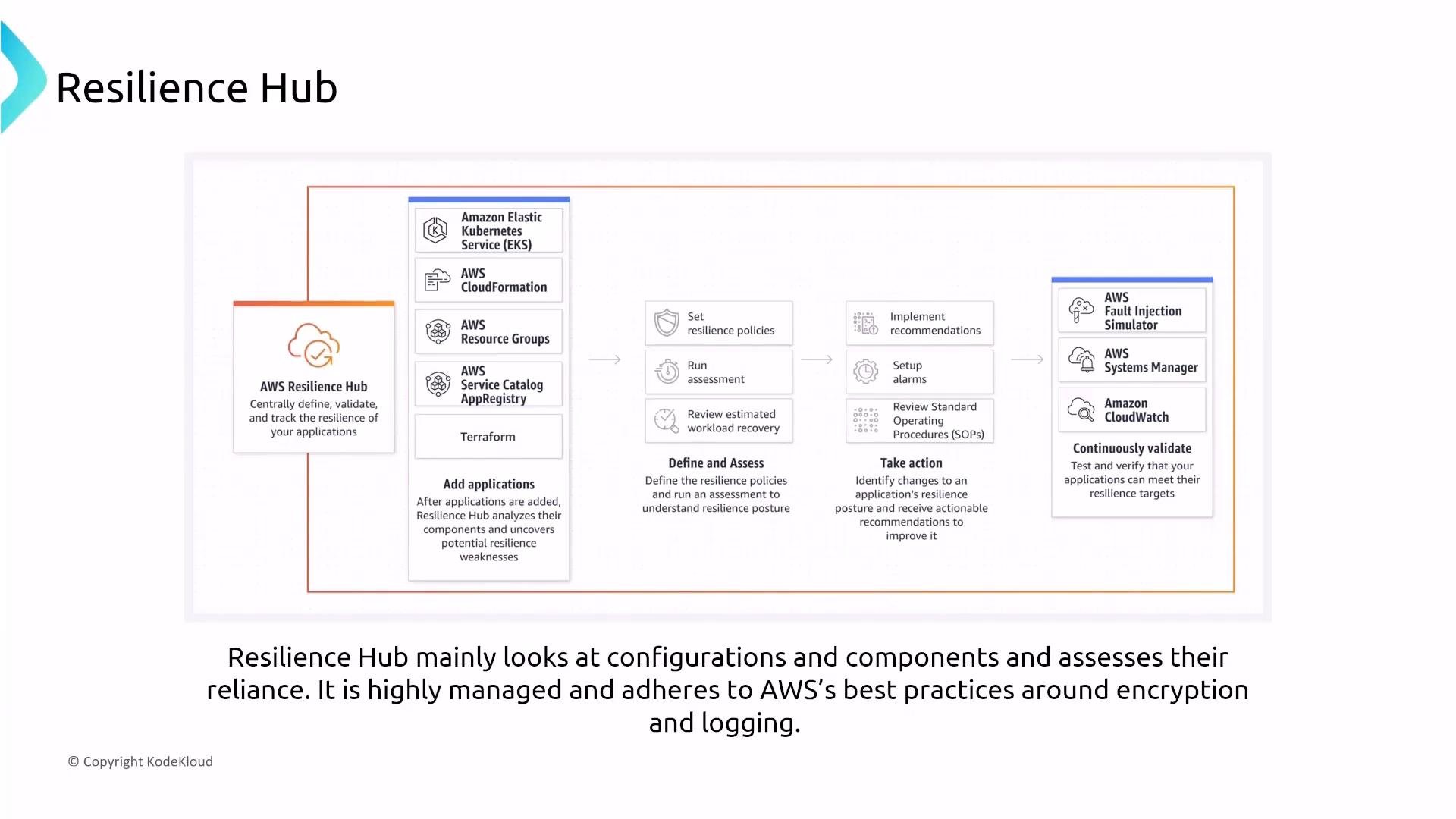
A diagram of AWS Resilience Hub showing its workflow for adding applications, defining and assessing resilience, and taking action to improve recovery. It lists integrations (EKS, CloudFormation, Terraform, etc.) and continuous validation tools like AWS Fault Injection Simulator, Systems Manager, and CloudWatch.

Quick reference: security controls per management service

Summary — key takeaways

  • The primary control knobs for management and governance services are IAM, CloudTrail (centralized logging), and KMS (encryption).
  • AWS Organizations + SCPs provide organization-wide guardrails (deny/permit boundaries) but cannot grant permissions.
  • Centralized logging — an organization CloudTrail that writes to an encrypted S3 bucket — plus CloudWatch/Events is a consistent best practice.
  • Systems Manager is the operational core: ensure the SSM Agent is deployed, use Automation/State Manager/Patch Manager for standardized and auditable operations, and use Session Manager for secure remote access without exposing instances.
Thanks for following this lesson. The final article in the “Turning Up Security” series will wrap up and provide consolidated action items and architectures to apply these controls across your AWS estate.

Watch Video