

- Place controls at the right layer (load balancer vs instance vs subnet).
- Prefer security groups for stateful, host-level filtering and NACLs for stateless, subnet-level defense in depth.
- Centralize routing where it simplifies operations (Transit Gateway) and insert inspection points where required (GWLBe).
- Keep sensitive traffic inside AWS with PrivateLink and protect sensitive application fields using field-level encryption at the edge.
Network Load Balancer (NLB) — UDP game traffic
Scenario- Real-time multiplayer game runs on EC2 instances in a VPC. Backends require low latency and support for UDP.
- NLB is evaluated because it supports UDP and operates at Layer 4.
- Restrict ingress to the game UDP port at the load-balancing boundary:
- Where supported, apply a security group on the load-balancer-target boundary (or on the targets themselves).
- NACLs remain useful as a stateless, subnet-level filter; use them for defense in depth.
- Prefer security groups for stateful, host-level access control (they track connection state).
- Use NACLs to enforce broad subnet-level allow/deny rules (e.g., restrict widely-scoped ports or CIDR ranges).
- Enforce the specific UDP port at the most appropriate boundary (ALB/NLB security group or target security group).
- Use NACLs to allow necessary inbound/outbound traffic and deny everything else by default.
- Monitor for anomalous traffic patterns and throttle or blackhole as needed.
AWS WAF protects application-layer HTTP(S) traffic and integrates with ALB and CloudFront. It does not protect raw UDP traffic handled by an NLB—use NACLs, security groups, or inline appliance inspection for UDP.
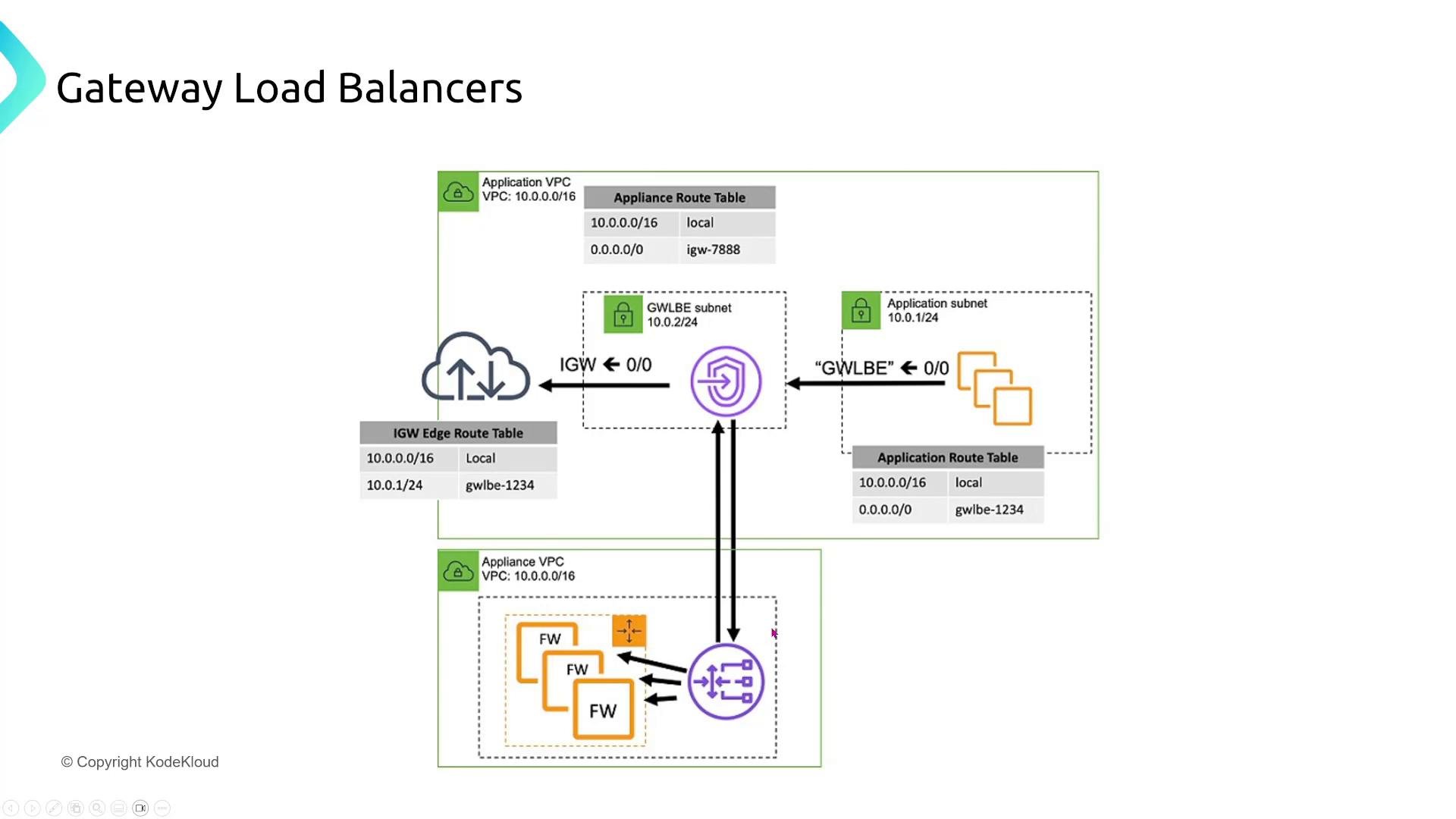
Gateway Load Balancer (GWLBe) — virtual appliance inspection and filtering
Overview- Gateway Load Balancers enable inline insertion and scaling of virtual appliances (firewalls, IDS/IPS, DPI).
- Typical flow:
- Application subnet routes traffic to a Gateway Load Balancer Endpoint (GWLBe).
- GWLBe forwards flows into the Gateway Load Balancer.
- GWLB distributes flows to appliance instances for inspection.
- Appliances return traffic back through the GWLBe; traffic proceeds to the original destination (for example, out to the Internet Gateway if approved).
- Centralized threat inspection for east-west and north-south traffic.
- Managed scaling of virtual appliances using GWLB autoscaling groups.
- Appliances must be able to handle the expected throughput and stateful flows.
- Monitor appliance health and ensure proper route table entries and target registration.
Transit networking
This section contrasts common transit and connectivity options: Site-to-Site VPN, Direct Connect, VPC peering, and Transit Gateway. Choose the right tool based on latency, security, scale, and topology requirements.Site-to-Site VPN (IPsec)
Scenario- A healthcare organization needs encrypted, reliable connectivity between an on-premises datacenter and AWS (patient data transfer).
- Use AWS Site-to-Site VPN with IPsec and dynamic routing (BGP) for resilient, encrypted transit over the public internet.
- For scale or centralized routing, terminate VPN at a Transit Gateway or a virtual private gateway depending on topology.
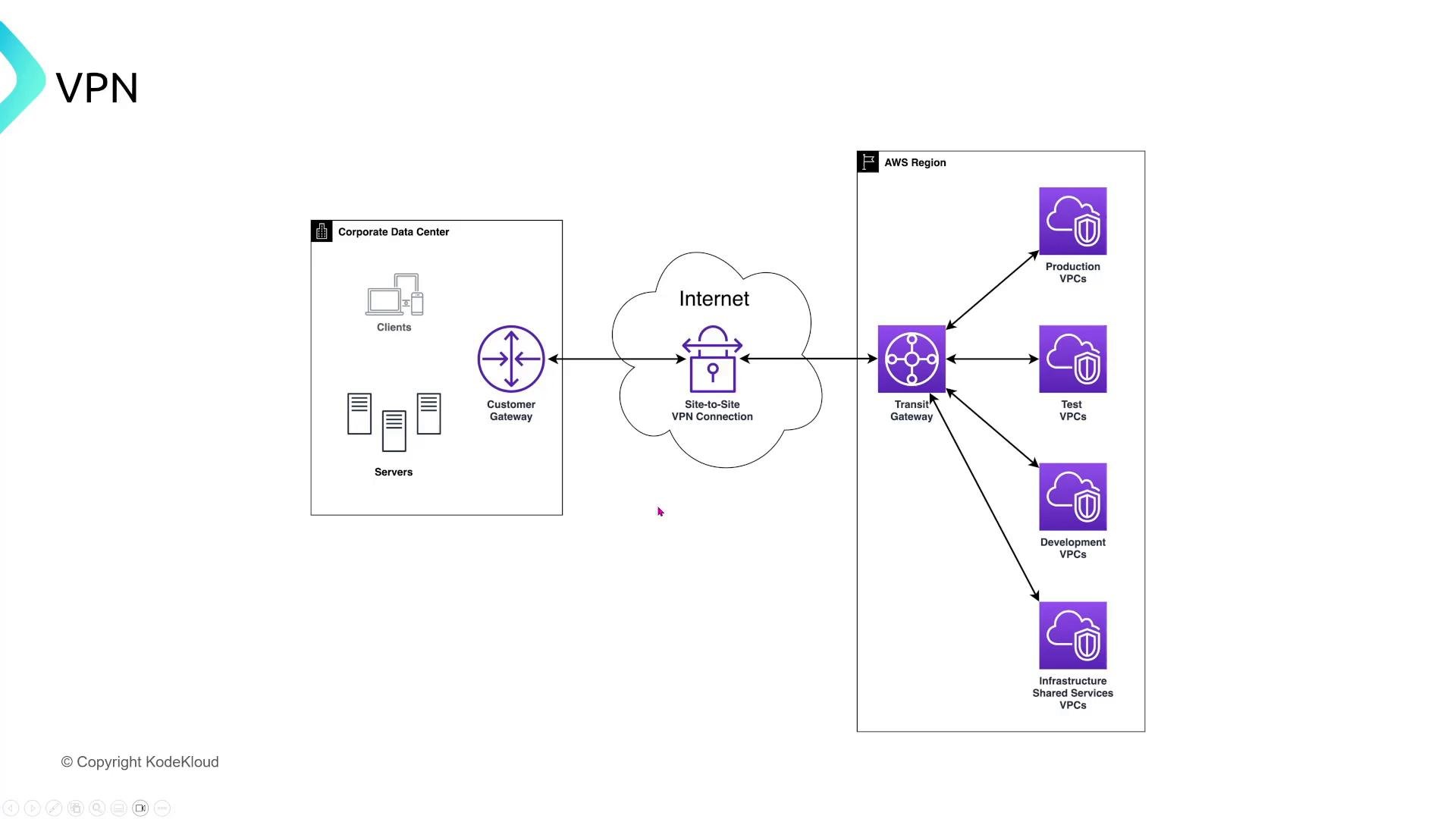
- Secure, encrypted connectivity without dedicated circuits.
- Fast to provision and cost-effective for small-to-medium bandwidth.
Direct Connect (DX) — private dedicated link
Use case- Multinational with heavy, latency-sensitive workloads needing predictable throughput and reduced public internet variability.
- Direct Connect is a dedicated physical/electrical link to AWS that does not traverse the public internet.
- Direct Connect by itself is not necessarily encrypted. Secure options:
- Run a VPN over Direct Connect to provide IPsec encryption.
- Use MACsec (where supported by your Direct Connect provider) for link-layer encryption.
- Typical flow: Customer datacenter → Direct Connect partner/co-location → Direct Connect → AWS (virtual interface to a virtual private gateway or Transit Gateway).
VPC peering — non-transitive, point-to-point
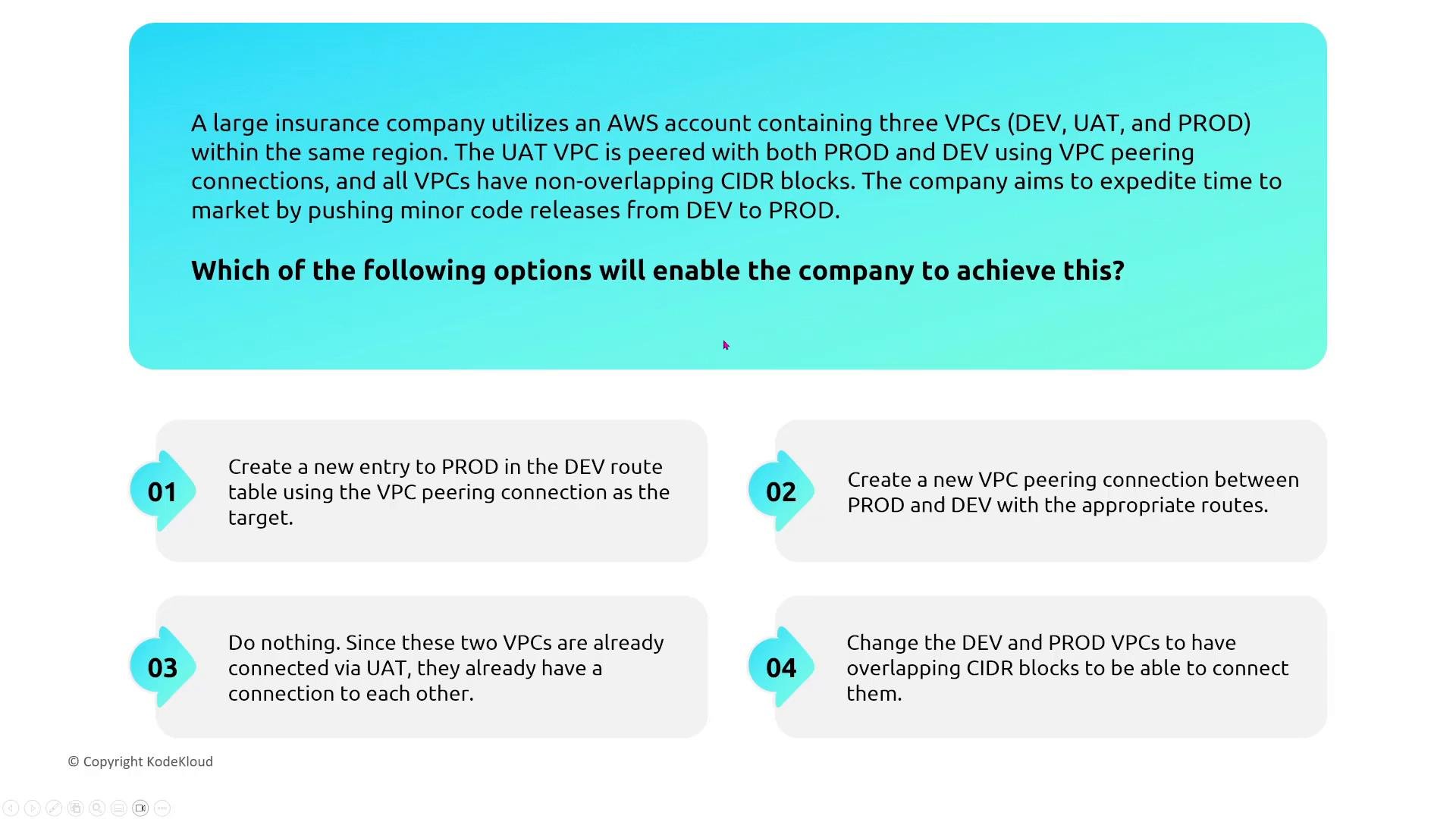
Scenario- Three VPCs (DEV, UAT, PROD) in the same region. UAT is peered with both DEV and PROD. Can DEV talk to PROD via UAT?
- VPC peering is point-to-point and non-transitive. Traffic does not route through a peered VPC to reach a third VPC.
- If DEV must talk to PROD, either:
- Create a direct peering connection between DEV and PROD, or
- Use a Transit Gateway to centralize routing.
Transit Gateway — hub-and-spoke for many VPCs and on-premises
Use case- Organizations with many VPCs or multiple on-premises connections want a simpler, scalable model than a full mesh of VPC peering.
- Centralized routing between VPCs and on-premises networks.
- Route tables and attachments to control which attachments can communicate.
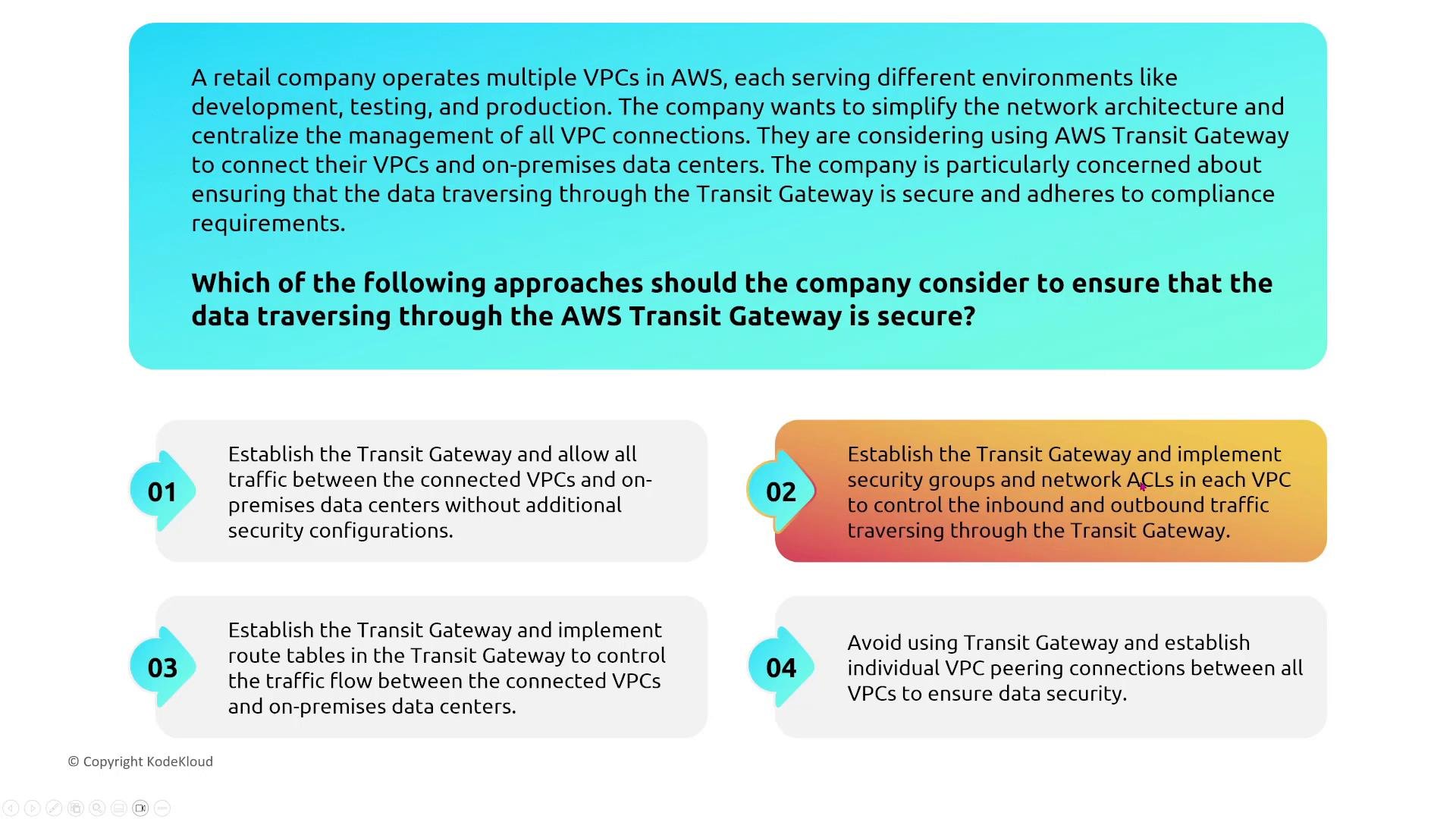
- Transit Gateway centralizes routing but does not automatically inspect or encrypt traffic.
- Retain security at the VPC edge (security groups, NACLs, host-level controls).
- For centralized inspection, place appliances behind a Gateway Load Balancer and route traffic through them.
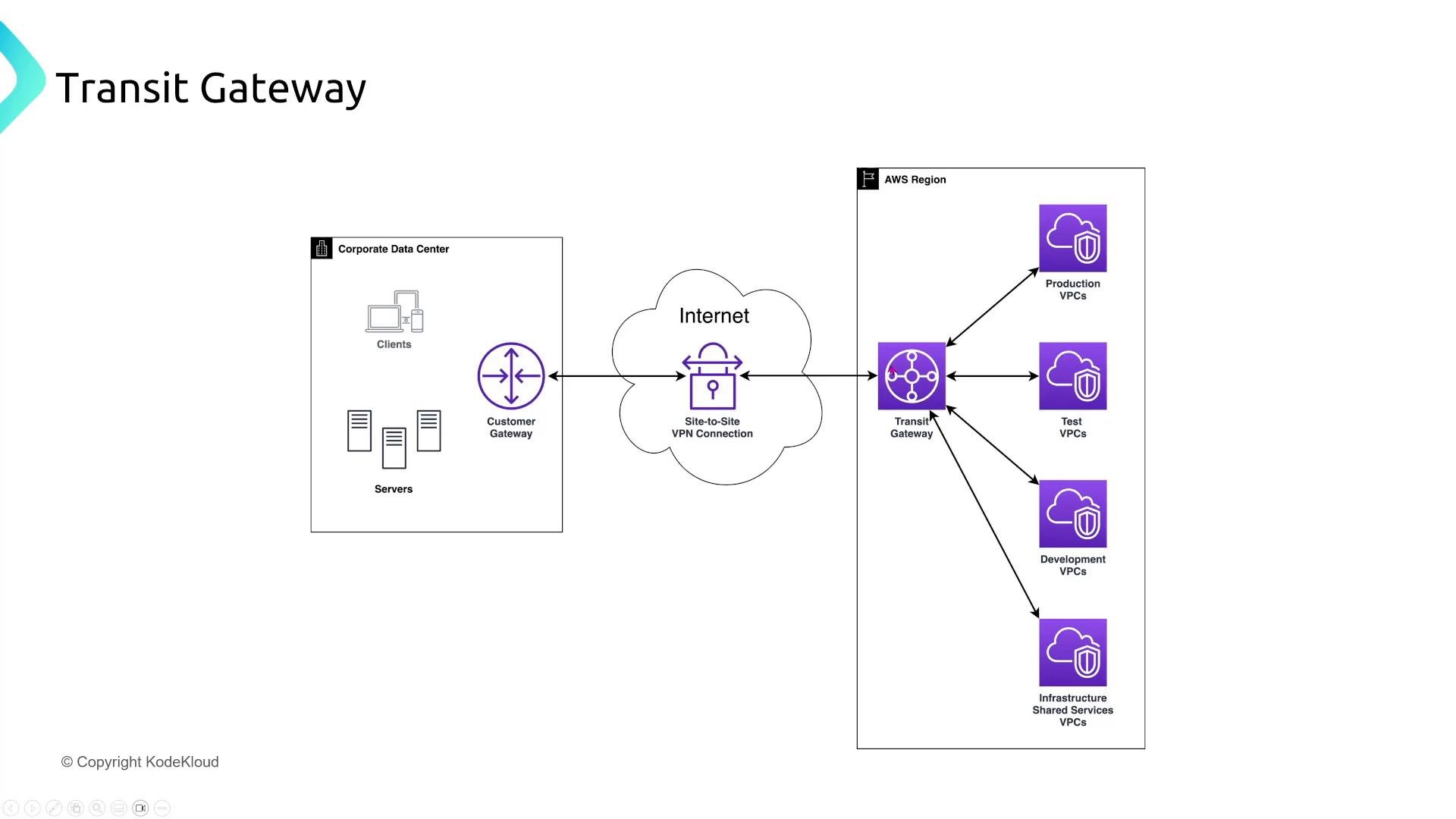
- Use Transit Gateway route tables and attachment-based route propagation to restrict cross-VPC traffic.
- Consider AWS Transit Gateway Network Manager for topology visualization and policy enforcement.
- Combine Transit Gateway with GWLB when inline inspection is required.
VPC Endpoints and PrivateLink
Types- Gateway endpoints (S3, DynamoDB): configured via route table entries; only for S3 and DynamoDB.
- Interface endpoints (PrivateLink): ENIs placed in your subnet(s), representing a private connection to an AWS service or a service in another AWS account.
- Microservice in a VPC needs to access Secrets Manager without leaving the AWS network.
- Create an interface VPC endpoint (PrivateLink) for Secrets Manager.
- Attach a security group to the interface endpoint to restrict which IPs or security groups may connect to it.
- Remember that NACLs are subnet-level and are not directly attached to the endpoint; use security groups to control access to interface endpoints.
- PrivateLink only reaches services that expose an interface endpoint (including cross-account PrivateLink services). It does not provide access to arbitrary Internet-hosted APIs.
- Gateway endpoints are limited to S3 and DynamoDB.
Edge networking — CloudFront protections
CloudFront field-level encryption- Use case: Protect sensitive form fields (for example, credit card numbers) at the edge before data reaches the origin.
- How it works:
- Configure CloudFront with an encryption profile containing the public key.
- Configure your application to indicate which form fields CloudFront should encrypt.
- The viewer-to-edge path is protected with TLS; CloudFront additionally encrypts the configured fields within the request payload so the origin can decrypt with the private key.
- Notes:
- Field-level encryption protects selected application payload fields in transit; server-side encryption and KMS protect data at rest.
- Use KMS and secure key management for origin-side decryption and storage.
- CloudFront Functions:
- Lightweight, sub-millisecond execution at the viewer edge.
- Ideal for header rewrites, redirects, lightweight request/response manipulation.
- Do not embed secrets in code; follow least-privilege principles.
- Lambda@Edge:
- More feature-rich, supports multiple CloudFront event types and longer execution time.
- Use when you need heavier processing near the edge.
- Store secrets in a managed secrets store (Secrets Manager / KMS) rather than code/config.
Deploy CloudFront Functions and Lambda@Edge with minimum privileges. Do not hard-code secrets in functions—use AWS Secrets Manager or KMS and restrict access via IAM roles.
Route 53, DNS security, and Application Recovery Controller
DNS security with Route 53- Recommendations:
- Restrict changes to hosted zones and records via granular IAM policies.
- Enable DNSSEC for your domain registrations and where supported to validate authenticity of DNS responses.
- Use Route 53 Resolver rules to forward queries to on-premises resolvers when centralized resolution is required.
- Do not grant public write access to DNS records.
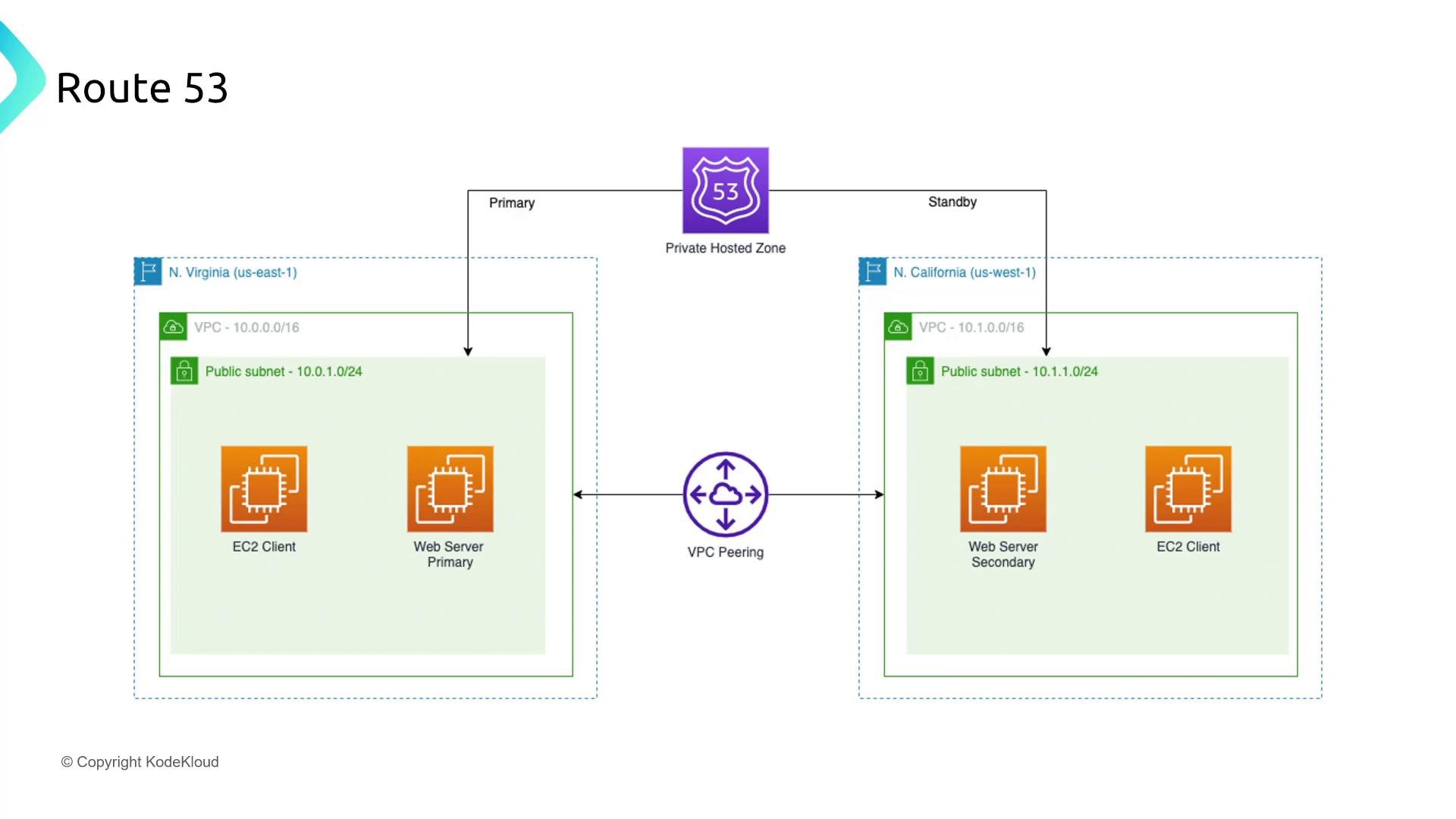
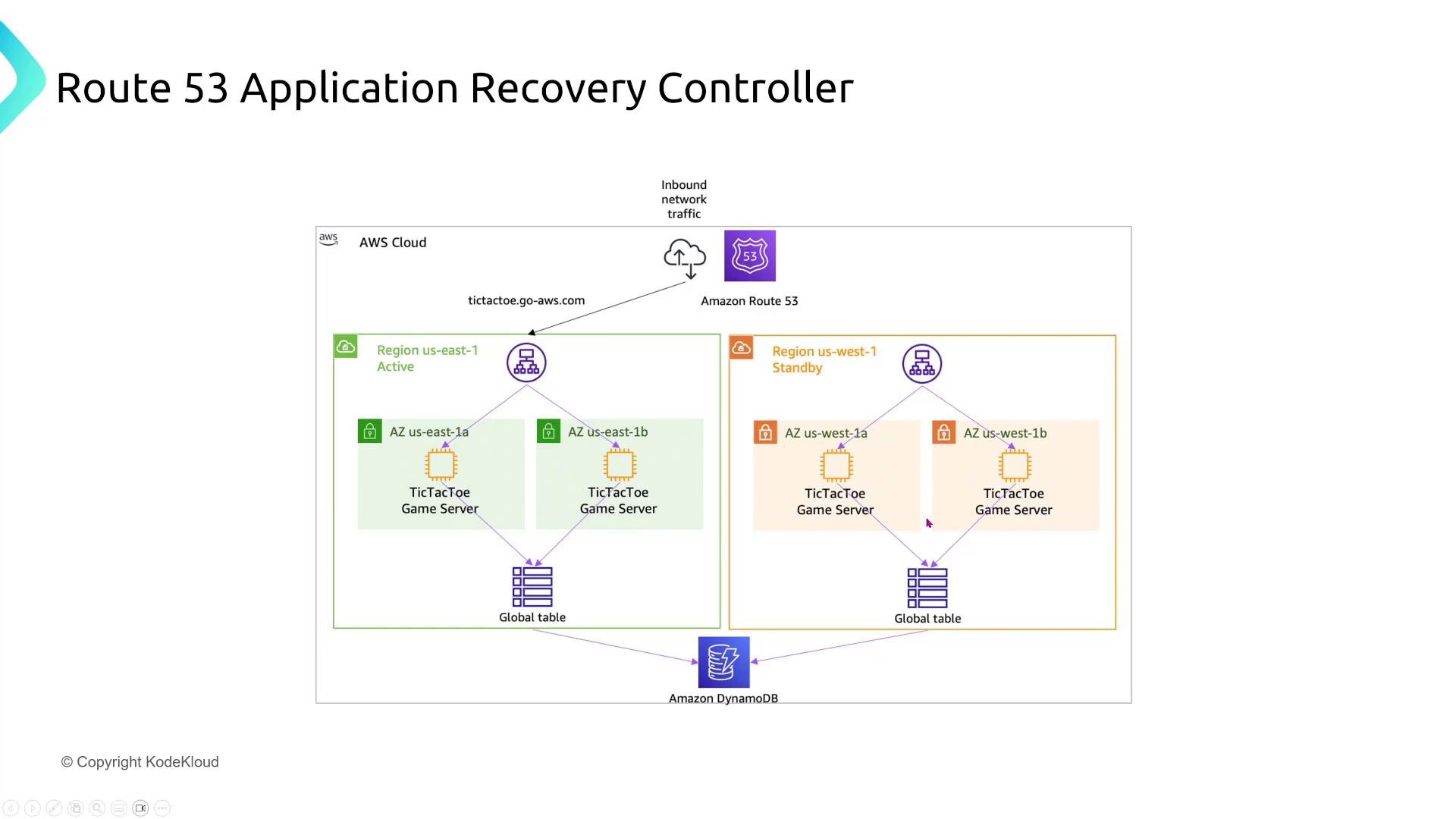
- Use case: Rapidly recover or redirect application traffic during failures; manage readiness checks and recovery groups.
- Recommended approach:
- Implement the Application Recovery Controller to define recovery groups and readiness checks.
- Model component dependencies accurately so recovery actions are safe and predictable.
- Protect recovery operations with least-privilege IAM policies and multi-person approval workflows if required.
Summary & recommended checklist
High-level recommendations- Place controls at the correct layer:
- Load balancer boundary (NLB/ALB) for port/protocol filtering where possible.
- Security groups for stateful, host-level filtering.
- NACLs for stateless, subnet-level filtering and defense-in-depth.
- Encrypt transit based on risk:
- Use Site-to-Site VPN or VPN over Direct Connect for encrypted links.
- Use MACsec and/or VPN on top of Direct Connect where available and required.
- Centralize routing when helpful (Transit Gateway) and centralize inspection with GWLB when inline inspection is required.
- Keep traffic inside AWS with PrivateLink when connecting to AWS services or partner-owned services.
- Protect sensitive application fields at the edge with CloudFront Field-Level Encryption and protect secrets via KMS/Secrets Manager.
- Secure DNS and recovery operations with IAM, DNSSEC, Route 53 Resolver, and Application Recovery Controller.
Links and references
- AWS Network Load Balancer: https://docs.aws.amazon.com/elasticloadbalancing/latest/network/introduction.html
- Gateway Load Balancer: https://docs.aws.amazon.com/vpc/latest/technology/what-is-gwlb.html
- Site-to-Site VPN: https://docs.aws.amazon.com/vpn/latest/s2svpn/what-is-aws-s2s-vpn.html
- AWS Direct Connect: https://docs.aws.amazon.com/directconnect/latest/UserGuide/Welcome.html
- Transit Gateway: https://docs.aws.amazon.com/vpc/latest/tgw/what-is-transit-gateway.html
- VPC Endpoints (PrivateLink): https://docs.aws.amazon.com/vpc/latest/privatelink/what-is-privatelink.html
- CloudFront Field-Level Encryption: https://docs.aws.amazon.com/AmazonCloudFront/latest/DeveloperGuide/field-level-encryption.html
- CloudFront Functions: https://docs.aws.amazon.com/AmazonCloudFront/latest/DeveloperGuide/cloudfront-functions.html
- Lambda@Edge: https://docs.aws.amazon.com/AmazonCloudFront/latest/DeveloperGuide/lambda-at-the-edge.html
- Route 53 DNSSEC: https://docs.aws.amazon.com/Route53/latest/DeveloperGuide/dns-configuring-dnssec.html
- Route 53 Application Recovery Controller: https://docs.aws.amazon.com/recovery/latest/devguide/what-is-application-recovery-controller.html
Thanks for following this lesson on Turning Up Security for Network Services. If you have questions, reach out to michael@goglides.com or in the community forums / Slack.