

AWS Backup
AWS Backup is a managed orchestration service that centralizes and automates backups across many AWS resources. A common pattern is to snapshot or backup resources (for example, EBS volumes), store them in an encrypted backup vault, and then copy those encrypted backups to another account and/or region for resilience. In cross-account, cross-region copy workflows you typically have:- Encrypted snapshots or volumes in the source account.
- A customer-managed KMS key (CMK) protecting the source backups.
- A backup vault in the source account with a cross-account copy job to a destination backup vault.
- A destination CMK in the target account/region that re-encrypts the copied backups.
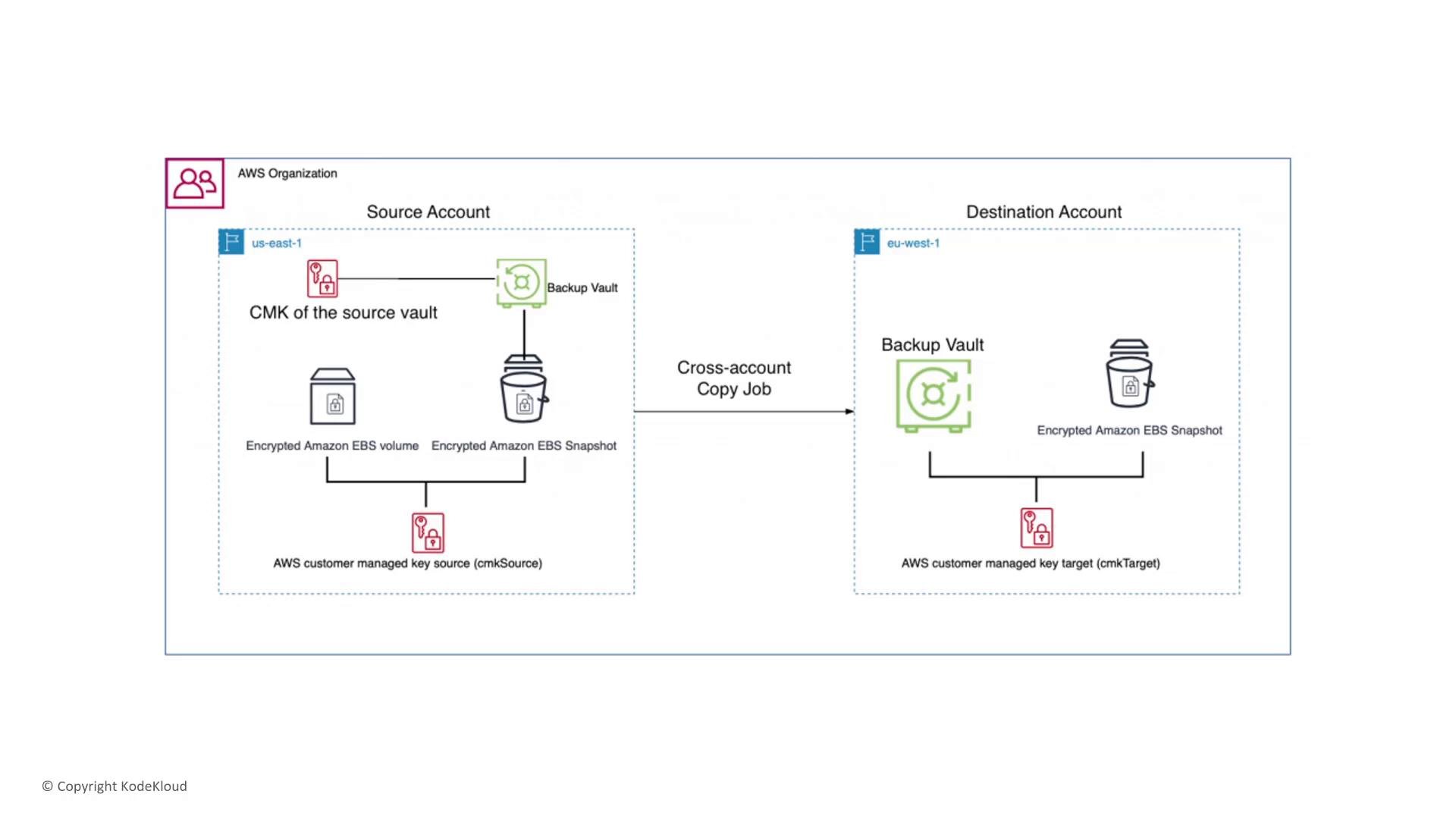
- Encrypt everything that goes into the backup vault. AWS Backup supports customer-managed KMS keys (CMKs) — choose the desired CMK in the backup plan/job encryption settings.
- Beware of S3 default encryption semantics. AWS Backup can use a KMS CMK for backup encryption; the S3 default encryption option (SSE‑S3) uses Amazon S3–managed keys and does not invoke KMS.
- Ensure KMS key policies and IAM policies grant the necessary permissions (Encrypt/Decrypt/Grant) to the backup service and any principals that need to restore.
- Consider layered encryption if needed: encrypt data at the source, and then have AWS Backup re-encrypt the backup with a CMK. This double-encryption pattern can help meet stricter regulatory requirements.
When using customer-managed CMKs for backups, explicitly include AWS Backup (and any cross-account principals) in the CMK key policy. Without correct key policy permissions restores or cross-account copies will fail even if IAM permissions exist.
- Use AWS Backup’s encryption settings when creating the backup plan/job and select the required customer‑managed KMS CMK. Also ensure the CMK key policy grants AWS Backup and any required principals access.
Vault Lock vs. Legal Hold in AWS Backup
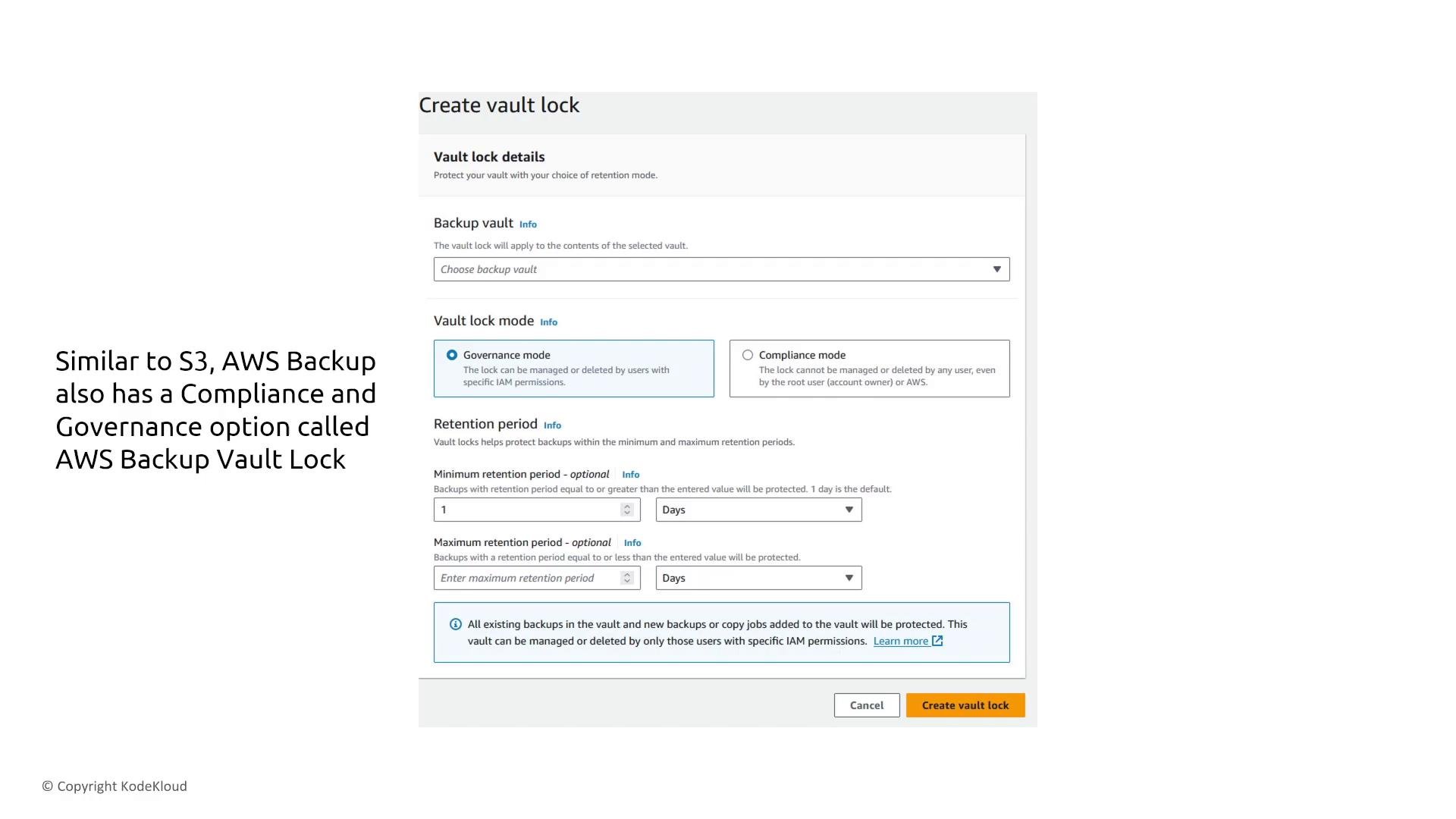
AWS Backup supports two mechanisms to protect backups from deletion or modification for a retention period:- Vault Lock: applies to a single backup vault (analogous to S3 Object Lock with Governance and Compliance modes).
- Legal Hold: can apply across multiple vaults/resources in AWS Backup to preserve backups for a compliance/legal preservation requirement.
- Use Vault Lock to immutably lock contents of a single vault for a set retention policy.
- Use Legal Hold when you must preserve a set of backups across multiple vaults or resources (for example, when a legal preservation notice spans many backups).
Private connectivity to AWS Backup
For stricter privacy of both backup control plane and data plane traffic between your VPC and AWS Backup, use a VPC interface endpoint (AWS PrivateLink). Interface endpoints provision an ENI in your subnet so traffic remains on the AWS network and does not traverse the public internet.Use a VPC interface endpoint (AWS PrivateLink) for AWS Backup to ensure backup traffic between your VPC and the service stays on the AWS network. Only S3 and DynamoDB support gateway endpoints; most other AWS services require interface endpoints.
Disaster recovery — AWS Elastic Disaster Recovery (CloudEndure)
AWS Elastic Disaster Recovery (formerly CloudEndure) provides continuous, block-level replication from on‑premises or other clouds into AWS. Core components:- Agents on source machines capture block changes and send them to replication servers.
- Replication servers convert and stage replicated blocks into EBS volumes (staging area).
- A staging area exists in your AWS account (staged EBS volumes inside your VPC).
- Recovery instances (EC2) are launched from replicated/staged volumes during failover.
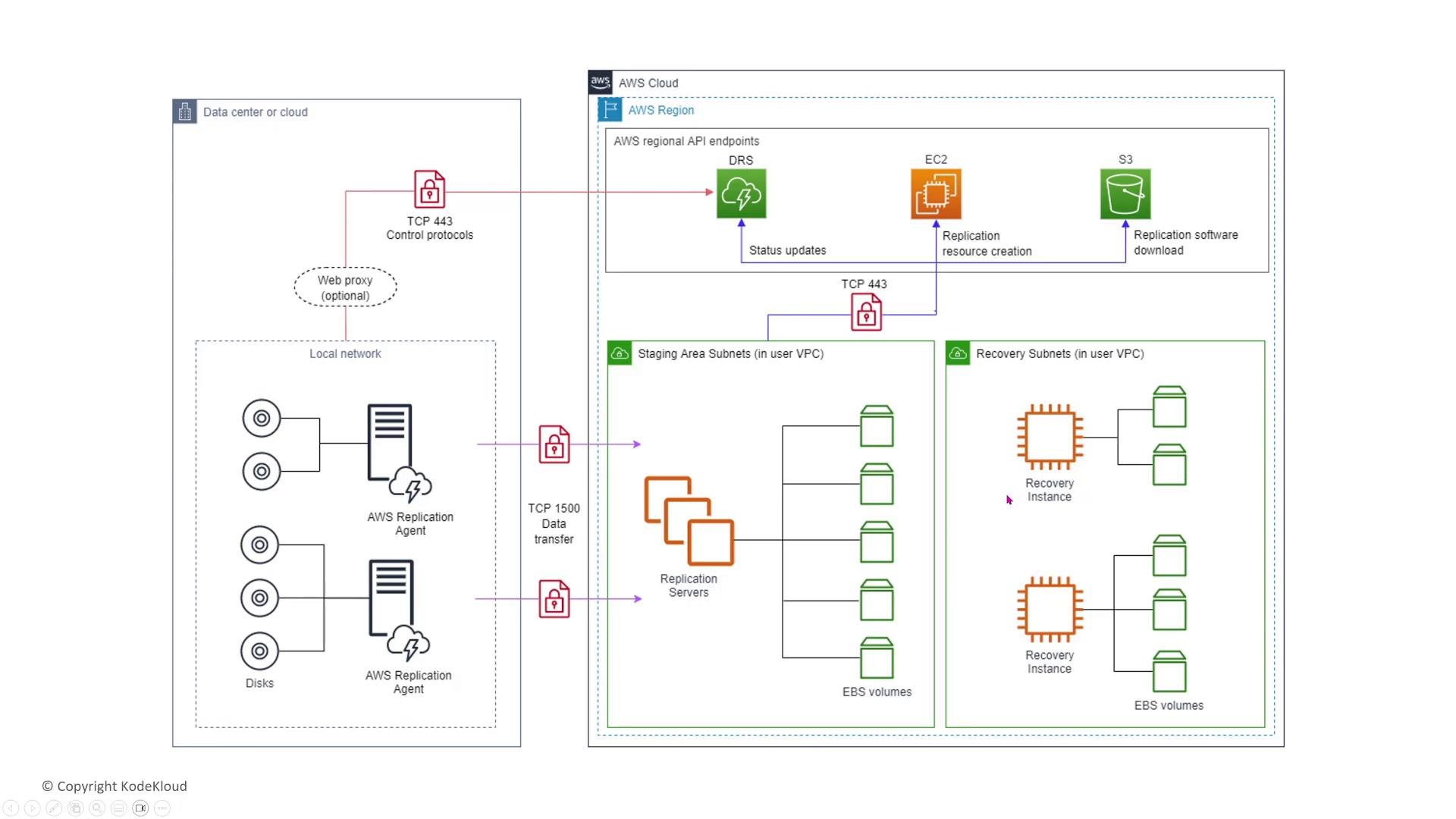
- Data in transit between agents, replication servers, and AWS is encrypted (TLS).
- For predictable bandwidth and private connectivity consider AWS Direct Connect. On the AWS side, ensure IAM and resource permissions are narrowly scoped and audited.
- Automate, document and test recovery and failback procedures regularly — recoverability is validated by DR exercises, not by backups alone.
- Failover: activating the recovery environment (secondary).
- Failback: returning operations from the recovery environment back to the primary after validation.
Storage Gateway family
AWS Storage Gateway provides several gateway types that bridge on‑premises environments with AWS storage services. The main modes are:S3 File Gateway (File Gateway)
- Exposes S3 buckets as file shares using NFS or SMB. Existing applications can read/write files as if on a traditional file system while objects are stored in S3.
- Encryption in transit and at rest is supported and should be enabled.
- Local caching can be configured for low-latency access to frequently used files.
- Yes — S3 File Gateway provides NFS/SMB mounts and integrates with existing applications. It supports encryption and local caching to optimize access.
FSx File Gateway
FSx File Gateway enables on‑premises clients to mount an FSx for Windows File Server share via a local gateway that caches data. Typical architecture includes SMB clients, Active Directory, DNS/NTP, a gateway VM (OS/metadata + cache), and FSx in the cloud.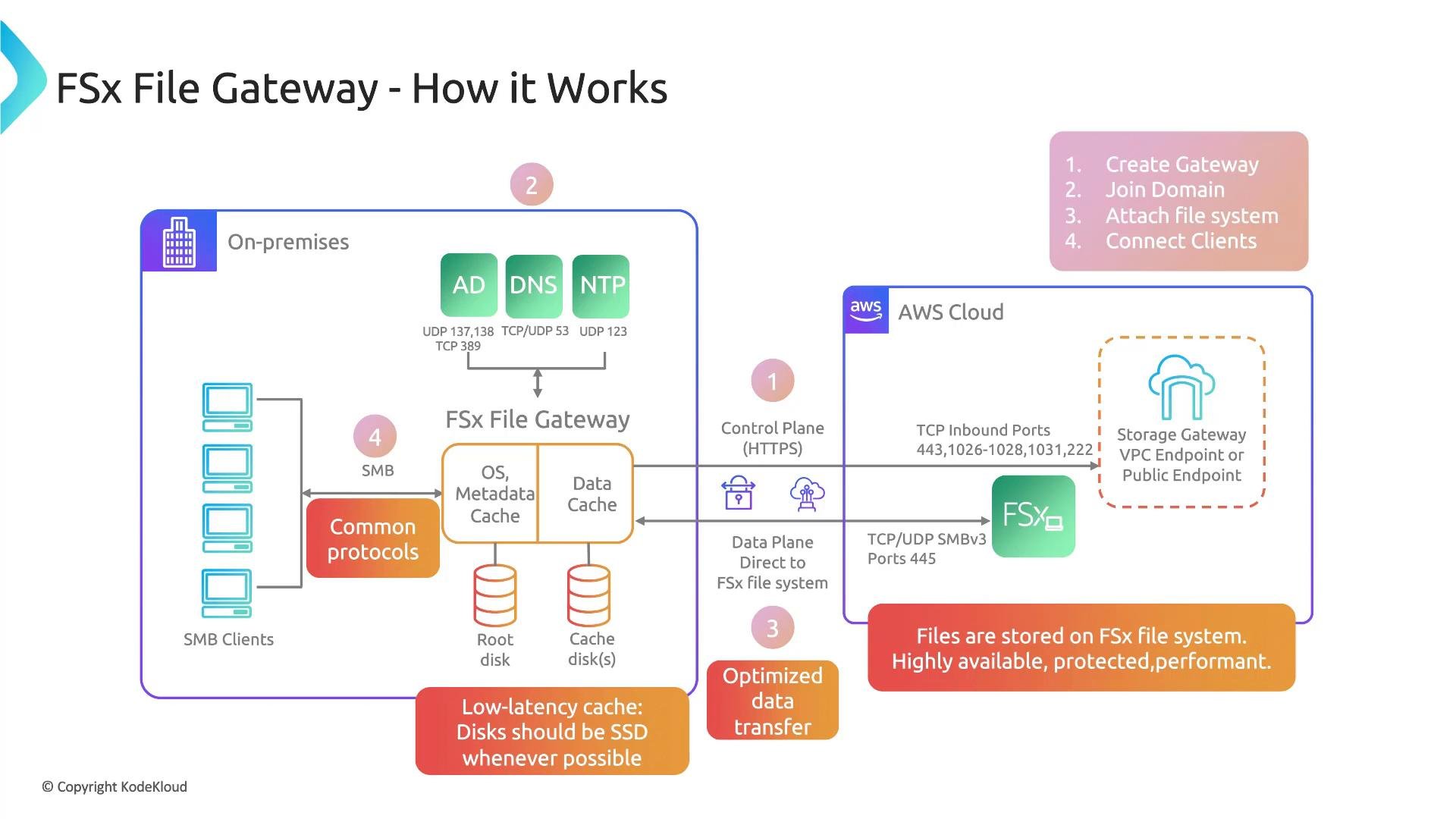
- FSx File Gateway typically requires Active Directory integration for authentication and access controls.
- Use fast local SSDs in the gateway appliance to improve caching performance.
- Traffic between the on‑prem gateway and AWS is encrypted; consider using VPC interface endpoints for control plane interactions where applicable.
Tape Gateway (Virtual Tape Library)
Tape Gateway provides a VTL interface to legacy backup applications. It exposes virtual tape drives and a media changer to backup software via iSCSI; the gateway stores virtual tapes in S3 and can archive them to S3 Glacier or Glacier Deep Archive based on lifecycle rules.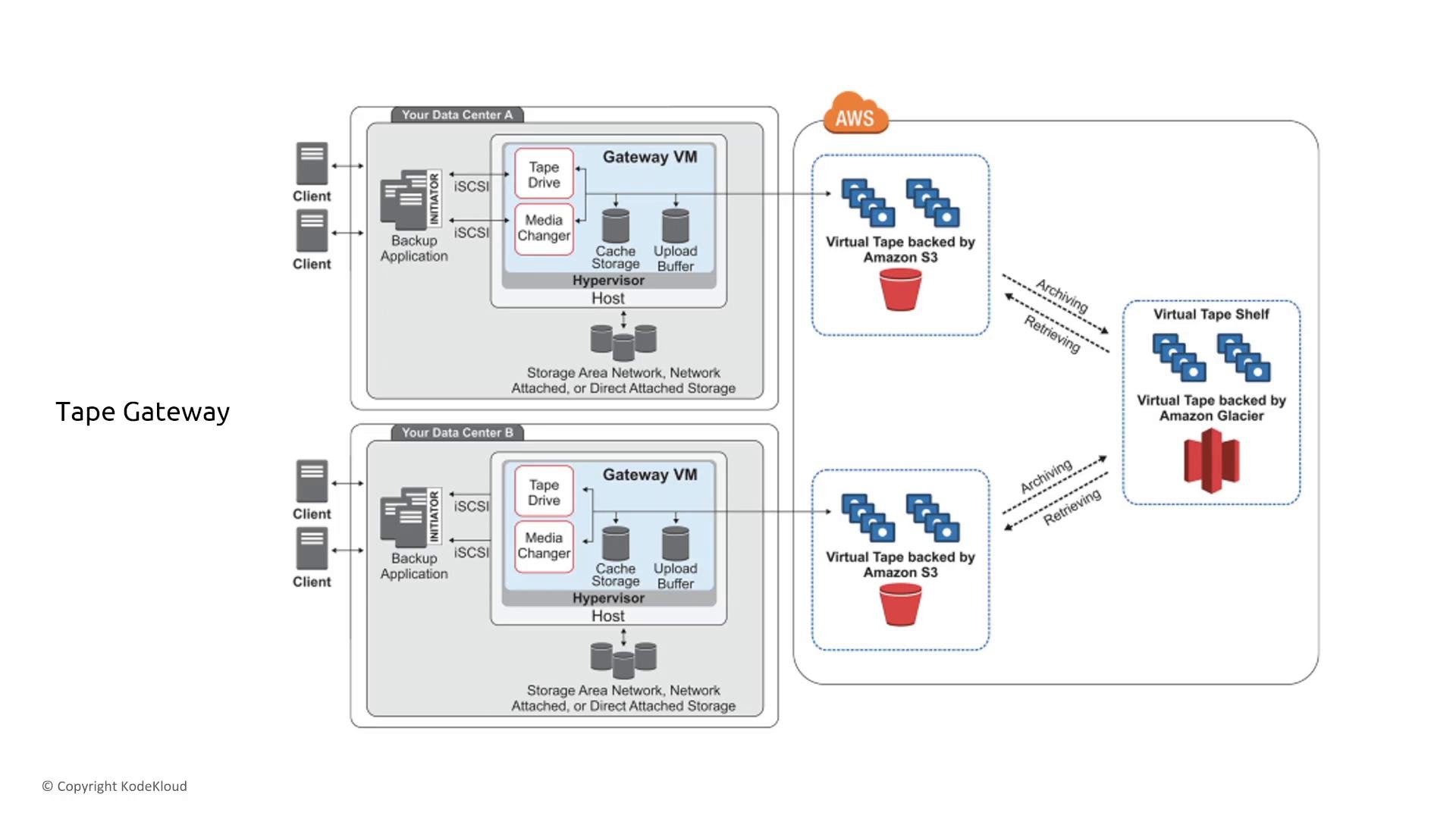
- Tape Gateway allows reuse of existing tape-based backup software without changing workflows.
- Virtual tapes are stored in S3 and can be archived to Glacier classes as required by retention policies.
- Tape Gateway reduces the operational overhead of physical tape libraries while enabling lifecycle management.
Volume Gateway (Stored mode vs. Cached mode)
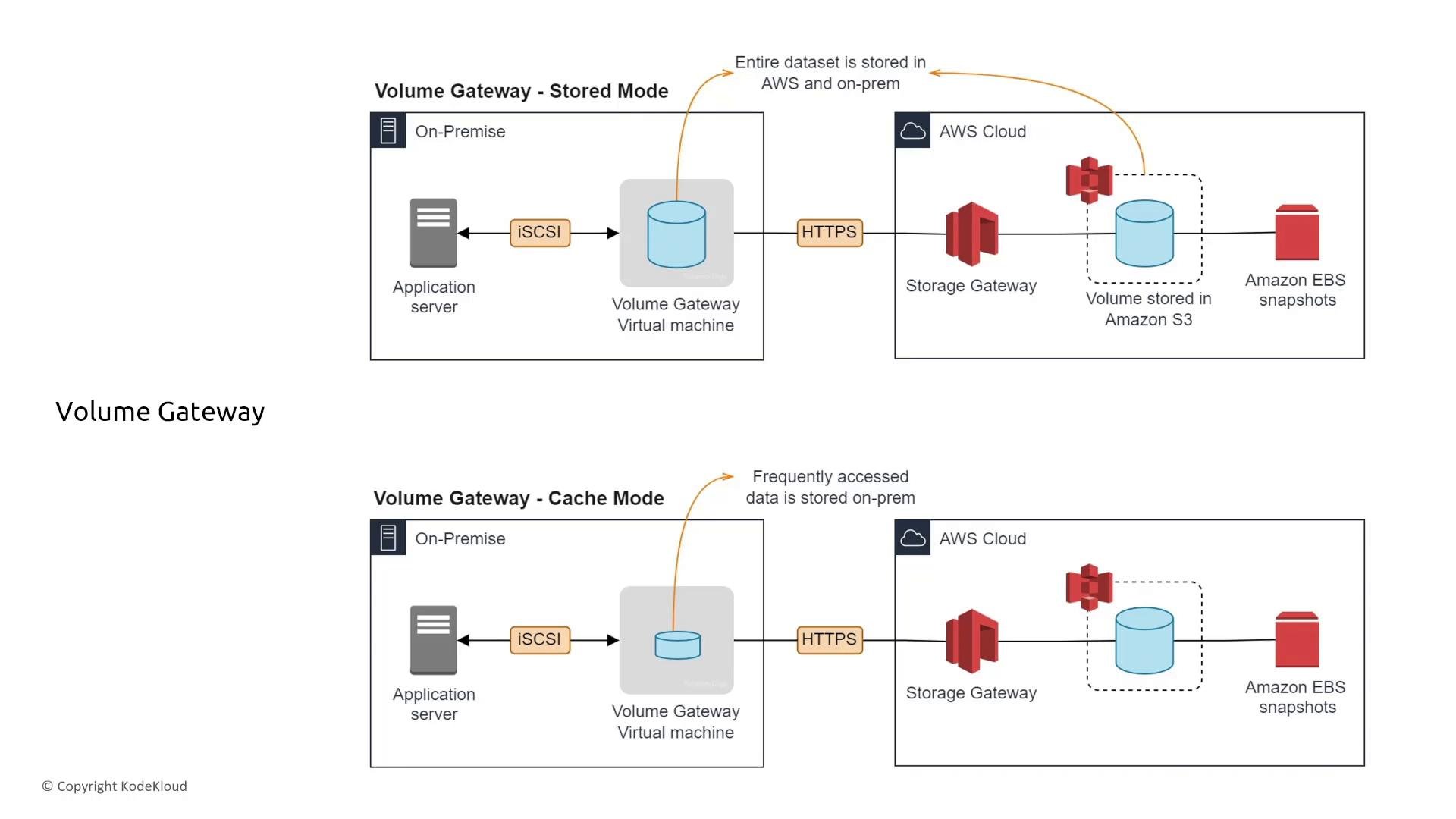
Volume Gateway presents cloud-backed iSCSI block storage to on‑premises applications. Two primary modes:- Stored Volumes: the entire dataset is kept locally on the gateway for fast local reads. Snapshots are taken and stored in AWS (EBS snapshots in S3).
- Cached Volumes: the primary data resides in AWS while the gateway caches frequently accessed blocks locally for low-latency access. Useful where on‑premises capacity is limited and only “hot” data should be local.
- Data is encrypted in transit and at rest by default; validate encryption settings during deployment.
- Select Stored mode when full local datasets and fast local reads are required; choose Cached mode to offload capacity to AWS while keeping performance-sensitive blocks locally.
- Verify current limits (volume sizes, number of volumes, throughput) in the AWS Storage Gateway documentation as quotas can change.
Summary — practical checklist
This lesson focused on storage manipulation services: backup orchestration, replication/disaster recovery, and storage gateway variants. Newer AWS storage services generally enable encryption and logging by default, but your responsibilities include:- Choose appropriate KMS keys. Use customer-managed CMKs when policy or compliance requires it, and ensure the CMK key policy includes the necessary service and cross-account principals.
- Configure retention and immutability controls (Vault Lock vs Legal Hold) according to legal/compliance requirements.
- Ensure private connectivity when required (VPC interface endpoints or Direct Connect).
- Limit and monitor who can perform backup/restore and recovery actions using least privilege IAM, and log all such actions in CloudTrail.
- Detect and audit: enable CloudTrail, AWS Config, and CloudWatch. Use AWS Config rules and alerts to track changes to backup/restore configuration.
- Validate recoverability: automate and run periodic restore/failover tests, and document failback procedures.
- AWS Backup Documentation
- AWS Elastic Disaster Recovery (CloudEndure)
- AWS Storage Gateway Documentation