Future AWS Solutions Architects, This lesson shows how to design for reliability for compute services, with a focus on Amazon EC2 (Elastic Compute Cloud). Unlike highly managed services (for example, AWS Lambda), EC2 places more of the resiliency burden on you: you manage the guest OS, instance configuration, and much of the application stack. This guide covers patterns, AWS features, and operational practices to make EC2-based systems resilient and recoverable.
EC2 reliability is a combination of architecture (multi-instance, multi-AZ), automated recovery (Auto Scaling, Auto Recovery), and operational practices (AMIs, Image Builder, monitoring, and change management). Use the patterns in this article to reduce recovery time objectives (RTO) and increase overall availability.
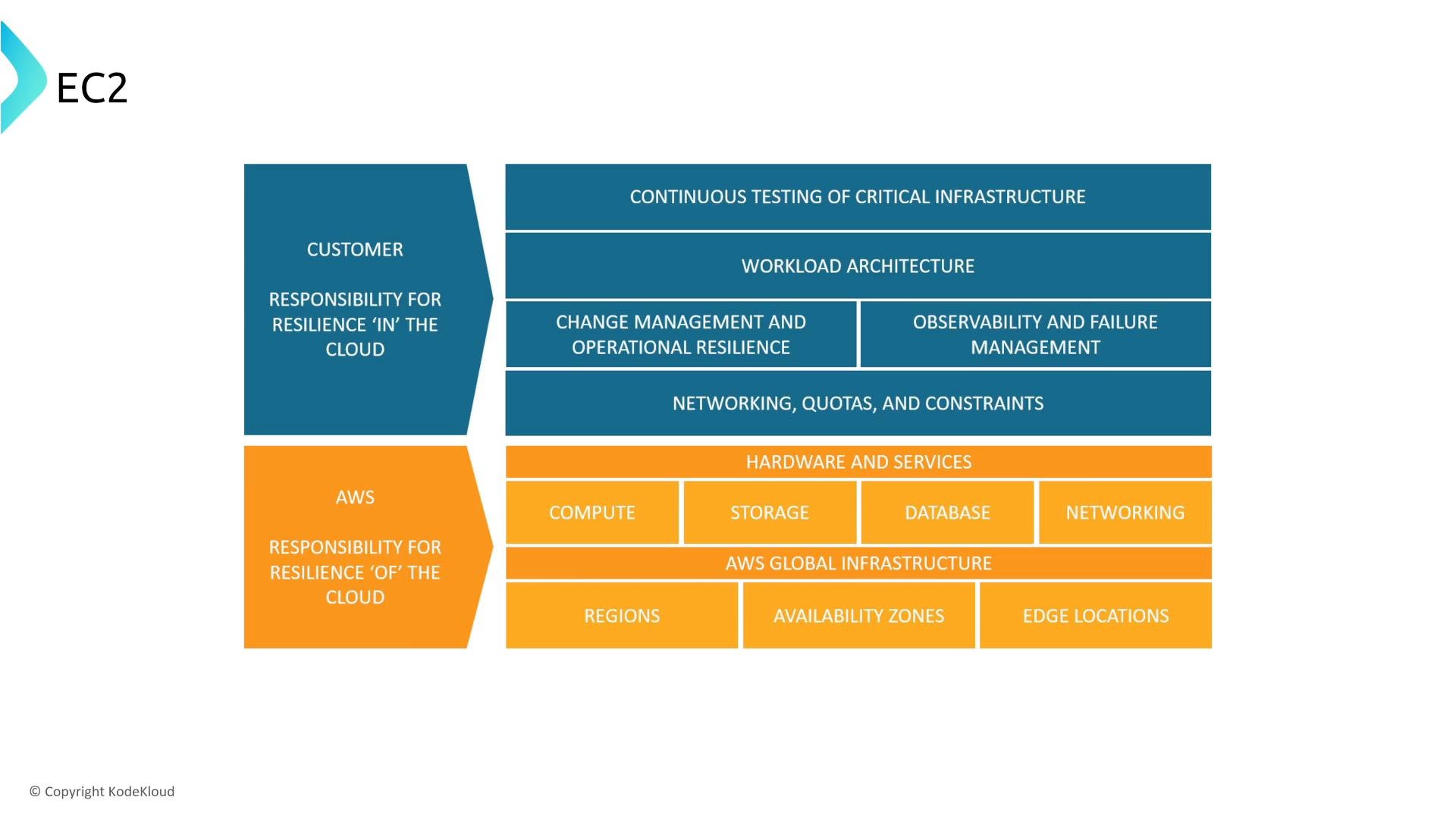
A layered EC2 diagram illustrating shared responsibility for cloud resilience, with blue blocks for the customer's responsibilities (continuous testing, workload architecture, observability, change management, networking) and orange blocks for AWS responsibilities (hardware/services, compute, storage, database, networking, regions/availability zones/edge locations).
Shared-responsibility examples
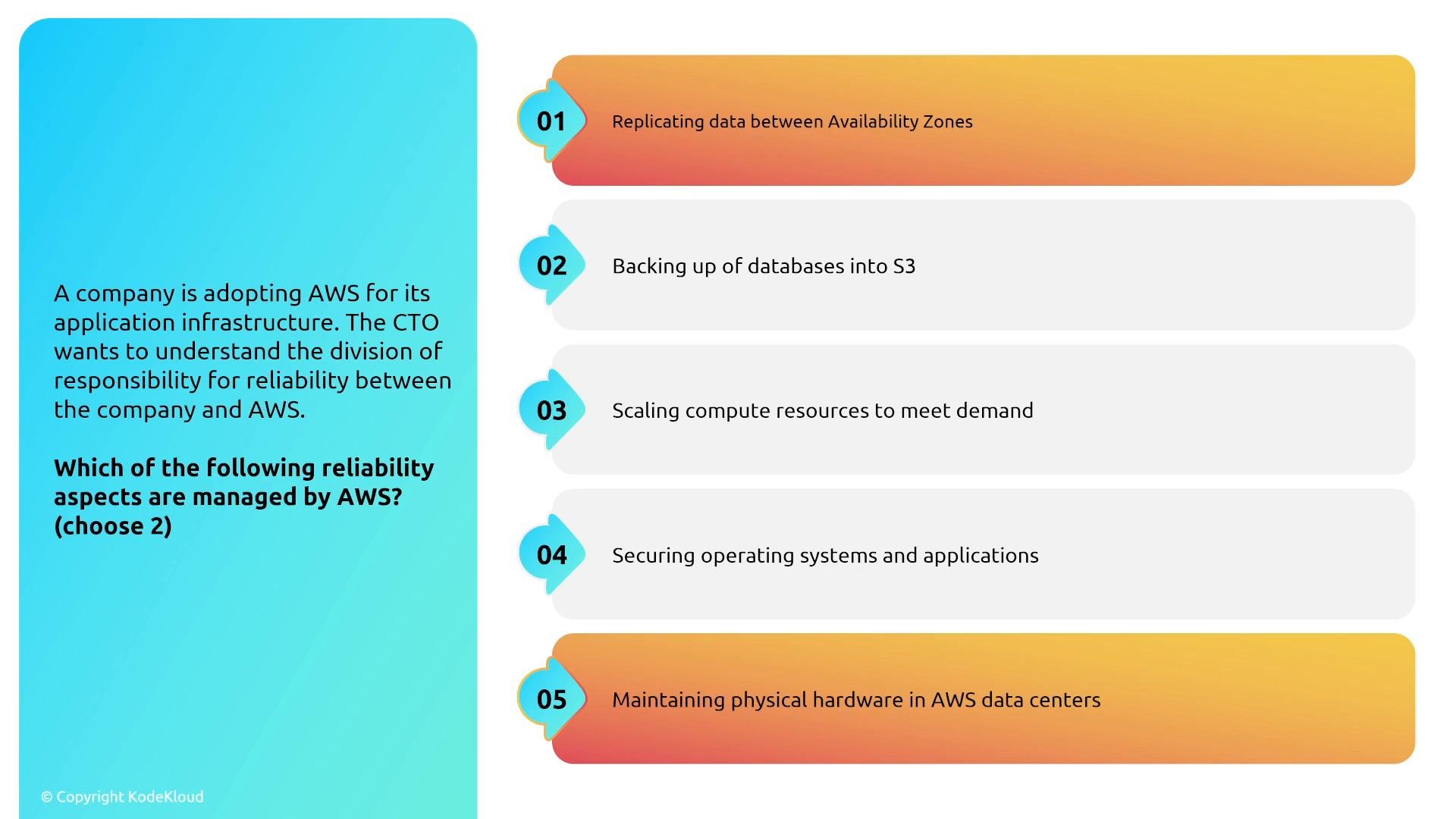
A slide showing a question about the division of reliability responsibility between a company and AWS, asking "Which of the following reliability aspects are managed by AWS? (choose 2)". It lists five numbered options: replicating data between Availability Zones; backing up databases to S3; scaling compute resources; securing operating systems and applications; and maintaining physical hardware in AWS data centers.
Note on operating systems
If you can log in to the VM (EC2, EMR, RDS Custom), you are responsible for patching, securing, and monitoring the guest OS and any software you run. For managed services where you cannot log in (standard RDS, Lambda), AWS handles the underlying OS and host infrastructure.

Designing resilient EC2 deployments

Many resilient architectures combine EC2 with managed services such as Elastic Load Balancing and Auto Scaling. When focusing on EC2 itself, the core patterns are:
  • Run multiple instances (Auto Scaling across AZs) to avoid a single instance failure.
  • Use Auto Recovery for impaired instances when supported (EBS-backed in a VPC) to keep the same instance ID and private IP.
  • Prefer immutable infrastructure: build and bake AMIs, replace instances instead of patching them in-place.
  • Use Fast Snapshot Restore for faster EBS boot and improved I/O performance from restored snapshots in specific Availability Zones.
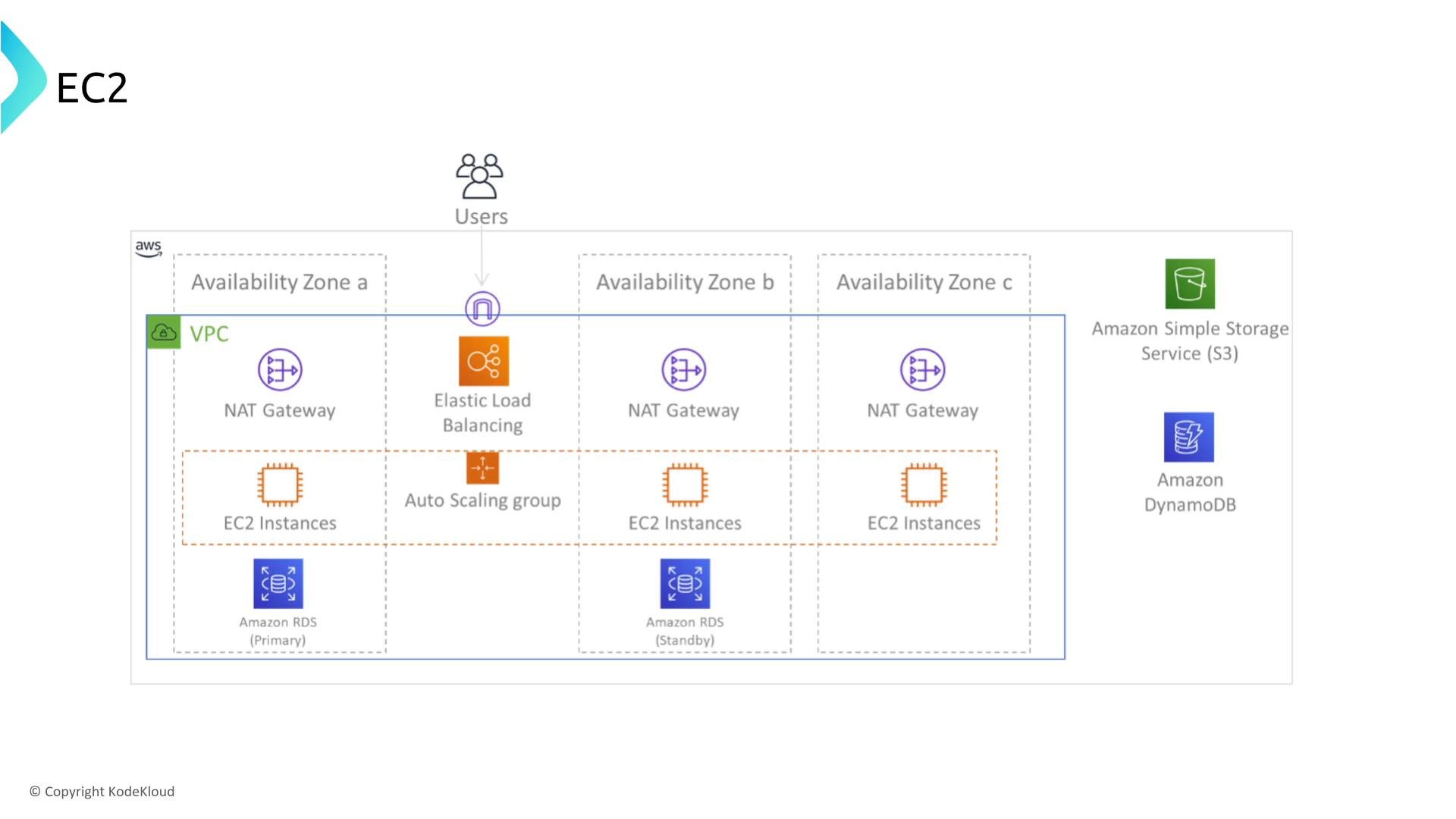
An AWS architecture diagram showing an EC2 deployment inside a VPC across three Availability Zones with an Elastic Load Balancer, NAT gateways, an Auto Scaling group and EC2 instances. It also shows Amazon RDS (primary/standby) and external services Amazon S3 and DynamoDB.
Fast recovery techniques
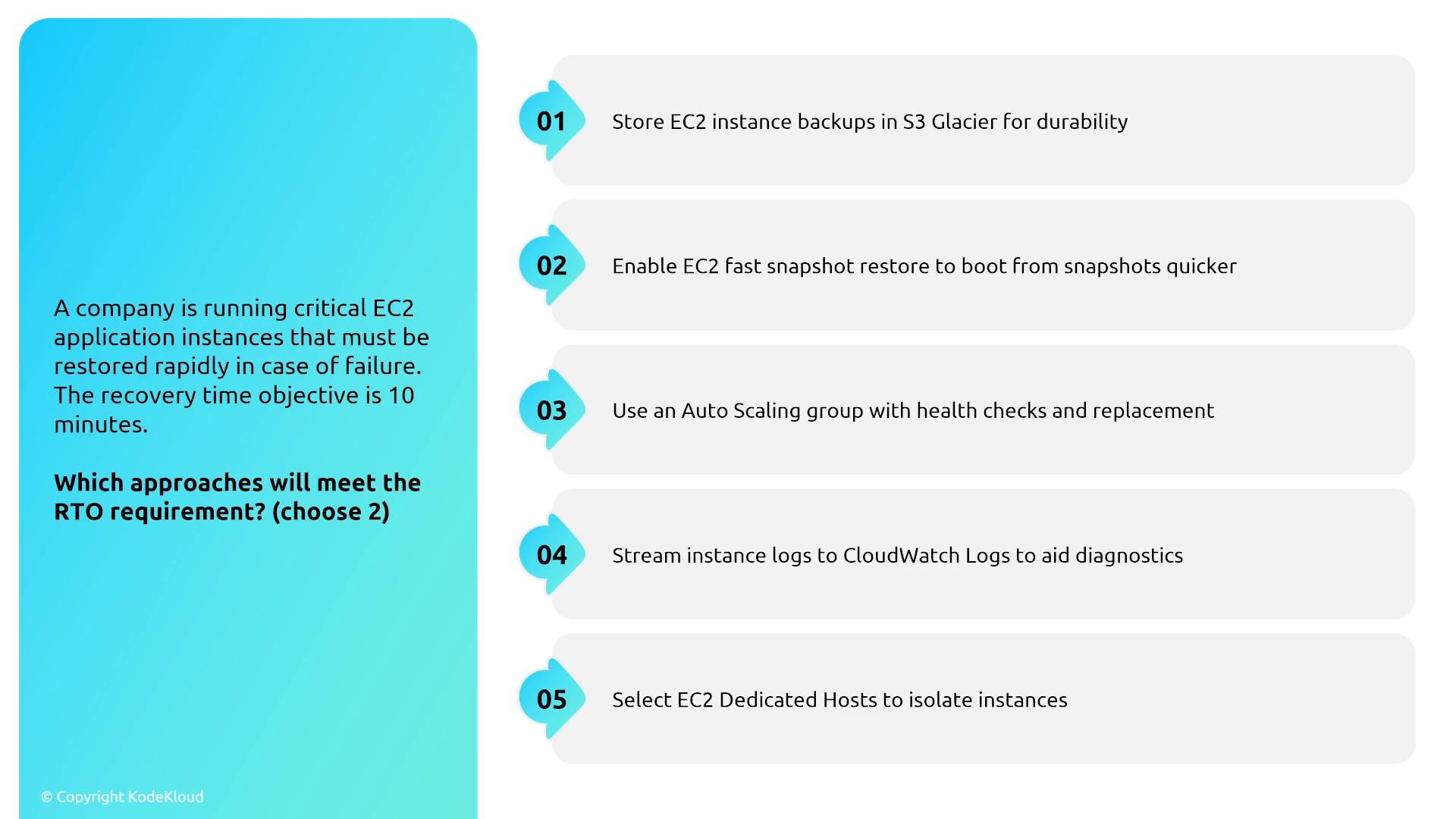
  • Auto Scaling groups (ASG) replace failed instances automatically. Even a single-instance ASG can keep a service available by launching a replacement.
  • EC2 Auto Recovery attempts to recover impaired instances; when recovery works, instance IDs and private IPs remain unchanged.
  • Enable EC2 Fast Snapshot Restore (FSR) for boot snapshots in AZs where you will restore frequently — this reduces boot and I/O latency compared with standard snapshot restores.
  • Immutable infrastructure and baked AMIs: create tested AMIs and launch new instances rather than performing complex boot-time configuration.
Example: create a simple Auto Scaling group (CLI example)
A slide shows a question about restoring critical EC2 application instances with a 10-minute RTO. The right side lists five numbered options (S3 Glacier backups, EC2 Fast Snapshot Restore, Auto Scaling with health checks, streaming logs to CloudWatch, and using Dedicated Hosts).
Practical tip: If you run stateful services on EC2 (for example Jenkins), put the server in a one-instance Auto Scaling group and store build artifacts/workspaces on a shared network file system (Amazon EFS). A replacement instance can quickly remount the same filesystem and resume service.

Loose coupling and queues

Buffering and message-driven design decouple request arrival from processing, improving resilience:
  • Synchronous decoupling: load balancers and timeouts — a client waits for a response.
  • Asynchronous decoupling: queues (SQS) and topics (SNS) — allow fire-and-forget or deferred processing.
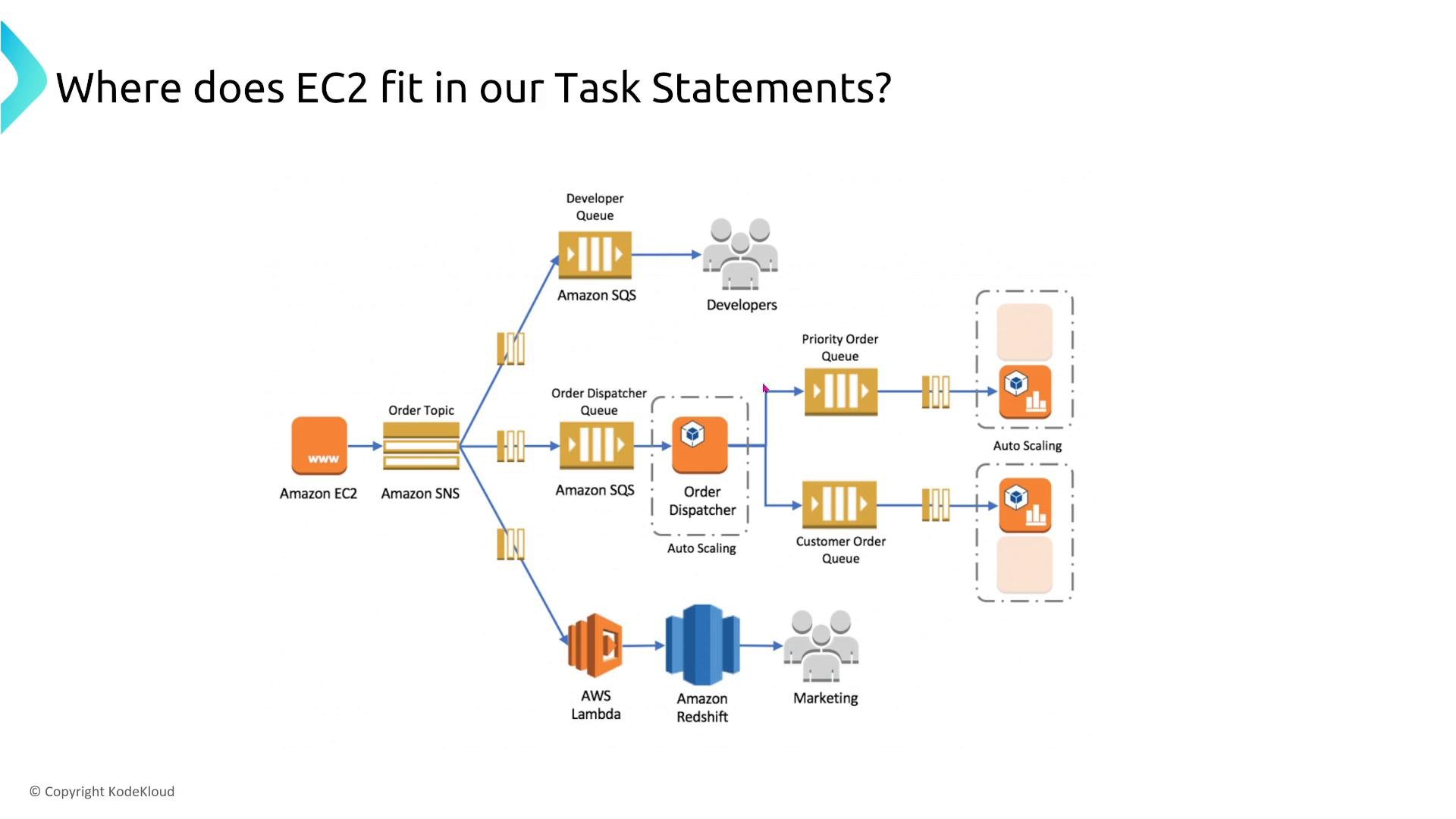
A cloud architecture diagram showing how Amazon EC2 fits into a messaging workflow with Amazon SNS, SQS queues, Lambda, Redshift and auto-scaled EC2 instances. It illustrates order dispatch, developer/customer queues, and downstream processing for developers and marketing.
Example: video processing pipeline
  • Upload → S3 generates a notification (SNS/S3 event) and sends a message to SQS.
  • EC2 workers pull messages from SQS to process videos.
  • Resiliency considerations:
    • Make processing idempotent — record message IDs or processing markers in a database so retries don’t produce duplicate results.
    • Use SQS visibility timeouts and dead-letter queues (DLQs) to avoid stuck or poison messages.
    • Autoscale worker fleet based on queue depth with CloudWatch metrics.
    • Use SNS to fan-out notifications to multiple SQS queues to support parallel processing or different consumers.
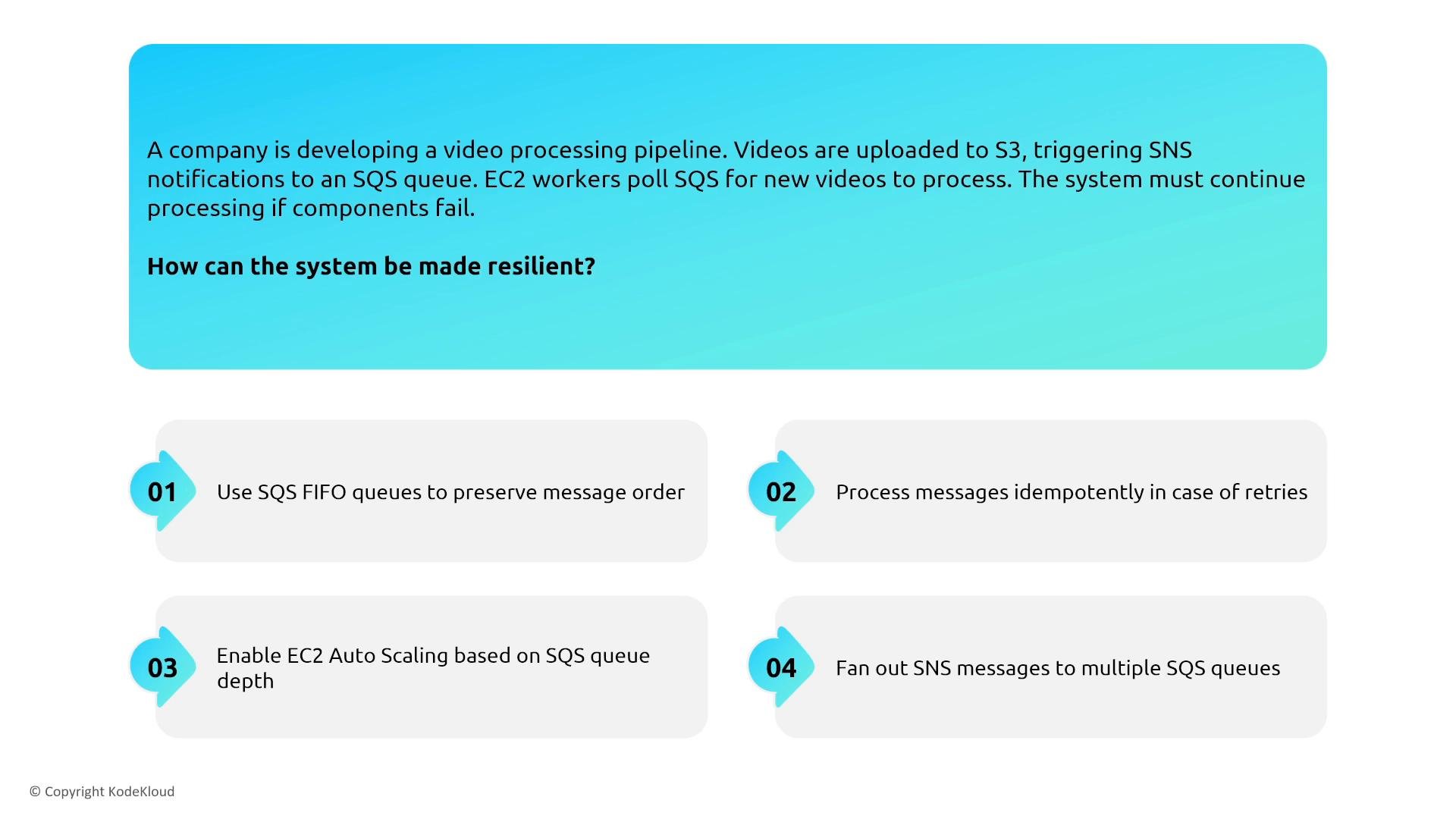
A slide showing an AWS video-processing pipeline scenario (S3 → SNS → SQS → EC2 workers) and asking how to make it resilient. It lists four recommendations: use SQS FIFO, make processing idempotent, enable EC2 autoscaling based on queue depth, and fan out SNS messages to multiple SQS queues.
Idempotency is an application-level change but is essential for retry-safe processing when using SQS and EC2 workers.

Image Builder, Launch Templates, and Auto Scaling refresh

  • EC2 Image Builder automates AMI creation and testing as part of a repeatable pipeline.
  • Integrate Image Builder with SNS/Lambda to automate launch template versioning and trigger Auto Scaling instance refreshes.
  • Use Launch Templates with parameters and overrides to ensure consistent instance configurations across environments.
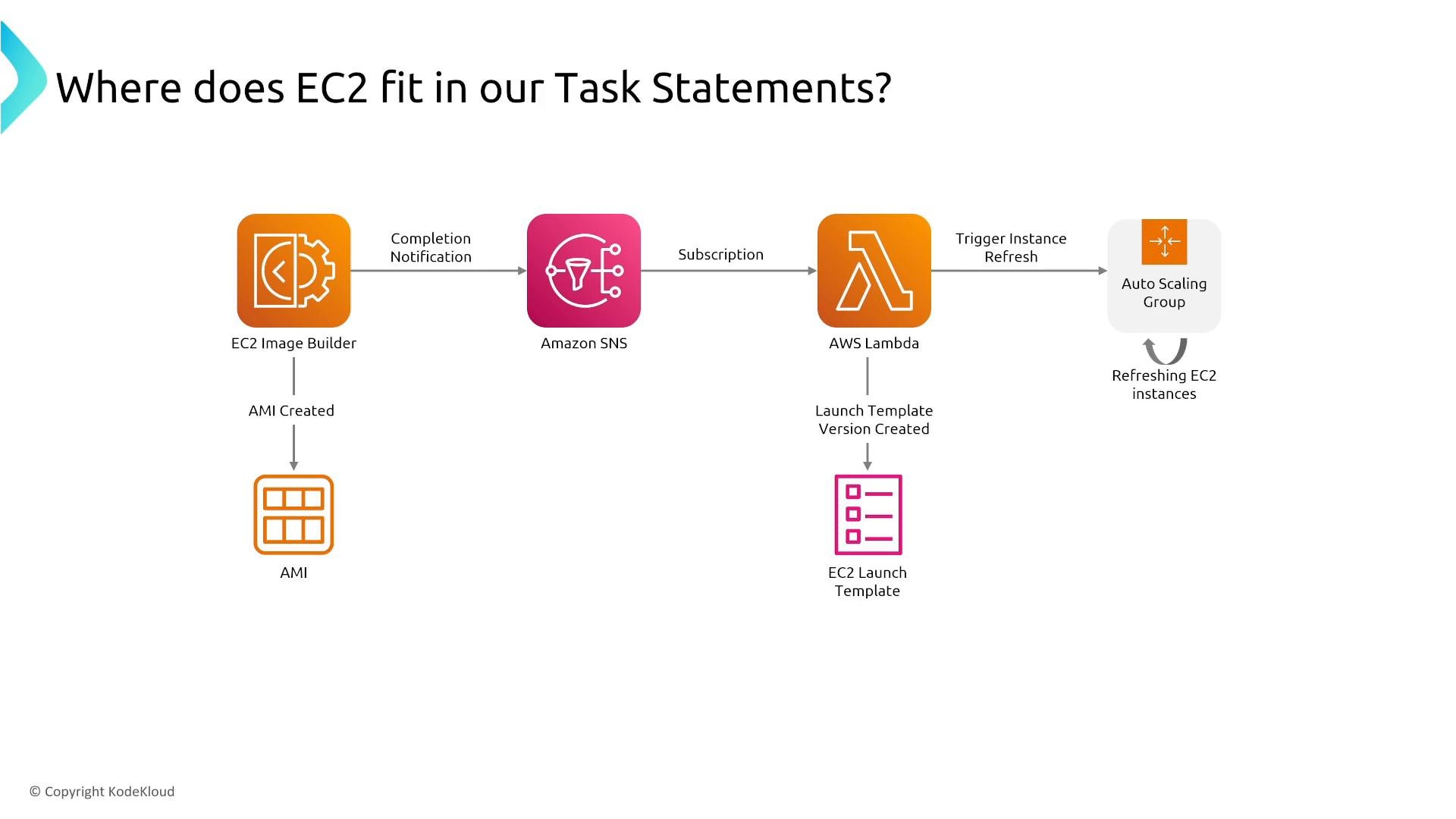
An AWS architecture diagram showing EC2 Image Builder creating an AMI, sending a completion notification to Amazon SNS, which triggers an AWS Lambda. The Lambda creates an EC2 launch template version and tells an Auto Scaling Group to refresh EC2 instances.

Consistent EC2 deployments across environments

Best practices for predictable deployments:
  • Use EC2 Launch Templates and parameterize differences (instance type, user data overrides).
  • Automate AMI copying across accounts and regions as part of your release pipeline.
  • Prefer baked AMIs for fast, predictable boot behavior; use instance user data for light bootstrap tasks only.
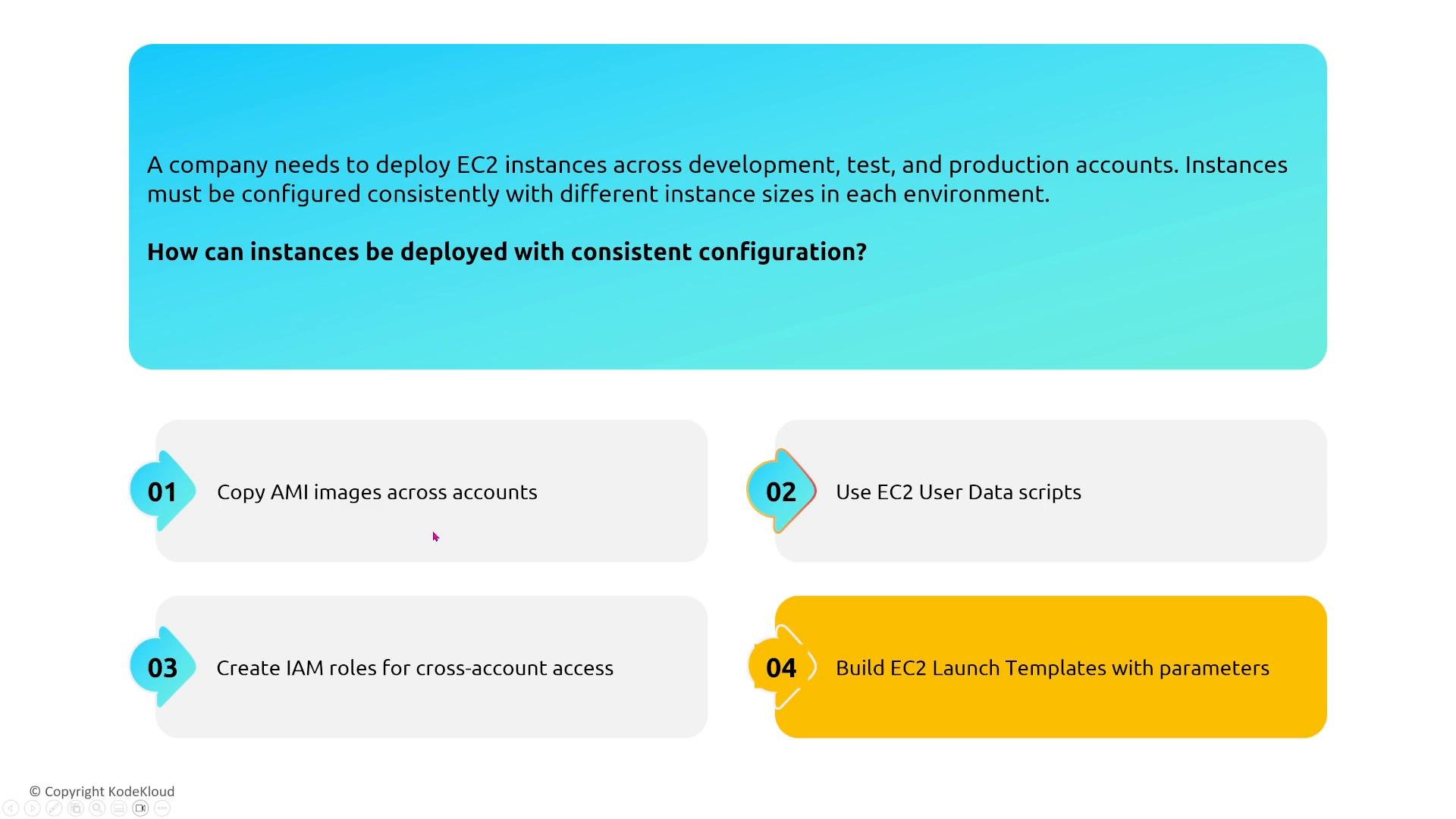
A presentation slide asking how to deploy EC2 instances with consistent configuration across development, test, and production, followed by four numbered recommendations (copy AMIs across accounts; use EC2 user data scripts; create IAM roles for cross-account access; build EC2 launch templates with parameters). The layout uses colored rounded blocks and icons for each numbered item.

Monitoring and metrics

Metrics and logs are the foundation for detecting degradation and informing automated recovery:
  • Install and configure the CloudWatch agent on EC2 instances to collect OS-level and custom metrics.
  • Stream logs to CloudWatch Logs; use CloudWatch Embedded Metric Format (EMF) to extract metrics from logs.
  • Push application-specific metrics to CloudWatch via the PutMetricData API when necessary.
  • Use the AWS CLI/SDK to pull metrics or integrate metric export into dashboards.
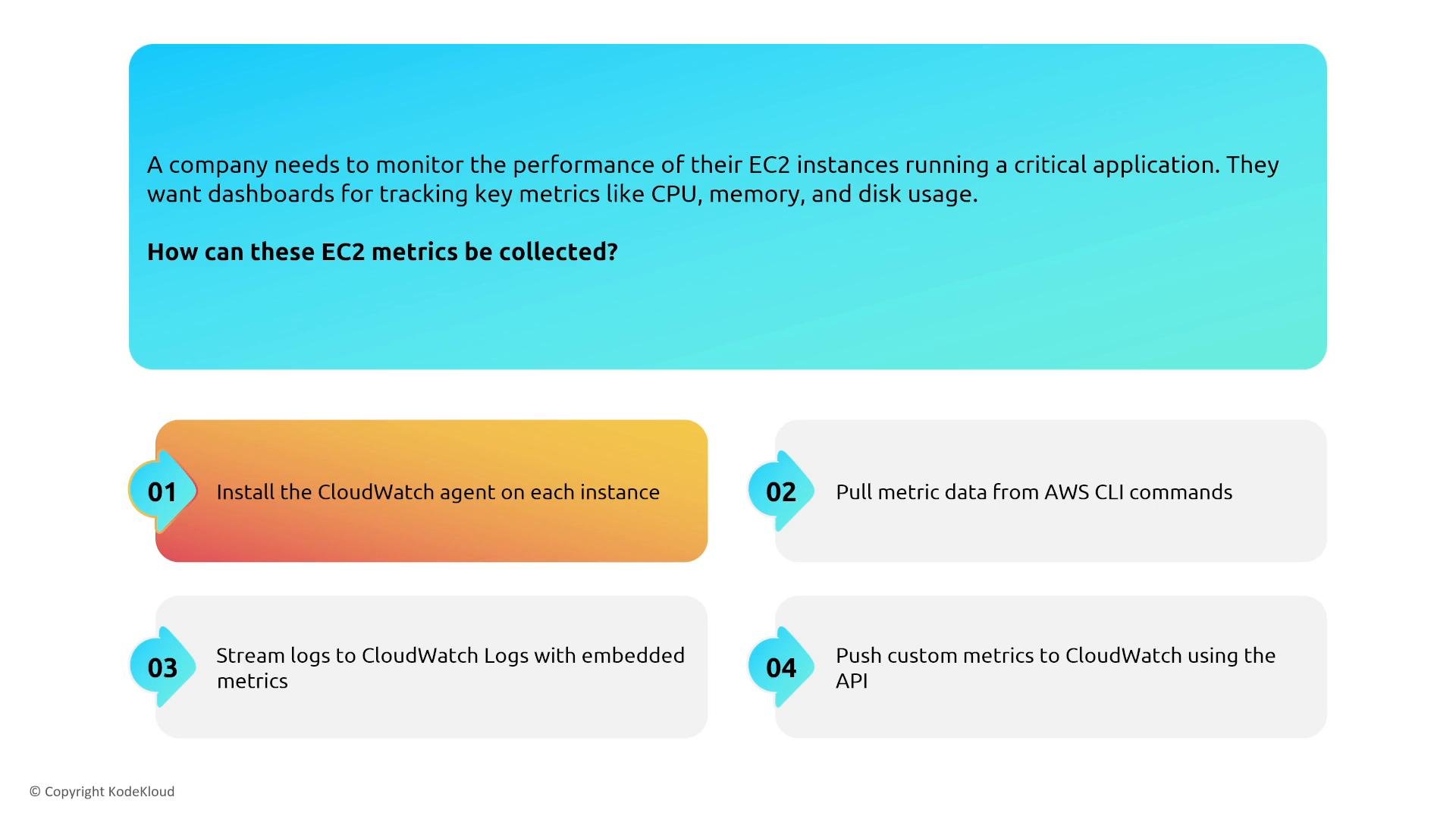
An infographic explaining how to collect EC2 metrics for dashboards. It lists four methods: install the CloudWatch agent, pull metrics with the AWS CLI, stream logs to CloudWatch Logs with embedded metrics, and push custom metrics via the CloudWatch API.
Combining metrics with Auto Scaling
  • Target tracking policies (for example, maintain average CPUUtilization near 40%) provide stable automated scaling behavior.
  • Scheduled and predictive scaling are useful when you have consistent patterns and historical data (predictive scaling requires adequate historic metrics to forecast demand).
  • CloudWatch alarms can trigger scaling policies for reactive scenarios.
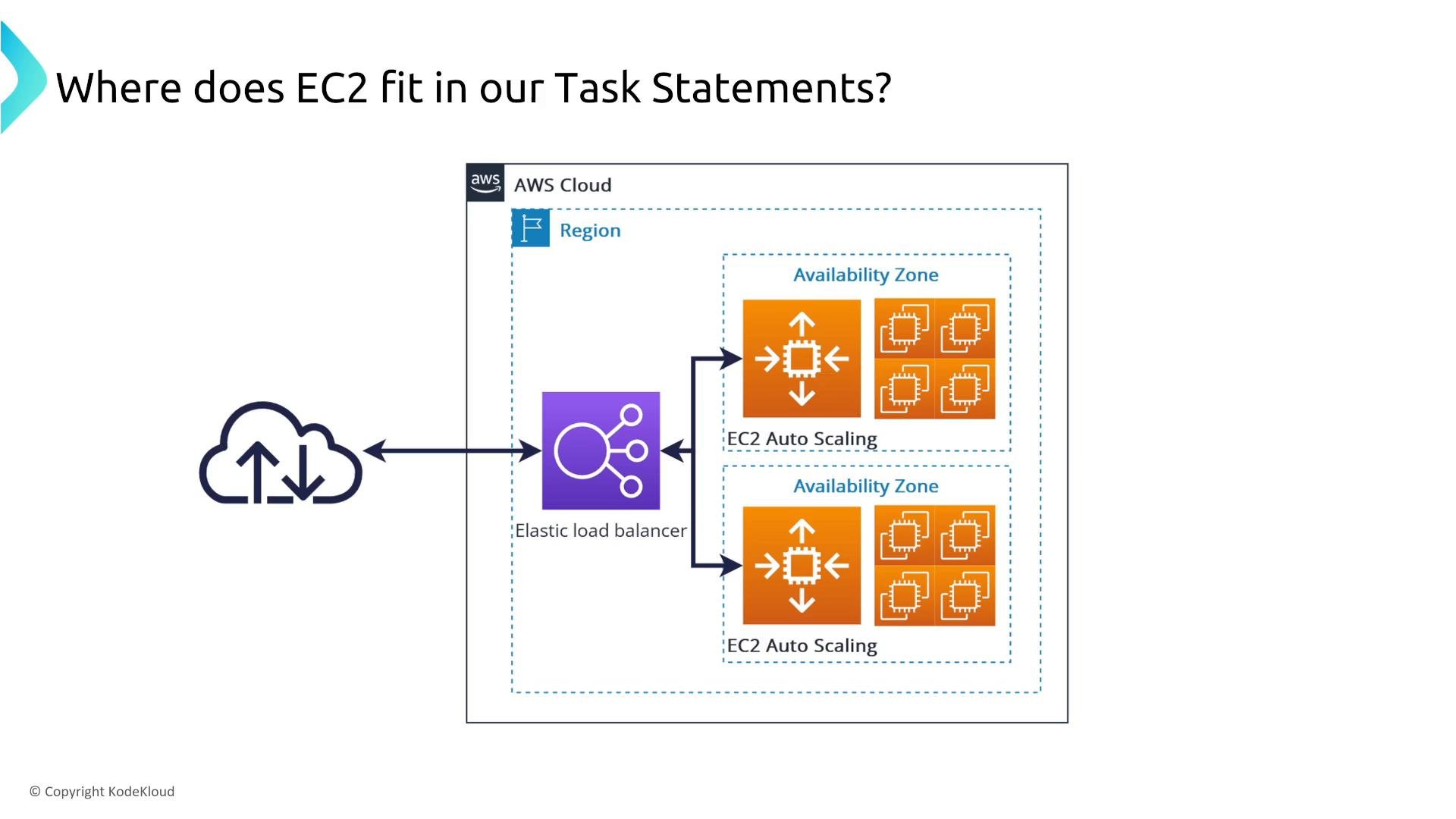
A diagram of an AWS Cloud setup showing an Elastic Load Balancer routing traffic to EC2 Auto Scaling groups across two Availability Zones inside a Region. The image labels where EC2 fits in the architecture.
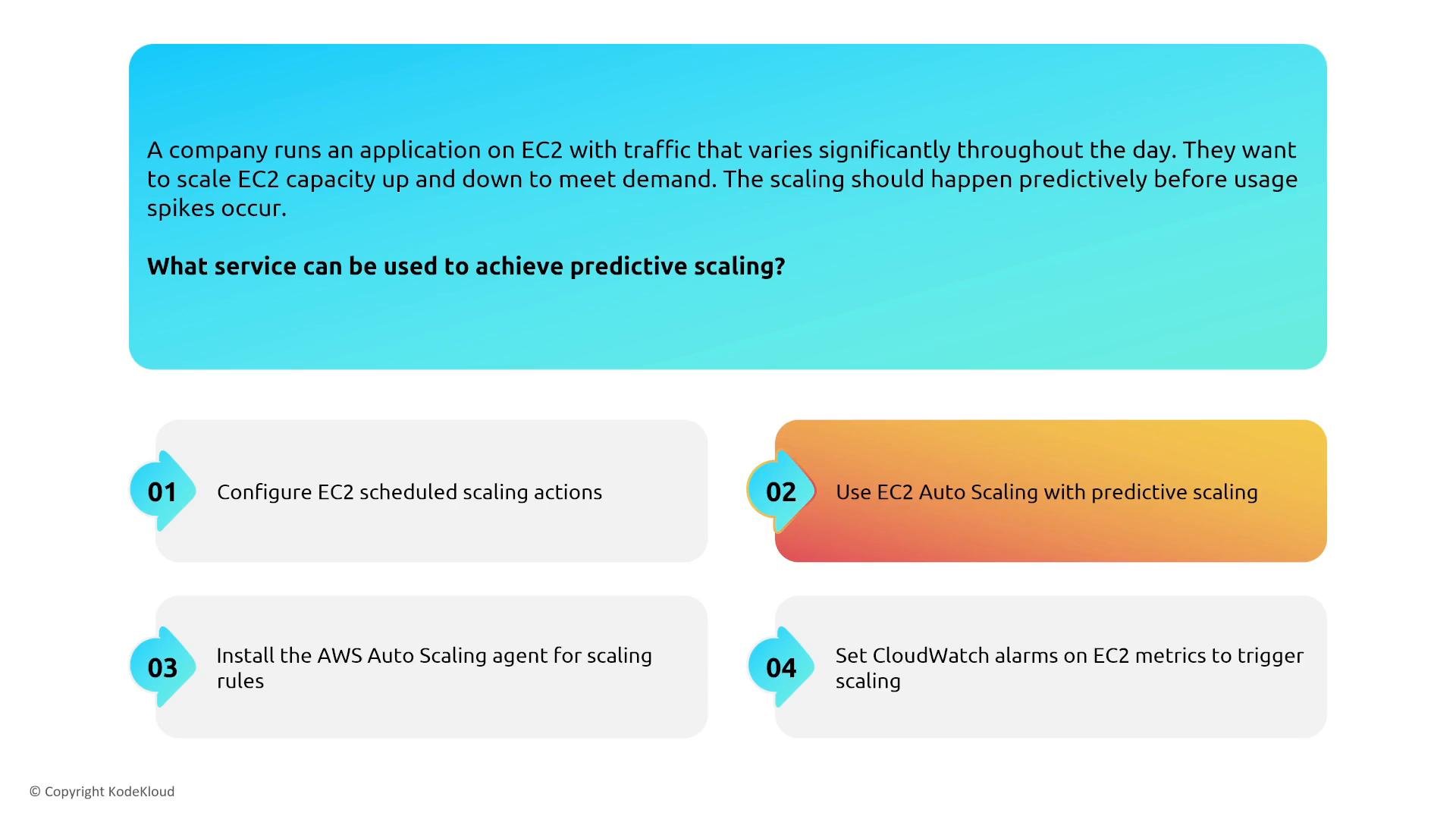
A slide asking which AWS service can provide predictive scaling for EC2 instances. The highlighted answer is "Use EC2 Auto Scaling with predictive scaling" among numbered options (e.g., scheduled scaling, CloudWatch alarms).
Example: maintain a target CPU utilization (e.g., 40%)
  • Use a target-tracking Auto Scaling policy bound to CPUUtilization or a custom metric to keep average utilization near the desired percentage.
  • Complement target tracking with scheduled scaling for predictable load spikes and predictive scaling when historical metrics provide reliable forecasts.
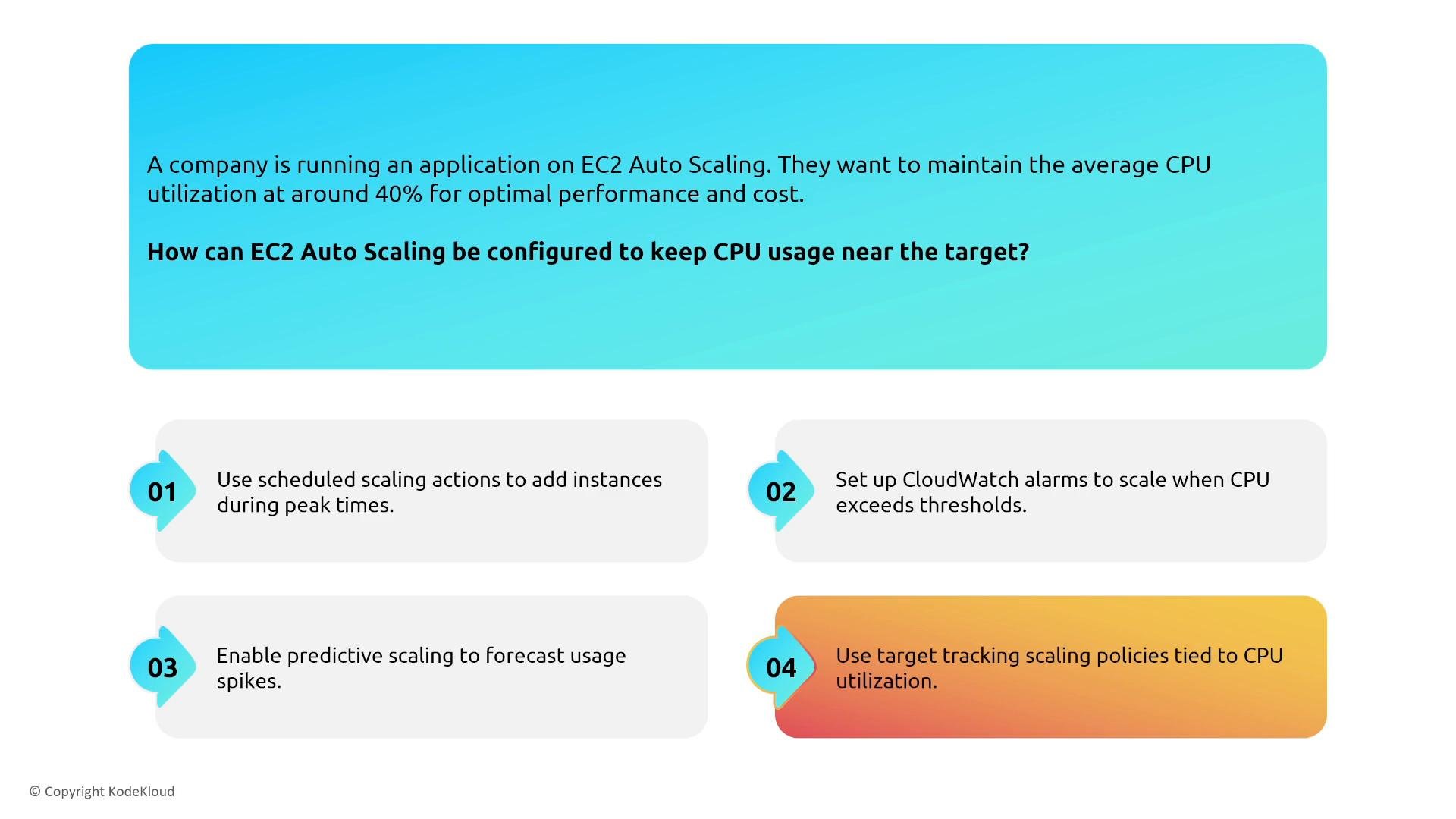
An infographic describing how to keep EC2 Auto Scaling CPU utilization around 40% for an application. It lists four approaches: scheduled scaling, CloudWatch alarms, predictive scaling, and target-tracking scaling policies tied to CPU utilization.

Change management and auditing

Control and visibility over changes reduce risk and help you detect configuration drift:
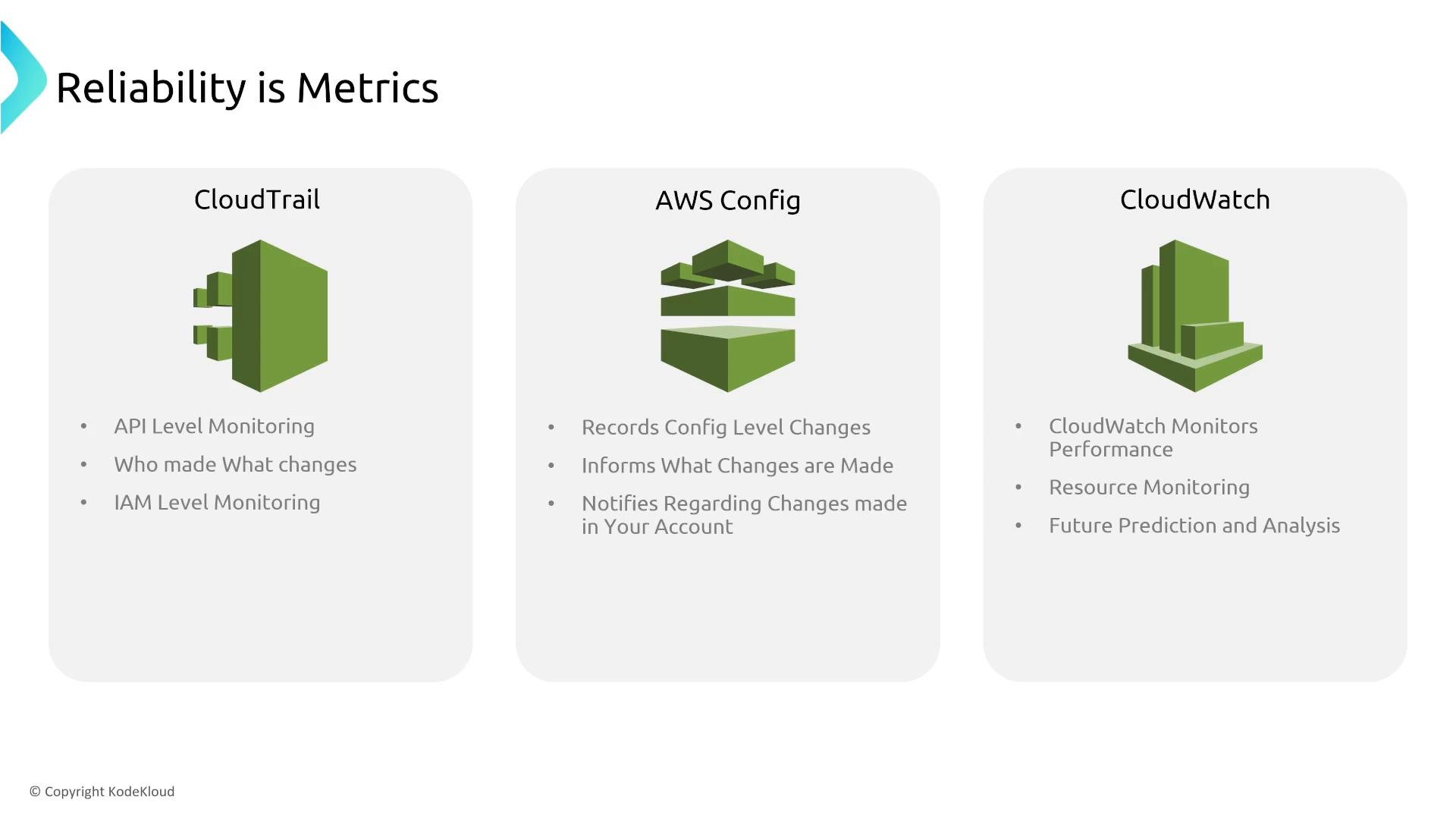
A presentation slide titled "Reliability is Metrics" showing three AWS services — CloudTrail, AWS Config, and CloudWatch — with icons and brief bullet points. Each column lists their roles: CloudTrail for API/IAM auditing, AWS Config for recording and notifying config changes, and CloudWatch for performance and resource monitoring.

Instance types and reliability

  • For most instance families, instance type does not materially affect basic reliability — requested vCPU and RAM are delivered as specified.
  • Exception: T-family burstable instances use CPU credits and can throttle sustained CPU workloads — not suitable for consistent, CPU-bound services.
  • For tenancy/isolation requirements, consider Dedicated Hosts (physical host allocation with placement visibility) or Dedicated Instances (instances on dedicated hardware).
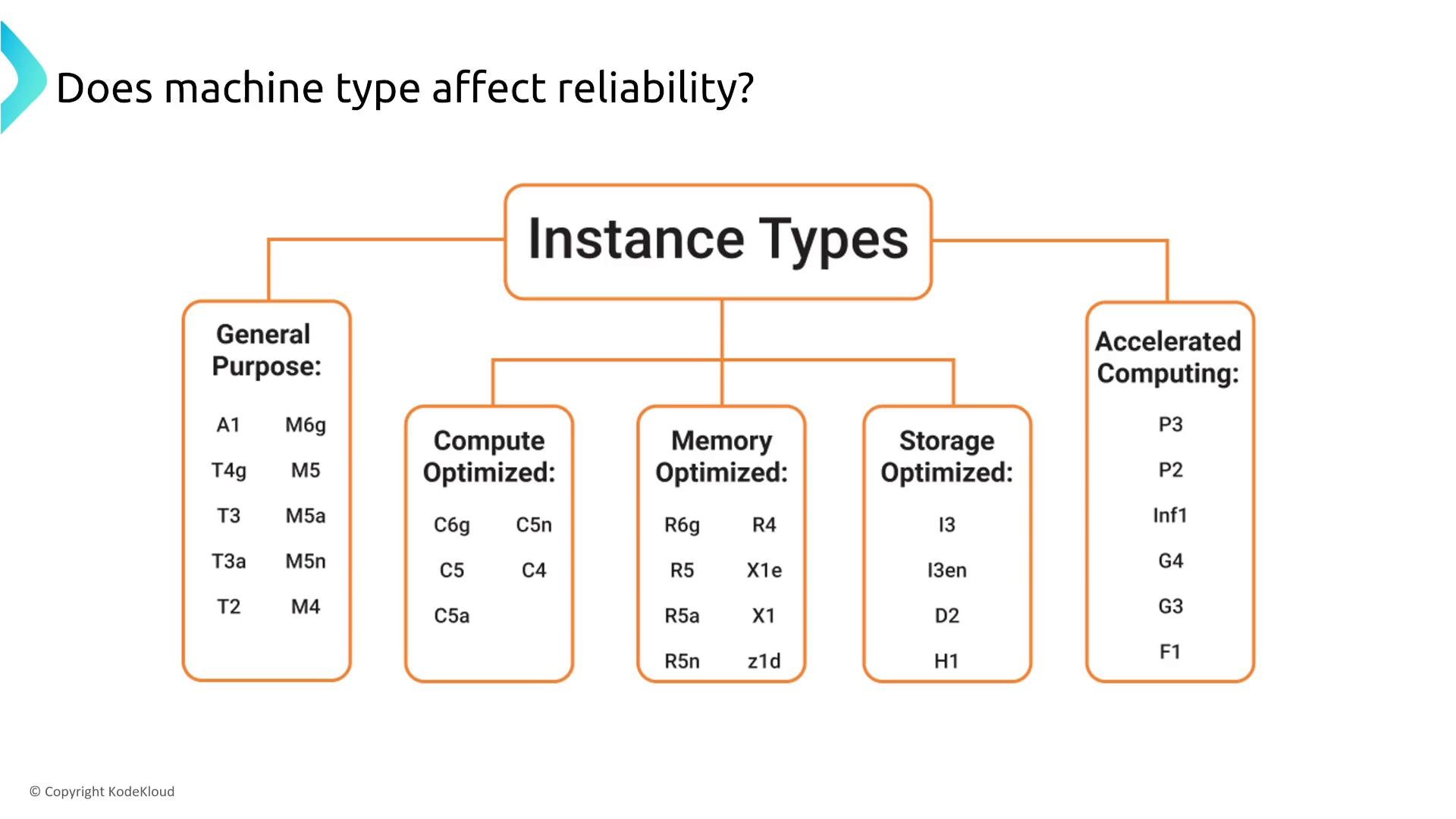
A diagram titled "Instance Types" that groups cloud/compute instance families into categories. It lists examples under General Purpose, Compute Optimized, Memory Optimized, Storage Optimized and Accelerated Computing (e.g., M5, C5, R5, I3, P3).

Placement groups and instance placement

Placement groups influence availability and performance trade-offs: Choose a placement strategy based on your availability and performance requirements.
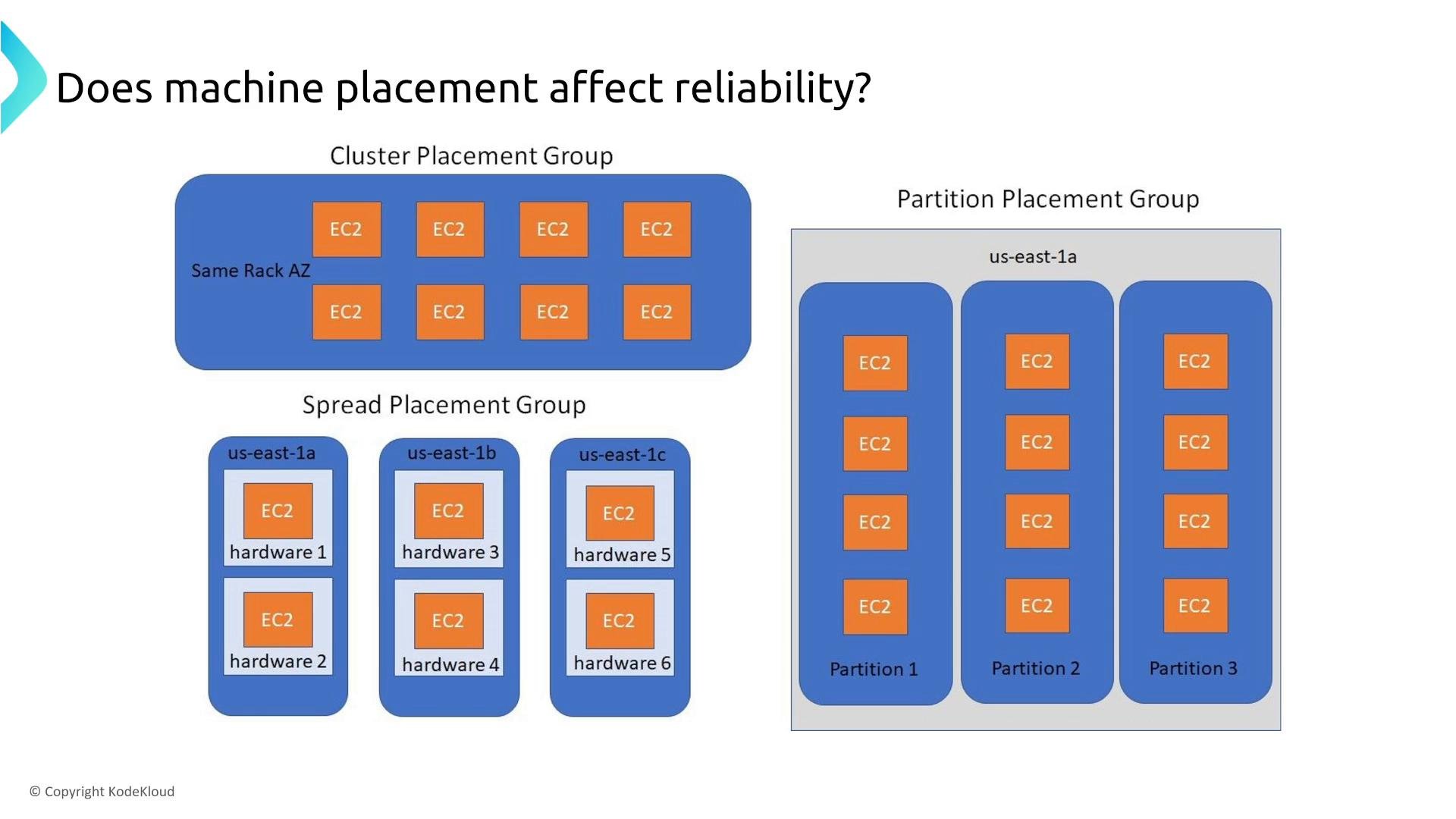
A diagram comparing EC2 placement strategies (Cluster, Spread, and Partition placement groups). It shows instances packed on the same rack, spread across different hardware/availability zones, or divided into partitions for reliability.

EC2 Image Builder (again — pipelines and gold images)

  • EC2 Image Builder is a managed service for producing standardized AMIs (golden images).
  • It improves consistency and repeatability in your deployment pipeline; treat it as part of your CI/CD infrastructure rather than a runtime reliability control.
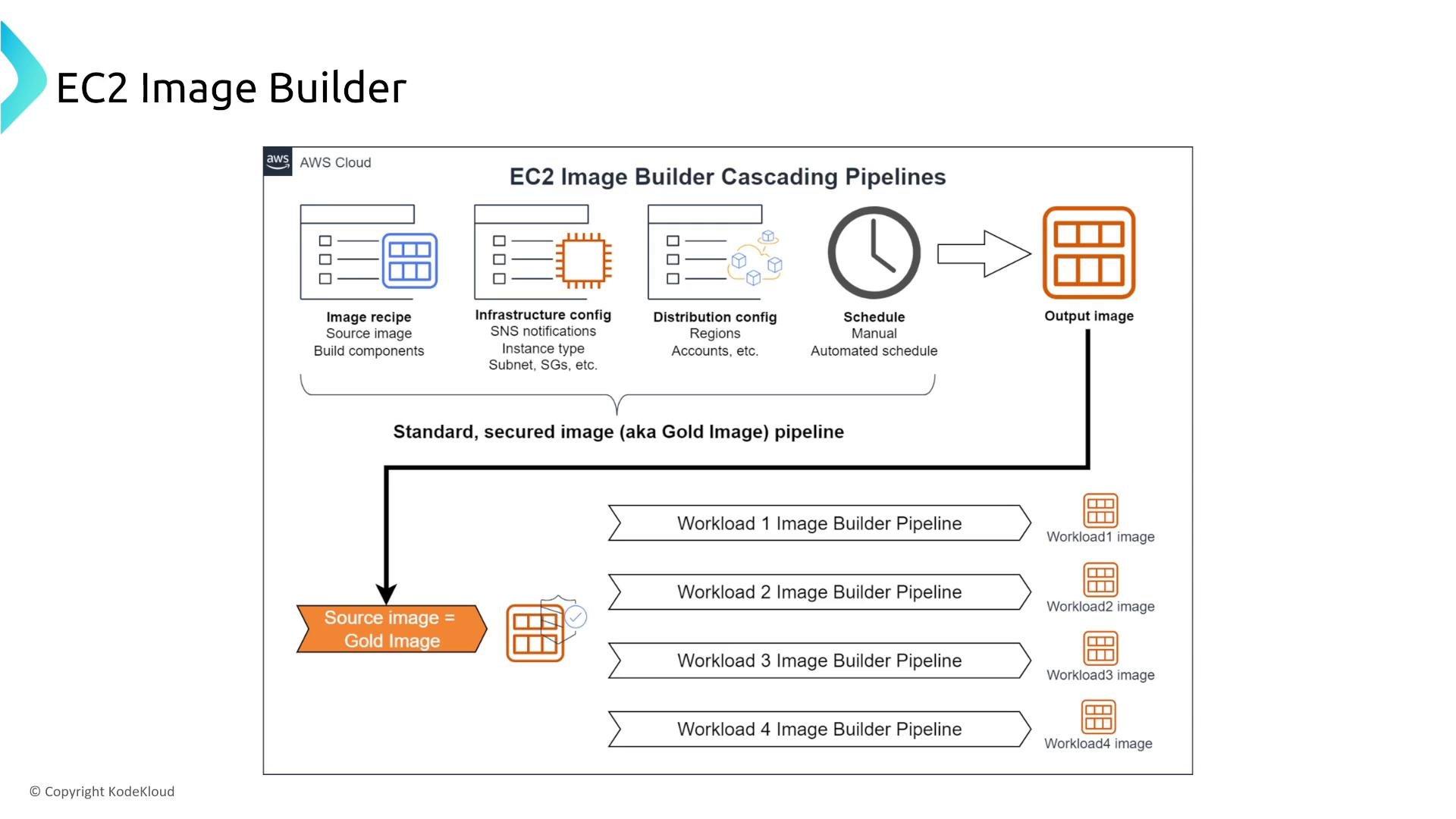
A diagram of AWS EC2 Image Builder showing a cascading pipeline: image recipe, infrastructure and distribution configs plus a schedule produce a standardized "Gold" output image. That gold image is then used as the source for multiple workload-specific Image Builder pipelines.

Elastic Beanstalk

Elastic Beanstalk is an orchestration layer that provisions AWS resources on your behalf and exposes configuration options (multi-AZ, load balancing, deployment strategies). Its reliability benefits come from the underlying AWS services (ELB, ASG, RDS, CloudWatch) it configures.
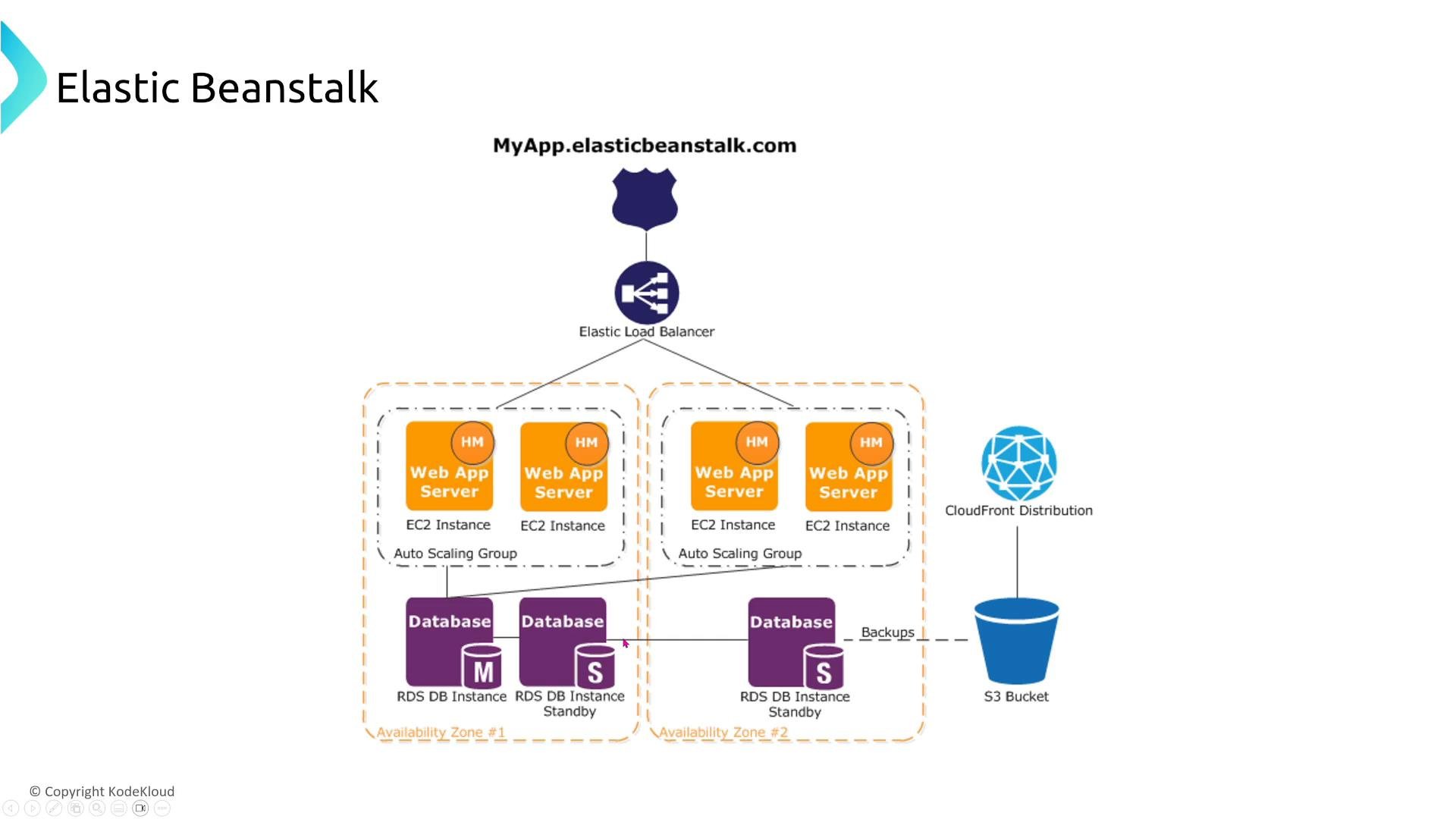
An AWS Elastic Beanstalk architecture diagram. It shows a load balancer routing traffic to auto‑scaled EC2 web app servers across two availability zones, with RDS master/standby databases, CloudFront and an S3 bucket.
Beanstalk deployment strategies
  • Blue/green and immutable deployments minimize downtime by creating new capacity before switching traffic.
  • Rolling and all-at-once deployments risk partial or full downtime during updates (all-at-once is highest risk).
  • Choose deployment policies based on availability requirements and risk tolerance.
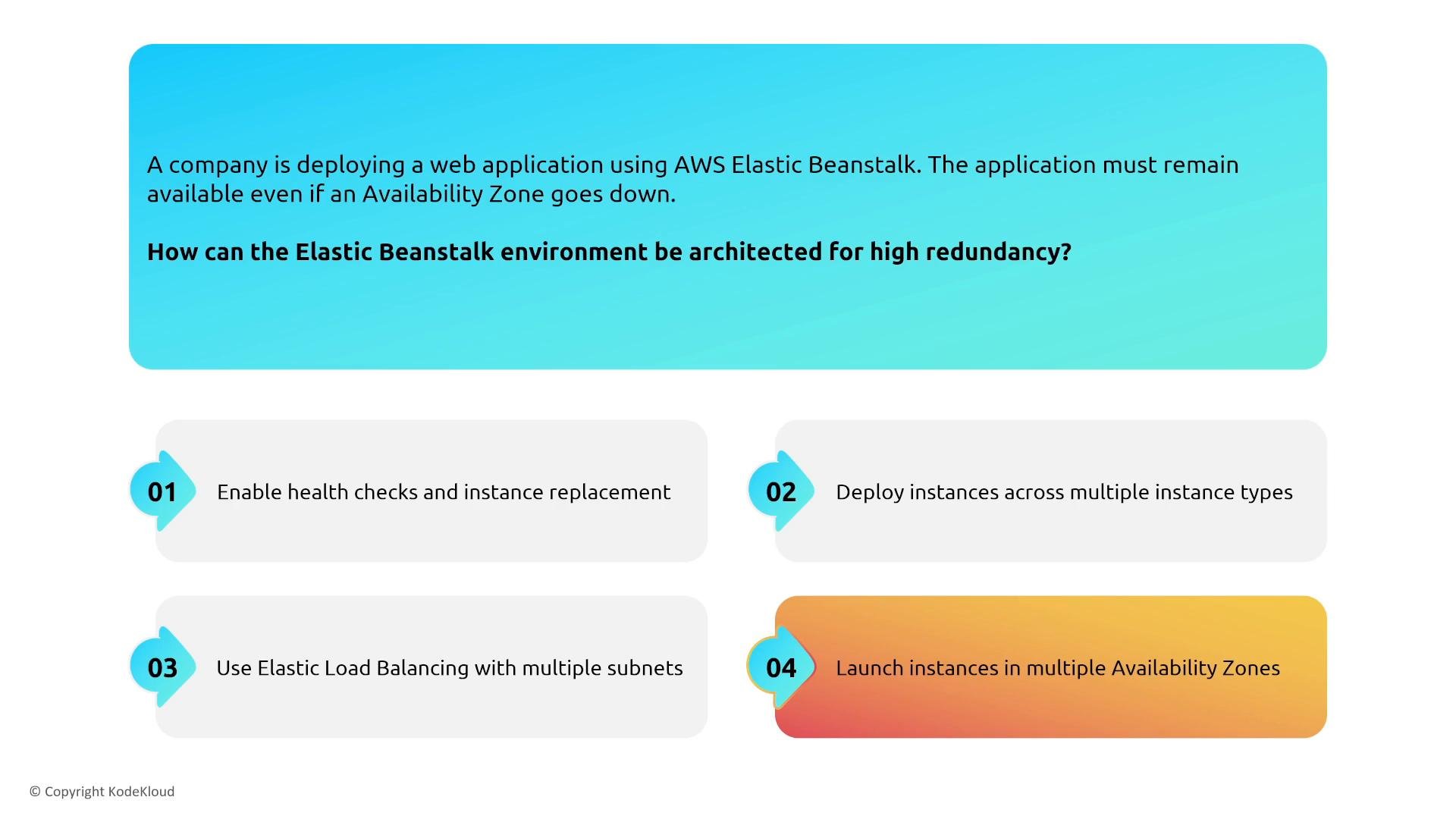
An infographic slide about architecting an AWS Elastic Beanstalk environment for high redundancy. It lists recommendations like enabling health checks and instance replacement, deploying across multiple instance types, using Elastic Load Balancing with multiple subnets, and launching instances in multiple Availability Zones.
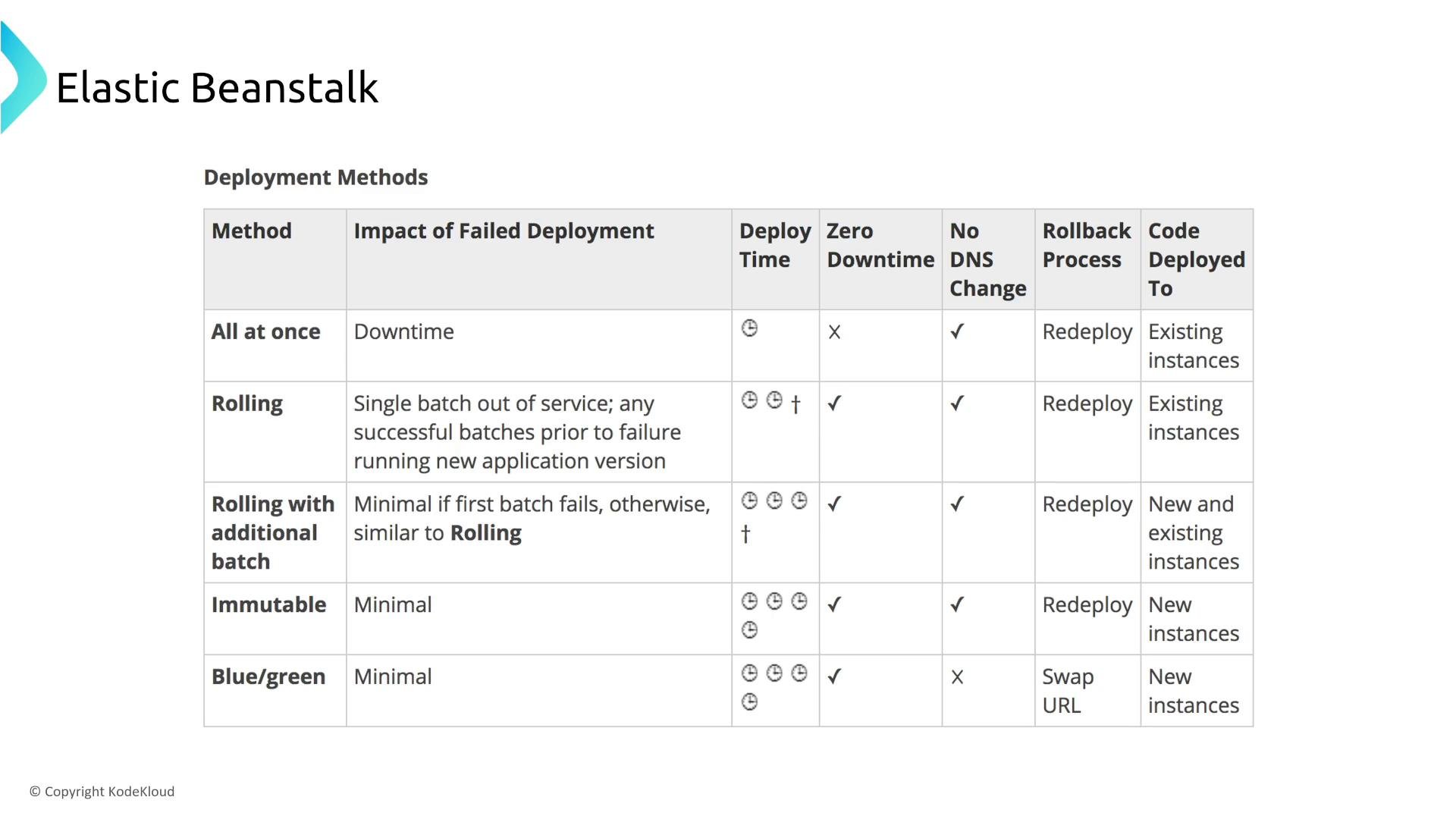
A presentation slide titled "Elastic Beanstalk" containing a table that compares deployment methods (All at once, Rolling, Rolling with additional batch, Immutable, Blue/green) across factors like impact of failed deployment, deploy time, zero downtime, DNS change, rollback process, and where code is deployed.
Beanstalk observability
  • Integrate application instrumentation (for example AWS X-Ray) to visualize service maps, latencies, and error traces across the stack and accelerate root-cause analysis.
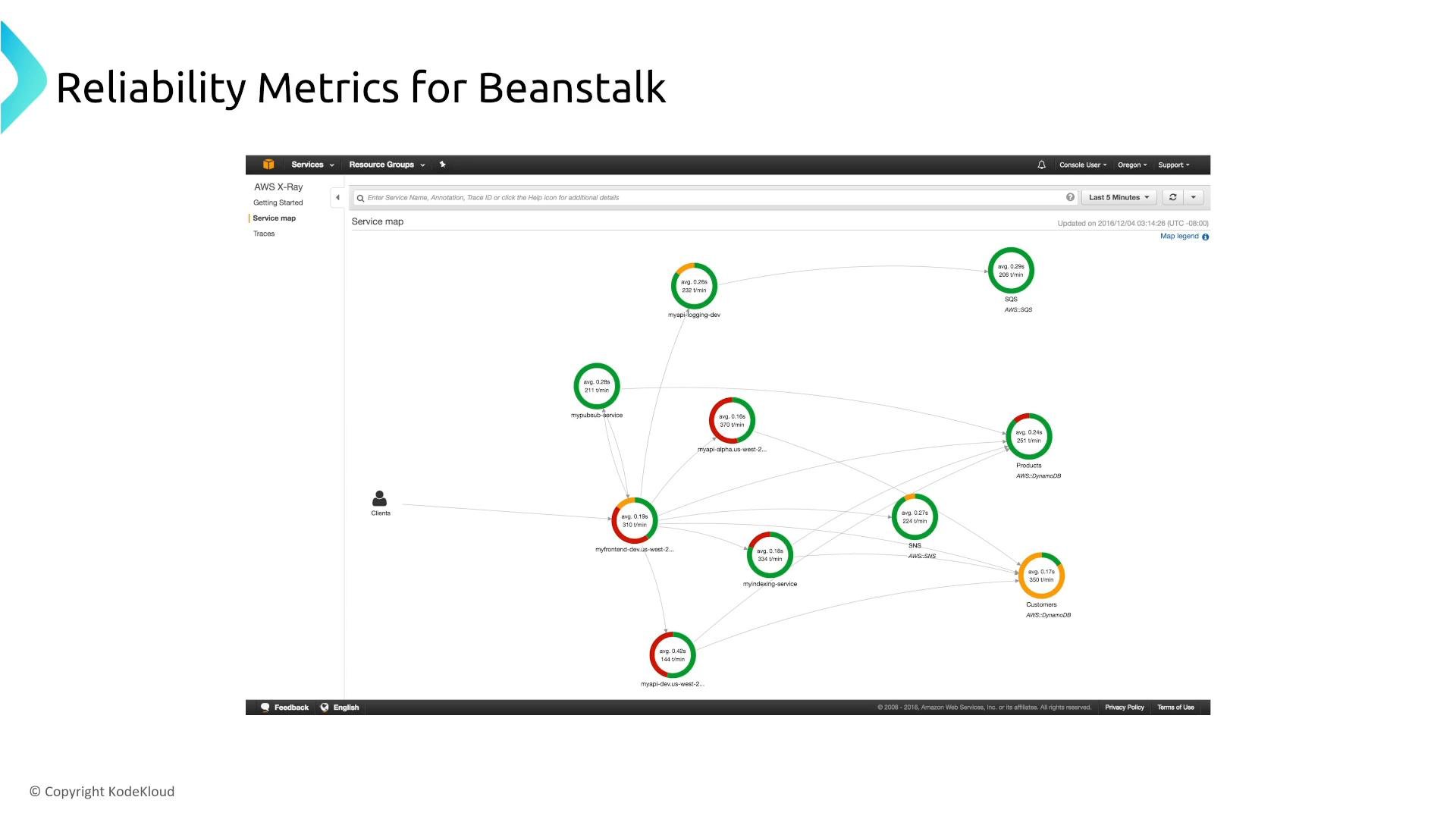
A slide titled "Reliability Metrics for Beanstalk" showing an AWS X‑Ray service map screenshot with interconnected service nodes displayed as colored rings indicating average latency and request rates. Clients are shown on the left and AWS resources like SQS, SNS and DynamoDB on the right.

Amazon Lightsail (honorable mention)

  • Lightsail is a simple VPS-style service useful for small workloads and prototyping. It provides fewer low-level controls than EC2 and is typically out of scope for Solutions Architect Associate reliability questions.
  • Use Lightsail for simplicity, EC2 for production workloads requiring fine-grained reliability and operational control.
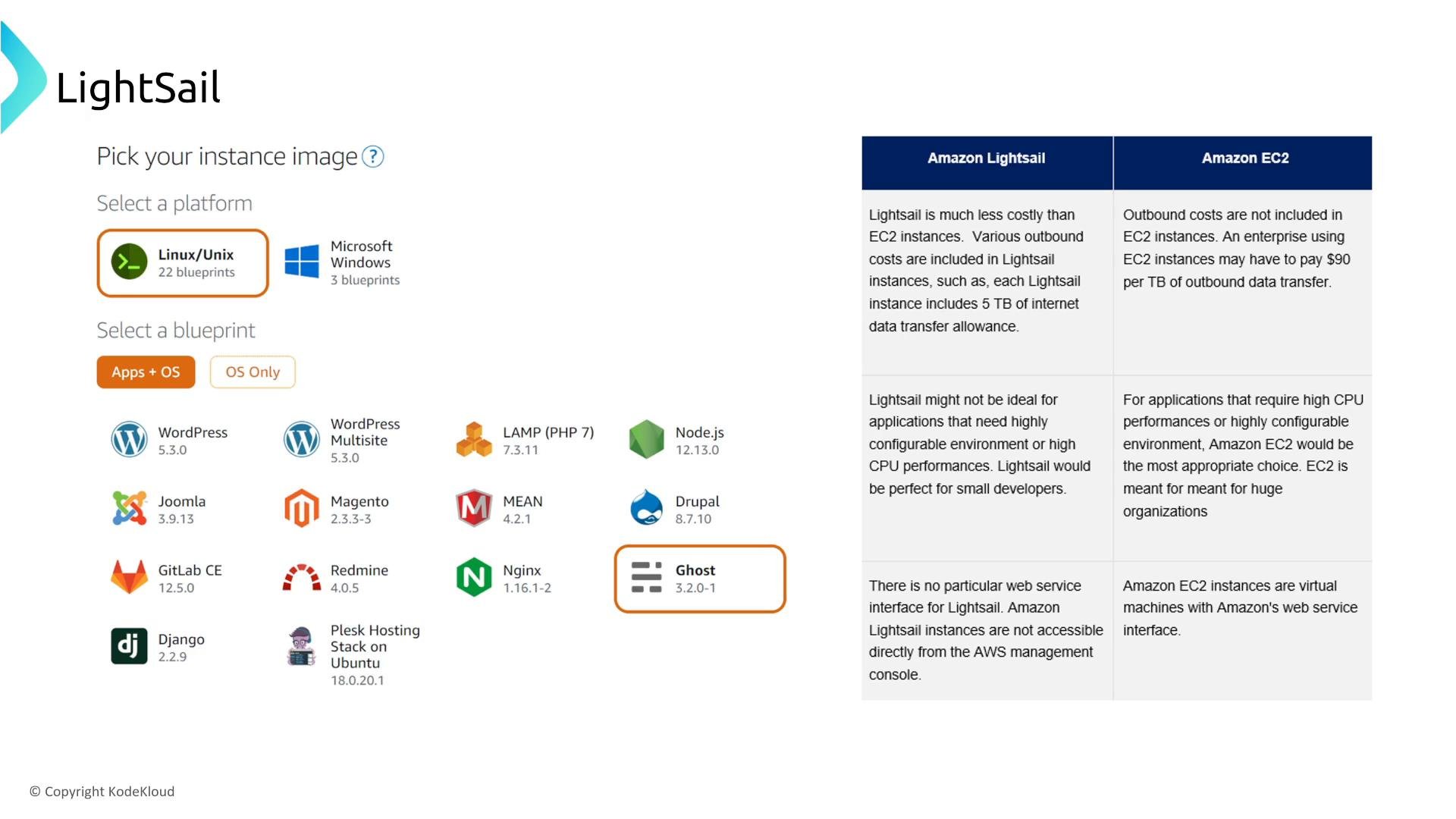
A screenshot of the Amazon Lightsail "Pick your instance image" screen showing platform choices and app/OS blueprints (WordPress, Joomla, Ghost, etc.). The right side shows a comparison table summarizing differences between Amazon Lightsail and Amazon EC2.

Next: containers

Having covered EC2 patterns, Auto Scaling, Image Builder, monitoring, and Elastic Beanstalk, the next step is to apply these reliability patterns to container platforms such as Amazon ECS, Amazon EKS, and AWS Fargate. These services shift more operational responsibility to the platform and provide additional primitives for orchestrating resilient, scalable container workloads.

Watch Video