

- Very large transfers (terabytes → petabytes) over the Internet can take days/weeks and incur high bandwidth costs.
- Source locations may have limited, intermittent, or no network connectivity.
- Snow devices provide efficient, secure offline transfer and optionally run compute at the edge to reduce the amount of data moved.
Core features and benefits
- Rugged and portable
- Devices are designed for field conditions. Snowcone (~4.5 lb) and Snowball devices (typically under ~50 lb) are portable while protecting data during transit.
- File system compatibility
- Snow devices can be mounted as NFS (v3) targets so on-prem systems and file-based apps can write directly. File metadata is preserved until objects are converted during import into S3.
- On-device compute
- Supported devices can run EC2 instances, host AWS IoT Greengrass, and (on some models) execute Lambda functions. You can select EC2 AMIs to preload when ordering a device.
- Strong encryption
- All data at rest on Snow devices is encrypted with 256-bit keys managed by AWS KMS; keys are not stored on the device.
- Offline data migration workflow
- Devices are shipped to you, you load data locally, then ship them back to AWS for ingestion into the S3 bucket(s) you specify.
Configure the destination S3 bucket and the required IAM roles/policies before ordering a Snow device. The import workflow requires a target S3 bucket. - Tamper resistance and device integrity
- Snow devices include a Trusted Platform Module (hardware root of trust) and tamper-evident features.
- Tracking and lifecycle
- Shipping labels and tracking are integrated with AWS. After data ingestion, devices are wiped per AWS procedures.
Snow Family device overview
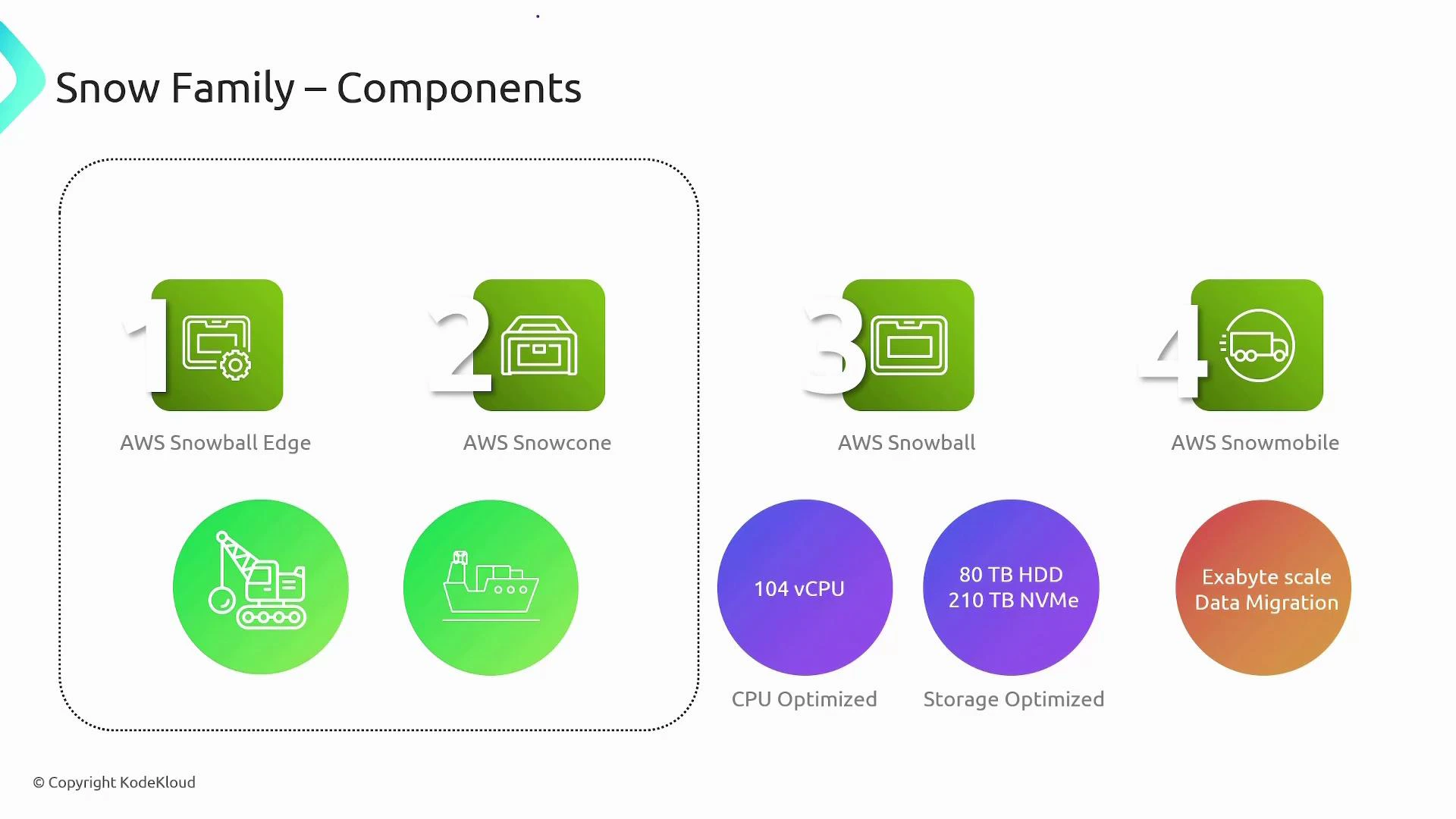
- Snowball Edge
- Rugged (~50 lb) with onboard storage and compute. Good for local processing + data transfer.
- Snowcone
- Ultra-portable, secure, and rugged. Ideal for small edge sites, field data collection, and when you need portability.
- Snowball (standard)
- Suitcase-sized rugged device in variants:
- Snowball Edge Compute Optimized — for compute-heavy edge workloads.
- Snowball Edge Storage Optimized — for data-heavy transfers.
- Suitcase-sized rugged device in variants:
- Snowmobile
- Exabyte-scale migration (semi-trailer truck), up to ~100 PB per Snowmobile.
When to use each device
- Snowcone and Snowball Edge: when connectivity is limited or intermittent, or when you need edge compute (e.g., image/video analytics, ML inference, IoT aggregation). Suited for rugged or remote environments (ships, field sites, construction).
- Snowball and Snowmobile: when on-network transfer is impractical due to data volume, cost, or time — e.g., large datacenter migrations.
Common use cases
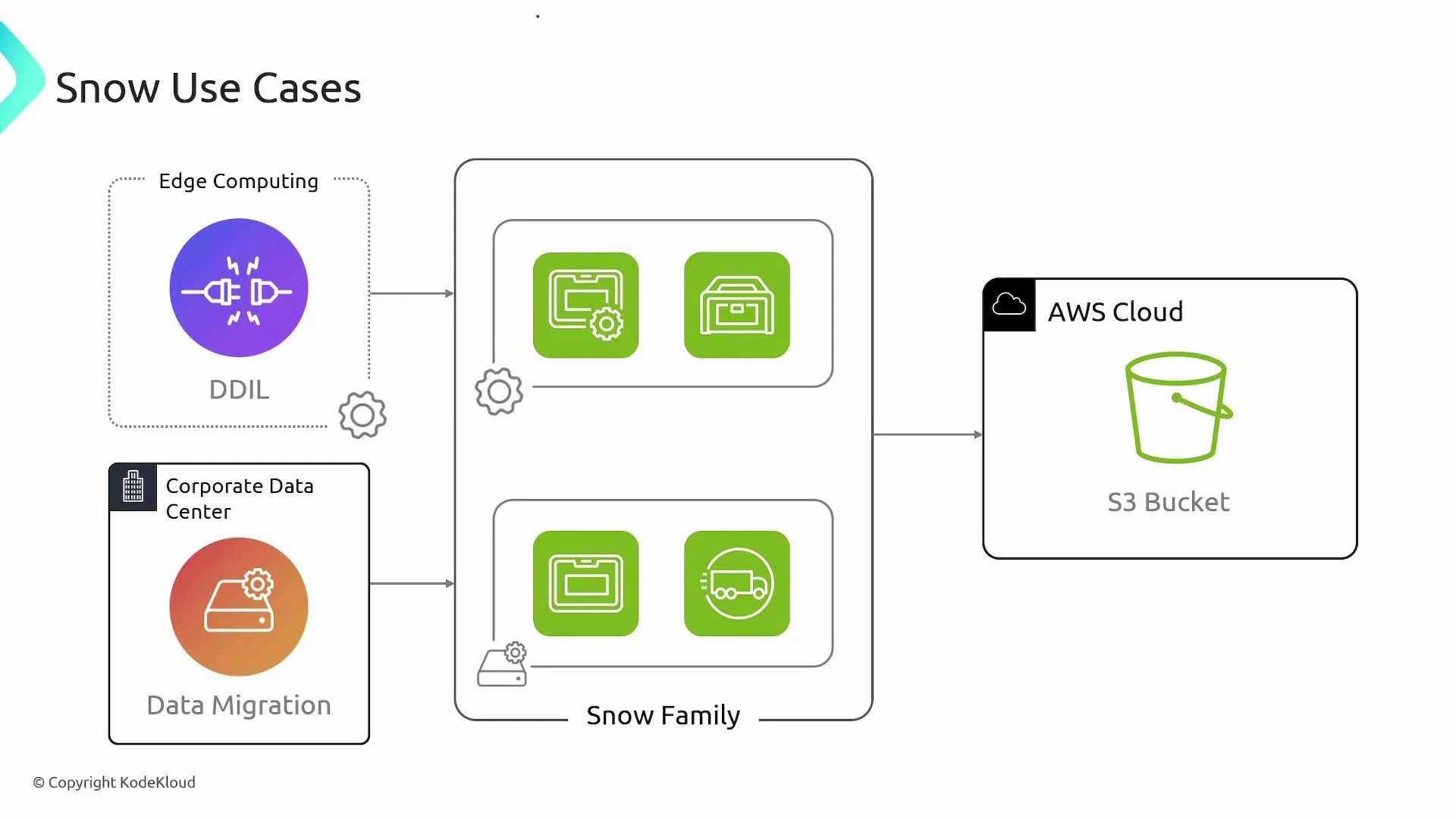
- Edge computing and data aggregation in disconnected or harsh environments
- Bulk data migration from corporate datacenters to Amazon S3
- Running analytics, ML inference, or custom EC2 workloads locally before shipping refined datasets to AWS
Integrations and supported services
- Primary ingestion target: Amazon S3 — configure target buckets before creating a Snow job.
- Compute and edge services: supported devices can run EC2 instances, Lambda functions (on some models), and host AWS IoT Greengrass for edge applications.
- AWS DataSync: can be used with Snowcone for online transfers where network connectivity permits.
Practical checklist before ordering a Snow device
- Create and confirm the target S3 bucket(s).
- Ensure IAM roles and policies for the import job are in place.
- Decide whether you need preloaded EC2 AMIs or runtime compute (for Snowball Edge).
- Plan logistics: shipping address, staging area, and physical security for the device.
Security & compliance
- Data encrypted with AWS KMS-managed 256-bit keys; encryption keys are not stored on the device.
- Trusted Platform Module (TPM) and tamper-evident hardware protect device integrity.
- AWS provides tracking and secure wiping procedures after ingestion.