

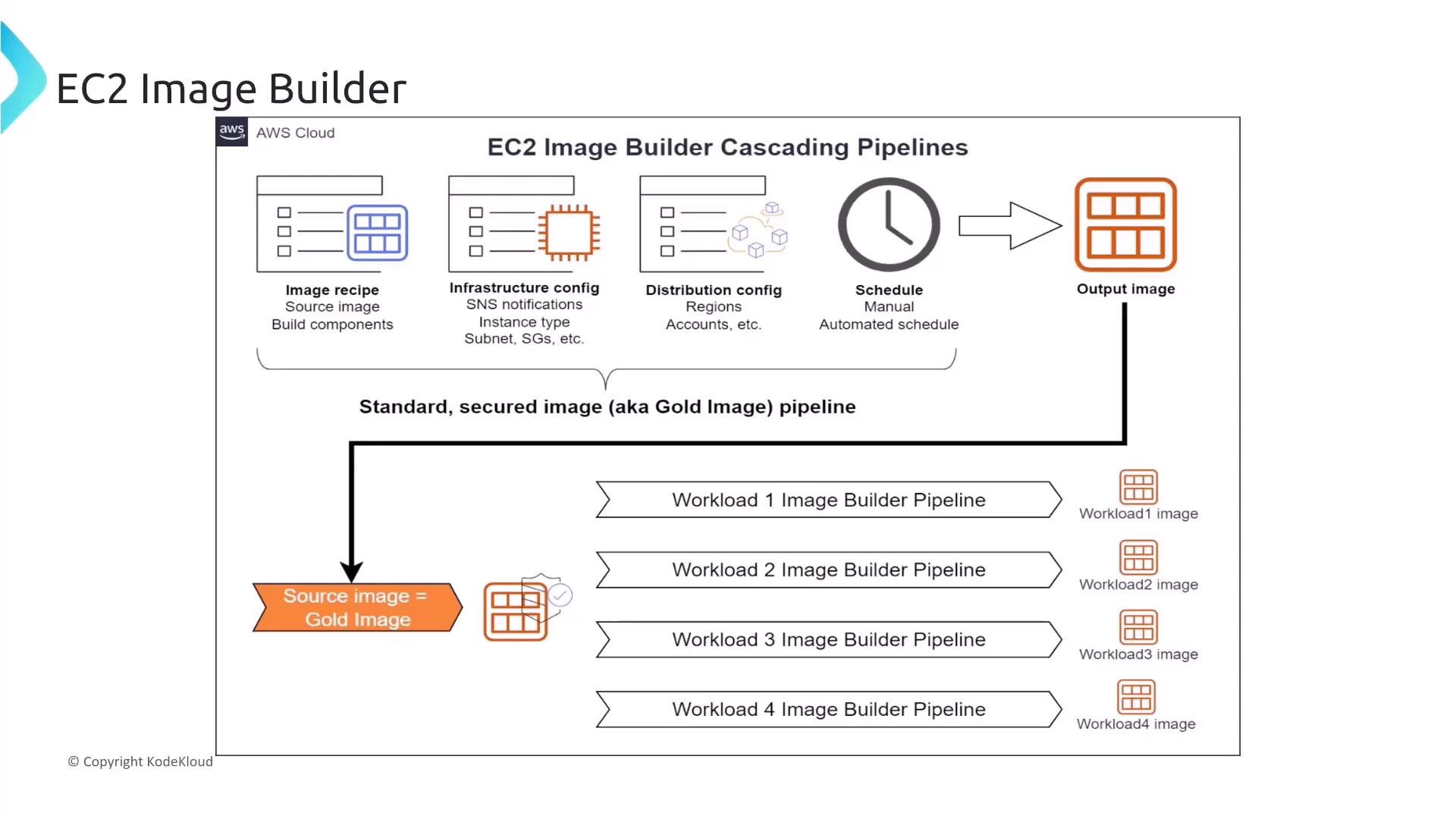
Regularly scan your images for known CVEs, apply security patches in your image pipeline, and keep image recipes declarative so builds are reproducible.
Practical design recommendations
- Bake security: include patched packages, a minimal footprint, and configuration that enforces principle of least privilege.
- Automate scanning: run CVE scanners (e.g., Amazon Inspector or third-party tools) during builds.
- Avoid embedding secrets in images; use IAM roles, Parameter Store, or Secrets Manager at runtime.
- Use image versioning and immutable deployments to make rollbacks predictable.
- Image Builder allows users to manually patch AMIs, ensuring they’re always up to date.
- Manual patching is possible, but Image Builder’s primary value is automation — this phrasing is misleading.
- EC2 Image Builder provides a fully managed service that simplifies the creation, maintenance, validation, and sharing of virtual machine or container images.
- Correct. Image Builder automates the image lifecycle for AMIs and container images.
- EC2 Image Builder is primarily designed to optimize the security posture of AMIs, reducing their size.
- Incorrect. Image Builder helps automate secure builds but does not inherently optimize size.
- Image Builder can automatically convert AMIs into container images for use with Amazon ECS.
- Incorrect. There is no automatic AMI→container conversion feature.
- Image Builder allows users to integrate third-party applications directly into the AMI process.
- Partially true: you can install third-party software via components or scripts, but it requires explicit configuration and licensing management.
- EC2 Image Builder automatically provides automated pipelines to build, test, and deploy custom secure images based on defined recipes.
- True. Image Builder supports pipelines and recipe-based builds; you define components, tests, and distribution.
- Image Builder can replicate AMIs across multiple AWS accounts or regions without additional configuration.
- Misleading. Distribution is supported but requires specific configuration and IAM permissions.
- EC2 Image Builder offers a marketplace where users can purchase pre-built AMIs from other customers.
- Incorrect. AWS Marketplace is used for purchasing third-party AMIs; Image Builder is not a marketplace.
Image distribution often requires additional IAM configuration (resource policies, account permissions). Treat distribution as a design step, not an automatic side effect.
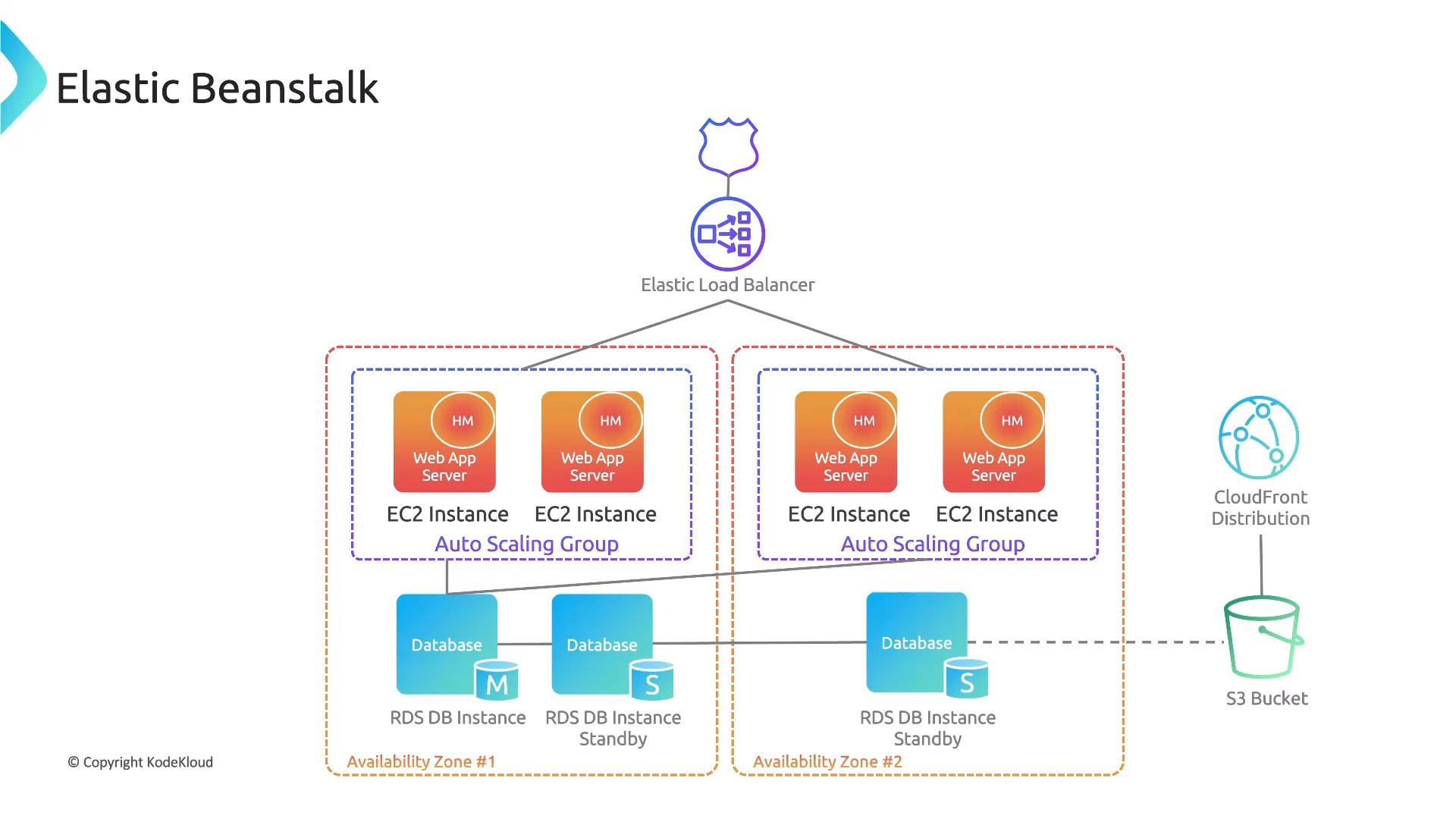
Now let’s move on to AWS Elastic Beanstalk. Elastic Beanstalk is a platform-as-a-service (PaaS) that provisions and manages underlying services (EC2, Auto Scaling, ELB/ALB, RDS, S3, etc.) according to opinionated defaults. Beanstalk makes deployment faster and reduces operational overhead, but most security controls are applied through the AWS resources it creates — not via a unique, Beanstalk-only control plane.
Elastic Beanstalk convenience features
- Managed platform updates to keep runtime environments patched.
- Environment configuration hooks (.ebextensions, platform hooks) for custom bootstrapping.
- Enhanced health reporting and integration with CloudWatch/SNS/X-Ray for monitoring and detection.
- Beanstalk automatically encrypts all data.
- Incorrect. Encryption is available but must be enabled and configured for EBS, RDS, S3, etc.
- Beanstalk allows for direct SSH access to the instance.
- Incorrect by default. SSH is enabled only if you provide a key pair or explicitly enable instance access.
- Beanstalk provides managed platform updates, ensuring the runtime environment is updated with the latest patches.
- Correct. Managed platform updates help keep runtimes patched; test updates for compatibility.
- Beanstalk offers a built-in web application firewall that can be customized for application-specific rules.
- Incorrect. AWS WAF is a separate service that can be integrated with ALB or CloudFront.
- Elastic Beanstalk’s enhanced health reporting provides environment- and instance-level details, events, and logs in the Management Console.
- Integrate with Amazon SNS to receive notifications about environment health changes.
- Combine enhanced health reporting with CloudWatch alarms, logs, and AWS X-Ray to accelerate incident detection and investigation.
- Enhanced health reporting only provides metrics at the environment level and does not provide instance-specific details.
- Incorrect. It includes instance-level information.
- Enhanced health reporting automatically integrates with SNS to send real-time notifications about environment health.
- True when configured. You can wire SNS to environment events and health changes.
- Enhanced health reporting does not require manual configuration — each EC2 instance that Beanstalk launches will automatically have enhanced health reporting ready to go.
- Partially misleading. Enhanced health reporting is available, but verify your environment settings and platform support; you may need to enable or configure it.
- Enhanced health reporting provides detailed metrics and logs that can be viewed in the Management Console.
- True. The console shows Recent Events and instance health details for troubleshooting.
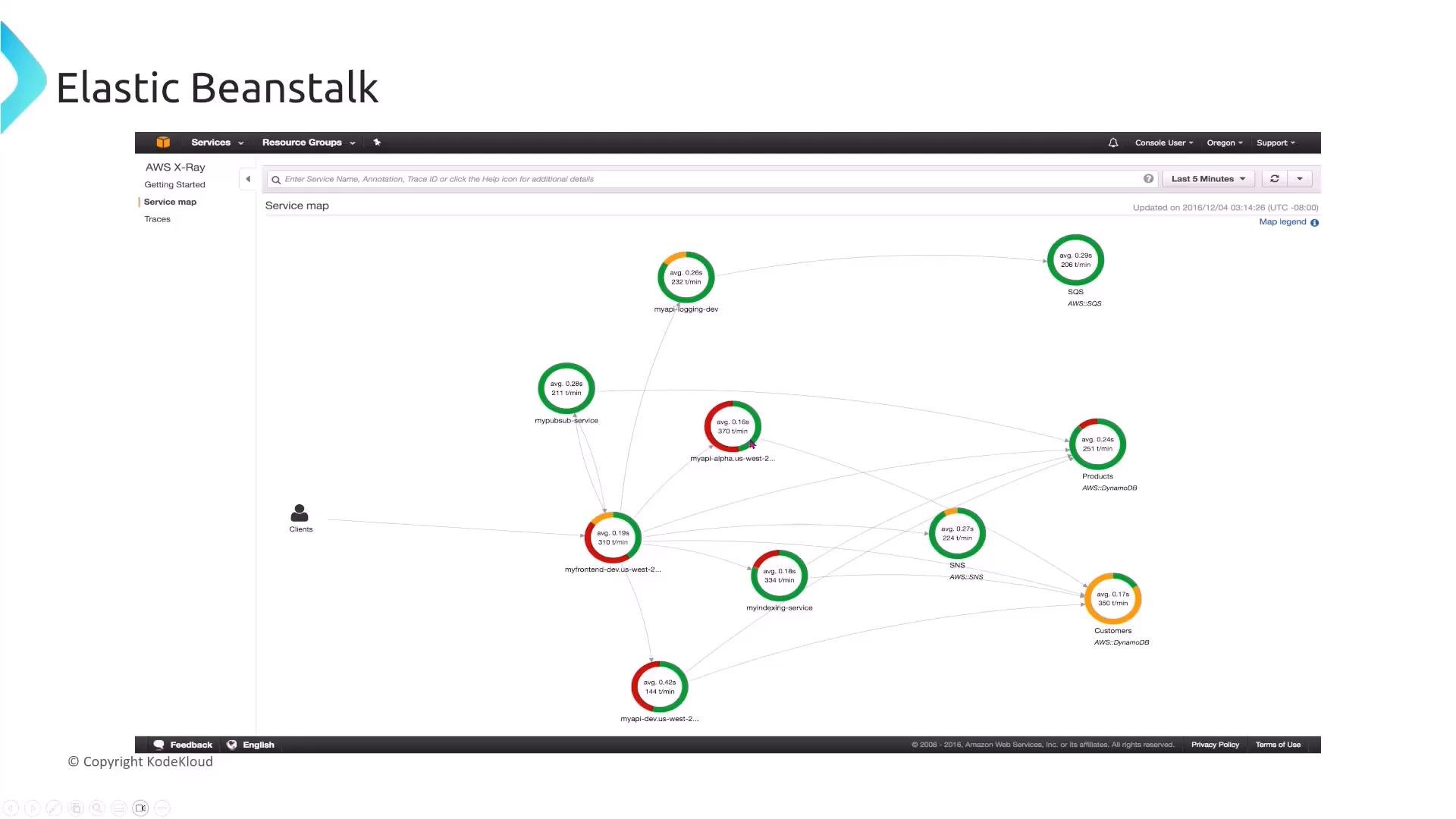
- Elastic Beanstalk can integrate with AWS X-Ray to provide distributed tracing and a service map for your application architecture.
- A service map visualizes request flows and helps identify latency or error hotspots.
- To use X-Ray correctly:
- Enable X-Ray in the Beanstalk environment configuration.
- Ensure the environment’s IAM instance profile has X-Ray permissions.
- Instrument your application (include X-Ray SDKs) when you need custom traces.
- Manually install the X-Ray daemon.
- Not usually necessary. When enabled, Beanstalk can manage the X-Ray daemon for the environment.
- Enable X-Ray in the Elastic Beanstalk environment configuration and ensure the necessary IAM role is in place.
- Correct. Enable X-Ray in the environment settings and give the EC2 instance profile the required permissions; add the X-Ray SDK if your application needs instrumentation.
- Modify the application code to remove any logging mechanism.
- Incorrect. Tracing complements logs; keep both.
- Store X-Ray traces in an S3 bucket without encryption for easy access and analysis.
- Incorrect and unsafe. If exporting traces, always enable encryption and lock down access.
Do not store tracing or telemetry data unencrypted. Use encryption at rest and restrict access with least-privilege IAM and resource-based policies.
- EC2 Image Builder: Automate image builds, tests, and distribution. Bake in security (patches, minimal packages), run vulnerability scans during the pipeline, avoid secrets in images, and plan IAM for cross-account/region distribution.
- Elastic Beanstalk: Use it to quickly deploy and manage environments, but audit and harden the underlying AWS resources (security groups, instance profiles, encryption). Leverage managed platform updates, enhanced health reporting, and X-Ray for patching, detection, and troubleshooting.
- Observability & access: Combine enhanced health reporting, CloudWatch metrics/alarms, SNS notifications, and X-Ray tracing; always enforce encryption and least-privilege IAM for telemetry and operational data.
- EC2 Image Builder — https://aws.amazon.com/image-builder/
- HashiCorp Packer — https://www.packer.io/
- AWS Elastic Beanstalk — https://aws.amazon.com/elasticbeanstalk/
- AWS X-Ray — https://aws.amazon.com/xray/
- AWS WAF — https://aws.amazon.com/waf/
- AWS CloudWatch — https://aws.amazon.com/cloudwatch/
- AWS SNS — https://aws.amazon.com/sns/