

What is AWS Transfer Family?
AWS Transfer Family is a managed, highly available service that enables secure file transfers into and out of AWS using standard protocols (SFTP, FTPS, FTP, and AS2). Instead of running and maintaining your own transfer servers, you create Transfer Family servers that integrate natively with Amazon S3 and Amazon EFS so uploaded files land directly in your storage. Key benefits:- Offloads operational management of transfer servers to AWS.
- Provides protocol endpoints that external partners and applications can use.
- Integrates with S3 and EFS for immediate consumption by downstream systems.
- Supports fine-grained access control, encryption, and observability.
Use Transfer Family when you need managed, protocol-compatible endpoints for partners or applications to upload/download files directly into AWS storage without operating your own transfer servers.
Key capabilities
When to use Transfer Family vs DataSync
Choose Transfer Family when you require protocol endpoints for partners or apps. Choose DataSync for large-scale, automated migrations or high-throughput replication.
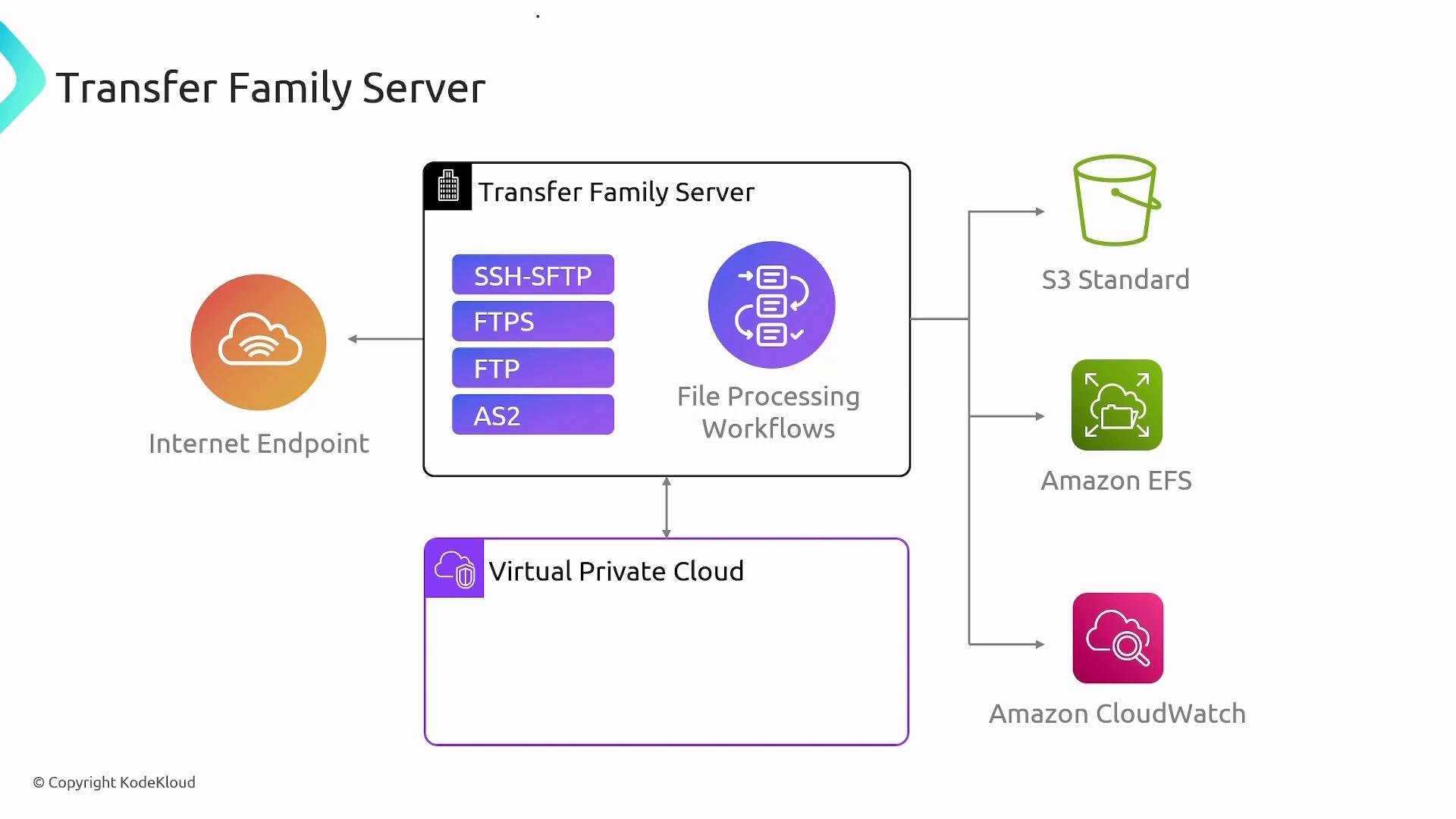
Network access and endpoint types
When creating a Transfer Family server you decide how clients reach it:- Public endpoint: a publicly resolvable hostname reachable over the internet.
- VPC-hosted endpoint: the server runs inside a VPC so only resources with network access (peering, VPN, Direct Connect, or VPC routing) can reach it.
Authentication and access control
Transfer Family supports multiple identity and authorization approaches:- Service-managed users: create and store user accounts in Transfer Family. Assign each user a home directory mapped to an S3 prefix or an EFS path.
- Custom identity provider: integrate Transfer Family with your identity system using API Gateway and AWS Lambda (for example, to validate credentials against LDAP or Active Directory).
- IAM policies attached to the service role Transfer Family assumes for S3/EFS access.
- Storage-layer permissions (S3 bucket policies, EFS POSIX permissions).
- Encryption controls using AWS KMS.
Logging and monitoring
Enable Amazon CloudWatch logging to capture session activity, API events, and file transfer details for operational visibility and compliance auditing. You can forward CloudWatch logs to centralized logging/analysis systems (e.g., CloudWatch Logs Insights, Amazon Elasticsearch Service, or third-party SIEMs).AWS SFTP connector (SFTP → S3 ingestion)
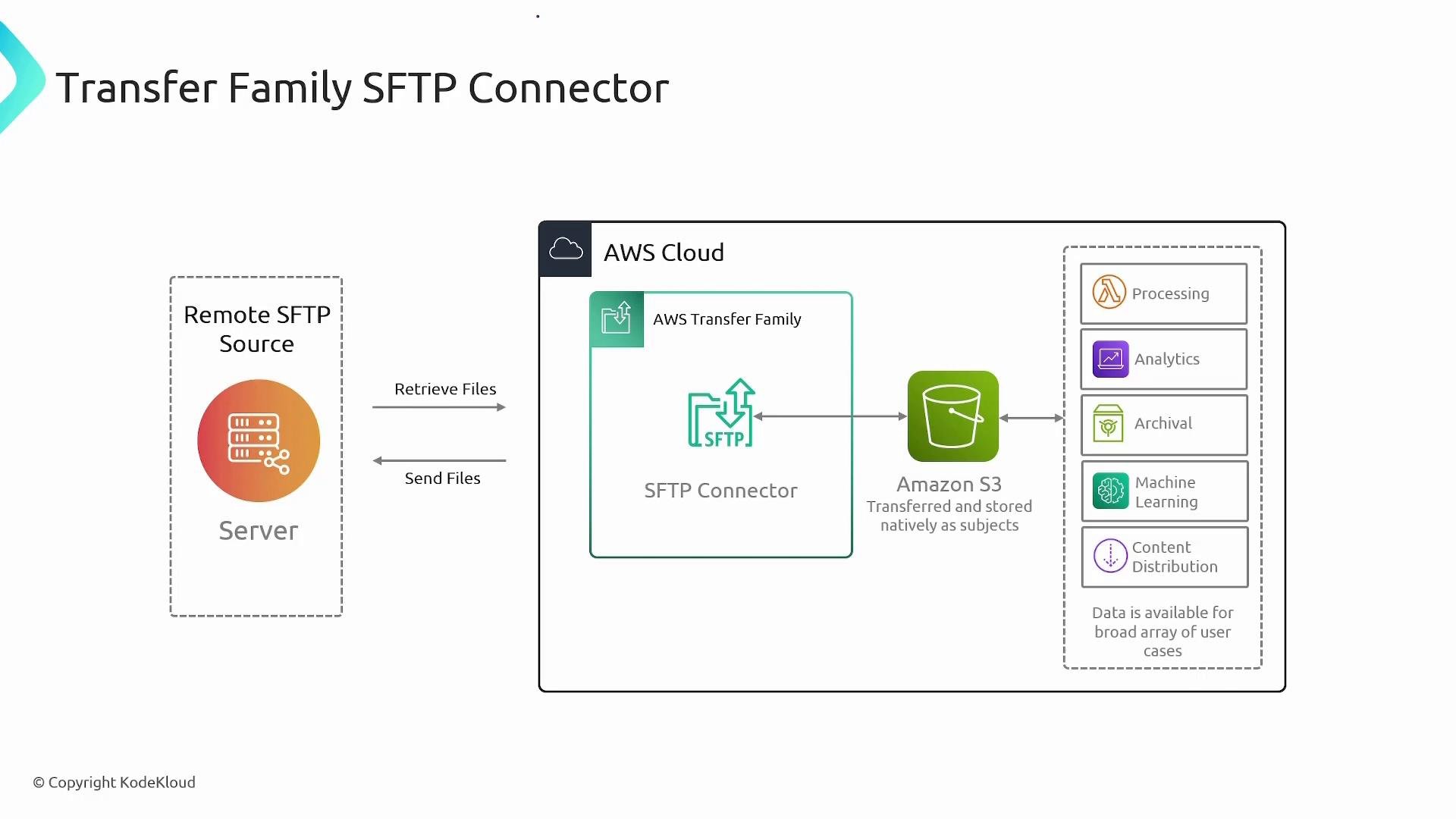
The AWS SFTP connector automates ingestion from remote SFTP servers (cloud or on-premises) into Amazon S3. This is useful when you need to:- Periodically pull files from trading partners or remote systems.
- Streamline ingestion into data lakes, ETL pipelines, or ML workloads.
- Eliminate intermediate transfer servers by using Transfer Family connectors to bridge remote SFTP and S3.
Common use cases
- Managed, auditable file exchange for regulated workloads (PCI, HIPAA).
- Ingesting files from legacy systems, partner portals, or IoT devices directly into your data lake (S3/EFS) for processing.
- Enabling partner and supply-chain integrations with protocol-level compatibility.
- Centralizing file-based workflows for analytics, archival, or distribution pipelines.
Security and compliance considerations
- Prefer VPC-hosted endpoints for sensitive or regulated data to limit exposure.
- Enforce least-privilege IAM for the Transfer Family service role that accesses S3 or EFS.
- Enable CloudWatch logging and forward logs to a centralized audit/incident response system.
- Use S3/EFS encryption at rest and manage encryption keys with AWS KMS where compliance requires it.
For sensitive production data, always combine VPC-hosted endpoints, least-privilege IAM policies, and centralized logging. Review your S3 bucket policies and KMS key policies to prevent unintended access.
Quick deployment checklist
Summary
AWS Transfer Family delivers managed SFTP/FTPS/FTP/AS2 endpoints that integrate directly with Amazon S3 and Amazon EFS. It is ideal for partner-facing file exchange, secure ingestion from remote servers, and integrating file-based workflows into AWS processing and analytics, while removing the burden of operating transfer servers.Links and references
- AWS Transfer Family documentation
- Amazon S3 documentation
- Amazon EFS
- AWS DataSync
- AWS CloudWatch
- AWS IAM
- AWS KMS