

What is AWS Direct Connect?
AWS Direct Connect provides a dedicated, private network connection from your on‑premises network (data center or corporate office) into AWS. Unlike an IPsec VPN that traverses the public internet, Direct Connect uses a physical cross‑connect to an AWS router at an AWS Direct Connect (DX) location. Typical port speeds include 1 Gbps, 10 Gbps, and 100 Gbps. Benefits include:- Lower and more predictable latency than internet-based VPNs
- Higher and more consistent throughput for large data transfers
- Traffic between your on‑premises environment and AWS uses the AWS global network once it reaches the AWS router
How Direct Connect works (high level)
There are three primary components in a Direct Connect deployment:- Your on‑premises network (edge router/firewall)
- The Direct Connect location (DX location) — a physical facility (often a third‑party colocation) where AWS has routers available
- The AWS Direct Connect router — the AWS side of the cross‑connect (the port you provision on an AWS router)
Key components at a glance
Logical traffic flow
From a logical perspective traffic traverses:- On‑premises network → edge/customer gateway → customer router (in DX location) → cross‑connect → AWS Direct Connect router → AWS backbone → AWS resources
- Private VPC resources via a Virtual Private Gateway (VGW) or a Direct Connect Gateway using a private Virtual Interface (VIF).
- Public AWS services (for example, Amazon S3 or DynamoDB) using a public VIF that routes over the AWS global network instead of the public internet.
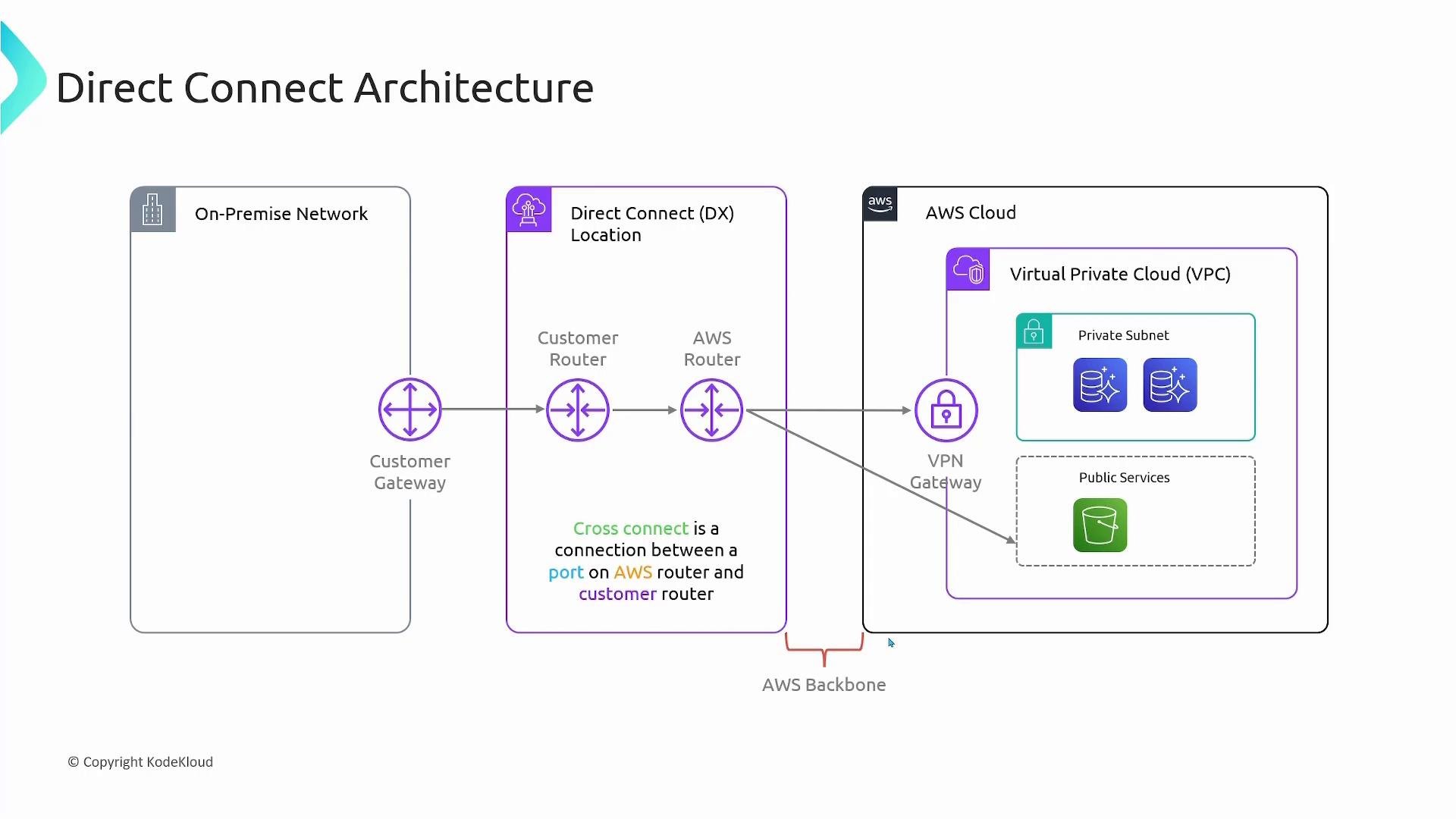
Virtual Interfaces (VIFs)
A Virtual Interface (VIF) is how you logically partition traffic over the Direct Connect link. There are two primary VIF types:
Notes:
- Use a Direct Connect Gateway when you need to access multiple VPCs (including VPCs in different regions that the Direct Connect Gateway supports) from a single Direct Connect connection.
- Private VIFs are for private IP connectivity; public VIFs are for public IPs advertised by AWS.
Connection options
- Dedicated connections
- You get a physical port on an AWS router (common port speeds: 1 Gbps / 10 Gbps / 100 Gbps). AWS provisions the port at the DX location and you order the cross‑connect with the colocation provider or AWS.
- Hosted connections
- A Direct Connect Partner provisions the connection for you. Useful for smaller bandwidth needs or when working through a partner handoff.
Inbound data transfer to AWS over Direct Connect is typically not charged, while outbound data transfer from AWS is usually billed. Pricing varies by region and connection type, so check the official AWS Direct Connect pricing page for current rates: https://aws.amazon.com/directconnect/pricing/
Pricing overview
The two primary cost components are:- Port hours — hourly charges for the provisioned Direct Connect port (varies by port speed and DX location)
- Data transfer — typically outbound data from AWS is billed; inbound data to AWS over Direct Connect is often free but verify current pricing for your region
Operational considerations and best practices
- Redundancy: Use at least two Direct Connect connections at separate DX locations for high availability and to avoid single points of failure.
- Access control: Use VLANs and route filters on VIFs to control advertised prefixes and limit exposure.
- Hybrid encryption: Direct Connect provides a private link but does not encrypt traffic by default. If encryption is required, combine Direct Connect with an IPsec VPN or use application-level encryption.
- Use Direct Connect Gateway to scale connectivity across multiple VPCs and regions (subject to AWS regional restrictions).
Provisioning Direct Connect requires physical cross‑connects and coordination with the DX facility or a Direct Connect partner. Expect lead times for port provisioning and follow the colocation or partner ordering process carefully.
Summary
AWS Direct Connect gives you a private, dedicated connection from your on‑premises environment into AWS. Compared with internet-based VPNs, Direct Connect provides more predictable latency, higher throughput, and a more stable path because traffic enters the AWS backbone at the DX location. Primary cost factors are port hours and outbound data transfer.Links and references
- AWS Direct Connect documentation: https://docs.aws.amazon.com/directconnect/
- AWS Direct Connect pricing: https://aws.amazon.com/directconnect/pricing/
- Amazon S3: https://aws.amazon.com/s3/
- Amazon DynamoDB: https://aws.amazon.com/dynamodb/