

- Granting broad internet access increases the instance’s attack surface.
- Internal resources may be exposed more than necessary.
- You may want private, tightly controlled connectivity to specific services rather than unrestricted internet access.
How PrivateLink works
PrivateLink exposes a supported service to your VPC on private IP addresses. In practice this is implemented as Elastic Network Interfaces (ENIs) in your subnets—these are called interface endpoints. When you create an interface endpoint, the service (whether an AWS service, a partner service, or a service in another VPC) becomes reachable as if it were inside your VPC. Traffic stays on the AWS network, avoids Internet Gateway/NAT, and is limited to the endpoint connection you configure. Note: AWS supports two kinds of VPC endpoints:- Interface endpoints (powered by PrivateLink) — used for many AWS services and third-party partner services. They provision ENIs in selected subnets.
- Gateway endpoints — used specifically for Amazon S3 and DynamoDB; they are implemented differently by adding route table entries.
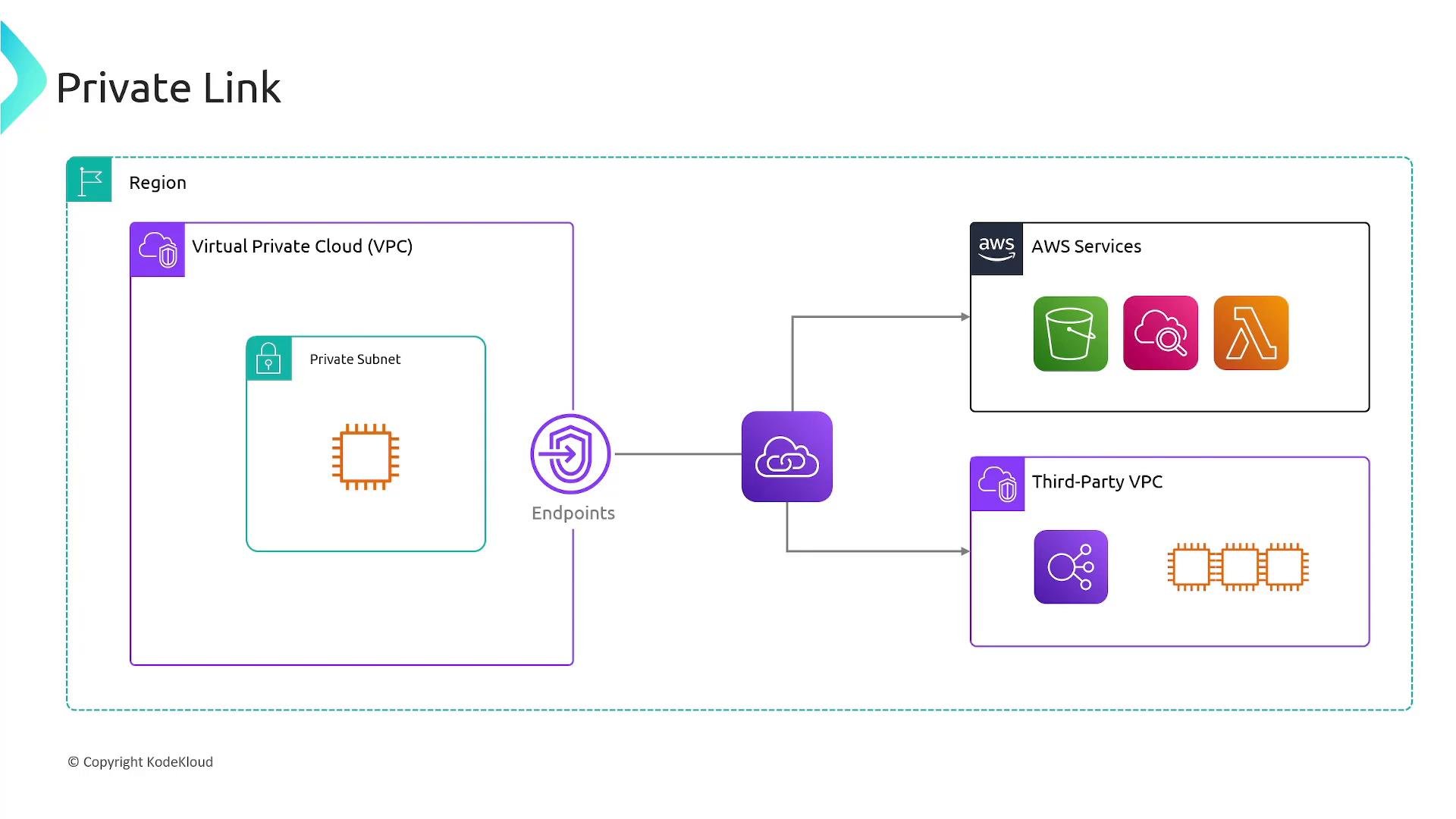
VPC endpoint types — quick comparison
When to use PrivateLink
- You need to access AWS services or partner services privately from a private subnet without granting internet access.
- You want to limit connectivity to a specific service and reduce your attack surface.
- You need cross-account or cross-VPC access to a service while keeping traffic on the AWS network.
Example: create an interface endpoint (AWS CLI)
The following AWS CLI command creates an interface VPC endpoint for a service (replace<vpc-id>, <subnet-ids>, <security-group-ids>, and <service-name> with your values):
Summary
- PrivateLink (interface endpoints) lets resources in your VPC connect privately to supported AWS services, partner services, or services hosted in other VPCs without traversing the public internet.
- Use interface endpoints for most services and third-party integrations; use gateway endpoints specifically for S3 and DynamoDB to leverage route-table-based private access.
Use interface endpoints (PrivateLink) when you need private, service-specific connectivity to many AWS or third-party services. Use gateway endpoints for Amazon S3 and DynamoDB, which are implemented through route table entries rather than ENIs.
Links and references
- AWS PrivateLink developer guide: https://docs.aws.amazon.com/vpc/latest/privatelink/what-is-privatelink.html
- Amazon VPC endpoints: https://docs.aws.amazon.com/vpc/latest/userguide/vpc-endpoints.html
- Kubernetes / EC2 basics: https://learn.kodekloud.com/user/courses/amazon-elastic-compute-cloud-ec2
- Amazon S3 course reference: https://learn.kodekloud.com/user/courses/amazon-simple-storage-service-amazon-s3
- Amazon DynamoDB: https://aws.amazon.com/dynamodb/