

What Rekognition provides
- Pre-trained image-analysis APIs with confidence scores and instance-level data (bounding boxes, landmarks).
- Support for images stored in Amazon S3 or provided as raw image bytes.
- Quick exploration in the AWS Console and production integration via SDKs (for example, boto3 for Python or the AWS SDK for JavaScript).
- Rekognition documentation: https://docs.aws.amazon.com/rekognition/
- boto3 Rekognition client: https://boto3.amazonaws.com/v1/documentation/api/latest/reference/services/rekognition.html
- AWS SDKs & Tools: https://aws.amazon.com/tools/
Key features and typical APIs
Label detection
Label detection identifies objects, scenes, and concepts inside images. Rekognition returns a list of labels with confidence scores and—when available—instance-level bounding boxes and per-instance confidence. Typical fields returned byDetectLabels: Name, Confidence, and Instances. Labels can include hierarchical or related concepts (for example, “Vehicle” and “Car”).
Use cases: automatic tagging and search indexing, extracting structured metadata from image collections, or detecting inventory in photos.
Here is an example of Rekognition detecting multiple objects, people, and a zebra crossing in a street photo. The console shows detected labels, confidence scores, and bounding boxes for each instance.
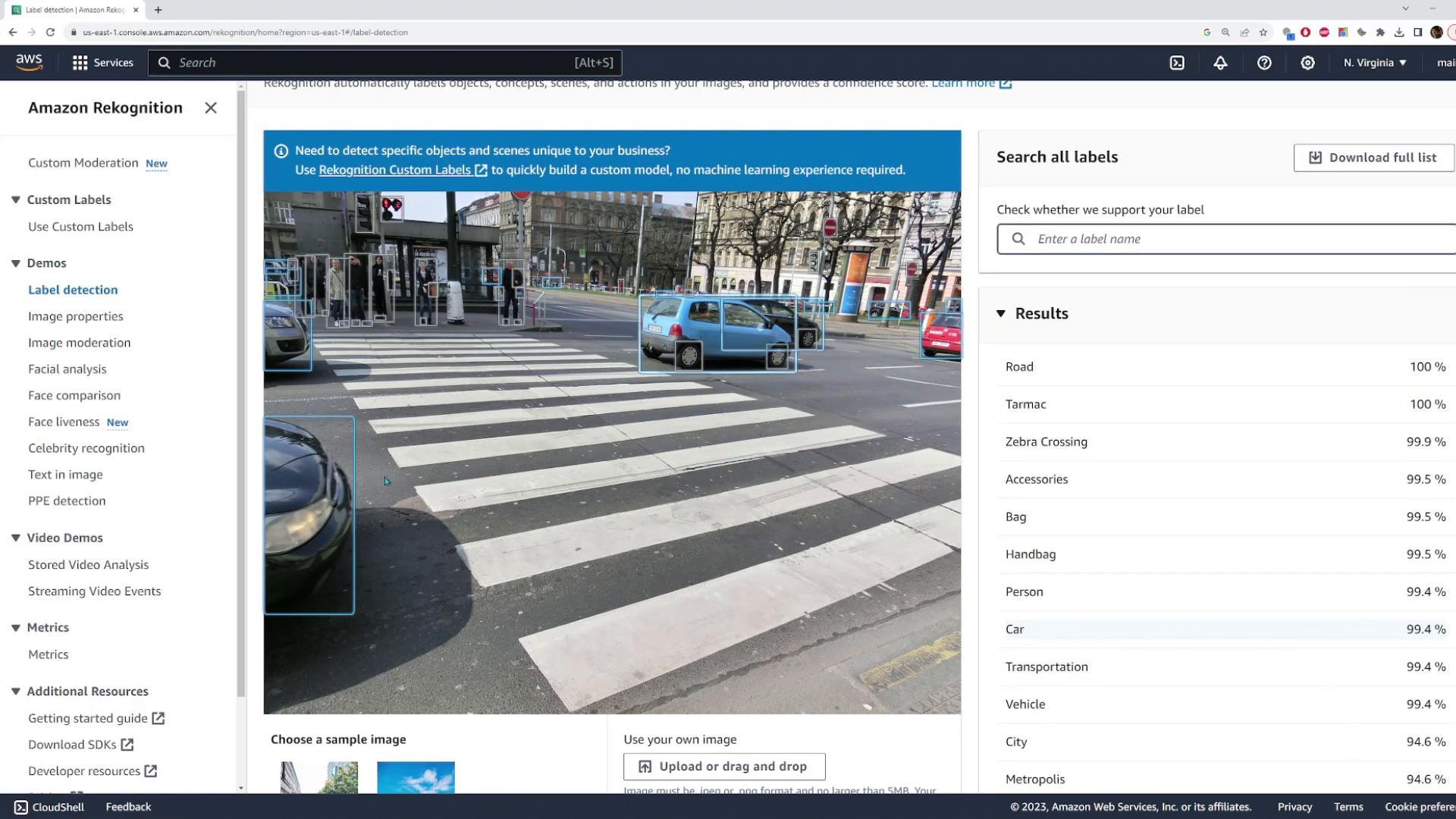
Image properties
The Image Properties view extracts visual attributes such as dominant colors, color distribution, and simple image-quality metrics. These attributes are useful for theme extraction, color search filters, or generating thumbnails consistent with brand palettes. The console shows primary colors detected in the image and foreground/background hints.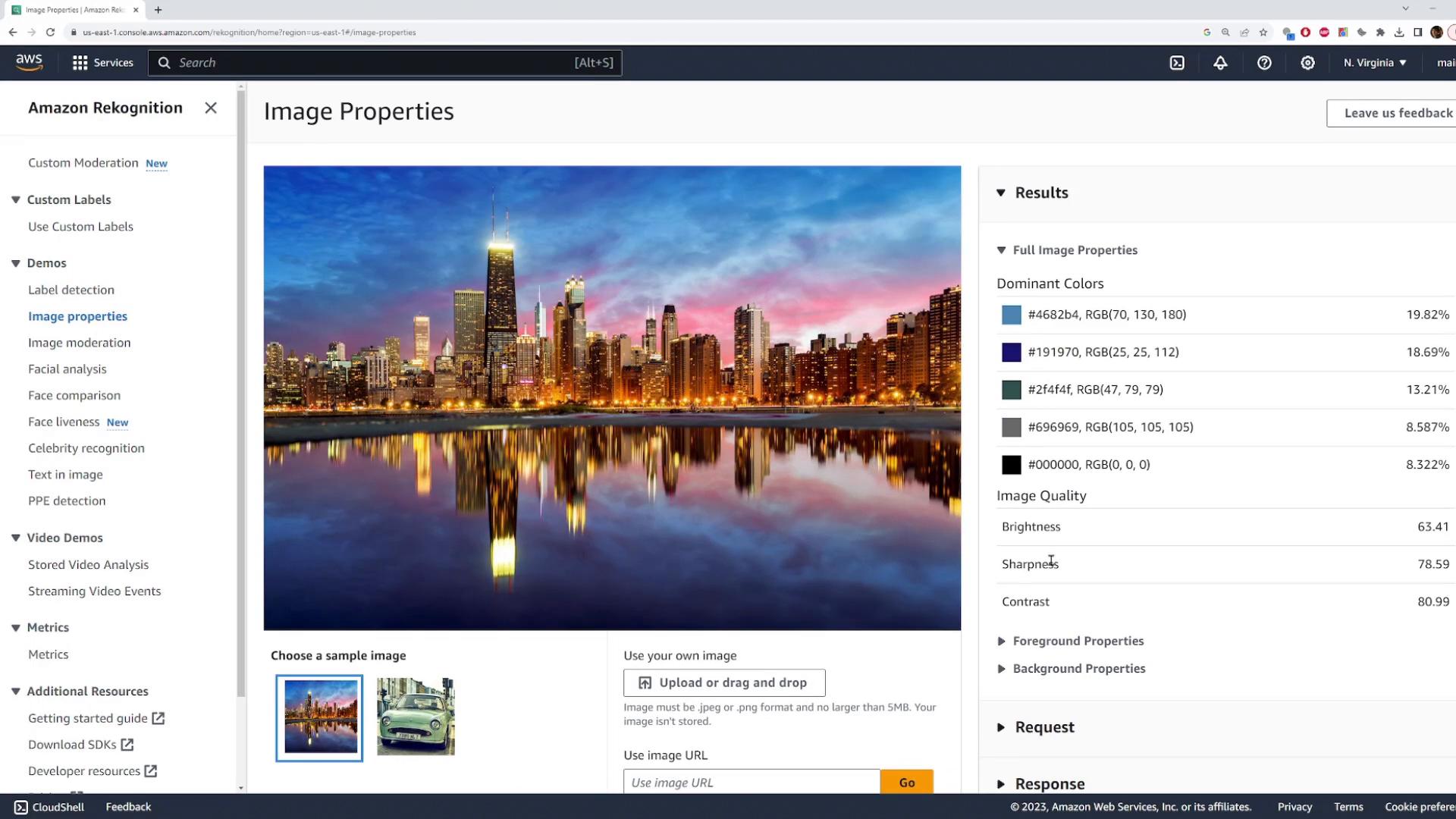
Image moderation
Rekognition’s moderation capability (DetectModerationLabels) flags potentially inappropriate or unsafe content. Labels include categories such as Explicit Nudity, Suggestive, and Violence, each with a confidence score.
Common applications:
- Automatic screening of user-uploaded images before publishing.
- Enforcing content policies at scale.
- Triaging content for human review.
Face analysis
Facial analysis detects faces and returns attributes and landmarks. Attributes include estimated age range, gender, emotions (HAPPY, SAD, CALM, etc.), whether the person is smiling, whether eyes/mouth are open, and presence of eyeglasses or sunglasses. Rekognition returns a confidence score for face detection and for many attributes, plus face landmarks (eyes, nose, mouth corners) and a bounding box for each face. Below is an example where Rekognition detects a face and reports attributes such as age range, emotions, and whether the subject is smiling.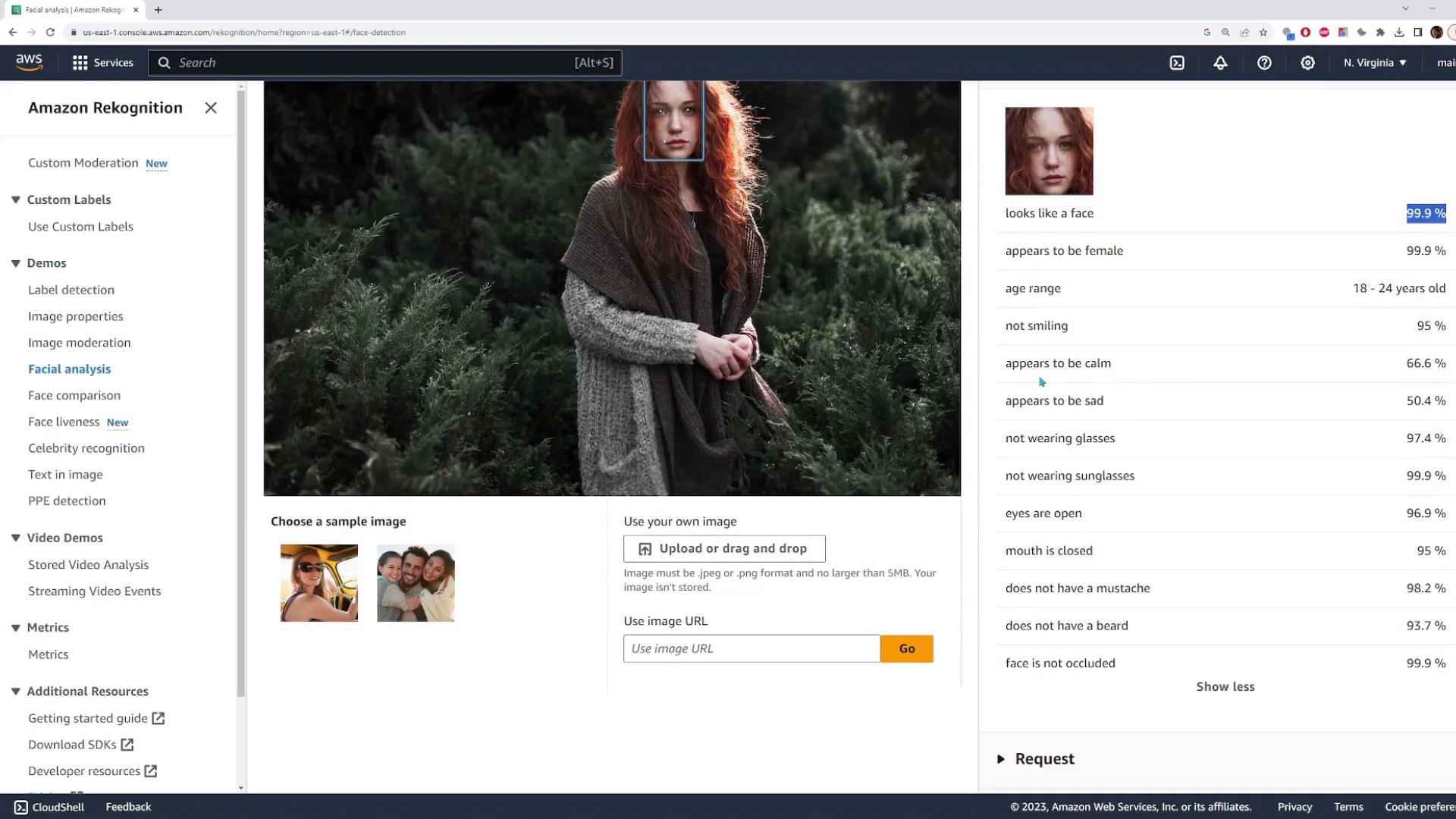
Face comparison
CompareFaces compares a source face (for example, a selfie) with one or more target faces and returns similarity scores for any matches along with the bounding boxes of matched faces. This is useful for verification workflows, such as confirming a user’s identity against a stored image.
Celebrity recognition
RecognizeCelebrities can identify public figures. When Rekognition finds a match it returns the celebrity’s name, confidence score, and related metadata—useful for media tagging and editorial workflows.
Text detection (OCR)
DetectText extracts printed and many handwritten text strings from images, returning the detected text, a confidence score, and a bounding box for each line or word.
Common uses:
- Reading signage and storefront text.
- Extracting fields from posters or product labels.
- Automating data entry from scanned images.
Programmatic usage (example: Python + boto3)
For production you’ll typically call Rekognition via an AWS SDK. Rekognition supports images stored in S3 or supplied as raw image bytes. Below is an example using boto3 to callDetectLabels on an image in S3:
- Prefer storing images in S3 for higher throughput and simpler permission management; grant Rekognition access via an IAM role.
- For low-latency or transient workloads, you can pass image bytes directly to the API.
When using Rekognition in applications, prefer images stored in S3 for higher throughput and simpler permission management (grant Rekognition access via an IAM role). For real-time or low-latency cases you can send image bytes directly.
Privacy, compliance, and governance
Face recognition and identity-related features carry legal and ethical responsibilities. Depending on your jurisdiction and use case, you may need to:- Obtain user consent.
- Document lawful basis and retention policies.
- Provide user notices and opt-outs.
- Follow AWS service guidelines and any applicable local laws.
Be mindful of privacy, local laws, and AWS terms when using face-based features. Avoid using facial recognition for sensitive decisions without appropriate governance and consent.
Summary
Amazon Rekognition offers a comprehensive set of image-analysis features—label detection, image properties, content moderation, face detection & analysis, face comparison, celebrity recognition, and OCR. Explore them in the AWS Console for quick validation, then integrate via the AWS SDKs to automate image analysis at scale. References and further reading:- Rekognition documentation: https://docs.aws.amazon.com/rekognition/
- boto3 Rekognition client: https://boto3.amazonaws.com/v1/documentation/api/latest/reference/services/rekognition.html
- AWS Identity and Access Management: https://docs.aws.amazon.com/iam/