

Shared responsibility model — quick refresher
As you choose services, customer responsibility generally decreases as you move from IaaS (EC2) toward more managed services (e.g., RDS, S3, DynamoDB, Lambda). RDS is a managed database service (PaaS), not a container platform.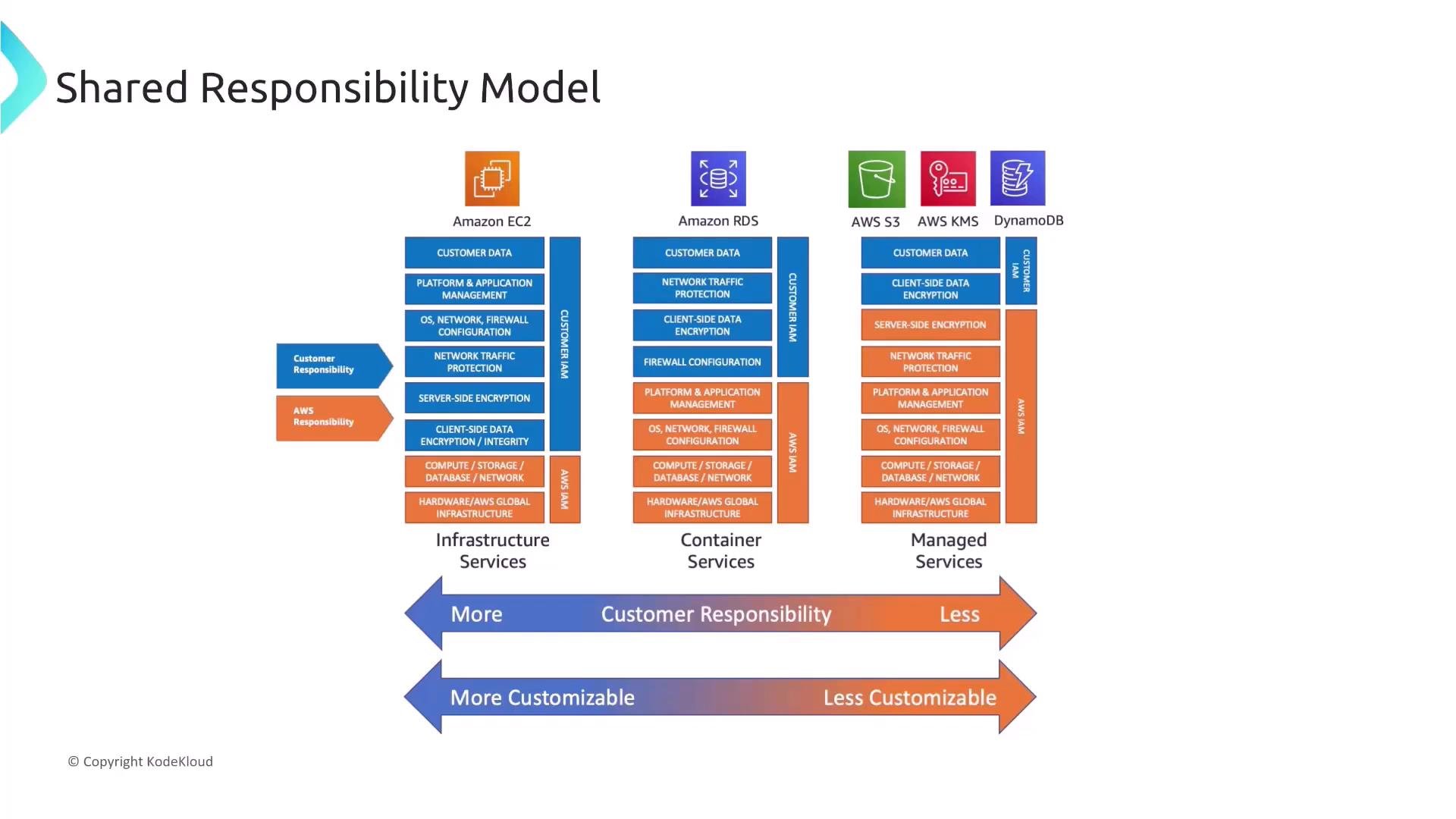
Links and references:
Shared responsibility question (scenario)
A rapidly growing startup migrates to AWS. The CTO asks which statement best describes the AWS shared responsibility model.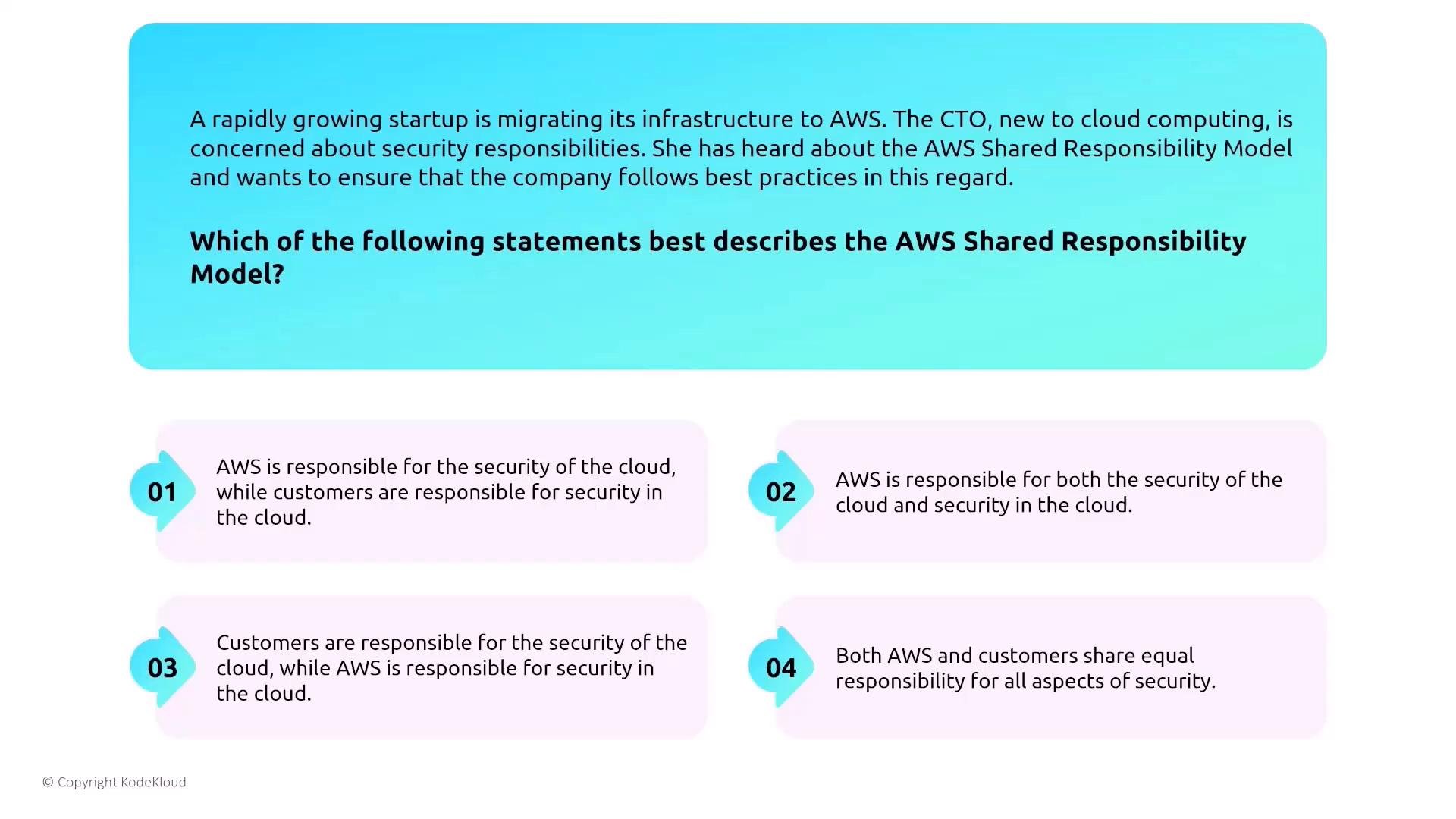
- Correct summary: customers are responsible for security in the cloud (customer data, OS, applications, IAM, configuration), while AWS is responsible for security of the cloud (hardware, virtualization, physical facilities, foundational services). The exact split shifts depending on IaaS, PaaS, or SaaS, but this is the general rule.
EC2 common secure access patterns
A traditional secure pattern is to place a single hardened entry point (bastion host/jump box) in a public subnet and keep application servers in private subnets. IAM roles grant instance permissions to access S3, CloudTrail, or other services instead of using static credentials.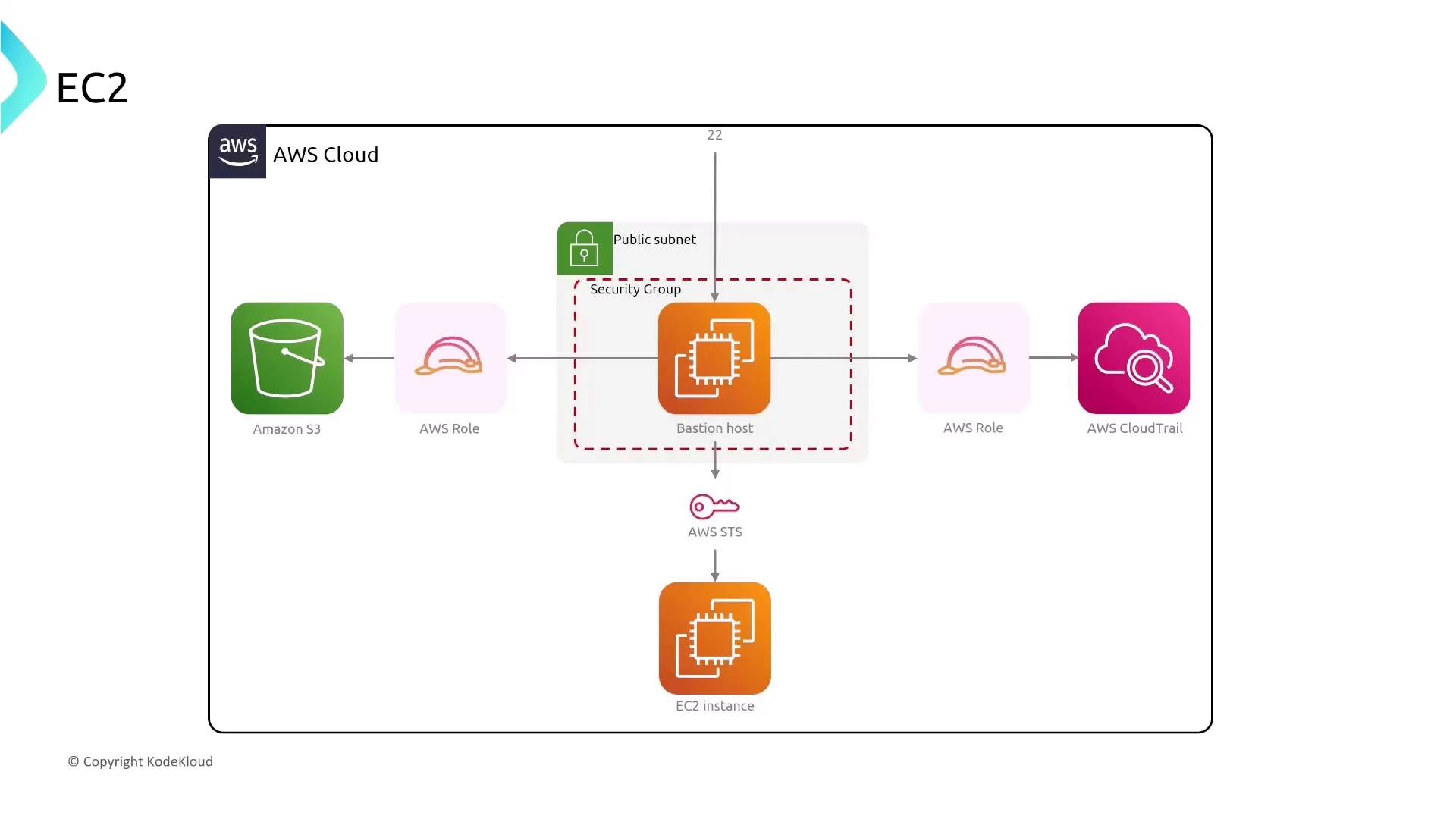
- Use a single, hardened bastion host to reduce attack surface.
- Restrict inbound SSH (TCP/22) to known admin IP ranges (or a VPN) using Security Groups and NACLs.
- Consider VPN, AWS Client VPN, or AWS Managed Microsoft AD plus jump hosts for centralized access.
- Prefer AWS Systems Manager Session Manager to remove the need for inbound SSH/RDP altogether.
Bastion host question (scenario)
A leading e-commerce company wants secure administrative access for a multi-tier EC2 application. Which approach should they adopt? Options summary:- Bastion in a public subnet, restrict SSH to known IPs, use it as a jump box to application servers in private subnets.
- Put a bastion in a private subnet and allow direct SSH from the internet to application servers.
- Deploy multiple bastions in different public subnets and allow unrestricted SSH from the internet.
- Avoid using bastion hosts that open SSH to all EC2 instances.
- Option 1 is the recommended approach: place the bastion in a public subnet, restrict SSH access (security groups + NACLs) to authorized IP ranges or VPNs, and use it to reach application servers in private subnets.
- Option 2 is incorrect because private subnets are not directly reachable from the internet for inbound SSH.
- Option 3 is unsafe unless inbound access is tightly restricted; resilience is fine, but never allow unrestricted SSH.
- Option 4 is a good caution: do not expose SSH to every instance — use a controlled entry point or Session Manager.
EC2 key pair management — best practices
Key pair management is critical for environments with strict compliance and auditing requirements.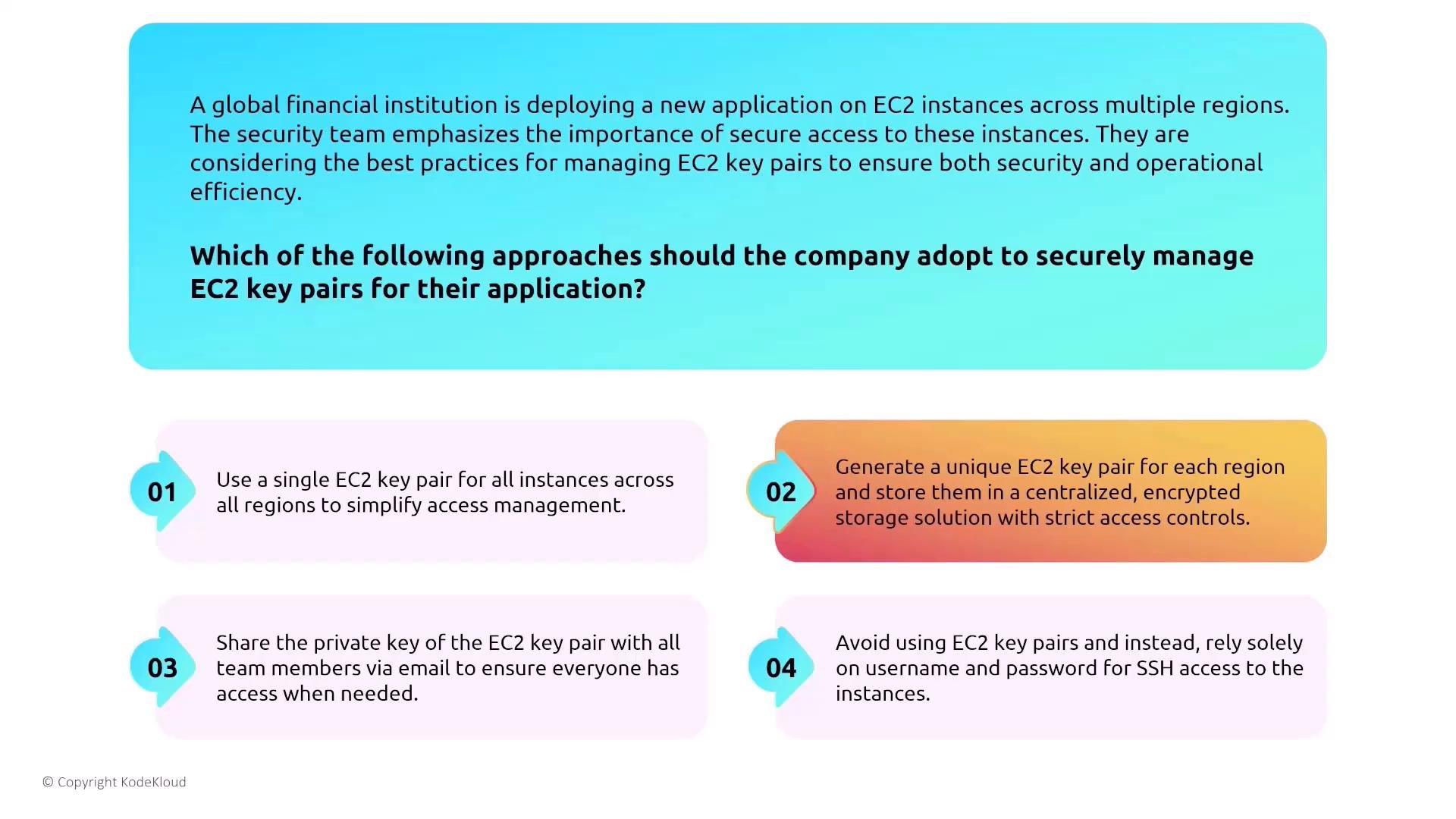
- Generate unique key pairs and enforce per-user accountability. Assign per-user public keys to instances they must access.
- Avoid a single private key shared across regions or users.
- Store private keys in an enterprise secret store such as AWS Secrets Manager or HashiCorp Vault with strict access control and auditing.
- Avoid transferring private keys via unencrypted channels (email, chat).
- Prefer identity-based access (IAM + SSM Session Manager) to reduce distribution of private key material.
Never share private key material over unencrypted channels. Use centralized, auditable secrets stores and restrict access with least privilege.
Systems Manager and Session Manager
Systems Manager (SSM) allows secure, auditable access to EC2 instances using an agent and IAM-based controls — without opening inbound SSH/RDP ports.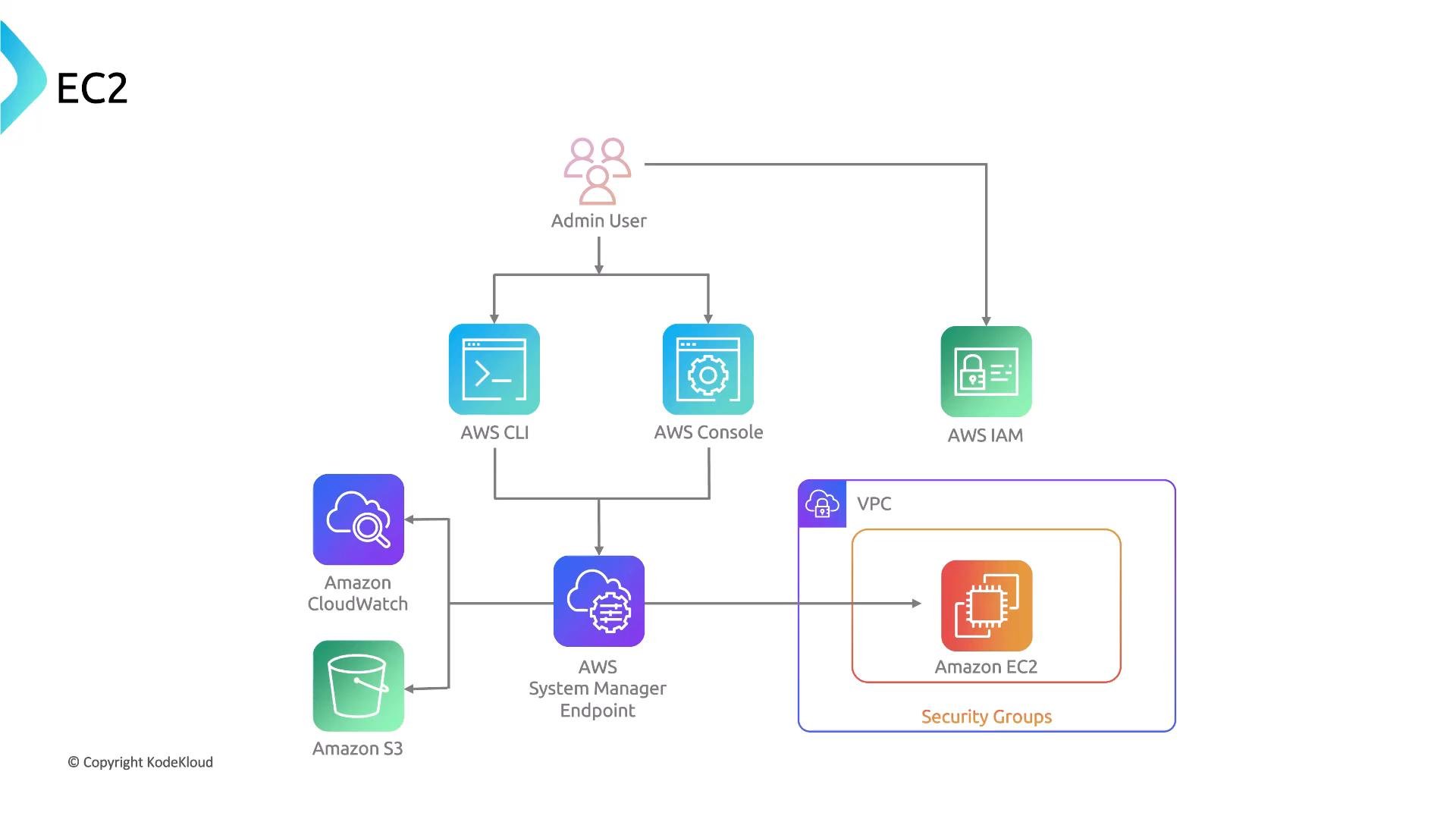
- Session Manager provides a unified, auditable interface for shell access that integrates with IAM for authentication and CloudWatch/CloudTrail for logging and auditing.
- Works with private instances (no public IP required).
- Removes the need to manage SSH keys or to open inbound management ports.
- Can be combined with IAM session policies and AWS KMS for additional control over recorded session data.
- Direct access to EC2 hardware for deeper diagnostics.
- Unified access to instances without opening inbound ports or managing SSH keys.
- Requires instances to be publicly accessible.
- Replaces EC2 virtual machines.
- Option 2 is correct. Session Manager allows secure access without opening inbound ports or distributing SSH keys; it integrates with IAM and audit services.
- Options 1, 3, and 4 are incorrect — SSM does not give low-level hardware access, does not require public IPs, and does not replace compute.
Use Systems Manager Session Manager to reduce attack surface: you don’t need to open SSH/RDP ports, and access is controlled via IAM and auditable via CloudWatch/CloudTrail.
Nitro Enclaves — isolation for sensitive workloads
Nitro Enclaves let you create isolated compute environments from an EC2 instance to process highly sensitive data (for example, cryptographic key operations, attestation, or sealed compute). Enclaves have no persistent network interfaces and communicate with the parent instance over vsock (a virtualization-local socket), strengthening isolation.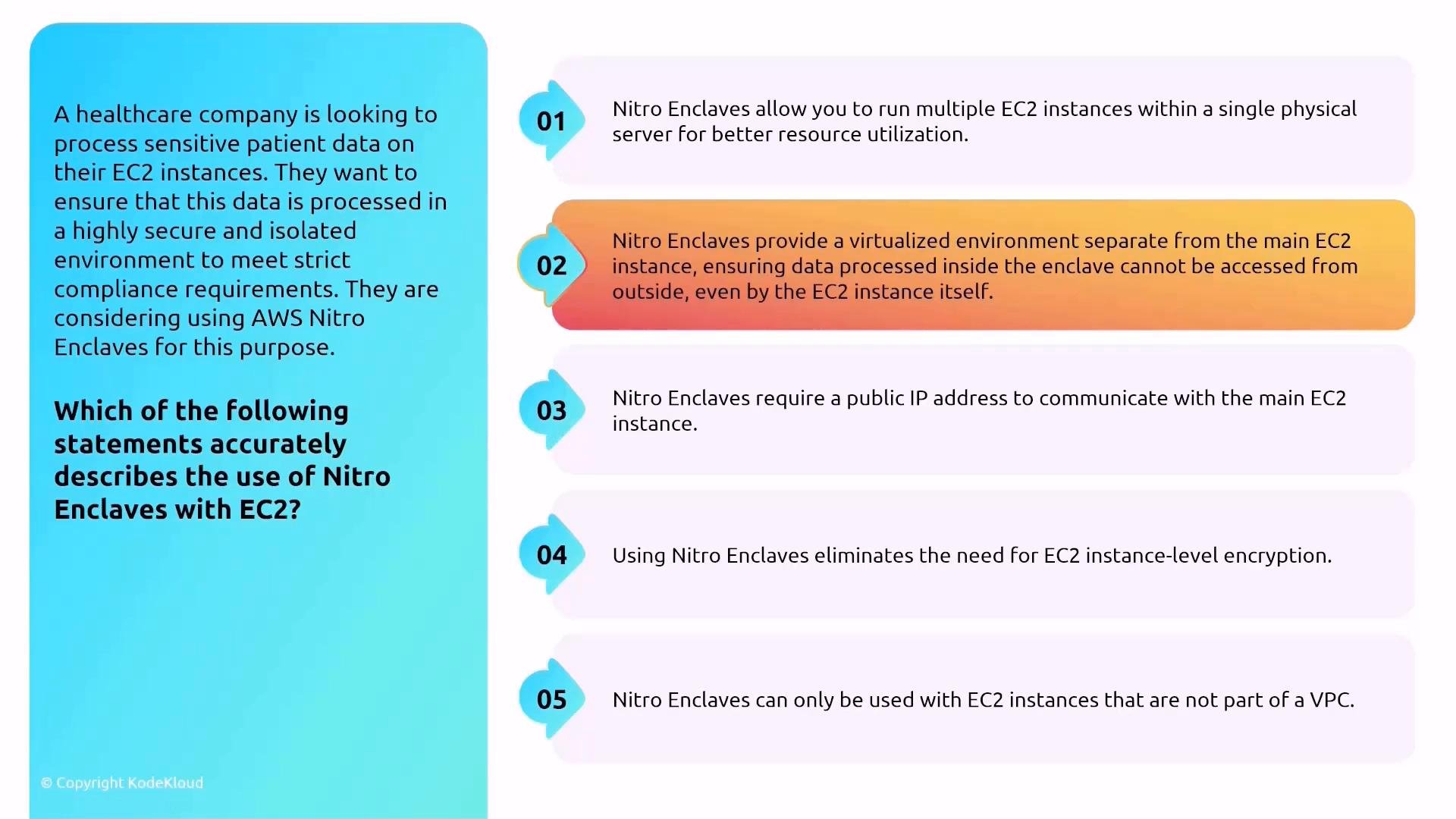
- Enclaves are isolated from the parent instance and the network.
- Communication between the instance and enclave happens via vsock, not a network interface.
- Ideal for processing sensitive payloads, handling private keys, or performing attestation without exposing secrets to the host OS.
EC2 instance families — choose the right type
You don’t need to memorize every size, but know common family purposes to match workload requirements.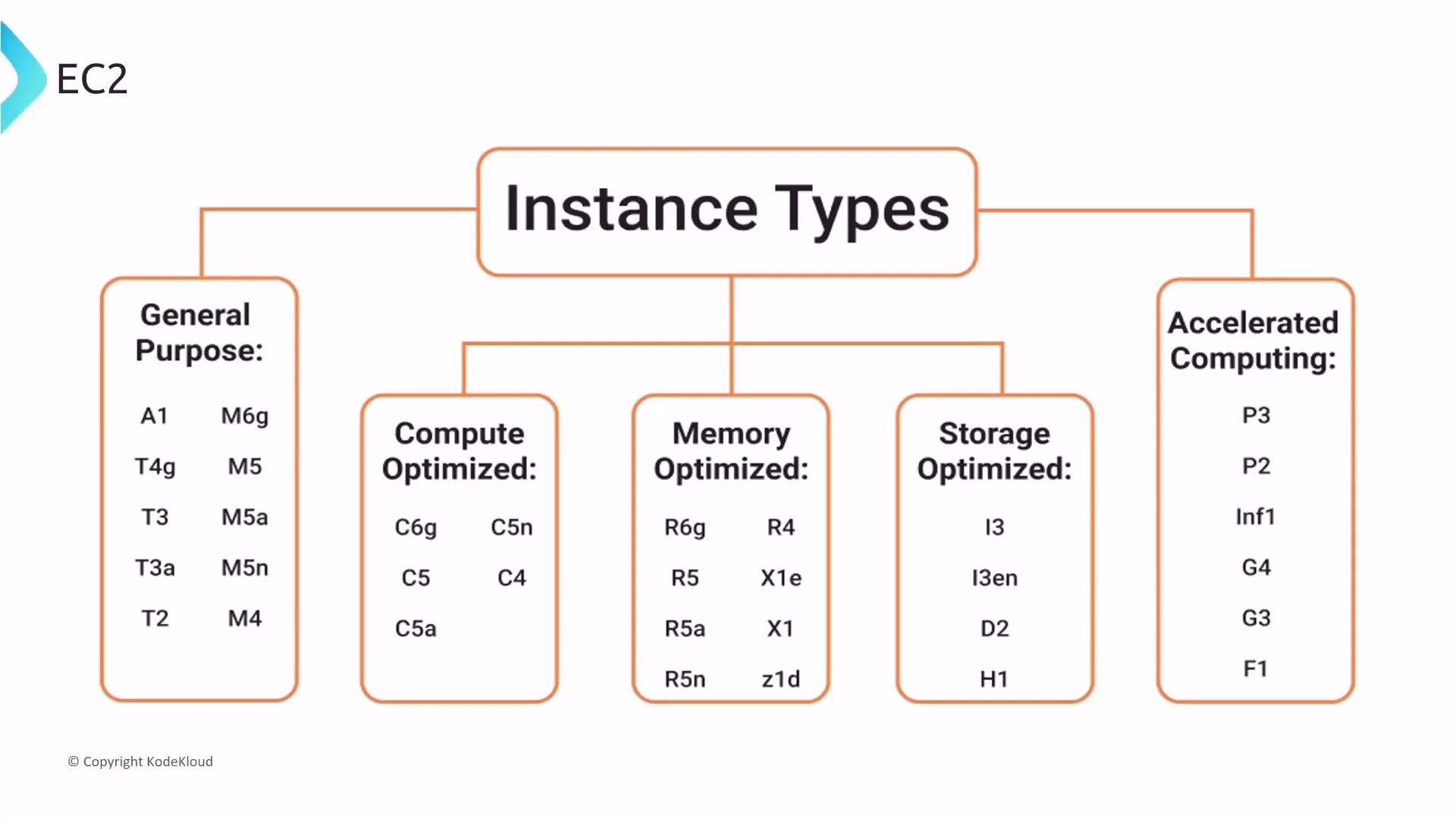
Accelerated computing (GPU) instances
If you need hardware acceleration for rendering, ML training/inference, or HPC, use accelerated instances that include GPUs or other accelerators. Animation-studio scenario question: Which statement describes the benefits of accelerated computing instances? Options summary:- Optimized for memory-intensive apps with higher RAM.
- Come with pre-installed animation software.
- Use hardware accelerators (GPUs) for graphics and floating-point calculations.
- Designed for storage-intensive workloads.
- The most cost-effective option.
- Option 3 is correct. Accelerated instances provide GPUs or accelerators to offload parallel and floating-point tasks. They are well-suited to rendering, ML, and HPC.
- They are not preloaded with application software and are typically more expensive than general-purpose instances; cost-effectiveness depends on workload and performance needs.
Summary — quick pickup points
- Understand the shared responsibility model: AWS secures the cloud; customers secure in the cloud.
- Use limited, hardened entry points (bastion hosts or Session Manager); avoid exposing SSH/RDP across many instances.
- Manage EC2 key pairs with per-user keys, centralized encrypted storage, strict access controls, and auditing.
- Use Systems Manager Session Manager to reduce attack surface and improve auditing.
- Nitro Enclaves provide isolated environments for sensitive computations and communicate via vsock.
- Know EC2 instance family purposes (general, compute, memory, storage, accelerated) to choose the right instance type.